1. Introduction
This manual provides essential instructions for the safe and effective use of your Canon EOS R50 Mirrorless Camera with the RF-S18-45mm F4.5-6.3 IS STM Lens Kit. Please read this manual thoroughly before using the camera and retain it for future reference. The EOS R50 is designed for capturing high-quality photos and 4K video, featuring a 24.2-megapixel APS-C CMOS sensor and advanced autofocus capabilities.
2. What's in the Box
Verify that all the following items are included in your package:
- Canon EOS R50 Camera Body (White)
- RF-S18-45mm F4.5-6.3 IS STM Lens
- Battery Pack LP-E17
- Battery Charger LC-E17
- Neck Strap
- Camera Cover
- Lens Dust Cap
- User Manual (this document)
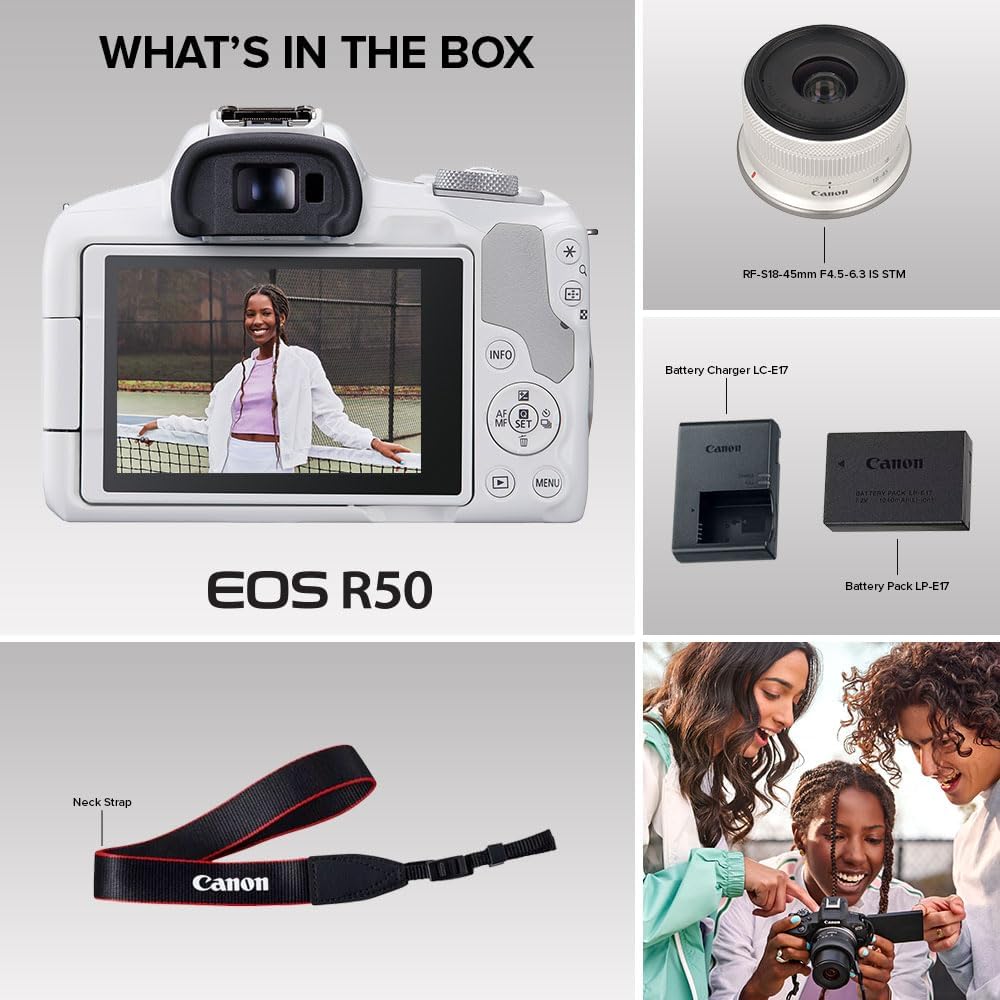
Image: Contents of the Canon EOS R50 kit, showing the camera body, RF-S18-45mm lens, LP-E17 battery, LC-E17 charger, and neck strap.
3. Camera Overview
Familiarize yourself with the main components of your EOS R50 camera.
3.1 Front View

Image: Front view of the Canon EOS R50 camera in white, with the RF-S18-45mm lens attached. Key features visible include the lens, lens release button, and Canon logo.
3.2 Side View

Image: Side view of the Canon EOS R50 camera, showing the grip, microphone port cover, and the profile of the attached lens.
3.3 Rear View and Vari-angle Screen

Image: Rear view of the Canon EOS R50 camera, highlighting the electronic viewfinder, LCD touchscreen, and various control buttons such as INFO, AF/MF, SET, and MENU.

Image: Canon EOS R50 camera with its vari-angle LCD screen extended and rotated, demonstrating its flexibility for different shooting angles.
4. Setup
4.1 Charging and Installing the Battery
- Insert the LP-E17 battery into the LC-E17 charger. Ensure the battery is correctly oriented.
- Plug the charger into a power outlet. The charging indicator light will illuminate.
- Once charging is complete, the indicator light will change or turn off. Remove the battery.
- Open the battery compartment cover on the bottom of the camera.
- Insert the charged battery into the compartment, ensuring it clicks into place. Close the cover securely.
4.2 Attaching the Lens
- Remove the camera body cap and the rear lens cap.
- Align the red index mark on the lens with the red index mark on the camera body.
- Rotate the lens clockwise until it clicks into place.
4.3 Inserting a Memory Card
The EOS R50 uses SD, SDHC, or SDXC memory cards. UHS Speed Class 3 (U3) or higher is recommended for 4K video recording.
- Open the memory card slot cover on the side of the camera.
- Insert the memory card with the label facing the front of the camera until it clicks.
- Close the memory card slot cover.
4.4 Initial Settings
Upon first power-on, you will be prompted to set the language, date, time, and time zone. Follow the on-screen instructions using the touchscreen or control buttons.
5. Operating the Camera
5.1 Basic Photography Modes
- Scene Intelligent Auto (A+): The camera automatically analyzes the scene and selects optimal settings. Ideal for beginners.
- Creative Assist: Offers simplified controls for adjusting background blur, brightness, contrast, and color tone in auto modes.
- Special Scene Modes (SCN): Pre-set modes for specific situations like Portrait, Landscape, Sports, etc.
5.2 Advanced Photography Modes
- Program AE (P): The camera sets aperture and shutter speed, but you can adjust other settings.
- Shutter-priority AE (Tv): You set the shutter speed, and the camera sets the aperture.
- Aperture-priority AE (Av): You set the aperture, and the camera sets the shutter speed.
- Manual Exposure (M): You control both aperture and shutter speed.
5.3 Autofocus System
The EOS R50 features Dual Pixel CMOS AF II, covering up to 100% of the image area with 651 AF zones. It includes advanced subject detection and tracking for people, animals, and vehicles using deep learning technology.

Image: A dog sitting on grass, sharply in focus, illustrating the camera's subject detection and tracking capabilities.
5.4 Video Recording
The camera supports 6K oversampled uncropped 4K video at up to 30 fps and Full-HD high-frame rate movies at up to 120 fps. The Movie for Close-up Demo Mode automatically switches focus to the closest subject.

Image: A Canon EOS R50 camera mounted on a tripod grip with an external microphone, configured for vlogging or content creation.
5.5 Connectivity
The EOS R50 features built-in Bluetooth and Wi-Fi for wireless functions such as file transfer and remote control via the free Canon Camera Connect app.

Image: A laptop screen displaying a live stream, demonstrating the camera's capability for direct streaming or use as a webcam.
6. Maintenance
6.1 Cleaning the Camera and Lens
- Use a soft, lint-free cloth to wipe the camera body.
- For the lens, use a lens brush to remove dust, then a lens cleaning solution and a microfiber cloth. Avoid touching the lens surface directly.
- Never use organic solvents like alcohol or paint thinner to clean the camera.
6.2 Battery Care
- Store batteries in a cool, dry place when not in use.
- Avoid fully discharging the battery frequently to prolong its lifespan.
- Do not expose batteries to extreme temperatures.
6.3 Storage
When storing the camera for extended periods, remove the battery and memory card. Store the camera in a dry, well-ventilated area, preferably with a desiccant to prevent mold and mildew.
7. Troubleshooting
| Problem | Possible Cause | Solution |
|---|---|---|
| Camera does not power on. | Battery is not charged or incorrectly inserted. | Charge the battery fully and ensure it is inserted correctly. |
| Images are blurry. | Incorrect focus, camera shake, or dirty lens. | Check focus mode, use a faster shutter speed or image stabilization, clean the lens. |
| Cannot record video. | Memory card is full, too slow, or not inserted. | Delete files, use a faster card (UHS Speed Class 3), or insert card correctly. |
| Wi-Fi connection issues. | Incorrect settings, interference, or app issues. | Ensure Wi-Fi is enabled, check network settings, restart camera and smart device, update Canon Camera Connect app. |
8. Specifications
| Feature | Detail |
|---|---|
| Model Name | EOS R50 RF-S18-45mm F4.5-6.3 IS STM Lens Kit (White) |
| Model Number | 5812C012 |
| Brand | Canon |
| Sensor Type | CMOS (APS-C) |
| Effective Still Resolution | 24.2 MP |
| Video Resolution | 4K (6K oversampled up to 30 fps), Full HD (up to 120 fps) |
| Lens Mount | Canon RF |
| Included Lens | RF-S18-45mm F4.5-6.3 IS STM Lens |
| Autofocus System | Dual Pixel CMOS AF II with subject detection (people, animals, vehicles) |
| Continuous Shooting Speed | Up to 15 fps (Electronic Shutter), 12 fps (Electronic First Curtain) |
| ISO Sensitivity (Expanded) | Up to 51200 |
| Screen | 3-inch Vari-angle LCD Touchscreen (1,062,000 dots) |
| Viewfinder | Electronic Viewfinder (2.36-million-dot) |
| Image Stabilization | Dual (Lens-based Optical IS + Digital IS) |
| Connectivity | Bluetooth, Wi-Fi, Micro HDMI, USB |
| Storage Media | SD/SDHC/SDXC (UHS-II compatible) |
| Battery Type | Lithium Ion (LP-E17) |
| Dimensions (Approx.) | Item Height: 3.37 inches (Body only) |
| Weight (Approx.) | 16 ounces (Body only) |
| UPC | 013803351491 |
9. Warranty and Support
Warranty: This Canon EOS R50 camera comes with a 1-year manufacturer's warranty. Please retain your proof of purchase for warranty claims.
Support: For technical assistance, service, or additional information, please visit the official Canon support website or contact Canon customer service. You can find detailed support resources, firmware updates, and FAQs on the Canon website.
Online Resources: Canon USA Support


