
1. Introduction
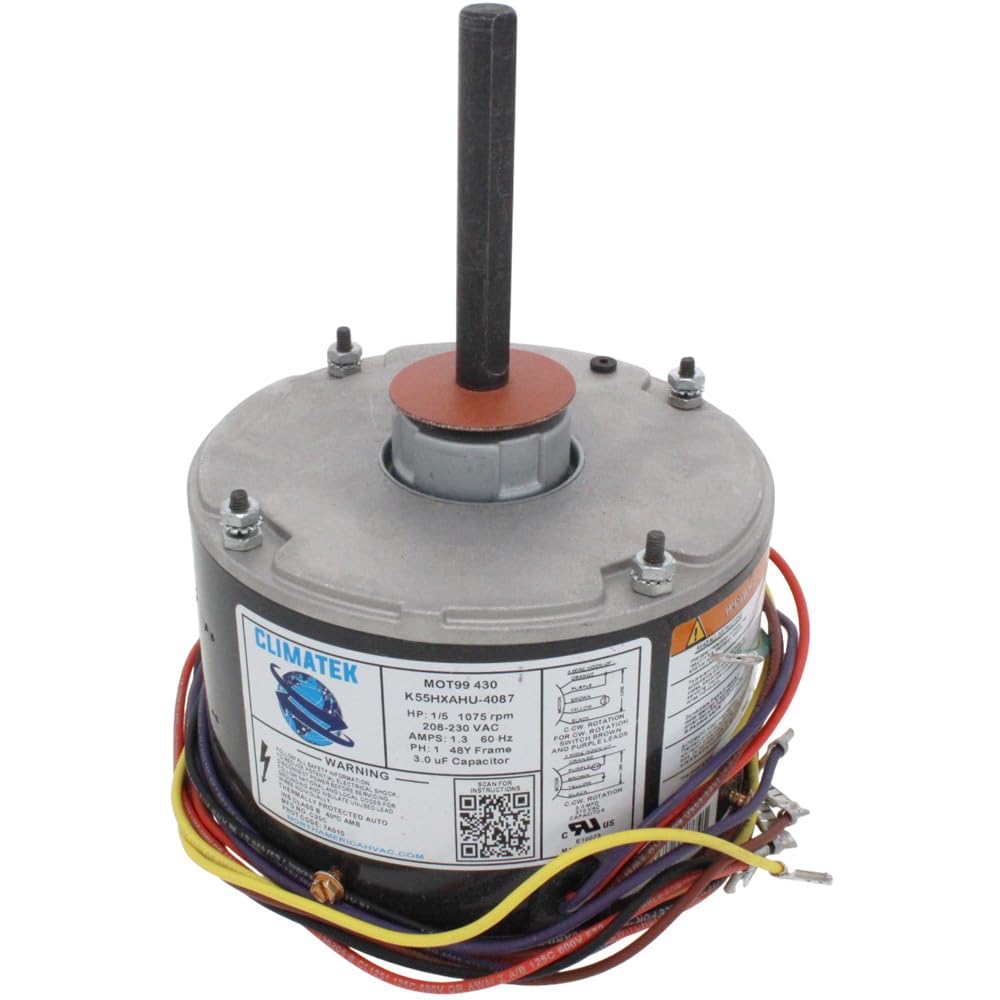
This manual provides essential information for the safe and effective installation, operation, and maintenance of your new ClimaTek Upgraded Condenser Fan Motor. This motor is designed as a direct replacement for Rheem, Ruud, Weather King, Corsaire, and Protech Part # 51-23055-11. It is compatible with 1/5 HP and 1/6 HP, 208-230 volt systems requiring side mounting screws. Please read all instructions carefully before proceeding with installation or use.
2. Safety Information
WARNING: Electrical shock hazard. Always disconnect power to the unit before installing or servicing the motor. Failure to do so can result in serious injury or death. Installation should only be performed by a qualified HVAC technician or electrician.
- Ensure the power supply matches the motor's voltage requirements (208-230 Volts).
- Wear appropriate personal protective equipment (PPE), including safety glasses and gloves.
- Verify all wiring connections are secure and correct according to the wiring diagram provided with your HVAC unit and the motor.
- Do not operate the motor if it appears damaged.
3. Package Contents
- 1 x ClimaTek Upgraded 1/5 HP Condenser Fan Motor
4. Specifications
| Feature | Specification |
|---|---|
| Product Model Number | ClimaTek Rplm for RHM 51-23055-11 |
| Replaces Part Numbers | Rheem, Ruud, Weather King, Corsaire, Protech 51-23055-11 |
| Horsepower (HP) | 1/5 HP (also replaces 1/6 HP) |
| Voltage | 208-230 Volts |
| Material | Copper |
| Mounting Type | Side Mounting Screws |
| Product Dimensions | 7 x 7 x 14 inches |
| Item Weight | 9.57 pounds |
| Manufacturer | ClimaTek |
5. Installation / Setup
Before beginning, ensure all power to the HVAC unit is disconnected at the breaker. Follow the safety guidelines outlined in Section 2.
- Access the Condenser Unit: Carefully open the outdoor condenser unit to access the existing fan motor.
- Disconnect Old Motor: Disconnect all wiring from the old motor and remove any mounting hardware. Note the orientation of the old motor and fan blade for correct installation of the new motor.
- Remove Fan Blade: Carefully remove the fan blade from the shaft of the old motor. You may need a shaft puller if it is seized.
- Prepare New Motor: Attach the fan blade to the shaft of the new ClimaTek motor, ensuring it is securely fastened and at the correct height relative to the fan shroud. Adjust the shaft length if necessary, ensuring not to damage the motor.
- Mount New Motor: Install the new motor using the side mounting screws, ensuring it is firmly secured and properly aligned within the condenser unit.
- Wiring Connections: Connect the electrical wires to the new motor. Refer to the wiring diagram provided with your HVAC unit and the motor for specific connections. This motor is designed for 208-230V systems.
- Capacitor Compatibility: This motor typically requires a compatible run capacitor. Ensure your existing capacitor is correctly rated for the new motor (e.g., 5uF for some applications). If the motor does not start reliably or requires a manual push, verify the capacitor is correctly sized and functioning, or consider switching to a 4-wire connection if your system allows, as some 3-wire setups may require a specific capacitor or wiring configuration to initiate rotation reliably.
- Secure and Test: Once all connections are made and the motor is securely mounted, close the condenser unit. Restore power to the unit and test the fan motor operation. Observe for smooth, quiet operation.
6. Operation
The ClimaTek Condenser Fan Motor is designed to operate automatically as part of your HVAC system's cooling cycle. When the thermostat calls for cooling, the condenser fan motor will activate, drawing air across the condenser coil to dissipate heat from the refrigerant. This process is crucial for the efficient operation of your air conditioning system.
- Ensure the fan blade spins freely without obstruction.
- Listen for any unusual noises during operation, which could indicate an issue.
7. Maintenance
Regular maintenance helps ensure the longevity and efficiency of your condenser fan motor.
- Annual Inspection: Have a qualified technician inspect the motor and fan blade annually for wear, damage, or debris accumulation.
- Clean Fan Blades: Periodically, with power disconnected, gently clean any dirt or debris from the fan blades to maintain proper airflow and balance.
- Check Wiring: Ensure all electrical connections remain tight and free from corrosion.
- Lubrication: This motor is typically sealed and does not require lubrication. Do not attempt to lubricate unless specified by a qualified technician.
8. Troubleshooting
If you encounter issues with your ClimaTek Condenser Fan Motor, refer to the following troubleshooting guide. Always disconnect power before performing any checks.
- Motor Does Not Start or Requires a Push:
- Check the run capacitor. A faulty or incorrectly sized capacitor is a common cause. Ensure it matches the motor's requirements.
- Verify wiring connections. Ensure the 3-wire or 4-wire connection is correctly implemented according to the motor's diagram and your system's requirements. Some systems may require a 4-wire connection for reliable startup.
- Inspect for obstructions preventing the fan blade from turning freely.
- Motor Runs Hot or Makes Noise:
- Ensure proper airflow around the motor and through the condenser coil.
- Check for loose mounting bolts or fan blade imbalance.
- Verify the motor is correctly sized for the application.
- Unusual noise can indicate bearing wear or internal damage; professional inspection is recommended.
- Motor Stops Unexpectedly:
- Check for tripped circuit breakers or blown fuses.
- Inspect for loose wiring connections.
- The motor may be overheating and tripping its internal thermal overload protector. Allow it to cool and check for causes of overheating.
If troubleshooting steps do not resolve the issue, contact a qualified HVAC technician for further assistance.
9. Warranty and Support
ClimaTek products are manufactured to high-quality standards. For specific warranty information or technical support, please refer to the documentation included with your purchase or contact ClimaTek customer service directly. Keep your proof of purchase for warranty claims.


