1. Product Overview
The SKMEI Kids Digital Sport Watch is designed for children aged 4 and above, offering a range of practical functions in a durable and comfortable design. This manual provides detailed instructions for setting up, operating, and maintaining your watch.

Figure 1.1: Front view of the SKMEI Kids Digital Sport Watch in Pink.
2. Key Features
This digital sport watch comes equipped with several features to assist children in learning time management and for daily use:
- Digital Display: Clear and easy-to-read time display.
- 7-Color LED Backlight: Adjustable backlight for visibility in low-light conditions.
- Calendar Function: Displays date and day of the week.
- 12/24 Hour Format: Option to switch between standard and military time.
- Alarm: Set a daily alarm.
- Stopwatch: For timing activities.
- 50M Water Resistance: Suitable for daily water contact like handwashing and rain (not for swimming or hot water).
- Durable Construction: High-quality silicone strap and ABS material for comfort and longevity.

Figure 2.1: Visual representation of the watch's main functions.
3. Watch Components and Buttons
Familiarize yourself with the different parts and buttons of your SKMEI Kids Digital Sport Watch:
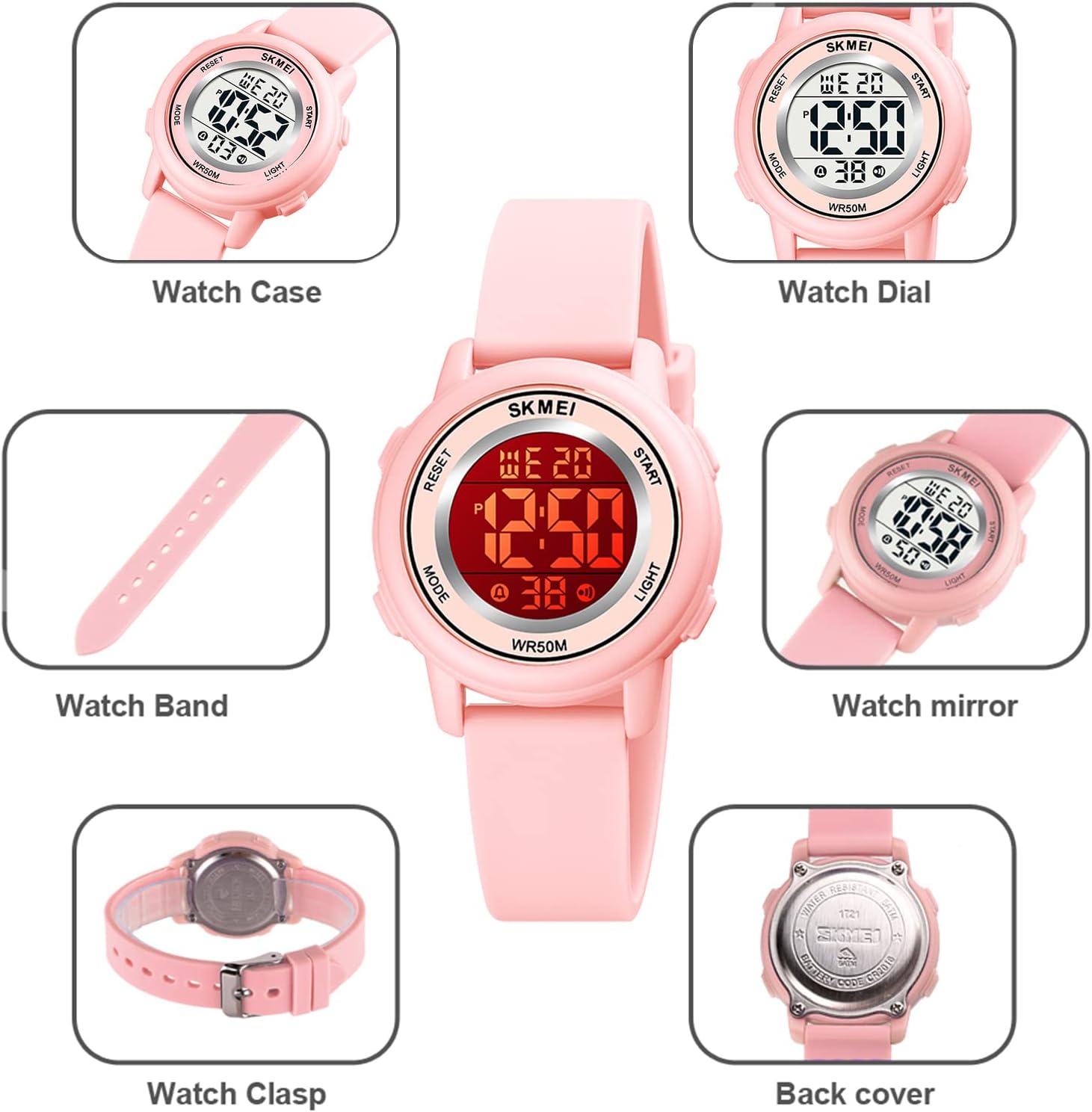
Figure 3.1: Key components of the watch.

Figure 3.2: Watch buttons and their corresponding functions.
- MODE Button (Bottom Left): Used to cycle through different modes: Time Display, Alarm Setting, and Stopwatch.
- LIGHT Button (Bottom Right): Activates the LED backlight. Hold for 3 seconds to change backlight color.
- START/STOP Button (Top Right): Used to start and stop the stopwatch. In setting modes, it adjusts values upwards.
- RESET Button (Top Left): Used to reset the stopwatch. In setting modes, it selects the item to be adjusted.
4. Initial Setup
4.1 Setting Time and Date
- From the normal time display mode, press the MODE button three times to enter the time setting mode. The seconds will start flashing.
- Press the RESET button to cycle through the settings: Seconds → Hours → Minutes → Month → Date → Day of the Week.
- While a value is flashing, press the START/STOP button to adjust the value.
- After setting all desired values, press the MODE button to return to the normal time display.
4.2 Setting the Alarm
- From the normal time display mode, press the MODE button twice to enter the alarm setting mode. The alarm hours will start flashing.
- Press the RESET button to switch between setting hours and minutes.
- While the hours or minutes are flashing, press the START/STOP button to adjust the value.
- To turn the alarm on or off, in the alarm setting mode, press the START/STOP button. An alarm icon will appear/disappear on the display.
- Press the MODE button to return to the normal time display.
4.3 Changing Backlight Color
- From any mode, press and hold the LIGHT button for approximately 3 seconds to cycle through the 7 available backlight colors. Release the button when your desired color is displayed.
5. Operating Instructions
5.1 Time Display
- The watch defaults to the time display mode. It shows hours, minutes, seconds, day of the week, and AM/PM indicator (if 12-hour format is selected).
- To switch between 12-hour and 24-hour format: In normal time display, press the START/STOP button.
5.2 Using the Stopwatch
- From the normal time display mode, press the MODE button once to enter stopwatch mode. The display will show "00:00:00".
- Press the START/STOP button to start the stopwatch.
- Press the START/STOP button again to pause the stopwatch.
- To resume, press the START/STOP button.
- To reset the stopwatch to zero, while it is paused, press the RESET button.
- Press the MODE button to exit stopwatch mode and return to normal time display.
6. Water Resistance Guidelines
Your SKMEI Kids Digital Sport Watch is designed with 50M (164 ft) water resistance. This means it is suitable for:
- Daily splashes
- Hand washing
- Sweating
- Rain
Important Precautions:
- DO NOT press any buttons while the watch is submerged in water.
- DO NOT expose the watch to hot steam or hot water (e.g., hot showers, saunas).
- The watch is NOT suitable for swimming, diving, or prolonged submersion.
- Excessive water contact or use in extreme hot/cold temperatures may shorten the watch's lifespan.

Figure 6.1: The watch is water-resistant for daily activities, but not for swimming.
7. Care and Maintenance
- Cleaning: Wipe the watch regularly with a soft, dry cloth. For stubborn dirt, a slightly damp cloth can be used, then dry thoroughly.
- Avoid Chemicals: Do not use harsh chemicals, cleaning solvents, or detergents as they can damage the watch's components and finish.
- Temperature: Avoid exposing the watch to extreme temperatures (very hot or very cold) for extended periods.
- Impact: While durable, avoid dropping the watch or subjecting it to strong impacts.
- Battery: The watch uses a standard watch battery. When the display dims or functions become erratic, it may be time for a battery replacement. This should ideally be done by a professional to maintain water resistance.
8. Troubleshooting
| Problem | Possible Cause | Solution |
|---|---|---|
| Display is blank or dim. | Low or dead battery. | Replace the battery. Consult a professional watch repair service. |
| Buttons are unresponsive. | Watch may be in a frozen state or internal issue. | Try pressing all buttons simultaneously for a few seconds to attempt a reset. If problem persists, contact support. |
| Time is incorrect. | Time not set correctly or battery is low. | Re-set the time following Section 4.1. If it frequently loses time, consider battery replacement. |
| Alarm does not sound. | Alarm not activated or set incorrectly. | Ensure the alarm is turned on (alarm icon visible) and the time is set correctly (Section 4.2). |
| Water inside the watch. | Water resistance compromised due to button pressing underwater, hot water exposure, or damage. | Immediately stop using the watch. Seek professional repair. Water damage is typically not covered by warranty if precautions are not followed. |
9. Product Specifications
- Model Number: SKMEI-1721-Pink-F
- Product Dimensions: 9.25 x 1.34 x 0.47 inches
- Item Weight: 3.52 ounces
- Water Resistance Depth: 50 Meters (164 Feet)
- Clasp Type: Buckle
- Strap Material: High-Quality Silicone
- Case Material: ABS
- Battery: 1 x Unknown battery (included)
- Recommended Age: 4+ years

Figure 9.1: Watch dimensions and adjustable band length.
10. Warranty and Customer Support
For any questions, concerns, or issues not covered in this manual, please contact SKMEI Official customer support. Please have your product model number (SKMEI-1721-Pink-F) and purchase details ready when contacting support.
Return Policy: This product typically comes with a 30-day return/replacement policy from the date of purchase. Please refer to your purchase platform's specific return policy for details.
You can often find support information on the official SKMEI website or through the retailer where the product was purchased.
Visit the SKMEI Store: SKMEI Official Store on Amazon