
Introduction
This manual provides comprehensive instructions for the Aigoss Bluetooth Car Handsfree Kit. This device is designed to enhance your driving experience by offering hands-free communication, music playback, and voice assistant integration. It features noise cancellation technology for clear calls and supports simultaneous connection of two mobile phones.
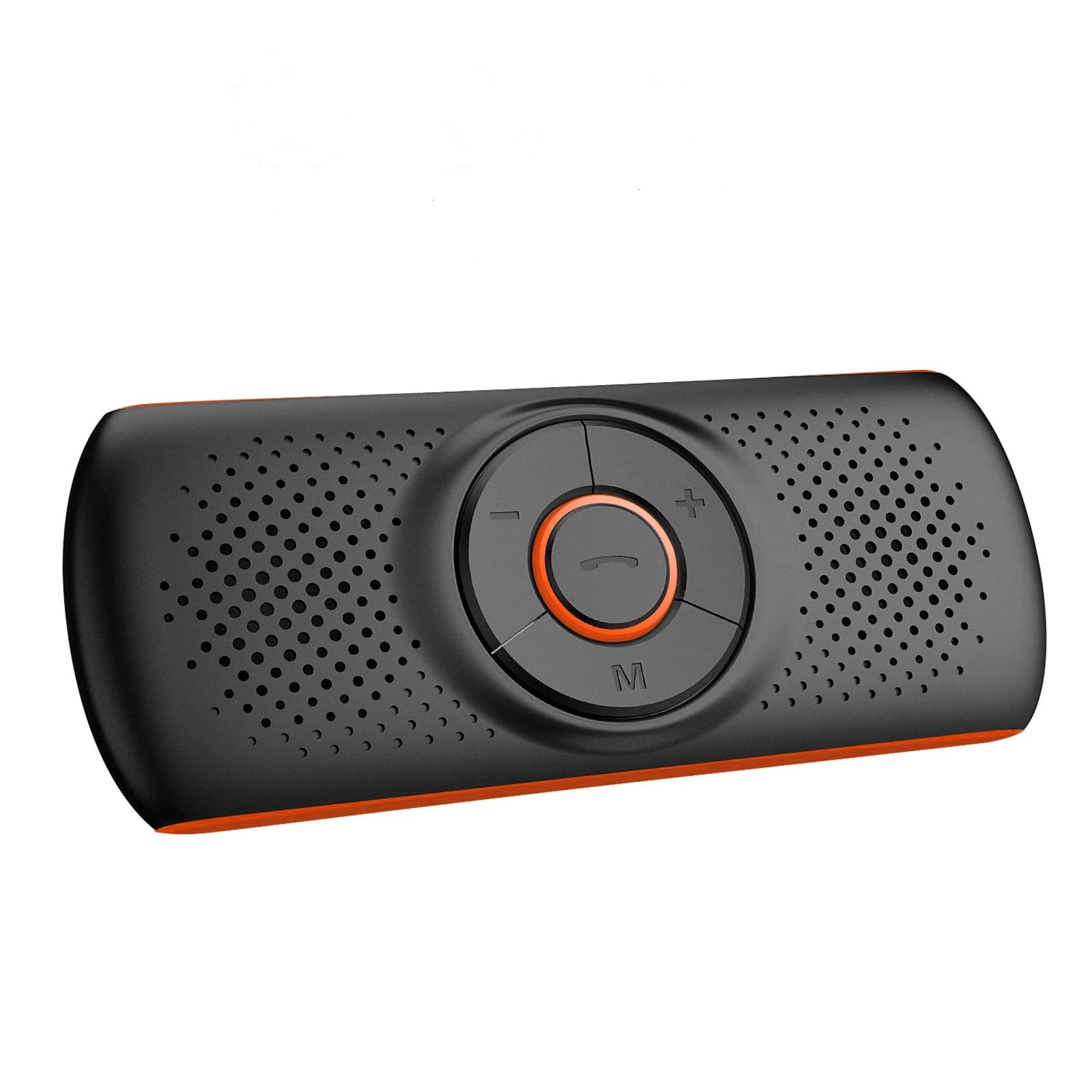
Figure 1: Aigoss Bluetooth Car Handsfree Kit
This image displays the Aigoss Bluetooth Car Handsfree Kit, showcasing its compact design and central control buttons.
Package Contents
Please check the package for the following items:
- 1 x Aigoss Bluetooth Car Handsfree Kit
- 1 x Magnetic Clip
- 1 x USB Charging Cable
- 1 x Lanyard
- 1 x User Manual (this document)
Product Overview
The Aigoss Car Handsfree Kit features intuitive controls and essential ports for ease of use.
- Main Control Button: Typically used for answering/ending calls, play/pause music.
- Volume Buttons (+/-): Adjust volume.
- "M" Button: Multi-function button, used for activating voice assistants.
- TF Card Slot: For playing music directly from a TF (MicroSD) card.
- Charging Port: Micro USB port for charging the device.
- Loudspeaker: Integrated 3W 4Ω loudspeaker for clear audio output.
- Microphone: Built-in for hands-free communication.

Figure 2: TF Card Slot and Charging Port
This image highlights the TF card slot and indicates the device's long playing time for music and hands-free calls.

Figure 3: Powerful Audio Output
This image illustrates the device's 3W 4Ω loudspeaker, emphasizing its powerful and clear audio quality with echo reduction and noise cancellation.
Setup
1. Charging the Device
Before first use, fully charge the device using the provided USB cable. Connect the USB cable to the charging port on the device and to a standard USB power source (e.g., car charger, computer USB port).
2. Mounting the Device
The device comes with a strong magnetic clip for easy installation.
- Attach the magnetic clip to the back of the handsfree kit.
- Clip the device onto your car's sun visor or any suitable metallic surface.
- Alternatively, use the provided lanyard to hang the device.

Figure 4: Visor Mounting
This image demonstrates how to clip the handsfree kit to the car's sun visor using its magnetic attachment.
3. Bluetooth Pairing
- Ensure the handsfree kit is charged and powered on.
- Activate Bluetooth on your mobile phone.
- Search for available Bluetooth devices and select "Aigoss Handsfree" (or similar name).
- Once paired, the device will automatically connect to your phone when powered on and within range.
Note: If Bluetooth is disconnected for 5 minutes, the device will automatically power off to conserve battery.
Operating Instructions
Power On/Off
- Power On: Press and hold the main control button until the indicator light turns on.
- Power Off: Press and hold the main control button until the indicator light turns off.
Making and Receiving Calls
- Answer Call: Press the main control button once.
- End Call: Press the main control button once during a call.
- Reject Call: Press and hold the main control button for 2 seconds.
- Redial Last Number: Double-press the main control button.
- Adjust Volume: Use the '+' and '-' buttons.
Music Playback
- Play/Pause: Press the main control button once.
- Next Track: Press the '+' button for 2 seconds.
- Previous Track: Press the '-' button for 2 seconds.
- TF Card Playback: Insert a TF card with MP3 audio files into the TF card slot. The device will automatically switch to TF card playback.
Voice Assistant (Siri/Google Assistant)
Activate your phone's voice assistant for hands-free commands.
- Activation: Double-click the "M" button to activate Siri or Google Assistant on your connected phone.
- You can then use voice commands for calls, messages, or navigation (e.g., "Call John", "Tell Jack I'll be right there", "Show me directions to restaurant").

Figure 5: Voice Command Functionality
This image illustrates the voice command feature, showing examples of how to use Siri or Google Assistant for phone calls, messages, and navigation.
Connecting Two Phones Simultaneously
The device supports connecting two mobile phones at the same time.
- Connect the first phone via Bluetooth as described in the "Bluetooth Pairing" section.
- Disconnect Bluetooth on the first phone.
- Turn off the handsfree kit.
- Connect the second phone to the handsfree kit via Bluetooth.
- Turn off the handsfree kit again.
- Turn on the handsfree kit and enable Bluetooth on both phones. The device should now connect to both phones simultaneously.
GPS Voice Prompts
Once connected via Bluetooth, the device will transmit GPS instructions from your phone, ensuring you receive navigation prompts clearly.
Maintenance
- Keep the device dry. Avoid exposure to moisture or liquids.
- Clean the device with a soft, dry cloth. Do not use harsh chemicals or abrasive cleaners.
- Store the device in a cool, dry place when not in use.
- Avoid extreme temperatures, as this can shorten the lifespan of electronic components.
Troubleshooting
| Problem | Solution |
|---|---|
| Device does not power on. | Ensure the device is fully charged. Connect it to a power source using the USB cable. |
| Cannot pair with phone. |
|
| Poor audio quality. |
|
| Device automatically turns off. | This is normal behavior if Bluetooth is disconnected for 5 minutes to save power. Reconnect Bluetooth or power on the device manually. |
Specifications
| Feature | Detail |
|---|---|
| Brand | Aigoss |
| Model | B0BTSHCJLP |
| Color | Orange |
| Connectivity Technology | Bluetooth / TF Card |
| Wireless Communication Standard | Bluetooth |
| Hardware Interface | Bluetooth |
| Power Source | Battery Powered |
| Rechargeable Battery | Yes |
| Special Features | Noise Cancellation Technology, Siri/Google Assistant Activation, Magnetic Clip, GPS Instruction Transmission |
| Compatible Devices | Apple iPhone, Google Nexus, HTC, OnePlus, Samsung Galaxy, ZTE |
| Media Type | MP3 |
| Loudspeaker Output | 3W 4Ω |
| Music Playback Time | Up to 10 hours |
| Hands-Free Working Time | Up to 16 hours |
Warranty and Support
Information regarding product warranty, spare parts availability, and software updates is not provided in the product details. For further support or inquiries, please refer to the manufacturer's official website or contact their customer service.
