1. Introduction
The Kala Red Light Elite Duo Panel is an advanced full-body red light therapy device designed to support cellular function and overall well-being. This device combines therapeutic red and near-infrared (NIR) light wavelengths to provide comprehensive coverage. The Duo configuration consists of two interconnected Kala Elite devices, allowing for full-body treatment in a single session. This manual provides essential information for the safe and effective use of your device, including setup, operation, and maintenance.
2. Important Safety Information
Please read all safety instructions before using the Kala Red Light Elite Duo Panel. Failure to follow these instructions may result in injury or damage to the device.
- Consult a Healthcare Professional: Always consult with a doctor or healthcare provider before starting any new light therapy regimen, especially if you have pre-existing medical conditions, are pregnant, or are taking medications.
- Eye Protection: While red and near-infrared light are generally safe for the eyes, prolonged direct exposure to high-intensity LEDs may cause discomfort. It is recommended to close your eyes or use protective eyewear during facial treatments.
- Skin Sensitivity: Some individuals may experience temporary skin redness or warmth. Discontinue use if irritation persists.
- Electrical Safety:
- Ensure the device is connected to a grounded power outlet.
- Do not operate the device with wet hands or in damp environments.
- Keep power cords away from heat sources and sharp edges.
- Unplug the device before cleaning or maintenance.
- Ventilation: Ensure adequate ventilation around the device during operation to prevent overheating. Do not block the ventilation openings.
- Children and Pets: Keep the device out of reach of children and pets.
- Device Modification: Do not attempt to open or modify the device. This will void the warranty and may pose a safety risk.
Statements regarding this device have not been evaluated by the FDA and are not intended to diagnose, treat, cure, or prevent any disease or health condition.
3. Package Contents
Verify that all components are present and undamaged upon unpacking:
- Kala Elite Red Light Therapy Panel (x2)
- Power Cord (x2)
- Connecting Brackets/Hardware for Duo Configuration
- Mounting Kit (e.g., door hook, stand components)
- User Manual (this document)
- Protective Eyewear (recommended)
4. Setup and Assembly
The Kala Red Light Elite Duo Panel consists of two individual panels that are designed to be connected for full-body coverage. Follow these steps for assembly and setup:
4.1 Unpacking
- Carefully remove all components from the packaging.
- Inspect each panel and accessory for any signs of damage.
- Retain packaging for future storage or transport.
4.2 Connecting the Duo Panels
To form the Duo configuration, align the two Kala Elite panels vertically. Use the provided connecting brackets and screws to securely fasten the panels together. Ensure the connection is stable before proceeding.

Figure 1: Front view of the assembled Kala Red Light Elite Duo Panel, displaying the array of red and near-infrared LEDs.
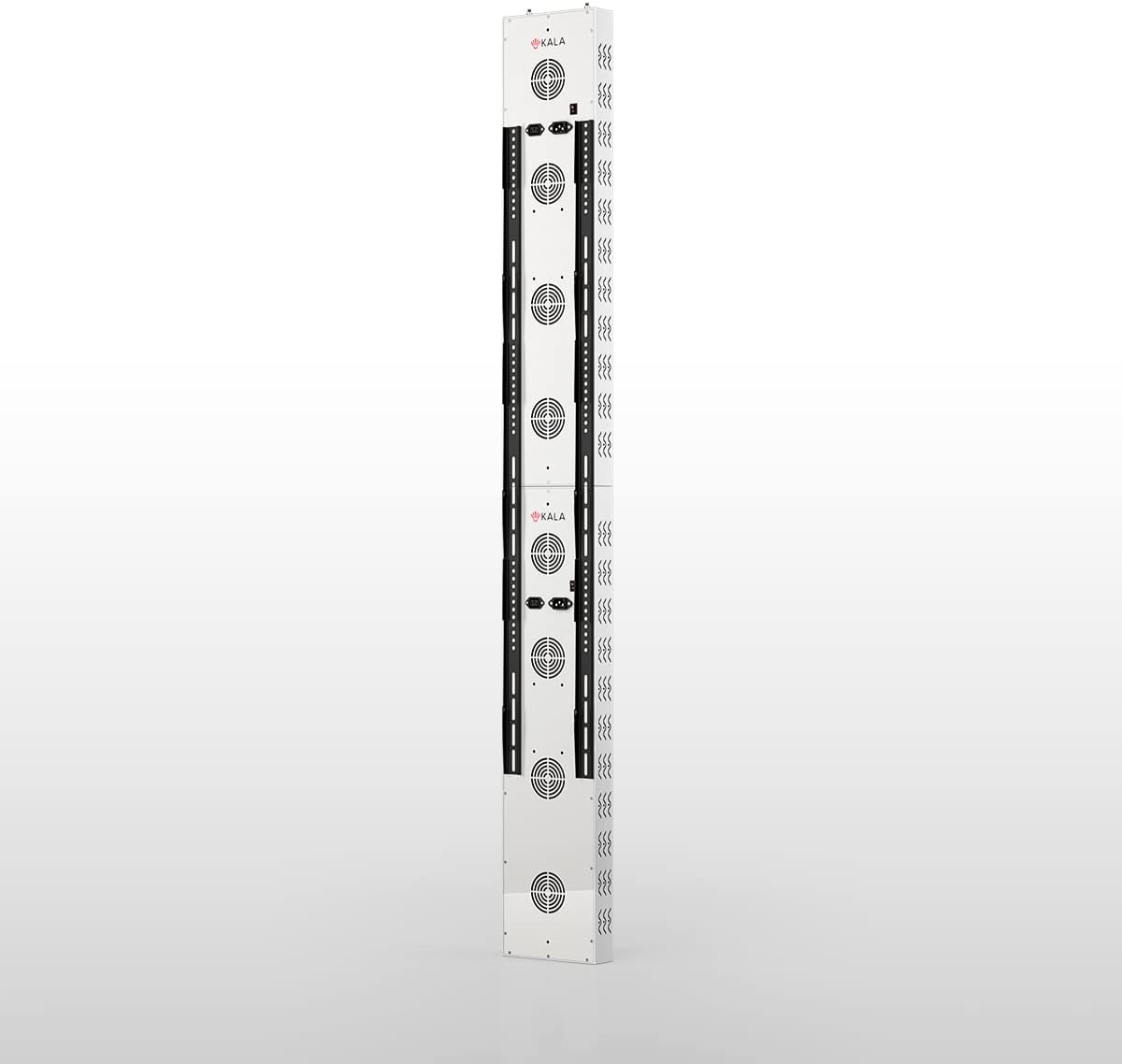
Figure 2: Rear view of the assembled Kala Red Light Elite Duo Panel, highlighting the cooling fans and control interfaces on each unit.
4.3 Mounting Options
The Kala Red Light Elite Duo Panel can be mounted in various ways depending on your preference and space. Common options include:
- Door Mount: Use the provided door hook to hang the assembled Duo panel over a sturdy door.
- Stand Mount: If a compatible stand is included or purchased separately, follow its instructions to attach the Duo panel.
- Wall Mount: For permanent installation, secure the panel to a wall using appropriate wall anchors and screws (not always included, consult a professional if unsure).
Ensure the mounting location is stable and can support the weight of the device. Maintain adequate clearance around the device for ventilation.

Figure 3: Side profile of the Kala Red Light Elite Duo Panel, illustrating its compact design and the seamless connection between the two units.
4.4 Power Connection
- Connect each power cord to its respective panel's power input port.
- Plug the power cords into a standard, grounded electrical outlet.
- Ensure the power switches on each panel are in the "OFF" position before plugging in.
5. Operating Instructions
The Kala Red Light Elite Duo Panel offers customizable settings for your therapy sessions.
5.1 Powering On/Off
- Locate the main power switch on each panel.
- Flip the switch to the "ON" position to power the device.
- To turn off, flip the switch to the "OFF" position.
5.2 Selecting Light Modes
Each panel typically features controls to select between red light, near-infrared (NIR) light, or a combination of both. Refer to the control panel on your device for specific buttons:
- Red Light Only: Activates the red LEDs (e.g., 660nm wavelength).
- NIR Light Only: Activates the near-infrared LEDs (e.g., 850nm wavelength).
- Red + NIR: Activates both red and near-infrared LEDs simultaneously.
5.3 Pulse+ Customizable Frequencies
The Kala Elite Duo Panel incorporates "Pulse+ customizable frequencies." This feature allows you to select specific pulsing patterns for the light output. Consult the device's control interface for options to adjust frequency settings. Different frequencies may be used for various therapeutic goals.
5.4 Session Duration
Most red light therapy devices include a timer function. Set your desired session duration using the control panel. Typical session times range from 10 to 20 minutes, but always follow the recommendations of your healthcare professional or product guidelines.
5.5 Recommended Usage
- Position yourself approximately 6-12 inches (15-30 cm) from the device for optimal light exposure.
- Ensure the target area of your body is fully exposed to the light.
- Use protective eyewear during facial treatments.
- Consistency is key for best results. Follow a regular treatment schedule.
6. Maintenance
Proper maintenance ensures the longevity and optimal performance of your Kala Red Light Elite Duo Panel.
- Cleaning:
- Always unplug the device before cleaning.
- Wipe the exterior surfaces with a soft, dry, or slightly damp cloth.
- Do not use abrasive cleaners, solvents, or harsh chemicals.
- Avoid spraying liquids directly onto the device.
- Storage:
- Store the device in a cool, dry place away from direct sunlight and extreme temperatures.
- If storing for an extended period, consider using the original packaging to protect it from dust and damage.
- Inspection: Periodically inspect the power cords and the device for any signs of wear or damage. If any damage is found, discontinue use and contact customer support.
7. Troubleshooting
If you encounter issues with your Kala Red Light Elite Duo Panel, refer to the following common troubleshooting steps:
| Problem | Possible Cause | Solution |
|---|---|---|
| Device does not power on. |
|
|
| Some LEDs are not lighting up. |
|
|
| Device feels excessively hot. |
|
|
If the problem persists after attempting these solutions, please contact Kala customer support for further assistance.
8. Specifications
- Product Name: Kala Red Light Elite Duo Panel Full Body Device
- Model: Elite Duo Panel
- Light Source: High-intensity Red and Near-Infrared LEDs (5W bulbs)
- Wavelengths: Therapeutic Red (e.g., 660nm), Near-Infrared (e.g., 850nm)
- Features: Pulse+ customizable frequencies
- Power Input: Standard AC (refer to device label for specific voltage/amperage)
- Manufacturer: Balkowitsch (as per product data)
- ASIN: B0BTRBZK91
9. Warranty and Customer Support
For warranty information, technical support, or service inquiries, please contact the retailer or manufacturer directly. Keep your purchase receipt and product serial number (if applicable) handy when contacting support.
Manufacturer: Balkowitsch
ASIN: B0BTRBZK91


