
VECHII 3521299712--64819144
VECHII Wired Video Intercom System User Manual
Model: 3521299712--64819144
1. Introduction
This manual provides detailed instructions for the installation, operation, and maintenance of your VECHII Wired Video Intercom System. Please read this manual thoroughly before installation and use to ensure proper functionality and safety.
The system features a 7-inch Wi-Fi video intercom with a camera, supporting remote unlocking via the Tuya Smart Life app, and is suitable for apartments, homes, and villas.
2. Product Components
Your VECHII Video Intercom System includes the following main components:
- Outdoor Camera Unit: Equipped with a 700 CMOS camera, IR night vision, and a durable zinc alloy casing.
- Indoor Monitor Unit: Features a 7-inch TFT-LCD screen, Wi-Fi connectivity, and supports mobile app integration.
- Power Adapter: For powering the indoor unit.
- Mounting Accessories: Including rain cover, connection terminal, and screws.
2.1. Monitor Structure (Figure 1)
The indoor monitor unit features various controls and indicators as shown below:

Figure 1: Indoor Monitor Unit Diagram. This image displays the front and back view of the indoor monitor, with numbered callouts for its various parts and connections. Key components include the Color LCD, Power indicator, Mute button, Music/Ring tone adjustment, Monitor button, Unlock button, Talk button, Microphone, connection ports (for outdoor and other indoor units), Intercom volume adjustment, DC 15V power interface, and Speaker.
- Color LCD
- Power indicator
- Mute
- Adjust the volume of music & replace the ring tone
- Monitor
- Unlock
- Talk
- Microphone
- Connect to outdoor unit or next indoor unit
- Adjust intercom volume
- DC 15V power interface
- Speaker
2.2. Outdoor Unit Structure (Figure 2)
The outdoor camera unit features the following components:
Figure 2: Outdoor Unit Diagram. This image displays the front and back view of the outdoor unit, with numbered callouts for its various parts and connections. Key components include the Camera, Microphone, Speaker, Infrared night vision lamp, Call button, 2P port (Output 12V voltage signal), and 4P indoor unit connector socket.
- Camera
- Microphone
- Speaker
- Infrared night vision lamp
- Call button
- 2P port (Output 12V voltage signal)
- 4P indoor unit connector socket
3. Setup and Installation
The system uses a 4-wire connection for easy installation. Please follow these guidelines carefully:
- Mounting: The outdoor unit is designed for surface mounting. Use the provided rain cover and screws for secure installation.
- Wiring: Connect the outdoor unit to the indoor monitor using the 4-wire cable. Ensure all connections are secure and correctly aligned.
- Power Connection: The power adapter must be connected to the indoor unit. Do not connect the power adapter directly to the outdoor unit, as this will cause damage.
- Lock Connection: The system supports various electric locks (Electronic Control Lock, Magnetic Lock, Electric Bolt Lock, Electric Strike Lock). Connect your chosen lock to the appropriate terminals on the indoor monitor.
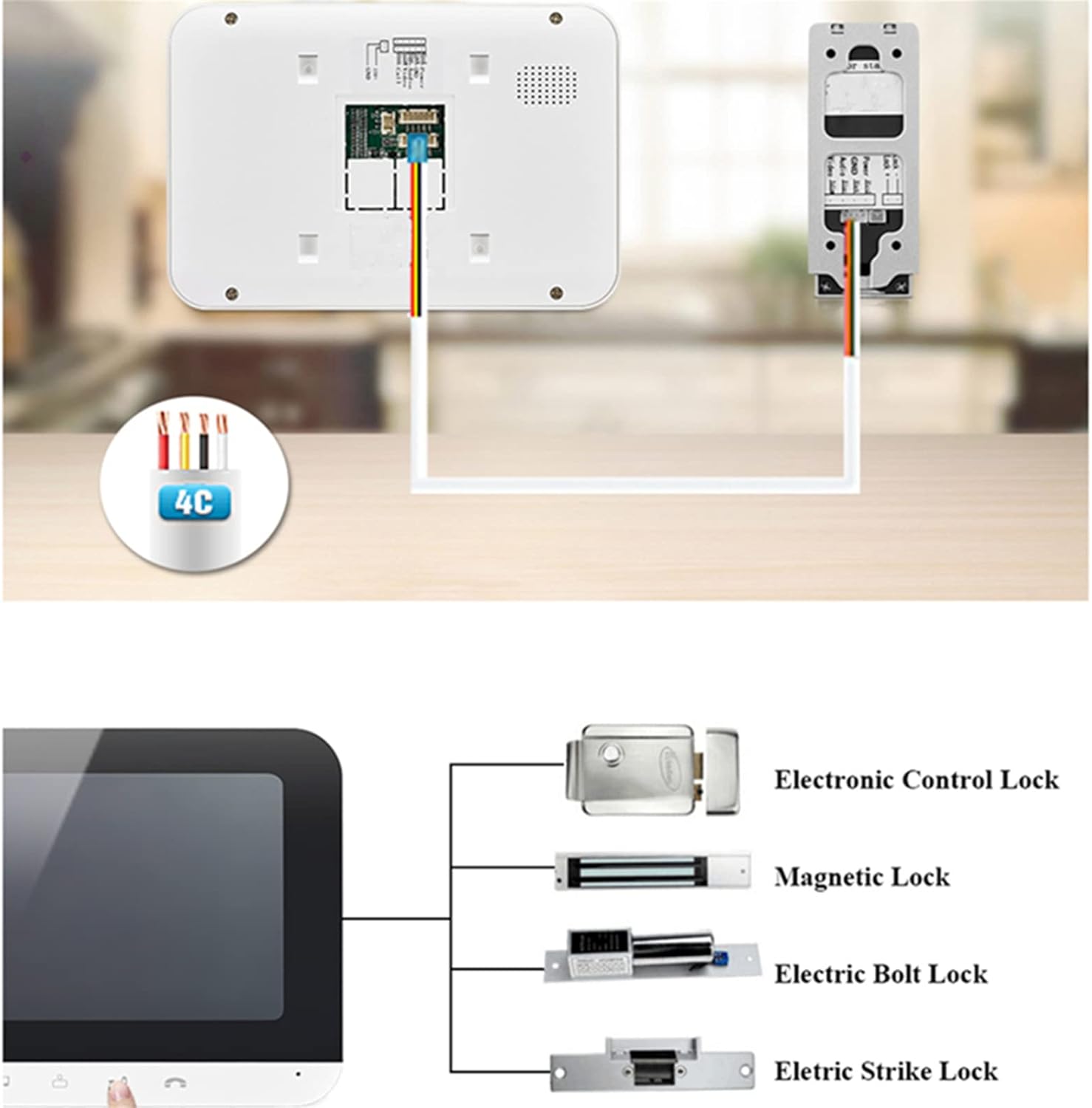
Wiring Diagram and Lock Compatibility. This image illustrates the 4-wire connection between the outdoor unit and the indoor monitor, and also shows different types of compatible electric locks: Electronic Control Lock, Magnetic Lock, Electric Bolt Lock, and Electric Strike Lock.

Outdoor Unit Installation. This image depicts the outdoor unit mounted on a wall, highlighting its waterproof IP55 rating and wide viewing angle of 120 degrees, suitable for various weather conditions and temperatures from -30°C to 60°C.
4. Operating Instructions
4.1. Basic Intercom Functionality
- When a visitor presses the call button on the outdoor unit, the indoor monitor will ring.
- You can see and speak to the visitor using the indoor monitor's screen and microphone/speaker.
- To unlock the door, press the "Unlock" button on the indoor monitor.
- Adjust volume, brightness, and contrast using the controls on the indoor monitor.
- Select from 16 different door chime melodies.
4.2. Tuya Smart Life App Integration
The system supports Wi-Fi connectivity and integrates with the Tuya Smart Life app for enhanced control and monitoring.
- Remote Call Answering: Receive calls from the outdoor unit directly on your smartphone via the Tuya app, no matter where you are.
- Remote Unlocking: Unlock your door remotely through the app.
- Monitoring: View live feed from the outdoor camera on your phone.
- Photo and Video Recording: The system supports a 32G TF memory card for capturing photos and videos of visitors.
- Motion Detection: The system can detect motion and alert you via the app.

Tuya Smart Life App Features. This image highlights key features of the system when integrated with the Tuya app, including Tuya App control, HD 1080p resolution, Motion Detect, Unlocking by pressing one key, Support for 64GB TF card (note: product description says 32G), Two-way intercom, Remote control, Message function, LCD screen, and Indoor group call.

Remote Access via Smartphone. This image demonstrates how users can interact with the intercom system remotely using their smartphone, showing the ability to see, hear, and speak to visitors, and remotely unlock the door through the app interface.

Motion Detection and Recording. This image illustrates the system's motion detection capability, showing how it can detect movement within its 120-degree horizontal viewing angle and record video, providing security alerts to the user's smartphone.
5. Maintenance
- Keep the outdoor camera lens clean for clear image quality.
- Wipe the indoor monitor screen with a soft, dry cloth. Avoid abrasive cleaners.
- Ensure all wiring connections remain secure.
- Regularly check for firmware updates for the Tuya Smart Life app and the device itself to ensure optimal performance and security.
6. Troubleshooting
| Problem | Possible Cause | Solution |
|---|---|---|
| No image or sound on indoor monitor. | Incorrect wiring; Power adapter not connected or faulty. | Check all 4-wire connections. Ensure the power adapter is correctly plugged into the indoor unit and receiving power. |
| Noise during testing. | Indoor and outdoor units are too close during testing. | Move the indoor unit further away from the outdoor unit during testing to prevent feedback. |
| Outdoor unit not powering on. | Power adapter connected directly to outdoor unit. | The power adapter must be connected to the indoor unit. Connecting it directly to the outdoor unit will damage it. |
| App connectivity issues. | Incorrect Wi-Fi settings; Router issues; App not updated. | Verify Wi-Fi credentials on the indoor unit. Restart your router. Ensure the Tuya Smart Life app is updated to the latest version. |
7. Specifications
7.1. Outdoor Camera Unit
- Camera: 700 CMOS with Super backlight compensation
- Night Vision Distance: WLED 3 m
- Casing: Zinc alloy
- Viewing Angle: 85 to 92 degrees (Note: some images suggest 120 degrees, using product description value)
- Dimensions: 50 x 125 x 27 mm
- Installation: Surface Mount
- Net Weight: 0.35 kg
- Waterproofing: IP55 (from image)
- Operating Temperature: -30°C to 60°C (from image)
7.2. Indoor Monitor Unit
- Display: 7-inch TFT-LCD screen
- Resolution: 800 x 480
- Power Input: AC 100V-240V
- Power Output: DC 15V 1.2A
- Consumption: Standby ≤1W, Working ≤10W
- Ringtone: 12 music chords
- Connection Mode: RVV4 wired connection
- Dimensions: 195 x 132 x 13 mm
- Material: ABS plastic
- Net Weight: 0.6 kg
- Phone Application: Tuya Smart Life App
- Memory Card Support: 32G TF card (product description) / 64GB TF card (image feature) - will use 32G as per description.
Ask a question about this manual
Ask about setup, troubleshooting, compatibility, parts, safety, or missing instructions. Manuals+ will review the question and use this page’s manual context to help answer it.