1. Product Overview
The Hadulcet UP-01B8 is a versatile mobile standing desk designed for various work and leisure activities. It features adjustable height, integrated charging capabilities, and smooth-rolling wheels for portability. This manual provides essential information for assembly, operation, maintenance, and troubleshooting.
Key Features:
- Adjustable Height: Easily transition between sitting and standing positions with a height range of 26.3" to 45.3".
- Integrated Charging Station: Equipped with 2 USB ports and 2 power outlets, plus a 4.9 ft power cord, to keep your devices charged.
- Mobile Design: High-quality rubber wheels allow for flexible movement and can be locked for stability.
- Multi-functional Use: Suitable as an office desk, art desk, drawing desk, mobile laptop stand, rolling cart, or treadmill desk.
- Tablet Slot: Conveniently holds tablets or smartphones for easy viewing.
- L-shaped Hook: Provides a dedicated spot for headphones or cables.
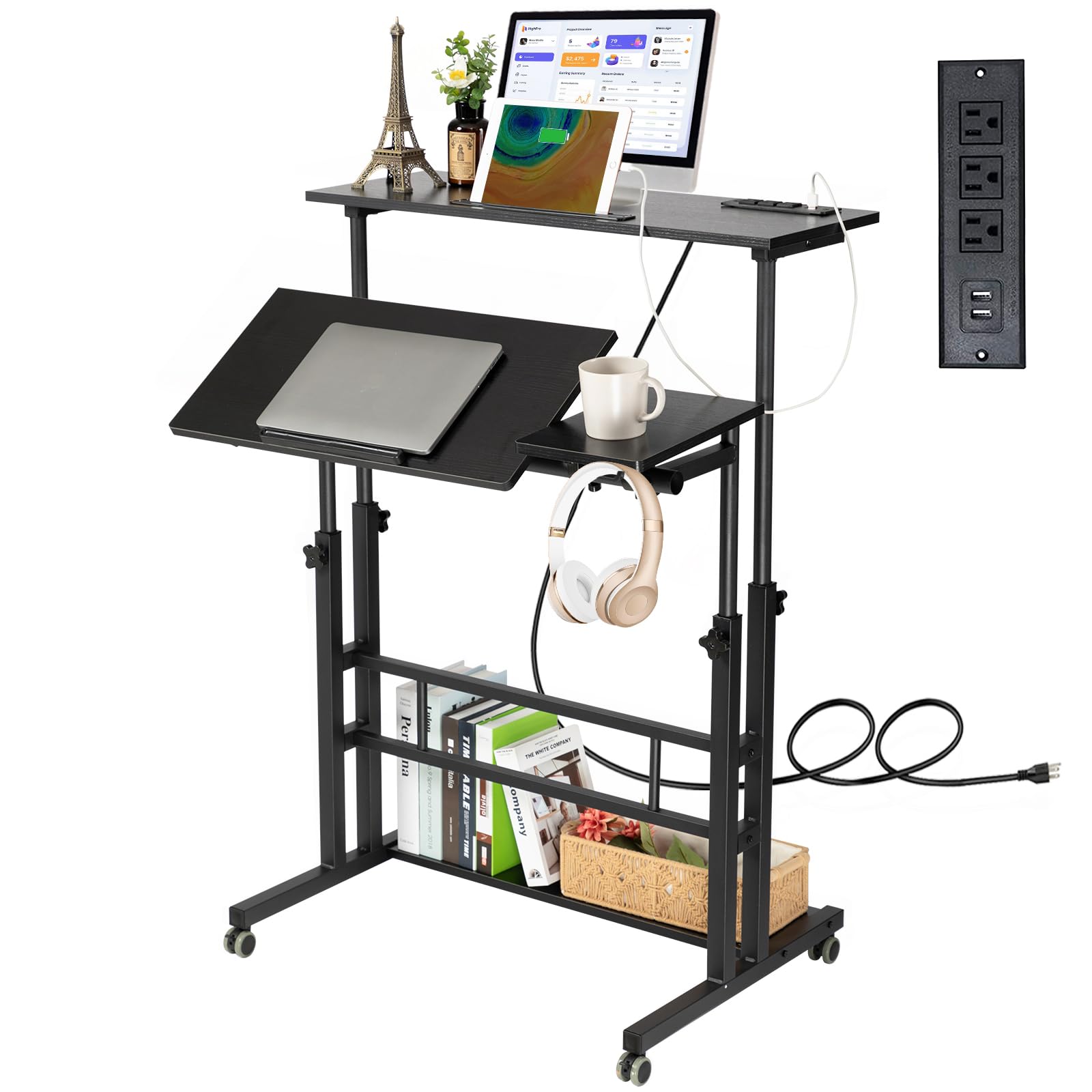
Figure 1: Hadulcet UP-01B8 Adjustable Mobile Standing Desk
2. Setup and Assembly
Assembly of the Hadulcet UP-01B8 desk is designed to be straightforward. All necessary tools and directions are included. Please follow the instructions carefully to ensure proper setup and stability.
Assembly Tips:
- Unpack all components and verify against the parts list provided in the packaging.
- Ensure proper alignment of parts during assembly for a stable structure.
- Tighten all screws and knobs securely, but do not overtighten.
- Attach the wheels last, ensuring they are locked if you prefer a stationary setup.

Figure 2: Product Dimensions and Adjustable Range

Figure 3: Detailed Features for Assembly and Use
3. Operating Instructions
Adjusting Height:
The desk features an adjustable height mechanism. To adjust the height, loosen the rotating knobs on the vertical support poles, raise or lower the desktop to your desired position (between 26.3" and 45.3"), and then securely tighten the knobs. Both desktop sections can be adjusted independently.
Using the Charging Station:
Plug the desk's 4.9 ft power cord into a standard wall outlet. The integrated power strip provides 2 USB ports and 2 standard power outlets for charging your devices directly from the desktop.

Figure 4: Integrated Charging Station
Mobility and Stability:
The desk is equipped with wheels for easy relocation. To move the desk, unlock the wheels. To keep the desk stationary, ensure all wheels are locked. For optimal stability, especially when using as a treadmill desk, ensure the desk is on a flat surface and wheels are locked.

Figure 5: Desk for Over Treadmill Use
Tilting Desktop Section:
One section of the desktop can be tilted to an angle, ideal for reading, drawing, or holding a tablet. To adjust the tilt, loosen the knobs underneath the tilting section, set to the desired angle, and re-tighten the knobs. A barrier strip prevents items from sliding off.
Video 1: Demonstrates the rolling and adjustable features of the Hadulcet Computer Desk with Charging Station.
Video 2: Shows the Hadulcet Stand Up Desk with Wheels & Charging Station in various use scenarios.
4. Maintenance
To ensure the longevity and optimal performance of your Hadulcet UP-01B8 desk, follow these maintenance guidelines:
- Cleaning: Clean wood surfaces with a damp cloth. Avoid harsh chemicals that may damage the finish.
- Metal Parts: Handle metal parts with care to prevent scratches or damage.
- Fasteners: Periodically check and tighten all screws and knobs to maintain stability.
- Weight Capacity: Do not exceed the maximum weight recommendation of 66 pounds to prevent damage or injury.
- Anchoring: If used in a dynamic environment (e.g., with a treadmill), consider anchoring the desk to prevent tipping.
5. Troubleshooting
If you encounter any issues with your Hadulcet UP-01B8 desk, please refer to the following common troubleshooting tips:
- Desk Wobbles: Ensure all assembly screws and height adjustment knobs are securely tightened. Verify the desk is on a flat, even surface.
- Difficulty Adjusting Height: Loosen the adjustment knobs sufficiently before attempting to raise or lower the desktop. Ensure no obstructions are present.
- Charging Station Not Working: Check if the desk's main power cord is securely plugged into a functional wall outlet. Test with different devices and cables.
- Wheels Not Rolling Smoothly: Check for any debris or hair caught in the wheel casters. Ensure the wheels are unlocked if you intend to move the desk.
For further assistance, please contact customer support.
6. Specifications
| Feature | Detail |
|---|---|
| Brand | Hadulcet |
| Model Number | UP-01B8 |
| Product Dimensions | 23.6"D x 31.5"W x 17.83"H |
| Adjustable Height Range | 26.3" - 45.3" |
| Color | Black |
| Material Type | Wood (Top), Metal (Base) |
| Maximum Weight Recommendation | 66 Pounds |
| Lifting Mechanism | Manual |
| Is Electric | Yes (for charging station) |
| Power Outlets | 2 USB ports & 2 Power Outlets |
| Power Cord Length | 4.9 ft |
| Required Assembly | Yes |
| Includes All Assembly Tools | Yes |
7. Warranty and Support
The Hadulcet UP-01B8 Adjustable Mobile Standing Desk comes with a Limited Warranty. For specific details regarding coverage and duration, please refer to the warranty information provided with your product packaging or contact Hadulcet customer service.
For any questions, technical support, or warranty claims, please contact Hadulcet customer service. Contact information can typically be found on the product packaging or the official Hadulcet website.

