
Important Safety Instructions
Please read and save these important safety instructions before using this fan. Failure to follow these instructions may result in electric shock, fire, or injury.
- Always unplug the fan before cleaning or performing any maintenance.
- Do not operate the fan with a damaged cord or plug. If the cord or plug is damaged, contact qualified service personnel.
- Keep the fan away from water or moisture. Do not immerse the fan in water.
- Do not insert fingers or any objects through the grille when the fan is operating.
- Ensure the fan is placed on a stable, flat surface to prevent tipping.
- This fan is for indoor use only. Do not use outdoors.
- Do not use this fan near windows, as rain may create an electrical hazard.
- Do not operate the fan in the presence of explosive and/or flammable fumes.
- Supervise children when the fan is in use.
Product Overview
The BETTER HOMES & GARDENS 8-Inch Retro Table Fan (Model SFDR0-200BPT) is designed to provide efficient air circulation in various indoor settings. It features a durable metal construction, three-speed settings, oscillation, and an adjustable tilting head for optimal airflow direction.
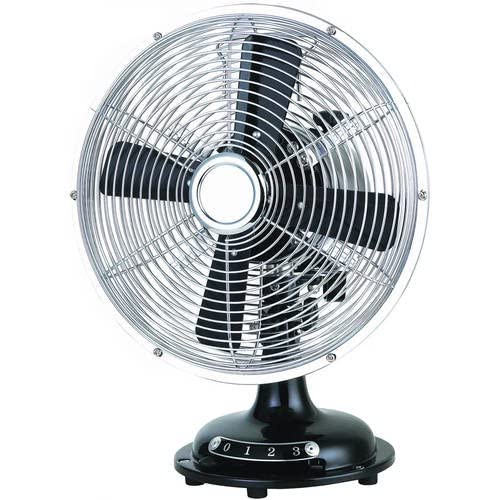
Figure 1: Front view of the BETTER HOMES & GARDENS 8-Inch Retro Table Fan. This image shows the fan's metal grille, blades, and the control knob on the base for speed selection and power.
Key Features:
- Three (3) speed settings for varied airflow.
- Oscillation function for wider air distribution.
- Adjustable tilt head for directional airflow.
- Durable metal construction.
- Compact design suitable for desks, tables, and shelves.
Setup and Assembly
The BETTER HOMES & GARDENS 8-Inch Retro Table Fan is designed for easy assembly without the need for special tools. Follow these steps to set up your fan:
- Unpack Components: Carefully remove all parts from the packaging. Ensure all components are present: fan head assembly, base, and power cord.
- Place on Stable Surface: Position the fan base on a firm, level surface where you intend to use the fan.
- Connect Power: Plug the fan's power cord into a standard electrical outlet (refer to specifications for voltage requirements).
- Initial Check: Before operating, ensure the fan grille is securely in place and there are no obstructions around the blades.
Operating Instructions
To operate your fan, follow these simple steps:
- Power On/Speed Selection: Locate the control knob on the fan base. Turn the knob clockwise to select your desired speed setting:
- 0: Off
- 1: Low Speed
- 2: Medium Speed
- 3: High Speed
- Adjust Tilt: To change the vertical angle of airflow, gently tilt the fan head up or down to the desired position. The fan head will hold its position.
- Activate Oscillation: To enable the fan to oscillate (move side-to-side), locate the oscillation pin on the top of the motor housing at the back of the fan head. Push the pin down.
- Stop Oscillation: To stop oscillation, pull the oscillation pin up. The fan will then blow air in a fixed direction.
- Power Off: Turn the control knob counter-clockwise back to the "0" position to turn off the fan.
Maintenance and Cleaning
Regular cleaning and maintenance will ensure optimal performance and extend the life of your fan.
- Always unplug the fan from the power outlet before cleaning.
- Cleaning the Exterior: Use a soft, damp cloth to wipe the exterior surfaces of the fan. Do not use abrasive cleaners or solvents, as these may damage the finish.
- Cleaning the Grille and Blades:
- The front grille can typically be removed for cleaning. Refer to the fan's specific design for grille removal instructions (often involves unscrewing clips or a retaining ring).
- Carefully wipe the fan blades with a soft, damp cloth to remove dust and debris.
- Ensure all parts are completely dry before reassembling the grille and plugging the fan back in.
- Storage: When not in use for extended periods, store the fan in a cool, dry place, preferably in its original packaging or covered to protect it from dust.
Troubleshooting
If your fan is not operating correctly, consult the following troubleshooting guide:
| Problem | Possible Cause | Solution |
|---|---|---|
| Fan does not turn on. |
|
|
| Fan operates but no oscillation. | Oscillation pin is not engaged. | Push the oscillation pin down on top of the motor housing. |
| Reduced airflow or unusual noise. |
|
|
If the problem persists after trying these solutions, please contact customer support.
Specifications
| Feature | Detail |
|---|---|
| Brand | BETTER HOMES & GARDENS |
| Model Name/Number | SFDR0-200BPT |
| Product Type | Table Fan |
| Color | Black |
| Style | Retro |
| Power Source | Corded Electric |
| Number of Speeds | 3 |
| Special Features | 3 speeds, Adjustable Tilt, Fabric cable with built-in fuse, Oscillating |
| Mounting Type | Tabletop Mount |
| Material | Metal |
| Number of Blades | 3 |
| Included Components | Cable |
| GTIN (UPC) | 671227023082 |
| ASIN | B0BTMW4CSZ |
Warranty and Support
Specific warranty information for the BETTER HOMES & GARDENS 8-Inch Retro Table Fan (Model SFDR0-200BPT) is not provided in this manual. Please refer to the product packaging or contact the retailer/manufacturer directly for warranty details and customer support.
For further assistance or inquiries, please visit the official BETTER HOMES & GARDENS website or contact their customer service department.

