
Introduction
Thank you for choosing the Setty 10000 mAh Solar Power Bank. This portable charger is designed to provide reliable power for your mobile devices, featuring a high-capacity battery, integrated charging cables, and a solar panel for emergency charging. Please read this manual carefully to ensure proper use and maintenance of your device.
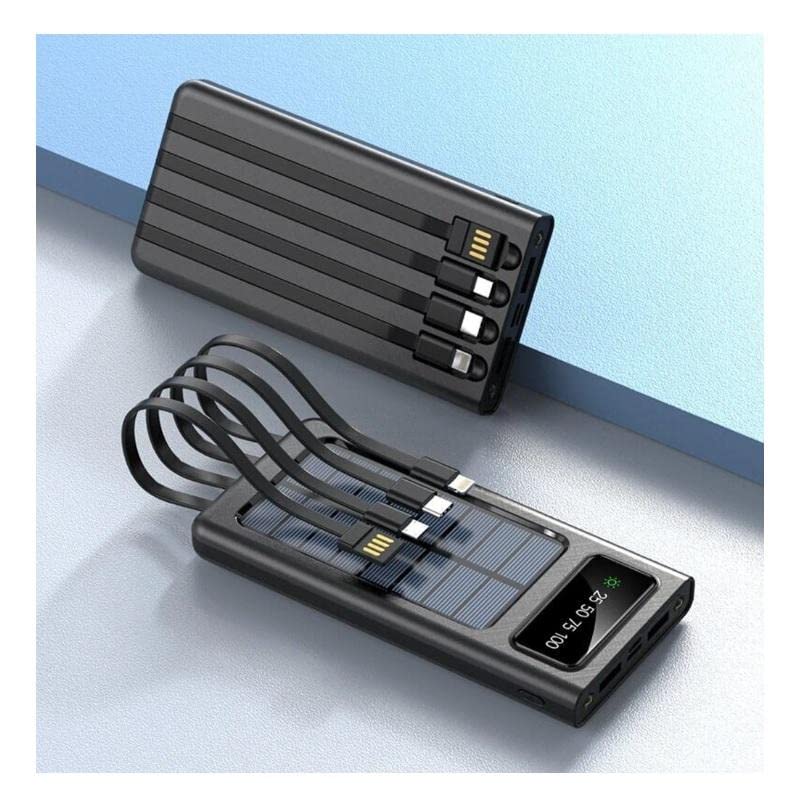
Product Features
- 10000 mAh High Capacity: Provides multiple charges for most smartphones.
- Integrated Charging Cables: Includes built-in USB, USB-C, MicroUSB, and Lightning cables for universal compatibility.
- Solar Charging Capability: Equipped with a solar panel for emergency power replenishment when conventional power sources are unavailable.
- Multiple Output Ports: Features a standard USB output port for charging various mobile devices.
- LCD Display: Digital screen indicates battery charge level.
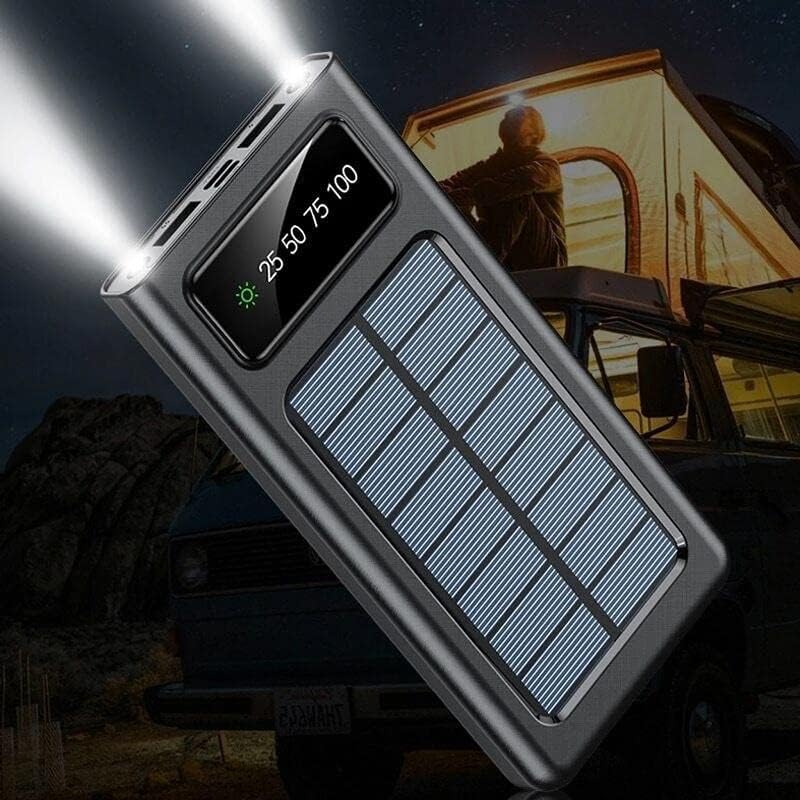
- LED Flashlight: Built-in flashlight for convenience in low-light conditions.
Package Contents
- Setty 10000 mAh Solar Power Bank (Model 84730235)
- User Manual
Component Identification

- Solar Panel: For emergency solar charging.
- LCD Display: Shows battery percentage and charging status.
- Integrated Cables: USB, USB-C, MicroUSB, Lightning output cables.
- USB-A Output Port: Standard USB port for connecting external cables.
- USB-C Input Port: For charging the power bank.
- MicroUSB Input Port: For charging the power bank.
- Power Button: To turn on/off the device and activate the flashlight.
- LED Flashlight: Integrated light source.
Setup
Initial Charging
Before first use, fully charge the power bank using a wall adapter. This ensures the internal battery is properly calibrated and ready for optimal performance.
- Connect a USB-C or MicroUSB cable to the corresponding input port on the power bank.
- Connect the other end of the cable to a USB wall adapter (not included).
- Plug the wall adapter into a power outlet.
- The LCD display will show the charging progress. Charge until the display shows 100%.
Operating Instructions
Charging the Power Bank
The power bank can be charged via a wall adapter or its solar panel.
Via Wall Adapter (Recommended for fastest charge)
- Use the USB-C or MicroUSB input port with a compatible cable and wall adapter.
- The LCD display will show the charging percentage.
Via Solar Panel (Emergency Charging)

- Place the power bank in direct sunlight. Ensure the solar panel faces the sun.
- The solar charging indicator on the LCD display will illuminate when charging via solar energy.
- Solar charging is slower than wall charging and is intended for emergency use to extend battery life, not as a primary charging method.
Charging External Devices
The power bank can charge up to four devices simultaneously using its integrated cables and USB-A output port.
- Identify the correct integrated cable (USB, USB-C, MicroUSB, or Lightning) for your device.
- Connect the appropriate integrated cable to your device's charging port.
- Alternatively, use your device's original charging cable and connect it to the USB-A output port on the power bank.
- The power bank will automatically begin charging your device. If not, press the power button once.
- The LCD display will show the remaining battery level of the power bank.
Using the LED Flashlight
- To turn on the flashlight, press and hold the power button for approximately 3 seconds.
- To turn off the flashlight, press and hold the power button again for approximately 3 seconds.
LCD Display Information

- The display shows the battery charge level as a percentage (e.g., 25, 50, 75, 100).
- A sun icon will appear when the power bank is actively charging via its solar panel.
Maintenance
- Cleaning: Wipe the power bank with a soft, dry cloth. Do not use harsh chemicals or abrasive materials.
- Storage: Store the power bank in a cool, dry place away from direct sunlight and extreme temperatures.
- Battery Care: To prolong battery life, fully charge the power bank at least once every three months if not in regular use. Avoid fully discharging the battery frequently.
- Water Exposure: This device is not waterproof. Avoid exposure to water or excessive moisture.
Troubleshooting
| Problem | Possible Cause | Solution |
|---|---|---|
| Power bank not charging | Cable not connected properly; faulty cable/adapter; power bank fully charged. | Ensure cables are securely connected. Try a different cable or wall adapter. Check LCD display for 100% charge. |
| Device not charging from power bank | Power bank battery low; incorrect cable; device not compatible; power bank not activated. | Charge the power bank. Use the correct integrated cable or a known good external cable. Press the power button to activate output. |
| Solar charging is slow or not working | Insufficient sunlight; solar panel obstructed; solar charging is inherently slow. | Place the power bank in direct, unobstructed sunlight. Solar charging is supplementary; use wall charging for faster results. |
| LED flashlight not working | Power bank battery low; incorrect operation. | Charge the power bank. Press and hold the power button for 3 seconds to activate/deactivate. |
Specifications
| Feature | Detail |
|---|---|
| Model Number | 84730235 |
| Brand | Setty |
| Manufacturer | TelForceOne |
| Battery Capacity | 10000 mAh |
| Battery Type | Lithium-polymer (1 Lithium-ion battery included) |
| Input Ports | USB Type C, MicroUSB |
| Output Ports | USB Type A, Integrated USB, USB-C, MicroUSB, Lightning cables |
| Voltage | 5 Volts |
| Amperage | 2.1 A |
| Color | Black |
| Recommended Use | Mobile phones |
| Compatible Devices | Mobile phones |
Safety Information
- Do not expose the power bank to extreme temperatures, direct sunlight for prolonged periods (especially when not charging), or fire.
- Do not immerse the power bank in water or expose it to rain or excessive moisture.
- Do not disassemble, modify, or attempt to repair the device yourself.
- Keep out of reach of children.
- Use only compatible charging cables and adapters.
- Avoid dropping or subjecting the power bank to strong impacts.
- If the power bank swells, overheats, or shows any other abnormal behavior, discontinue use immediately.
Warranty and Support
This product is covered by a standard manufacturer's warranty. For specific warranty terms and conditions, please refer to the documentation provided at the time of purchase or contact your retailer. For technical support or inquiries, please visit the official Setty website or contact their customer service department.
