
YESWELDER MIG-270K
YESWELDER MIG-270K Wide Voltage Multi-process MIG Welder User Manual
Model: MIG-270K | Brand: YESWELDER
Introduction
The YESWELDER MIG-270K is a versatile multi-process welding machine designed for a wide range of welding applications. It supports Gas MIG, Gasless MIG, Lift TIG, and Stick welding, making it suitable for both experienced professionals and hobbyists. This manual provides essential information for the safe and effective operation, setup, and maintenance of your MIG-270K welder.
Included Components
Upon unboxing your YESWELDER MIG-270K, please verify that all the following components are present:
- YESWELDER MIG-270K Welder Unit
- Ground Clamp with 10' [3m] Cable
- Electrode Holder with 10' [3m] Cable
- 250A MIG Torch with 10' [3m] Cable
- Instruction Manual (this document)
- Regulator
- 3 Connection Terminals for Wiring
- V Knurl Grooves Feeding Roll .030”/.035” (for solid wire and flux core wire)
- V Knurl Grooves Feeding Roll .030”/.039” (for solid wire and flux core wire)
Safety Information
Always prioritize safety when operating welding equipment. Failure to follow safety guidelines can result in serious injury or death. Refer to local safety regulations and standards.
- Electric Shock: Welding current can cause fatal electric shock. Ensure proper grounding and insulation. Never touch live electrical parts.
- Fumes and Gases: Welding produces fumes and gases that can be hazardous to your health. Work in a well-ventilated area or use a fume extractor.
- Arc Rays: Arc rays can burn eyes and skin. Always wear a welding helmet with appropriate shade, safety glasses, and protective clothing.
- Fire and Explosion: Welding sparks and hot metal can cause fires. Keep flammable materials away from the welding area. Have a fire extinguisher readily available.
- Hot Parts: Welded materials and equipment can remain hot for a significant time after welding. Use insulated gloves and allow parts to cool before handling.
Setup
1. Unpacking and Placement
Carefully remove the welder from its packaging. The MIG-270K is designed with a trolley for easy mobility and can support a gas cylinder. Position the welder on a stable, level surface in a well-ventilated area, away from moisture and direct sunlight.

Figure 1: Side view of the MIG-270K welder, illustrating its integrated trolley and robust wheels for easy transport and stability.
2. Power Connection
The MIG-270K features wide input voltage compatibility, ranging from 220V-480V, supporting 1-phase 220V, 380V, and 3-phase 220V, 380V, 415V, 440V, 460V. Use the appropriate connection terminals for your power source. Ensure the power supply matches the welder's requirements and is properly grounded.

Figure 2: Rear view of the MIG-270K, highlighting the power input connection point and the gas inlet for shielding gas.
3. Gas Connection (for Gas MIG)
For Gas MIG welding, connect your shielding gas cylinder to the regulator provided, and then connect the regulator to the gas inlet on the rear of the welder. Ensure all connections are secure and leak-free. The welder supports a gas check function on its digital panel.
4. Wire Installation
The welder is suitable for .030” to .039” welding wires and can accommodate 8”, 10”, or 12” (D200/D270) spools. It supports solid wire (ER70S), flux core wire (E71TGS), and ER308L stainless steel wire. Open the side panel to access the wire feeder mechanism. Install the wire spool, thread the wire through the feeder, and select the appropriate V Knurl Grooves Feeding Roll for your wire diameter.

Figure 3: Internal view of the MIG-270K, displaying the wire feeder assembly where the welding wire spool is mounted and fed.
5. Torch and Clamp Connection
Connect the 250A MIG Torch to the appropriate connector on the front panel. Connect the Ground Clamp to the workpiece. For Stick welding, connect the Electrode Holder. For Lift TIG, an additional WP-17V-35 torch is required and connects to the designated port.
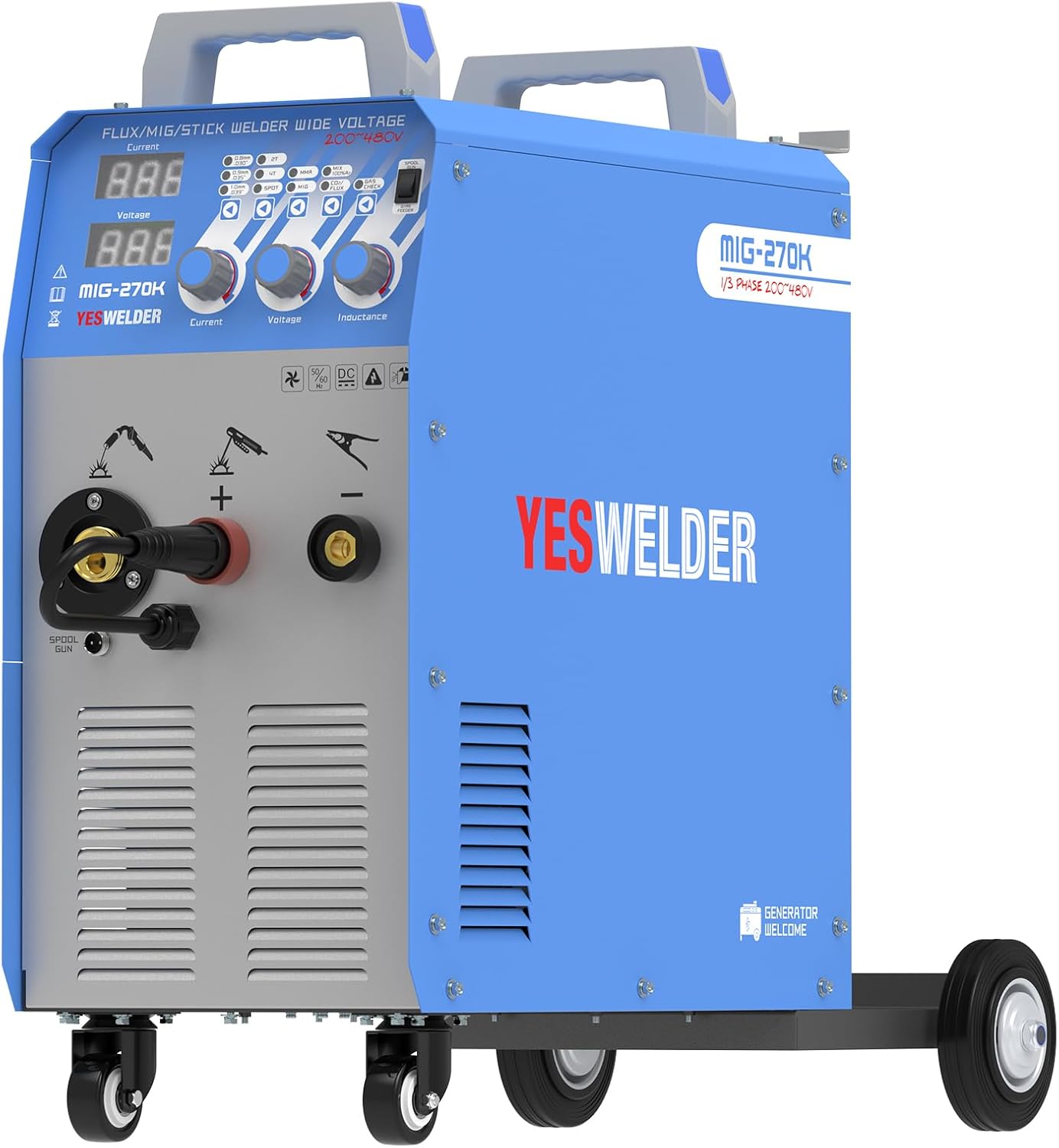
Figure 4: Front view of the MIG-270K, illustrating the connection points for the MIG torch, ground clamp, and the dedicated spool gun port.
Operating Instructions
1. Digital Control Panel Overview
The MIG-270K features an intuitive digital panel for precise control over welding parameters. The LED display shows amperage and voltage, which can be adjusted via the control knobs for accuracy.

Figure 5: Detailed view of the MIG-270K's digital control panel, showing the LED displays for current and voltage, along with control knobs for current, voltage, and inductance.
- Process Selection: Digitally select between MIG (Gas/Gasless), Lift TIG, and ARC (Stick) welding modes.
- Gas Type Selection: Choose between Mix Gas, 100% CO2, or 100% Gas for MIG welding.
- Amperage and Voltage Control: Use the dedicated knobs to set and fine-tune welding current and voltage.
- Wire Diameter Selection: Select the appropriate wire diameter (0.8mm/0.030”, 0.9mm/0.035”, 1.0mm/0.039”) to optimize wire feed speed.
- Inductance Control: Adjust inductance to control arc stiffness and puddle fluidity, affecting bead appearance and penetration.
- 2T/4T/Spot Welding: Select trigger modes for continuous welding (2T/4T) or timed spot welds.
- Torch Selection: Switch between MIG torch, Lift-TIG, ARC, or Spool Gun modes.
- Gas Check: Utilize this function to verify gas flow and torch operation.
2. Multi-Process Welding
The MIG-270K offers four primary welding processes:
- Gas MIG Welding: Requires shielding gas (e.g., Argon/CO2 mix, 100% CO2) and solid wire. Ideal for clean, high-quality welds on various metals.
- Gasless MIG Welding (Flux Core): Uses flux-cored wire, which produces its own shielding gas. Suitable for outdoor use or on dirty/rusty materials.
- Lift TIG Welding: Provides precise control for thin materials and critical applications. Requires an optional WP-17V-35 torch and appropriate shielding gas (e.g., 100% Argon).
- Stick Welding (ARC): Uses coated electrodes. Versatile for various materials and thicknesses, often used for outdoor or structural welding.
3. Spool Gun Compatibility
The MIG-270K is compatible with an additional YesWelder LBT150 spool gun, offering enhanced versatility, particularly for welding aluminum and stainless steel with ER308L stainless steel wire on 1lb spools.
Maintenance
Regular maintenance ensures the longevity and optimal performance of your welder.
- General Cleaning: Keep the welder clean and free from dust, metal particles, and debris. Use compressed air to blow out internal components periodically.
- Wire Feeder Maintenance: Inspect the wire feeder rollers and guide tubes for wear or blockages. Clean any accumulated wire dust. Ensure the drive roll tension is correctly set for the wire being used.
- MIG Torch Maintenance: Regularly clean or replace the contact tip, gas nozzle, and diffuser. Ensure the liner is free of kinks and debris for smooth wire feeding.
- Cable Inspection: Check all cables (power, ground, torch) for cuts, fraying, or damaged insulation. Replace damaged cables immediately.
- Cooling System: Ensure the cooling fan is unobstructed and functioning properly to prevent overheating.
Troubleshooting
This section addresses common issues you might encounter. For problems not listed here, contact customer support.
| Problem | Possible Cause | Solution |
|---|---|---|
| No power to welder | Power cord unplugged, circuit breaker tripped, faulty power switch. | Check power connections, reset circuit breaker, contact service if switch is faulty. |
| No arc/poor arc starting | Poor ground connection, incorrect settings, worn contact tip, wrong wire feed speed. | Ensure good ground, adjust voltage/amperage, replace contact tip, adjust wire feed. |
| Wire feeding issues (stuttering/no feed) | Incorrect drive roll tension, wrong drive roll size, kinked liner, wire spool tangled. | Adjust tension, use correct drive roll, straighten/replace liner, untangle wire. |
| Porosity in weld | Insufficient shielding gas, gas leak, contaminated base metal, incorrect gas flow. | Check gas cylinder/connections, clean workpiece, adjust gas flow rate. |
| Overheating protection activated | Exceeded duty cycle, blocked ventilation. | Allow welder to cool down, ensure clear airflow around the unit. |
Specifications
| Feature | Detail |
|---|---|
| Model Number | MIG-270K |
| Manufacturer | YESWELDER |
| Country of Origin | China |
| Power Source | AC |
| Input Voltage Range | 220V-480V (1P 220V, 380V; 3P 220V, 380V, 415V, 440V, 460V) |
| MIG Output (1P 220V) | 20-175A |
| MIG Output (1P 380V) | 20-270A |
| MIG Output (3P 220V) | 20-175A |
| MIG/Stick Output (3P 380V, 415V, 440V, 460V) | 20-270A |
| Duty Cycle (380V) | 60% Duty Cycle, 270A@MIG, 180A@Stick/Lift TIG |
| Compatible Wire Diameters | 0.030” (0.8mm) to 0.039” (1.0mm) |
| Compatible Wire Spool Sizes | 8” / 10” / 12” (D200/D270) |
| Generator Compatibility | Suitable with more than 15KW generators |
| Welding Processes | Gas MIG, Gasless MIG, Lift TIG, Stick (ARC) |
| Digital Panel Features | Amperage/Voltage display, Wire Diameter Selection, 2T/4T/Spot, Torch Selection, Gas Check, Inductance Control |
Warranty and Support
For detailed warranty information, please refer to the warranty card included with your product or visit the official YESWELDER website. For technical support, troubleshooting assistance beyond this manual, or spare parts, please contact YESWELDER customer service through their official channels.
You can find more information and contact details by visiting the YESWELDER Store on Amazon.
Ask a question about this manual
Ask about setup, troubleshooting, compatibility, parts, safety, or missing instructions. Manuals+ will review the question and use this page’s manual context to help answer it.