1. Introduction
This manual provides detailed instructions for the installation, operation, and maintenance of your YITAHOME 52-inch Industrial Ceiling Fan. This fan features a quiet reversible DC motor, 6 speed settings, a dimmable LED light with 3 color temperatures, and can be controlled via a remote or a wall switch. Please read this manual thoroughly before installation and use to ensure safe and efficient operation.

Figure 1: YITAHOME 52-inch Industrial Ceiling Fan
2. Safety Information
Always follow basic safety precautions when installing and operating electrical appliances to reduce the risk of fire, electric shock, and personal injury.
- Ensure the power is turned off at the circuit breaker before installation or maintenance.
- All wiring must be in accordance with national and local electrical codes.
- Consult a qualified electrician if you are unsure about wiring procedures.
- The mounting structure must be capable of supporting the weight of the fan (approximately 13.5 lbs).
- Do not bend the blade holders during installation or cleaning.
- Keep hands clear of the fan blades when the fan is operating.
3. Package Contents
Verify that all components are present and undamaged before beginning installation.
- Motor Housing
- Fan Blades (3)
- LED Light Kit
- Downrods (5-inch and 10-inch)
- Mounting Bracket
- Remote Control
- Wall Switch Control
- Hardware Pack (screws, wire nuts, etc.)
- Instruction Manual
4. Specifications
| Feature | Specification |
|---|---|
| Model Number | MAYIH0008832MA |
| Dimensions | 52"D x 52"W x 12.4"H |
| Blade Material | Walnut Wood |
| Number of Blades | 3 |
| Motor Type | DC Motor |
| Fan Speeds | 6 |
| Light Type | Integrated Dimmable LED |
| Light Color Temperatures | 3 (Warm White 3000K, Natural White 4500K, Cool White 6000K) |
| Control Method | Remote Control, Wall Switch Control |
| Timer Function | 1/2/4/8 hours |
| Noise Level | Under 35 Decibels |
| Indoor/Outdoor Usage | Indoor (Damp Covered Rated) |
| Recommended Room Size | 144-300 Square Feet |
| Item Weight | 13.5 Pounds |
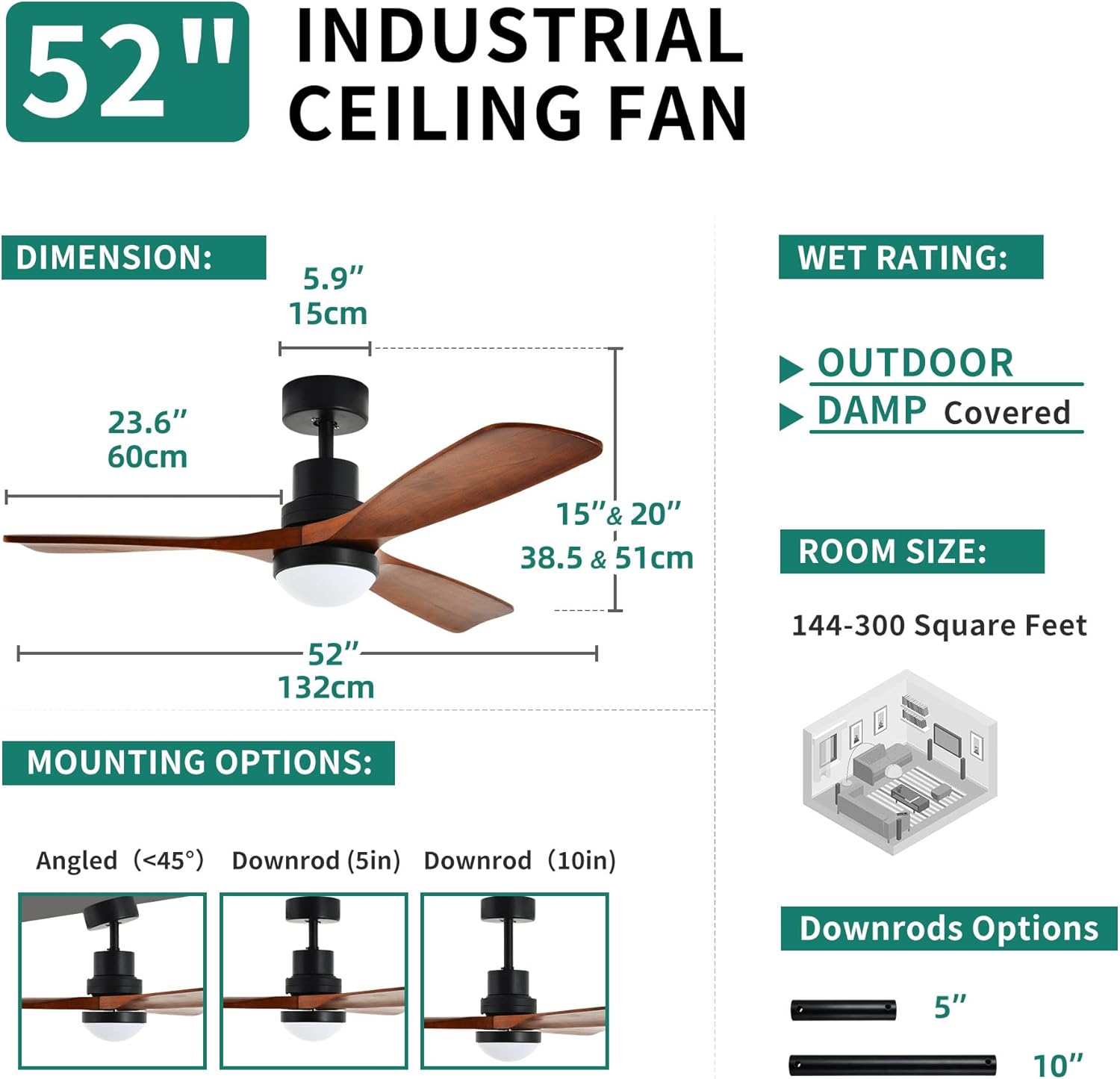
Figure 2: Fan Dimensions and Specifications
5. Installation
Careful installation is crucial for the safe and proper functioning of your ceiling fan. Follow these general steps, referring to the detailed diagrams in your included printed manual for specific wiring and assembly instructions.
- Prepare for Installation: Turn off power at the main circuit breaker. Ensure the mounting location can support the fan's weight.
- Assemble Blades: Attach the three walnut wood blades to the motor housing using the provided screws.
- Install Downrod: Select either the 5-inch or 10-inch downrod based on your ceiling height and desired fan position. Secure it to the motor housing.
- Mount Bracket: Secure the mounting bracket to your ceiling junction box.
- Hang Fan: Carefully lift the fan assembly and hang it on the mounting bracket.
- Wire Connections: Connect the fan's electrical wires to your household wiring according to the color-coded instructions. Use wire nuts to secure connections.
- Install LED Light Kit: Attach the LED light kit to the bottom of the motor housing.
- Secure Canopy: Slide the canopy up to cover the mounting bracket and wiring, securing it in place.
For a visual guide on the assembly process, please watch the following video:
Video 1: Assembly and Installation Overview for YITAHOME Wood Ceiling Fan.

Figure 3: Key Features of the Low Profile DC Ceiling Fan
6. Operating Instructions
Your YITAHOME ceiling fan can be operated using the included remote control or the wall switch control.
6.1 Remote Control Functions

Figure 4: Remote and Wall Control Features
- Power On/Off: Press the power button to turn the fan and light on or off.
- Fan Speed: Use the speed buttons (1-6) to adjust the fan's rotation speed.
- Light Control:
- On/Off: Toggle the light on or off.
- Color Temperature: Cycle through 3 color temperatures: Warm White (3000K), Natural White (4500K), and Cool White (6000K).
- Dimming: Adjust the brightness of the LED light steplessly.
- Memory Function: The fan's light will remember your last brightness and color temperature settings when turned off and on again.
- Reversible Motor: Press the reverse button to change the direction of the fan blades. This allows for downward airflow in summer for cooling and upward airflow in winter to circulate warm air.
- Timer Function: Set the fan to turn off automatically after 1, 2, 4, or 8 hours.

Figure 5: Reversible Airflow for Year-Round Comfort

Figure 6: Material Quality and Memory Function
6.2 Wall Switch Control
The included wall switch control provides an alternative method for operating the fan and light, ensuring functionality even if the remote is misplaced. It typically offers basic on/off control for both the fan and light, and may include speed and light color adjustments depending on the model. Ensure the wall switch is installed correctly according to the wiring diagrams.

Figure 7: Dual Control Options: Remote and Wall Switch
Observe the fan's operation and features in the following video:
Video 2: Demonstration of YITAHOME 52-inch Wood Ceiling Fan features.
7. Maintenance
Regular maintenance helps prolong the life and efficiency of your ceiling fan.
- Cleaning: Use a soft, damp cloth to clean the fan blades and motor housing. Do not use abrasive cleaners or solvents.
- Blade Inspection: Periodically check the fan blades for any signs of damage or warping. Ensure all blade screws are tight.
- Light Kit: The integrated LED light does not require bulb replacement. If the light malfunctions, consult the troubleshooting section or contact customer support.
- Dust Accumulation: Dust can accumulate on the blades and motor, potentially affecting performance. Clean regularly.
8. Troubleshooting
If you encounter issues with your ceiling fan, refer to the following common problems and solutions:
| Problem | Possible Cause | Solution |
|---|---|---|
| Fan does not start | No power, loose wiring, remote not paired | Check circuit breaker. Verify all wire connections are secure. Re-pair remote control if necessary. |
| Light does not work | Loose wiring, LED malfunction | Check light kit wiring. If integrated LED, contact customer support if issue persists. |
| Fan wobbles | Loose blades, unbalanced blades, loose mounting | Ensure all blade screws are tight. Use the included balance kit to balance blades. Verify mounting bracket is securely fastened. |
| Noisy operation | Loose screws, motor issue, blades hitting obstruction | Check all screws for tightness. Ensure no obstructions are near the blades. If motor noise persists, contact support. |
| Light color changes unexpectedly with remote | Normal remote cycling behavior | This is a common characteristic. Simply press the light button a few times to cycle to your desired color temperature. Using the wall switch may retain the last setting. |
9. Warranty and Support
Your YITAHOME 52-inch Industrial Ceiling Fan comes with a 1-year warranty from the date of purchase. This warranty covers manufacturing defects and malfunctions under normal use.
For warranty claims, technical assistance, or any questions regarding your product, please contact YITAHOME customer support through the retailer where you purchased the item or visit the official YITAHOME website for contact information.
Please retain your proof of purchase for warranty validation.