
Kethvoz KE-570TAPP
Kethvoz 570T-APP Digital Clamp Meter User Manual
Model: KE-570TAPP | Brand: Kethvoz
1. Product Overview
The Kethvoz 570T-APP is a versatile 4000-count digital clamp meter designed for comprehensive electrical measurements. It features Bluetooth connectivity for remote monitoring and data logging, a large jaw capacity for non-contact current measurement, and a wide range of functions including AC/DC voltage, current, resistance, capacitance, frequency, temperature, diode, and continuity tests.
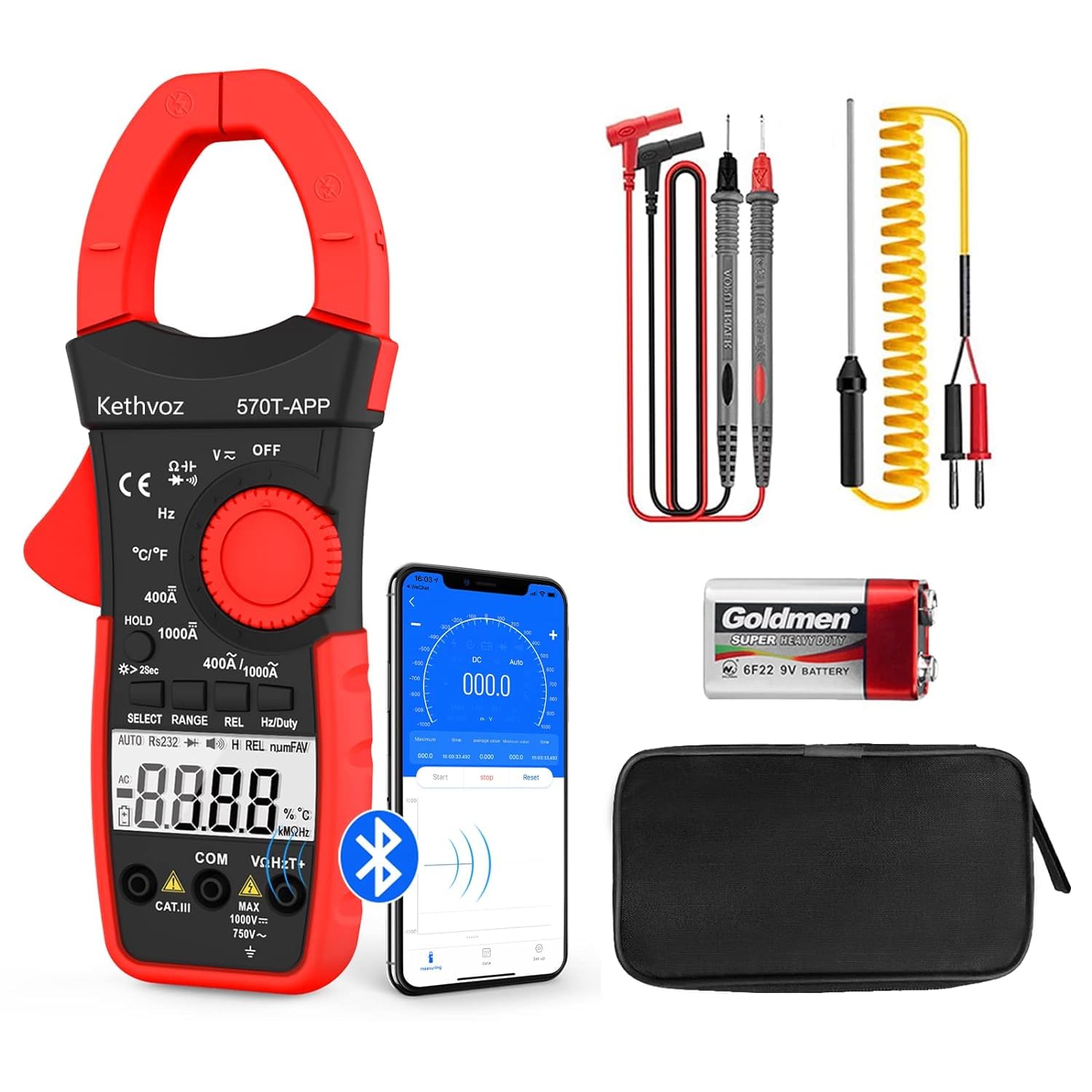
Figure 1.1: Kethvoz 570T-APP Digital Clamp Meter with test leads, temperature probe, 9V battery, screwdriver, and carrying case.

Figure 1.2: Detailed view of the contents included in the product package.
2. Setup
2.1 Battery Installation
The Kethvoz 570T-APP requires one 9V battery (included). To install the battery:
- Locate the battery compartment cover on the back of the device.
- Use the included small screwdriver to loosen the screw securing the cover.
- Remove the cover.
- Connect the 9V battery to the battery clips, observing correct polarity (+ and -).
- Place the battery into the compartment.
- Replace the battery compartment cover and tighten the screw.
2.2 Test Lead Connection
For voltage, resistance, capacitance, frequency, diode, and continuity measurements, connect the test leads:
- Insert the black test lead into the "COM" (Common) input jack.
- Insert the red test lead into the "VΩHzT+" input jack.
2.3 App Installation and Bluetooth Pairing
The 570T-APP supports remote monitoring and data logging via the "Intelligent Monitor" app. Follow these steps to install the app and pair your device:
- Download the "Intelligent Monitor" app from your smartphone's app store (available on App Store for iOS and Google Play for Android). You can also scan the QR code provided in the product images or visit the official download page: Intelligent Monitor App Download.
- Ensure Bluetooth is enabled on your smartphone.
- Turn on the Kethvoz 570T-APP.
- Open the "Intelligent Monitor" app. The app will search for available devices.
- Select "570T-APP" from the list of found devices to establish a Bluetooth connection. The connection range is typically 10-15 meters (32.8-49 ft).

Figure 2.1: Bluetooth connectivity for remote monitoring and data logging via the Intelligent Monitor app.
3. Operating Instructions
The Kethvoz 570T-APP features a rotary dial for function selection and several buttons for additional controls.
3.1 Panel Buttons and Functions

Figure 3.1: Overview of the Kethvoz 570T-APP's panel buttons and their respective functions.
- OFF Key: Turns the device off.
- HOLD Button: Short press to freeze the current data on the display. Long press (more than 2 seconds) to turn on the backlight.
- SELECT Key: Used to select different measurement modes within a rotary dial position (e.g., AC or DC voltage, Diode or Continuity).
- RANGE Key: Used to switch between manual and auto-ranging modes.
- REL Button: Relative value measurement and reset.
- Hz/Duty Key: On ACV/ACA or Hz gear, press to select Frequency or Duty Cycle measurement.
3.2 Measurement Functions

Figure 3.2: Visual representation of the various measurement capabilities of the clamp meter.
3.2.1 AC/DC Voltage Measurement
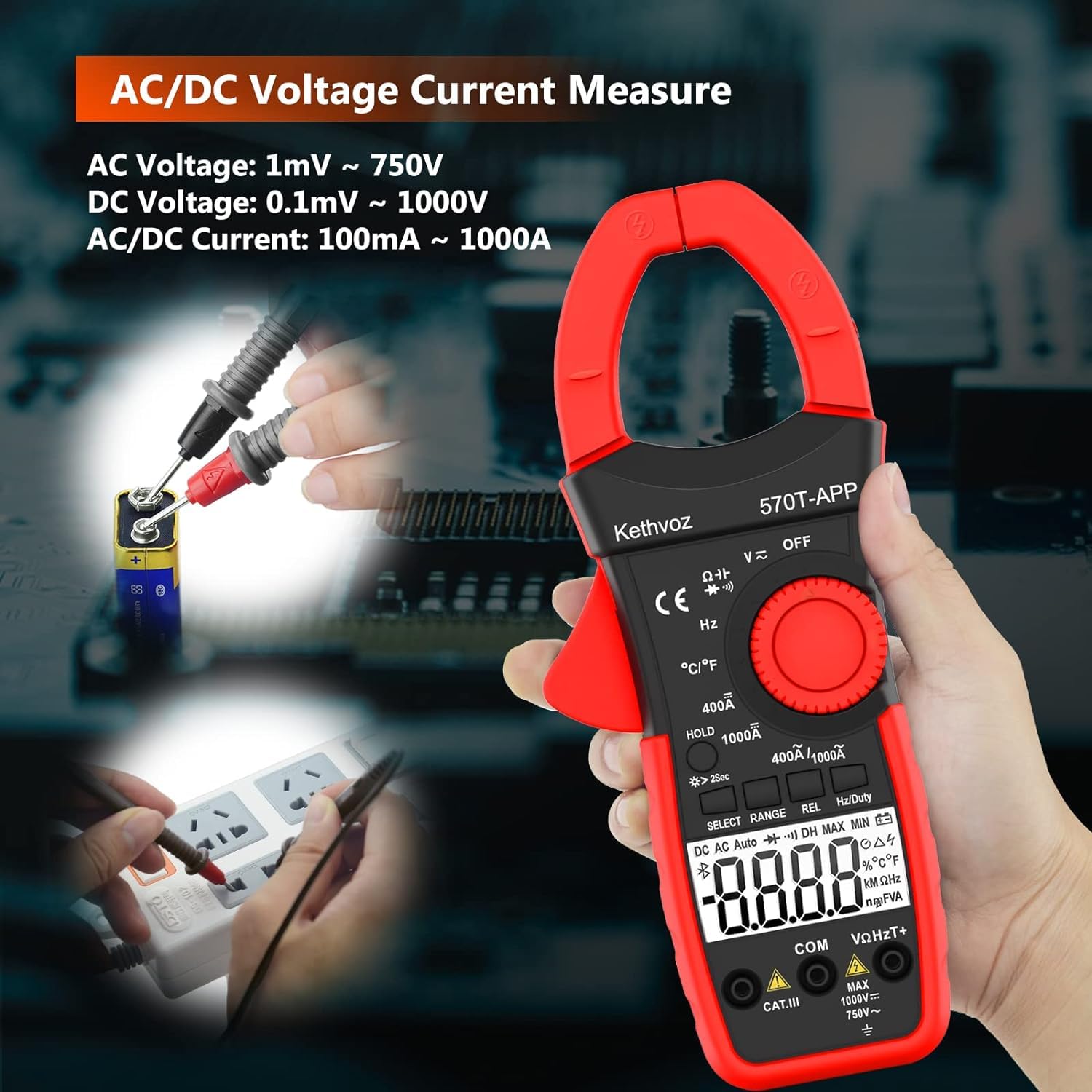 To measure voltage, turn the rotary dial to the "V~" (AC Voltage) or "V-" (DC Voltage) position. Connect the test leads to the circuit in parallel. The meter can measure DC voltage from 400mV to 1000V and AC voltage from 4V to 750V.
3.2.2 AC/DC Current Measurement (Clamp-on)
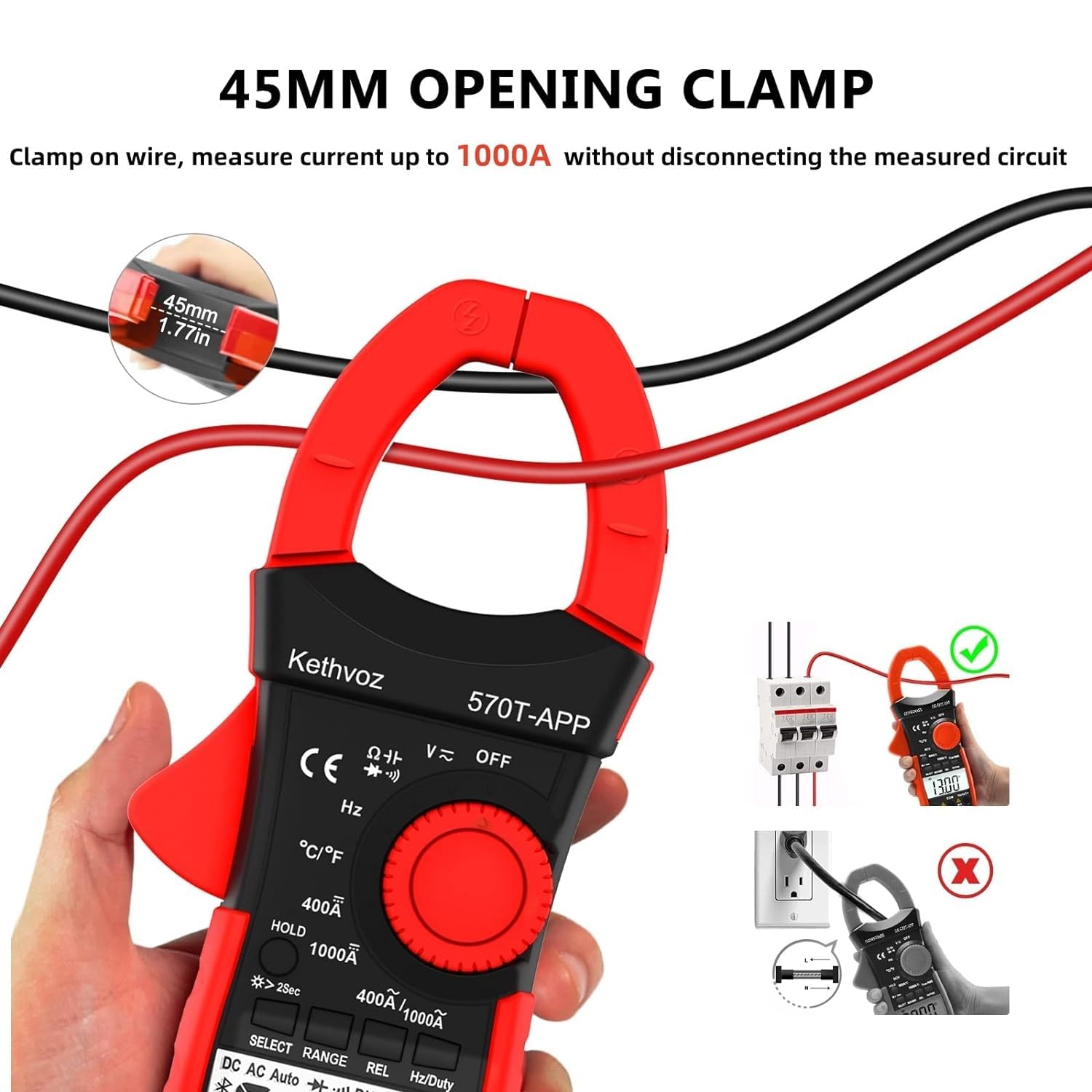 The 570T-APP allows for non-contact AC/DC current measurement up to 1000A using its 45mm (1.77 inch) jaw capacity. Turn the rotary dial to the "400A" or "1000A" position. Clamp the jaw around a single conductor.Important Note: When measuring AC/DC current, ensure you clamp around only one conductor (e.g., the hot wire). Clamping around both hot and neutral conductors will result in a zero reading as their magnetic fields cancel each other out.
3.2.3 Resistance Measurement
Turn the rotary dial to the "Ω" position. Connect the test leads across the component to measure resistance. The meter measures resistance from 400Ω to 40MΩ.
3.2.4 Capacitance Measurement
Turn the rotary dial to the "Capacitance" position. Connect the test leads across the capacitor. The meter measures capacitance from 4nF to 200nF.
3.2.5 Frequency Measurement
Turn the rotary dial to the "Hz" position. Connect the test leads to the signal source. The meter measures frequency up to 9.999MHz.
3.2.6 Temperature Measurement
 Turn the rotary dial to the "°C/°F" position. Connect the K-type thermocouple (included) to the input jacks. The meter measures temperature from -4°F to 1832°F (-20°C to 1000°C).
3.2.7 Diode and Continuity Test
Turn the rotary dial to the "Diode/Continuity" position. Use the SELECT button to toggle between Diode Test and Continuity Test. For continuity, the buzzer will sound if the resistance between two points is less than 50Ω.
3.2.8 Data Logging and Bluetooth Functionality
Once connected via Bluetooth to the "Intelligent Monitor" app, you can remotely control the multimeter, monitor real-time measurements, and log data. The app supports exporting data in TXT/Excel format for analysis. Ensure your phone's display remains active during data logging to prevent connection drops.
4. Maintenance
4.1 Cleaning
To clean the device, use a soft, damp cloth. Do not use abrasive cleaners or solvents. Ensure the device is turned off and disconnected from any power source before cleaning.
4.2 Battery Replacement
When the low battery indicator appears on the display, replace the 9V battery as described in the "Battery Installation" section (2.1). Always use a fresh 9V battery.
4.3 Storage
When not in use for extended periods, remove the battery to prevent leakage. Store the device in its portable carrying case in a cool, dry place, away from direct sunlight and extreme temperatures.
5. Troubleshooting
| Problem | Possible Cause | Solution |
|---|---|---|
| "OL" or "-OL" displayed | Measurement exceeds the selected range or maximum input. | Switch to a higher range if available, or ensure the measured value is within the device's capabilities. |
| Zero amp reading when measuring current | Clamping around both hot and neutral conductors. | Ensure the clamp is around only one conductor (e.g., the hot wire) of the circuit. |
| Unstable or fluctuating readings | Interference, poor connection, or device needs time to stabilize. | Ensure test leads are securely connected. Move away from strong electromagnetic fields. Allow a few seconds for the reading to stabilize. |
| Bluetooth connection drops during data logging | Smartphone display turns off, app goes to background, or environmental interference. | Configure your smartphone settings to prevent the display from turning off during logging. Keep the app active in the foreground. Ensure the device is within the 10-15m Bluetooth range without significant obstructions. |
| Device does not turn on or repeatedly beeps | Low battery or internal fault. | Replace the 9V battery with a new one. If the issue persists, contact customer support. |
6. Specifications
- Model: KE-570TAPP
- Display: 4000 Counts
- Jaw Capacity: 45mm (1.77 inches)
- DC Voltage: 400mV ~ 1000V
- AC Voltage: 4V ~ 750V
- AC/DC Current: 400A ~ 1000A
- Resistance: 400Ω ~ 40MΩ
- Capacitance: 4nF ~ 200nF
- Frequency: Up to 9.999MHz
- Duty Cycle: 0.1% ~ 99.9%
- Temperature: -4°F ~ 1832°F (-20°C ~ 1000°C)
- Continuity Test: Buzzer sounds at < 50Ω
- Bluetooth Range: 10-15m (32.8-49 ft)
- Power Source: 1 x 9V Battery (included)
- Product Dimensions: 8.15 x 3.03 x 1.77 inches (225 x 77 x 45mm)
- Item Weight: 11.64 ounces (330 Grams)
- Safety Rating: IEC1010, CAT.III 600V Overload Protection
7. Warranty and Support
7.1 Warranty Information
The Kethvoz 570T-APP Digital Clamp Meter comes with a 365-day quality warranty from the date of purchase. This warranty covers defects in materials and workmanship under normal use.
7.2 Technical Support
Kethvoz provides lifetime technical support for this product. If you encounter any issues or have questions regarding the operation, maintenance, or troubleshooting of your device, please contact Kethvoz customer service. Refer to the product packaging or the official Kethvoz website for the most current contact information.
Ask a question about this manual
Ask about setup, troubleshooting, compatibility, parts, safety, or missing instructions. Manuals+ will review the question and use this page’s manual context to help answer it.