
1. Introduction
Thank you for choosing the Nulksen TC15 Portable Air Compressor Tire Inflator. This device is designed for convenient and efficient inflation of various items, including car tires, motorcycle tires, bicycle tires, and sports balls. Please read this manual thoroughly before use to ensure proper operation and safety.

Image 1.1: The Nulksen TC15 Portable Air Compressor Tire Inflator, a compact device for various inflation needs.
2. Safety Information
- Keep out of reach of children.
- Do not operate the inflator in wet conditions or near flammable liquids or gases.
- Avoid prolonged continuous operation to prevent overheating. Allow the device to cool down if it becomes hot.
- Always check the recommended pressure for the item being inflated to prevent over-inflation.
- Do not leave the inflator unattended while in operation.
- Store the device in a cool, dry place when not in use.
3. Package Contents
Verify that all items are present in the package:
- Nulksen TC15 Portable Air Compressor Tire Inflator
- Air Hose
- Various Nozzle Adapters (e.g., for balls, bicycles)
- USB Charging Cable
- Storage Pouch (if included)
- User Manual
4. Product Overview
Familiarize yourself with the components and controls of your Nulksen TC15 inflator.

Image 4.1: The digital display of the Nulksen TC15, showing current pressure readings and control buttons.
The device features a digital display for accurate pressure readings, control buttons for mode selection and pressure adjustment, and a built-in LED light.

Image 4.2: An internal view highlighting the 7800mAh battery, capable of inflating multiple items on a single charge.
5. Setup
- Charge the Device: Before first use, fully charge the inflator using the provided USB charging cable. The battery indicator on the display will show charging status.
- Attach Air Hose: Screw the air hose securely onto the inflator's air outlet.
- Select Nozzle: Choose the appropriate nozzle adapter for the item you intend to inflate and attach it to the air hose.
6. Operating Instructions
6.1 General Inflation Process
- Power On: Press and hold the power button to turn on the inflator. The display will show the current pressure.
- Select Mode: Press the 'M' button to cycle through the preset inflation modes (Car, Motorcycle, Bicycle, Ball). Each mode has a default pressure value.
- Set Desired Pressure: Use the '+' and '-' buttons to adjust the target pressure value. The unit supports up to 150 PSI.
- Connect to Item: Securely attach the air hose with the correct nozzle to the valve of the item you wish to inflate.
- Start Inflation: Press the power button to begin inflation. The display will show the real-time pressure.
- Auto Shut-Off: The inflator will automatically stop once the preset pressure is reached.
- Disconnect: Carefully disconnect the air hose from the item and the inflator.
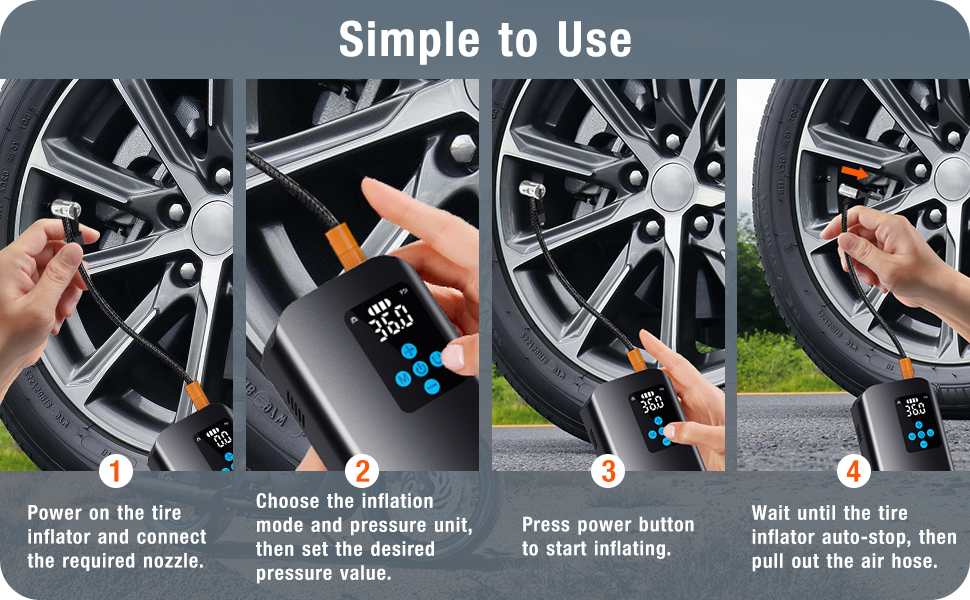
Image 6.1: A visual guide demonstrating the simple four-step process for operating the inflator.
6.2 Fast Inflation Capability
The Nulksen TC15 is designed for rapid inflation. It can inflate a car tire from 25 PSI to 36 PSI in approximately 1 minute, and a completely flat car tire (0 PSI to 36 PSI) in about 5 minutes.

Image 6.2: Illustration of the inflator's fast inflation performance, completing a 25-36 PSI car tire inflation in 1 minute.
6.3 Auto Shut-Off Feature
The auto shut-off function prevents over-inflation. Once the preset pressure is reached, the device will automatically power off.
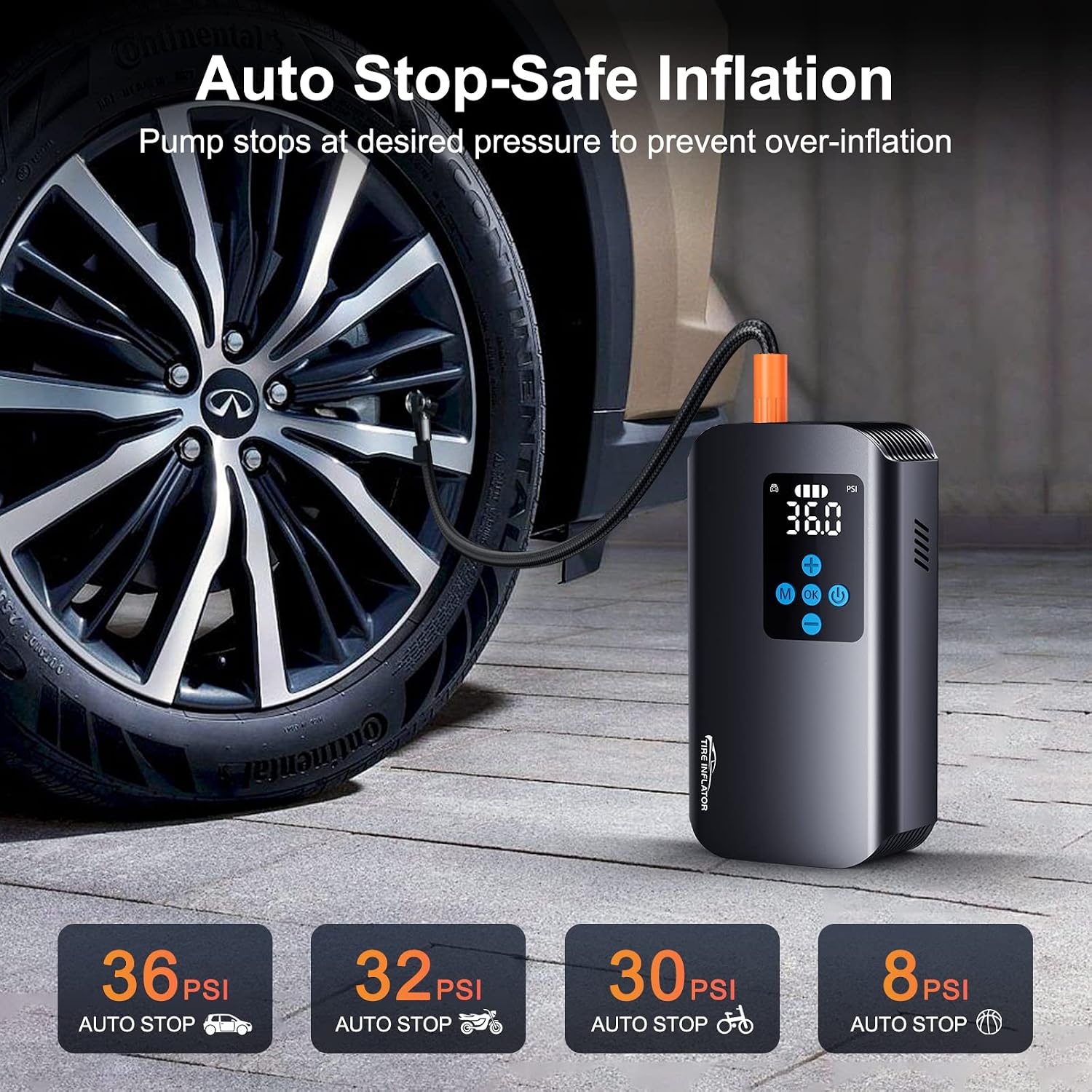
Image 6.3: The inflator connected to a car tire, demonstrating the auto shut-off feature at the desired pressure.
6.4 Using the LED Light
The built-in LED light offers three modes for various situations:
- Always Bright: For general illumination.
- SOS Mode: Emits an SOS signal for emergencies.
- Strobe Mode: Flashes alternatively for visibility.

Image 6.4: The inflator's LED light in operation, illustrating its three distinct lighting modes for different scenarios.
6.5 Power Bank Function
The 7800mAh battery can also function as an emergency power bank to charge mobile devices via its USB output port.
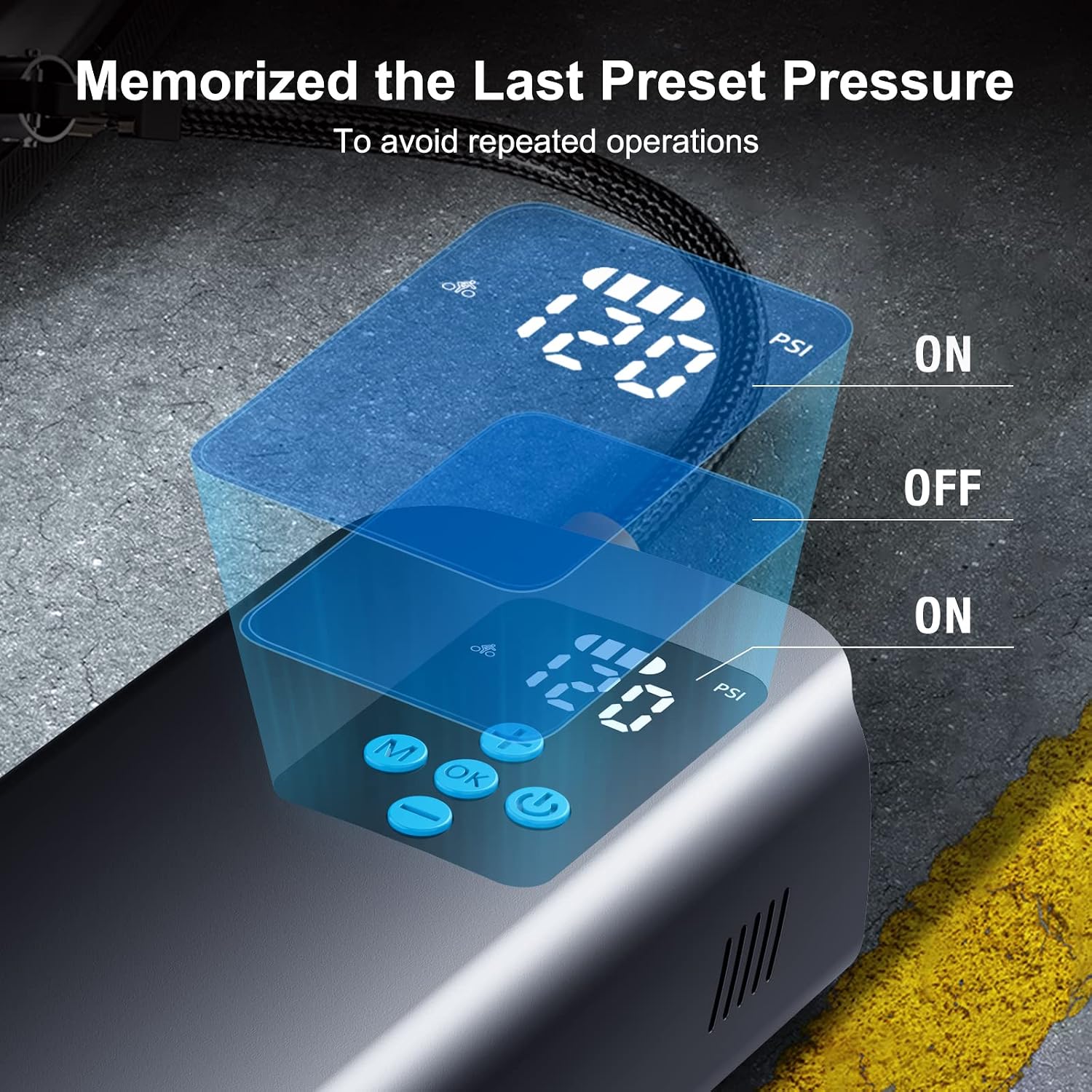
Image 6.5: The inflator being used to charge a smartphone, demonstrating its power bank capability.
6.6 Memorized Preset Pressure
The device remembers the last set pressure value, eliminating the need to reset it for repeated operations.

Image 6.6: The inflator's display indicating that the last preset pressure is automatically recalled for convenience.
7. Maintenance
- Cleaning: Wipe the exterior of the inflator with a soft, dry cloth. Do not use harsh chemicals or abrasive cleaners.
- Storage: Store the device and its accessories in the provided pouch in a cool, dry place away from direct sunlight and extreme temperatures.
- Battery Care: For optimal battery life, charge the device at least once every three months if not used regularly.
- Hose Inspection: Periodically check the air hose and nozzles for any signs of wear or damage. Replace if necessary.
8. Troubleshooting
| Problem | Possible Cause | Solution |
|---|---|---|
| Inflator does not turn on | Low battery; Power button not pressed correctly | Charge the battery; Press and hold the power button for 2-3 seconds |
| No air output | Hose not connected securely; Nozzle blocked; Inflation mode not selected | Ensure hose is tight; Check for obstructions; Select appropriate inflation mode |
| Inaccurate pressure reading | Loose connection to valve; Sensor issue | Ensure a tight seal on the valve; Contact customer support if issue persists |
| Device overheats and shuts off | Prolonged continuous use | Allow the device to cool down for at least 10-15 minutes before resuming use |
9. Specifications
| Feature | Detail |
|---|---|
| Model Number | TC15 |
| Brand | Nulksen |
| Battery Capacity | 7800mAh (Lithium Ion) |
| Maximum Pressure | 150 PSI |
| Air Flow Capacity | 34 liters per minute |
| Operation Mode | Automatic |
| Material | Metal |
| Product Dimensions | 8.9L x 4.8W x 16H centimetres |
| Item Weight | 880 g |
| Included Components | Tire Inflator, Air Hose, Nozzle Adapters, USB Charging Cable |
10. Warranty Information
Nulksen products are manufactured to high-quality standards. For specific warranty details, please refer to the warranty card included with your purchase or contact Nulksen customer support. Keep your proof of purchase for warranty claims.
11. Customer Support
If you have any questions, concerns, or require assistance with your Nulksen TC15 Portable Air Compressor Tire Inflator, please contact our customer support team. Refer to the contact information provided in your product packaging or on the official Nulksen website.
