
1. Product Overview
This manual provides essential information for the safe and effective use of your HYPER GO Angry Snail 3S 11.1V 2000mAh 25C LiPo Battery. Please read it thoroughly before use.

Image 1: HYPER GO Angry Snail 3S 11.1V 2000mAh 25C LiPo Battery.
Package Contents:
- 1 x HYPER GO Angry Snail 3S 11.1V 2000mAh 25C LiPo Battery
- 1 x XT60 Female to Male T Plug Connector Adapter
- 1 x USB Charger Wire
- 1 x Battery Clip
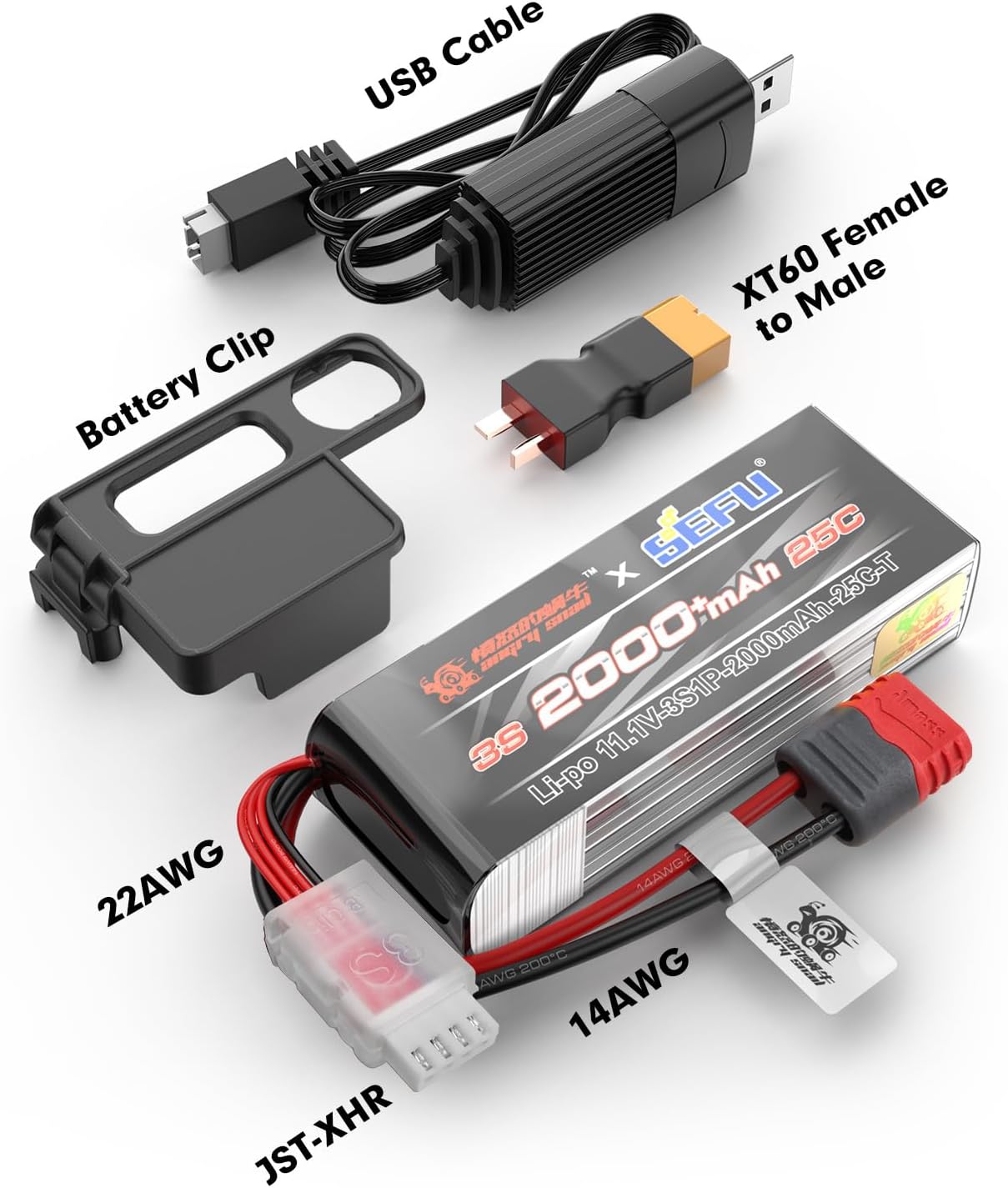
Image 2: Included components: LiPo battery, USB cable, XT60 adapter, and battery clip.
2. Safety Information
LiPo batteries require careful handling. Failure to follow these safety guidelines can result in fire, personal injury, and property damage.
- Charging: Always use a LiPo-compatible charger. Never charge unattended. Charge on a non-flammable surface away from combustible materials.
- Storage: Store batteries in a cool, dry place, away from direct sunlight and extreme temperatures. Do not store fully charged or fully discharged for extended periods.
- Handling: Do not puncture, short-circuit, or disassemble the battery. Avoid physical impact. If the battery swells, leaks, or shows any damage, discontinue use immediately and dispose of it properly.
- Disposal: Dispose of damaged or depleted LiPo batteries according to local regulations. Never put them in household trash.
3. Charging Instructions
Use the provided USB charger wire or a compatible LiPo balance charger for optimal battery life and safety.
- Connect the USB charger wire to a suitable USB power source (e.g., computer USB port, USB wall adapter).
- Connect the battery's balance lead (white connector) to the USB charger wire.
- Ensure the charging indicator on the charger shows proper charging status (refer to your charger's manual for specific indicators).
- Once charging is complete, disconnect the battery from the charger.
Note: The XT60 adapter is for connecting the battery to your RC vehicle, not for charging unless your charger specifically uses an XT60 input for charging.
4. Installation and Operation
This battery is designed for various 1/14 and 1/16 scale RC vehicles, including models like H16GT, H16DR, H16BM, 16207, 16208, 16209, 16210, 14301, 14302, 14209, 14210, H16PL, H14BM.
Battery Installation:
- Ensure your RC vehicle is powered off.
- Locate the battery compartment in your RC vehicle.
- Insert the HYPER GO 3S2000 LiPo battery into the compartment. Use the provided battery clip or existing straps to secure it firmly.
- Connect the battery's main power connector (XT60) to your vehicle's ESC. If your vehicle uses a T-plug, use the included XT60 Female to Male T Plug Connector Adapter.
- Ensure all connections are secure before operating the vehicle.

Image 3: Example of battery installation and securing with a battery cover in a HYPER GO 1/16 Scale RC Truck.

Image 4: Battery secured using cross fixed straps in compatible HYPER GO 14301, 14302, and H14MK models.

Image 5: Example of perfect battery installation in a HYPER GO 1/14 Scale RC Truck.
Unlocking Speed Limit (for H16BM or H14BM models):
If your H16BM or H14BM model is not achieving expected speeds with the 3S battery, you may need to unlock the speed limit.
- Press the ESC switch 5 times to unlock the speed limit.

Image 6: Visual guide for unlocking the speed limit on H16BM or H14BM models by pressing the ESC switch.
5. Specifications
| Feature | Detail |
|---|---|
| Battery Type | LiPo (Lithium Polymer) |
| Voltage | 11.1V (3S) |
| Capacity | 2000 mAh |
| Discharge Rate | 25C |
| Configuration | 3S1P |
| Dimensions | 95mm x 34mm x 23mm (3.6 x 1.3 x 0.8 inches) |
| Weight | 143g (5 ounces) |
| Connectors | XT60 (main), JST-XHR (balance) |
| Recommended Use | Remote Control Vehicles (1/14, 1/16 scale) |
| Model Number | 3S2000 |

Image 7: Detailed dimensions of the 3S 2000 mAh LiPo battery.

Image 8: The 3S 2000 mAh LiPo battery is suitable for various RC applications including cars, boats, helicopters, and buggies.
6. Battery Technology and Performance
The HYPER GO Angry Snail LiPo battery utilizes advanced stacking technology for enhanced performance and durability.

Image 9: Illustration of the stacking technology used in battery cell construction.
This technology contributes to a small internal resistance, long cycle life, high space utilization, and high energy density. Compared to winding technology, lamination stacking technology can increase the energy density of the battery by 5% and extend the cycle life by 10%.

Image 10: Graph illustrating the stable and continuous high-rate discharge platform of the battery.
Manufacturing Process:
Video 1: Overview of the battery manufacturing process, highlighting precision and quality control. This video is provided by the seller.
7. Maintenance and Storage
- Regular Inspection: Periodically check the battery for any signs of damage, swelling, or loose connections.
- Balance Charging: Always balance charge your LiPo battery to ensure cell voltage consistency, which prolongs battery life.
- Storage Voltage: For long-term storage, charge or discharge the battery to its storage voltage (typically 3.8V-3.85V per cell).
- Temperature: Avoid exposing the battery to extreme heat or cold. Optimal operating temperature is between 0°C and 40°C (32°F and 104°F).
8. Troubleshooting
Common Issues:
- Battery not charging: Ensure all connections are secure. Verify the charger is compatible and functioning correctly. Check for any visible damage to the battery or charger cables.
- Reduced run time: This can indicate an aging battery, improper charging, or excessive discharge. Ensure the battery is fully charged before use and avoid over-discharging.
- Vehicle not performing optimally: Check if the speed limit is engaged (refer to Section 4 for unlocking instructions). Ensure the battery is fully charged and properly connected.
9. Warranty and Support
For warranty claims, technical support, or further assistance, please contact HYPER GO customer service through the retailer where the product was purchased. Keep your purchase receipt as proof of purchase.