
Jecod Jebao DP4
Jebao Jecod DP-4 Auto Dosing Pump Instruction Manual
Brand: Jecod | Model: Jebao DP4
1. Introduction
The Jebao Jecod DP-4 is an advanced automatic dosing pump designed for reef aquariums. It features four independent dosing heads, allowing precise and stable delivery of various liquid elements, such as calcium, magnesium, and other trace elements, essential for maintaining optimal water parameters in your aquarium. This manual provides comprehensive instructions for the setup, operation, and maintenance of your DP-4 dosing pump.
2. Product Overview
2.1 Key Features
- 4 Channel Dosing Pump: Equipped with four independent dosing heads for precise control over multiple solutions.
- Programmable Dosing: Each channel can be programmed to dispense 1 to 9999ml per day, with up to 24 dosing times per day.
- Interval Dosing: Capable of dosing at intervals of up to 30 days, offering flexibility for various dosing regimens.
- Compact Design: Efficiently designed with dimensions of approximately 9.25" x 5.11" x 2.55".
- Versatile Application: Ideal for dosing CA / MG / AB Water or other liquid elements crucial for reef aquarium health.
2.2 Components
The Jebao Jecod DP-4 Dosing Pump system includes the main dosing unit, a power adapter, and dosing tubes. Familiarize yourself with the main components as shown in the images below.

Figure 2.2.1: Front view of the Jebao Jecod DP-4 Dosing Pump, showing the four dosing heads, control panel, and included power adapter. A small portion of the assembly drawing from the manual is also visible.
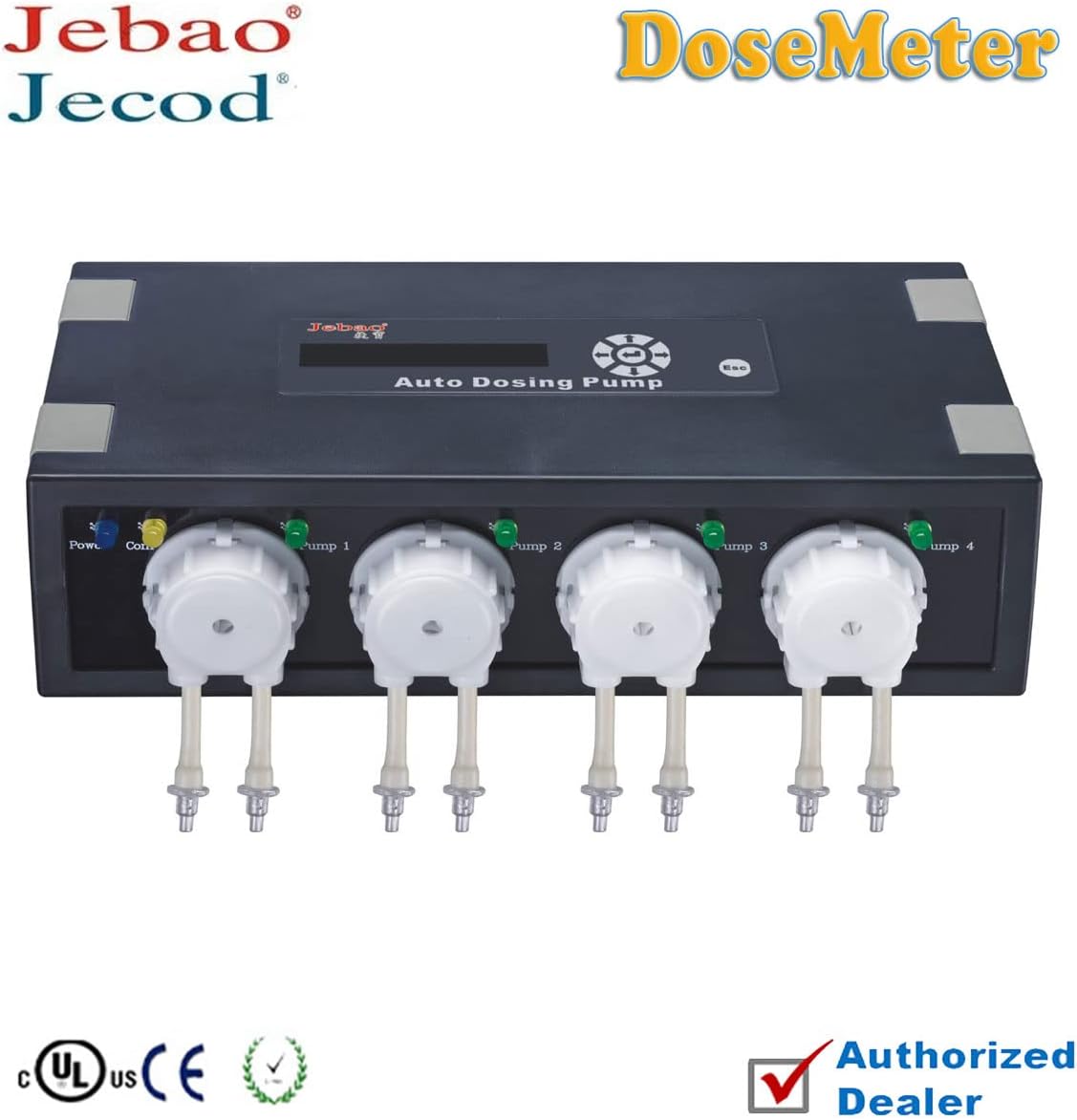
Figure 2.2.2: Clear front view of the Jebao Jecod DP-4 Dosing Pump, highlighting the Jebao and Jecod branding, the "Auto Dosing Pump" display, and the four individual pump heads.

Figure 2.2.3: Top-down view of the Jebao Jecod DP-4 Dosing Pump, focusing on the control panel with its LCD display, navigation buttons (up, down, left, right, enter), and the 'EH' button for settings.
3. Setup
3.1 Placement
- Place the DP-4 dosing pump on a stable, level surface near your aquarium or sump.
- Ensure the location is dry and protected from splashes or direct water contact.
- Allow sufficient space around the unit for ventilation and easy access to the dosing tubes and power connection.
3.2 Tube Connection
- Connect the intake ends of the dosing tubes to your liquid supplement containers. Ensure the tubes reach the bottom of the containers to prevent air intake.
- Connect the output ends of the dosing tubes to your aquarium or sump. Position them securely to prevent them from falling out or causing splashes.
- Label each tube clearly to correspond with the specific supplement it will dose and the pump channel it is connected to.
3.3 Power Connection
- Connect the provided AC/DC power adapter to the power input port on the DP-4 unit.
- Plug the power adapter into a suitable electrical outlet. The unit should power on, and the display will illuminate.
- It is recommended to use a drip loop for the power cord to prevent water from running down the cord into the electrical outlet.
4. Operating Instructions
The DP-4 allows for highly customizable dosing schedules. Programming is done via the control panel and LCD display.
4.1 Initial Priming
- Before setting up a dosing schedule, it is crucial to prime each pump channel to remove any air from the lines and ensure accurate dosing.
- Refer to the on-screen menu for a "Manual Dosing" or "Prime" function. Select each channel individually and run it until the liquid flows smoothly through the output tube.
4.2 Setting Time and Date
- Navigate to the system settings menu using the control panel buttons (refer to Figure 2.2.3 for button layout).
- Set the current time and date accurately. This is critical for precise dosing schedules.
4.3 Programming Dosing Schedules
Each of the four channels can be programmed independently.
- Select Channel: From the main menu, select the desired dosing channel (Pump 1, Pump 2, Pump 3, or Pump 4).
- Set Dosing Volume: Enter the total daily volume (1 to 9999ml) you wish to dispense for that channel.
- Set Dosing Times: Specify up to 24 individual dosing times throughout the day. The pump will automatically divide the total daily volume by the number of dosing times.
- Set Dosing Interval (Optional): For less frequent dosing, you can set an interval of up to 30 days. This means the pump will dose the specified daily volume every X days.
- Save Settings: Ensure you save your settings for each channel before exiting the programming menu.
Example: To dose 100ml of a supplement daily across 4 intervals, you would set the total volume to 100ml and the number of dosing times to 4. The pump would then dispense 25ml at each of the four specified times.
4.4 Calibration (Recommended)
To ensure the highest accuracy, it is recommended to periodically calibrate your dosing pump. This typically involves:
- Using the manual dosing function to dispense a known volume (e.g., 100ml) into a measuring cylinder.
- Comparing the actual dispensed volume with the programmed volume.
- Adjusting the pump's calibration factor in the settings menu if there is a significant discrepancy. Refer to the on-screen menu for calibration options.
5. Maintenance
Regular maintenance ensures the longevity and accurate performance of your DP-4 dosing pump.
- Tube Inspection: Periodically inspect dosing tubes for kinks, blockages, or signs of wear. Replace tubes if they become brittle or discolored.
- Pump Head Cleaning: If dosing sticky or precipitating solutions, the pump heads may require occasional cleaning. Consult the manufacturer's guidelines for disassembling and cleaning the pump heads.
- Power Cord Check: Ensure the power cord and adapter are free from damage.
- Keep Dry: Always ensure the unit remains dry. Wipe off any spills immediately.
6. Troubleshooting
If you encounter issues with your DP-4 dosing pump, refer to the following common problems and solutions:
| Problem | Possible Cause | Solution |
|---|---|---|
| Pump not dosing / No liquid flow |
|
|
| Inaccurate dosing volume |
|
|
| Display not working |
|
|
For issues not covered here, please contact Jecod customer support.
7. Specifications
| Model | Jebao DP4 (DP-4) |
| Brand | Jecod |
| Manufacturer | JEBAO INC |
| Part Number | PET-FILTER-DP4-1 |
| Channels | 4 Independent Dosing Heads |
| Dosing Volume per Channel | 1 - 9999 ml/day |
| Dosing Times per Day | Up to 24 times |
| Dosing Interval | Up to 30 days |
| Maximum Flow Rate | 70 Liters Per Minute (Q max) |
| Power Source | AC/DC Adapter |
| Material | Plastic |
| Color | Black |
| Product Dimensions (L x W x H) | Approx. 9.25" x 5.11" x 2.55" (23.5 x 13 x 6.5 cm) |
8. Warranty and Support
For warranty information, please refer to the documentation included with your purchase or contact the retailer from whom you purchased the Jebao Jecod DP-4 dosing pump. Warranty terms and conditions may vary by region and seller.
For technical support, troubleshooting assistance beyond this manual, or inquiries regarding parts and service, please contact the manufacturer, JEBAO INC, or your authorized Jecod dealer. Keep your purchase receipt or proof of purchase handy when contacting support.
Ask a question about this manual
Ask about setup, troubleshooting, compatibility, parts, safety, or missing instructions. Manuals+ will review the question and use this page’s manual context to help answer it.