
Introduction
This manual provides essential information for the safe and effective use of your Gonine 12V 5A Monitor Power Supply Cord. Please read these instructions carefully before use and retain them for future reference.

Image: The Gonine 12V 5A Monitor Power Supply Cord, showing the main adapter unit, the AC input cable, and the DC output cable with a barrel connector.
Important Safety Information
- Ensure the power supply is used with devices that match its voltage (12V DC) and current (up to 5A) specifications. Incorrect voltage or current can damage your device or the adapter.
- Verify the DC port dimensions (5.5 x 2.5 mm) and polarity (inner positive, outer negative) of your device before connecting.
- This product is a power adapter, not a battery charger. Do not attempt to charge batteries with it.
- Avoid exposing the power supply to water, moisture, or extreme temperatures.
- Do not disassemble or modify the power supply. Refer servicing to qualified personnel.
- Unplug the power supply from the wall outlet when not in use for extended periods.
Setup and Compatibility
Determining Compatibility
Before connecting the power supply, it is crucial to confirm its compatibility with your device. Follow these steps:
- Check Device Voltage: Locate the specification label on your device. The working voltage must be 12V DC. This adapter is not compatible with AC 12V or voltages lower or higher than 12V DC.
- Check Device Current: Determine the maximum current your device requires. It should be equal to or less than 5A (e.g., 0.5A, 1A, 2A, 2.5A, 3A, 3.5A, 4A, 4.5A, 5A). If your device requires more than 5A, this adapter is not suitable.
- Verify DC Port Dimensions: The power input port of your device must match the adapter's DC port size: 5.5 mm (outer diameter) × 2.5 mm (inner diameter).
- Confirm Polarity: The inner core polarity of your device's power input port should be positive (+), and the exterior polarity should be negative (-).
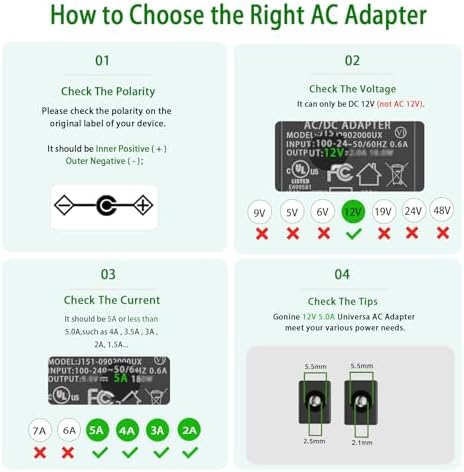
Image: Visual guide illustrating how to check the polarity, voltage, current, and physical tip dimensions to ensure compatibility with the power adapter.
Connecting the Power Supply
- Ensure your monitor or compatible device is turned off.
- Connect the DC output barrel connector (5.5 x 2.5 mm) of the power supply to the power input port of your monitor.
- Connect the AC power cord to the power supply unit.
- Plug the AC power cord into a standard 100-240V AC wall outlet.
- A green LED indicator on the power supply unit will illuminate, indicating it is receiving power.
- You can now power on your monitor or device.

Image: The Gonine 12V 5A power supply connected to a monitor, with the AC cord plugged into a wall outlet, demonstrating a typical setup.
Compatible Devices
This 12V 5A DC power cord is compatible with various monitors requiring 12V DC input, including but not limited to:
- AOC Monitors: 16", 20", 22", 23", 24", 27" models.
- Dell Monitors: 21.5", 22", 23", 24", 27" Screen IPS LED LCD Monitor models.
- Sceptre EC Series: 32", 30", 27", 24", 22", 20", 19", 15" E248W, E225W, E205W, E275W Screen LED Monitor models.
- Also compatible with other 12V monitors from brands like ACER, HP, AG, BENQ, CTX, Hitachi, KDS, NEC, Proview, Sampo, Viewsonic, provided they match the voltage, current, and DC plug specifications.
Note: This power supply is NOT compatible with monitors requiring 19V or 19.5V DC input.

Image: An illustration demonstrating the wide compatibility of the power adapter with various 12V LCD monitors from brands like AOC, Dell, and Sceptre, and explicitly stating incompatibility with 19V monitors.
Operating Instructions
The Gonine 12V 5A Monitor Power Supply Cord operates automatically once connected correctly. The green LED indicator on the adapter unit confirms that power is being supplied. No further user interaction is required for its basic operation.
Maintenance
- Keep the power supply clean and free from dust. Use a dry, soft cloth for cleaning.
- Store the power supply in a cool, dry place when not in use.
- Avoid bending or crimping the cables excessively, as this can damage the internal wiring.
- Regularly inspect the cables and connectors for any signs of damage. If damage is found, discontinue use and replace the unit.
Troubleshooting
| Problem | Possible Cause | Solution |
|---|---|---|
| Monitor not powering on. |
|
|
| Green LED indicator is off. |
|
|
| Power supply feels excessively hot. |
|
|
Product Features and Quality
The Gonine 12V 5A Monitor Power Supply Cord is engineered with several features to ensure reliable and safe operation:
Multiple Protection Mechanisms
The adapter incorporates advanced safety features to protect both the power supply and your connected devices:
- Short Circuit Protection: Prevents damage from electrical shorts.
- Over Voltage Protection: Safeguards against excessive voltage input.
- Over Current Protection: Protects against drawing too much current.
- Over Temperature Protection: Prevents overheating of the unit.
- Electromagnetic Wave Protection: Minimizes interference.
- Quality Microchip: Ensures stable and efficient power delivery.
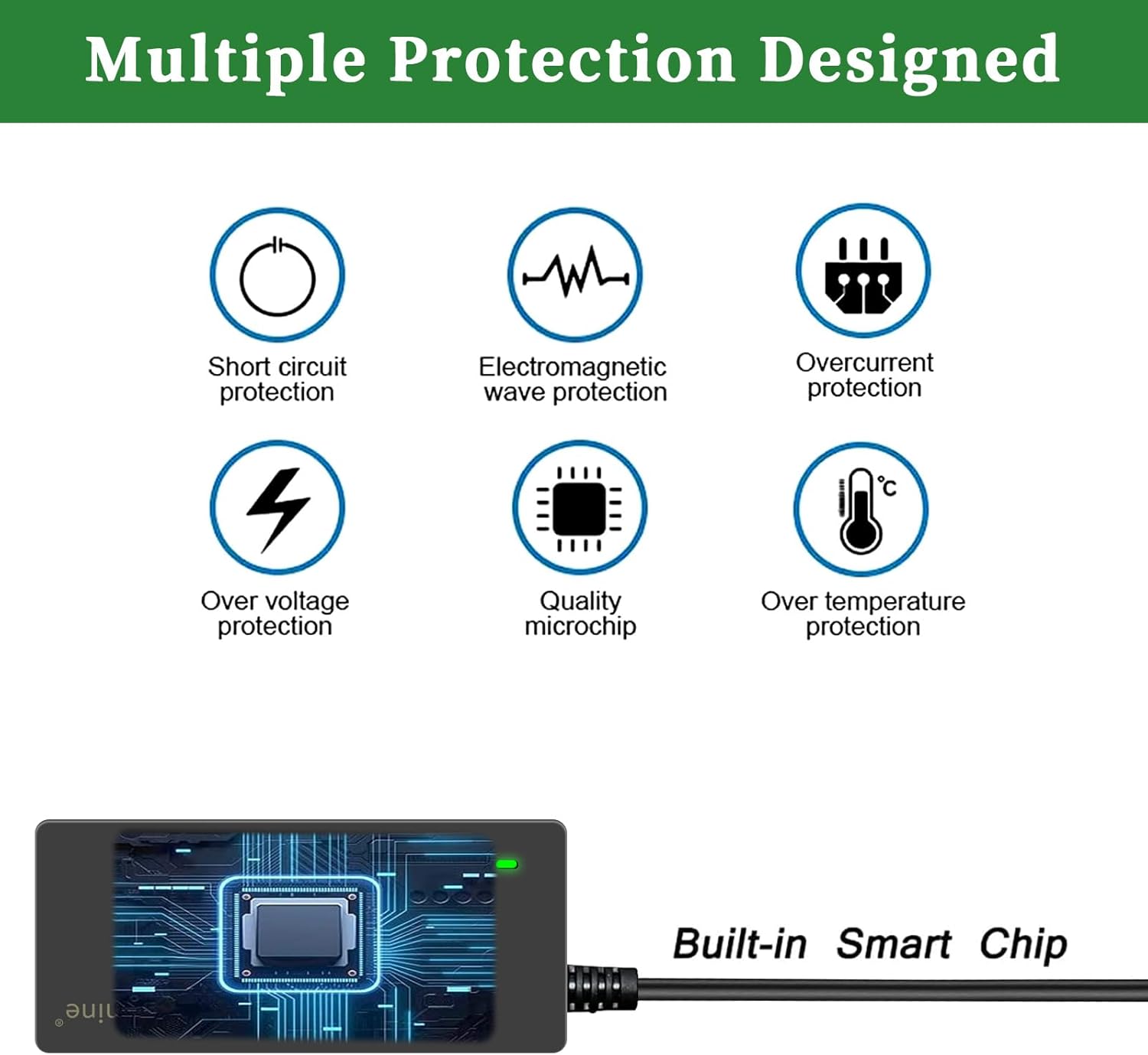
Image: An infographic detailing the various protection mechanisms built into the power adapter, including short circuit, over voltage, and over current protection.
Durable Construction
- Power Interface: The interface is treated with a copper nickel process, enhancing conductivity and corrosion resistance for extended service life.
- Magnetic Ring: An anti-jamming magnetic ring is integrated to absorb electromagnetic interference (EMI), meeting international standards.
- Craftsmanship: Features a rigorous and meticulous long tail design for durability, preventing easy breakage.
- Safe Reliable Power Cord: Constructed with high-quality oxygen-free copper for low resistance and superior conductivity. The PVC cable jacket prevents electrical leakage and breakdown.

Image: Close-up views highlighting the quality components and construction, such as the power interface, magnetic ring, and robust cable design.

Image: A cross-sectional diagram illustrating the internal structure of the power cord, featuring tinned copper core wire, multiple shielding layers, and a PVC cable jacket for enhanced safety and transmission efficiency.
Specifications
- Model: J652-1205000D
- Input: 100-240V AC, 50/60Hz
- Output Voltage: 12V DC
- Output Current: 5A (Max)
- Maximum Power: 60W
- DC Connector Size: 5.5 mm (Outer Diameter) x 2.5 mm (Inner Diameter)
- AC Power Cord Length: 1.2 meters (3.9 ft)
- DC Power Cord Length: 1.5 meters (4.9 ft)
- Safety Features: Automatic Overload Cut-off, Short Circuit Protection, Over Voltage Protection, Over Current Protection, Low Fever, No Noise.
- Certifications: FCC, CE, RoHS Approved.
- Item Weight: Approximately 10.3 ounces
- Package Dimensions: 6.73 x 3.66 x 2.09 inches

Image: A diagram illustrating the physical dimensions of the power adapter unit and the total length of its connected cables.

Image: Certificates of compliance for the Gonine power supply, indicating adherence to FCC, CE, and RoHS safety and environmental standards.
Package Contents
The package includes:
- 1 x Gonine 12V 5A DC Power Supply for LCD Monitor
- 1 x US Plug Power Cord
Warranty and Support
Gonine products are designed for reliability and performance. This power supply features multiple protection mechanisms including short circuit, over voltage, and over current protection, and is FCC, CE, RoHS approved.
For any questions, technical assistance, or support regarding your Gonine 12V 5A Monitor Power Supply Cord, please contact the seller or manufacturer through the platform where the purchase was made.