
Introduction
Thank you for choosing the Xmenha Open Ear Bluetooth Wireless Ear Clip Headphones. These headphones are designed for comfort and stability, particularly suitable for sports and daily activities. The open-ear design allows you to remain aware of your surroundings while enjoying audio. This manual provides detailed instructions for setup, operation, maintenance, and troubleshooting to ensure optimal performance and longevity of your device.
Package Contents
Please check the package for the following items:
- 1 x Pair of Xmenha Wireless Ear Clip Headphones
- 1 x Charging Case
- 1 x USB-C Charging Cable
- 1 x User Manual
Product Overview
The Xmenha ZXY-JX80 headphones feature an ergonomic ear clip design for secure fit and comfort. The charging case provides portable power and includes an LED display for battery status.

Image: Xmenha ZXY-JX80 headphones inside their charging case, displaying battery levels.

Image: Diagram illustrating the touch control area and functions on the Xmenha ZXY-JX80 headphone.
Setup
1. Charging the Headphones and Case
Before first use, fully charge the headphones and the charging case.
- Place the headphones into the charging case. Ensure they are correctly seated.
- Connect the USB-C charging cable to the charging port on the case and plug the other end into a USB power source (e.g., wall adapter, computer USB port).
- The LED display on the charging case will indicate the charging status. A full charge typically takes about 1.5 hours.
- Once fully charged, disconnect the charging cable. The charging case has a 400 mAh battery capacity, providing multiple recharges for the headphones.
2. Wearing the Headphones
The ear clip design ensures a secure and comfortable fit.
- Gently hold the earlobe.
- Position the ear clip headset over your earlobe.
- Slide the headset upwards until it sits comfortably and securely on your ear. The ergonomic design is intended to optimize weight distribution and prevent falling during activity.
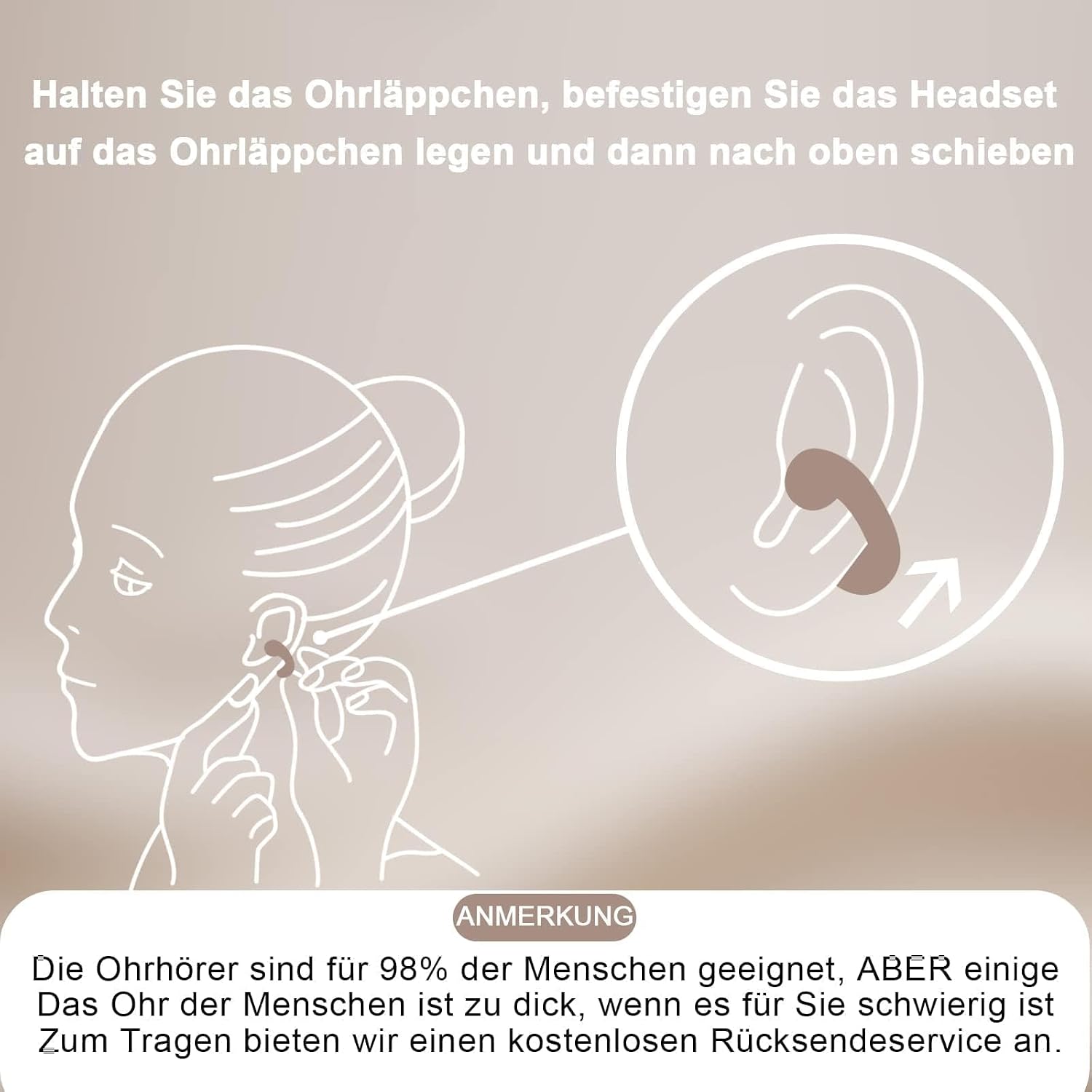
Image: Visual guide on correctly positioning the ear clip headphones on the ear.
3. Bluetooth Pairing
The headphones use Bluetooth 5.3 for a fast and stable connection.
- Open the charging case. The headphones will automatically power on and enter pairing mode.
- On your mobile device (smartphone, tablet, etc.), go to the Bluetooth settings.
- Search for available devices and select "Xmenha ZXY-JX80" (or similar name) from the list.
- Once connected, you will hear an audible confirmation, and the headphones will be ready for use.
- The headphones will automatically connect to the last paired device when removed from the case, if Bluetooth is enabled on the device.
Operating Instructions
The Xmenha ZXY-JX80 headphones feature intuitive touch controls on each earbud.
Power On/Off
- Power On: Open the charging case, and the headphones will automatically power on.
- Power Off: Place the headphones back into the charging case and close the lid. They will automatically power off and begin charging.
Music Playback
- Play/Pause: Single tap the touch area on either earbud.
- Next Track: Double tap the touch area on the right earbud.
- Previous Track: Double tap the touch area on the left earbud.
Call Management
- Answer/End Call: Single tap the touch area on either earbud.
- Reject Call: Press and hold the touch area on either earbud for 2 seconds.
Volume Control
- Volume Up: Triple tap the touch area on the right earbud.
- Volume Down: Triple tap the touch area on the left earbud.
Voice Assistant
- Activate Voice Assistant: Press and hold the touch area on either earbud for 3 seconds.
Maintenance
Proper care will extend the life of your headphones.
- Cleaning: Use a soft, dry, lint-free cloth to clean the headphones and charging case. Do not use harsh chemicals or abrasive materials.
- Water Resistance: The headphones are waterproof and resistant to daily splashes, sweat, and rain. However, they are not designed for submersion. Avoid exposing them to strong jets of water or prolonged immersion. Ensure they are dry before placing them back in the charging case.
- Storage: When not in use, store the headphones in their charging case to protect them from dust and damage. Store in a cool, dry place away from extreme temperatures.
- Battery Care: To preserve battery life, avoid fully discharging the headphones and charging case frequently. Charge them regularly, even if not in constant use.
Troubleshooting
If you encounter issues, try the following solutions:
| Problem | Possible Solution |
|---|---|
| Headphones do not power on. | Ensure the headphones are charged. Place them in the charging case and check the case's battery level. |
| Cannot pair with device. | 1. Ensure Bluetooth is enabled on your device. 2. Make sure the headphones are in pairing mode (open the case). 3. Forget/delete the headphones from your device's Bluetooth list and try pairing again. 4. Ensure the headphones are within 10 meters of your device. |
| No sound or low volume. | 1. Check the volume level on both the headphones and your connected device. 2. Ensure the headphones are properly connected to your device. 3. Recharge the headphones. |
| Intermittent connection. | 1. Ensure there are no obstructions between the headphones and your device. 2. Move closer to your device. 3. Avoid environments with strong Wi-Fi or other wireless interference. |
| Charging case not charging. | 1. Check the USB-C cable and power adapter for damage. 2. Try a different USB-C cable or power source. 3. Ensure the charging port is clean and free of debris. |
Specifications
- Model: ZXY-JX80
- Bluetooth Version: 5.3
- Transmission Distance: Approximately 10 meters (33 feet)
- Headphone Playback Time: 4-5 hours (per charge)
- Charging Case Battery Capacity: 400 mAh
- Charging Port: USB-C
- Water Resistance: IPX4 (Resistant to splashes, sweat, and rain)
- Supported Systems: All Bluetooth-enabled devices and mobile phones
Safety Information
- Do not disassemble or modify the product.
- Keep the product away from extreme temperatures, direct sunlight, and open flames.
- Avoid dropping or subjecting the product to strong impacts.
- Do not use the product at excessively high volumes for prolonged periods to prevent hearing damage.
- Dispose of the product and its battery responsibly according to local regulations.
Warranty and Support
If you receive a defective product or have any questions during use, please contact the seller or manufacturer for assistance. Please refer to your purchase documentation for specific warranty terms and conditions.