
Futaba Electronics Industrial 00008691-3
Futaba 4YWD-R214GFE-F24J1DX RC System Instruction Manual
Model: 00008691-3 | Brand: Futaba Electronics Industrial
1. Introduction
This manual provides essential instructions for the safe and effective use of your Futaba 4YWD-R214GFE-F24J1DX 2.4GHz FHSS radio control system. This system is designed for electric trailers and trucks, offering reliable control and ease of use. Please read this manual thoroughly before operating your RC system to ensure proper setup and to prevent damage or injury.
2. Product Overview and Features
The Futaba 4YWD-R214GFE-F24J1DX is a 4-channel 2.4GHz FHSS (Frequency Hopping Spread Spectrum) radio control system. It is specifically designed for basic control of electric trailer and truck models.
Key Features:
- 4-Channel FHSS System: Provides reliable and interference-resistant communication.
- Integrated Antenna Receiver: The R214GF-E receiver features a built-in antenna, ideal for scale models where appearance is a priority.
- Shift Gate Function: Includes a dedicated shift gate for convenient gearbox control in compatible models.
- Servo Reverse: Allows for reversing the direction of servo operation for each channel.
- Battery Level Indicator: LED indicator on the transmitter shows battery status (2 levels).
- Adjustable Lever Head: Non-slip adjustable lever heads for comfortable operation.
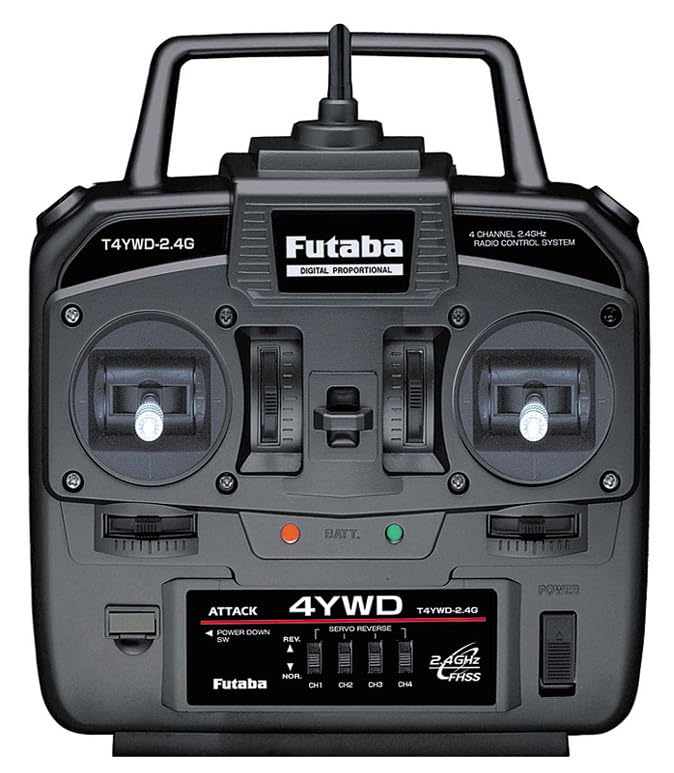
Figure 2.1: Front view of the Futaba 4YWD-R214GFE-F24J1DX Transmitter. Shows the control sticks, trim levers, and various switches.

Figure 2.2: Rear view of the Futaba 4YWD-R214GFE-F24J1DX Transmitter. Shows the battery compartment cover.
3. Package Contents
The Futaba 4YWD-R214GFE-F24J1DX Basic Propo for Electric Trailers & Trucks (ATTACK 4YWD T/R Set) typically includes the following components:
- Futaba T4WD 2.4GHz FHSS Transmitter
- Futaba R214GF-E 2.4GHz FHSS Receiver (with built-in antenna)
- Instruction Manual (this document)
Note: Power supply for driving the product (e.g., batteries for the transmitter, power for the RC model) is required but not included. This product does not include fuel, additional batteries, chargers, paint, glue, oil, grease, or tools.
4. Setup
4.1 Transmitter Battery Installation
- Ensure the transmitter's power switch is in the OFF position.
- Open the battery compartment cover located on the back of the transmitter (refer to Figure 2.2).
- Insert four (4) AA dry cell batteries (6.0V total) into the battery holder, observing the correct polarity (+/-).
- Close the battery compartment cover securely.
- Turn the transmitter ON. The LED battery indicator should light up, indicating sufficient power. If the LED flashes or does not light, replace the batteries.
4.2 Receiver Installation and Connections
The R214GF-E receiver features a built-in antenna, simplifying installation, especially for scale models where external antennas might detract from appearance.
- Mount the receiver securely within your RC model using double-sided tape or a suitable mounting method, ensuring it is protected from vibration and moisture.
- Connect your servos and Electronic Speed Controller (ESC) to the corresponding channels on the receiver.
- Channel 1: Steering Servo
- Channel 2: ESC (Throttle)
- Channel 3: Auxiliary (e.g., Shift Gate Servo)
- Channel 4: Auxiliary
- Ensure all connections are firm and correctly oriented (signal, positive, negative).
4.3 Binding (Linking) the Transmitter and Receiver
Your Futaba 2.4GHz FHSS system typically comes pre-bound. However, if you need to re-bind or bind a new receiver, follow the instructions provided with the receiver or consult the full Futaba FHSS system manual. Generally, this involves powering on the receiver while holding a specific button, then powering on the transmitter.
5. Operating Instructions
5.1 Powering On/Off
- Always turn on the transmitter first.
- Then, turn on the receiver/ESC in your model.
- When finished, turn off the receiver/ESC first.
- Finally, turn off the transmitter.
Failure to follow this sequence may result in loss of control or damage to your model.
5.2 Basic Controls
- Steering Wheel (Left Stick): Controls the direction of the model (left/right).
- Throttle Trigger (Right Stick): Controls forward/reverse movement and speed. Pull for forward, push for reverse/brake.
- Trim Levers: Used to fine-tune the neutral position of steering and throttle. Adjust as needed to ensure the model tracks straight and stops completely when the throttle is neutral.
5.3 Servo Reverse
The transmitter features switches for servo reversing (labeled "SERVO REVERSE"). If a servo operates in the opposite direction to your stick input, flip the corresponding servo reverse switch to correct the direction.
5.4 Shift Gate Control
The transmitter includes a shift gate mechanism. This allows for precise control of multi-speed gearboxes commonly found in RC trucks and trailers. Refer to your model's specific instructions for connecting and operating the shift gate servo via the transmitter's auxiliary channel.
6. Maintenance
- Cleaning: Wipe the transmitter and receiver with a soft, dry cloth. Do not use solvents or harsh chemicals.
- Storage: Store the RC system in a cool, dry place away from direct sunlight and extreme temperatures. Remove batteries from the transmitter if storing for extended periods to prevent leakage.
- Inspection: Regularly check all wires and connectors for damage or loose connections.
- Battery Replacement: Replace transmitter batteries when the LED indicator shows low power.
7. Troubleshooting
| Problem | Possible Cause | Solution |
|---|---|---|
| No power to transmitter | Dead or incorrectly installed batteries. | Check battery polarity; replace with fresh AA batteries. |
| Model does not respond to transmitter |
|
|
| Servo operates in wrong direction | Servo reverse switch set incorrectly. | Flip the corresponding servo reverse switch on the transmitter. |
8. Specifications
| Feature | Detail |
|---|---|
| Model Number | 00008691-3 |
| Transmitter Model | T4WD (FHSS) |
| Receiver Model | R214GF-E (FHSS, built-in antenna) |
| Channels | 4-channel |
| Frequency | 2.4GHz FHSS |
| Transmitter Power Supply | 6.0V (4 x AA dry batteries) |
| Battery Level Indication | LED (2 levels) |
| Product Dimensions | 3.94 x 3.94 x 3.94 inches |
| Item Weight | 2 pounds |
| Manufacturer Recommended Age | 0 months and up |
9. Safety Information
- Always operate your RC model in a safe, open area, away from people, pets, and obstacles.
- Never operate your RC model near public roads, power lines, or water.
- Ensure all batteries are fully charged before operation.
- Always turn on the transmitter first and turn off the receiver/model first.
- Keep hands, face, and loose clothing away from moving parts of the model.
- Do not expose the transmitter or receiver to water or extreme temperatures.
- Adult supervision is recommended for younger users.
10. Warranty and Support
For warranty information and technical support, please refer to the official Futaba Electronics Industrial website or contact your local Futaba distributor. Keep your purchase receipt as proof of purchase.
Manufacturer: Futaba Electronics Industrial