
Edifier CX7
Edifier CX7 Active 2.1 Home Entertainment System User Manual
Model: CX7
Introduction
The Edifier CX7 is an active 2.1 home entertainment system designed to deliver high-quality audio for various devices, including televisions, personal computers, and notebooks. This system features Bluetooth V5.0 connectivity, an 8-inch subwoofer, and an infrared remote control for convenient operation. This manual provides essential information for setting up, operating, and maintaining your CX7 system.
Package Contents
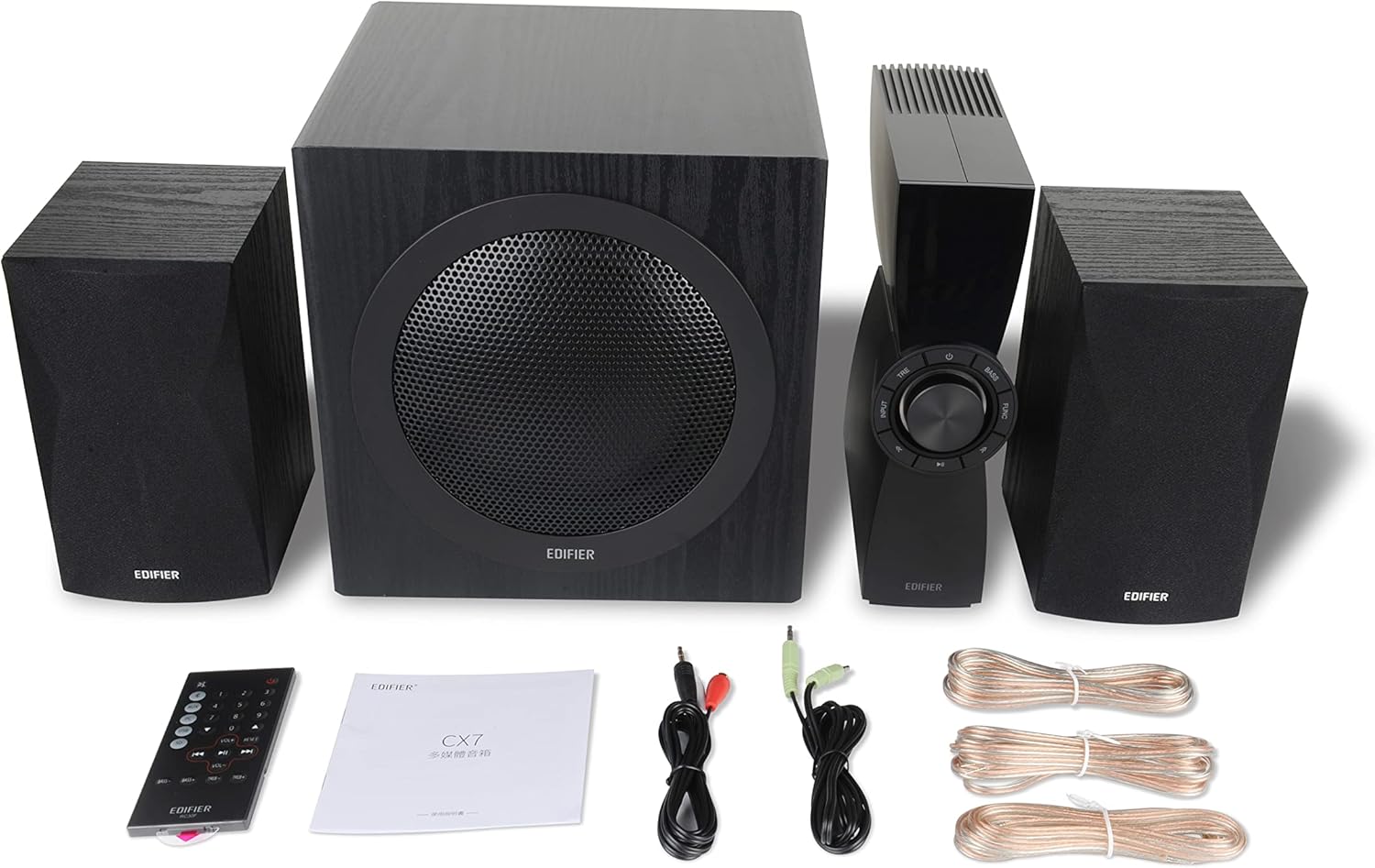
Figure 1: Edifier CX7 System Components
Please verify that all items listed below are included in your package:
- Subwoofer (1)
- Satellite Speakers (2)
- Control Unit (1)
- Infrared Remote Control (1)
- 3.5mm to RCA Audio Cable (1)
- RCA to RCA Audio Cable (1)
- Speaker Connection Cables (2)
- User Manual (1)
Setup Guide
1. Placement
Position the subwoofer on the floor, preferably in a corner or near a wall for optimal bass response. Place the satellite speakers on either side of your listening area, equidistant from the listener, and at ear level if possible. Ensure the control unit is easily accessible.

Figure 2: Recommended System Placement
2. Connecting Speakers
Connect the satellite speakers to the speaker output terminals on the rear of the control unit using the provided speaker cables. Ensure correct polarity (red to red, black to black) for each speaker.
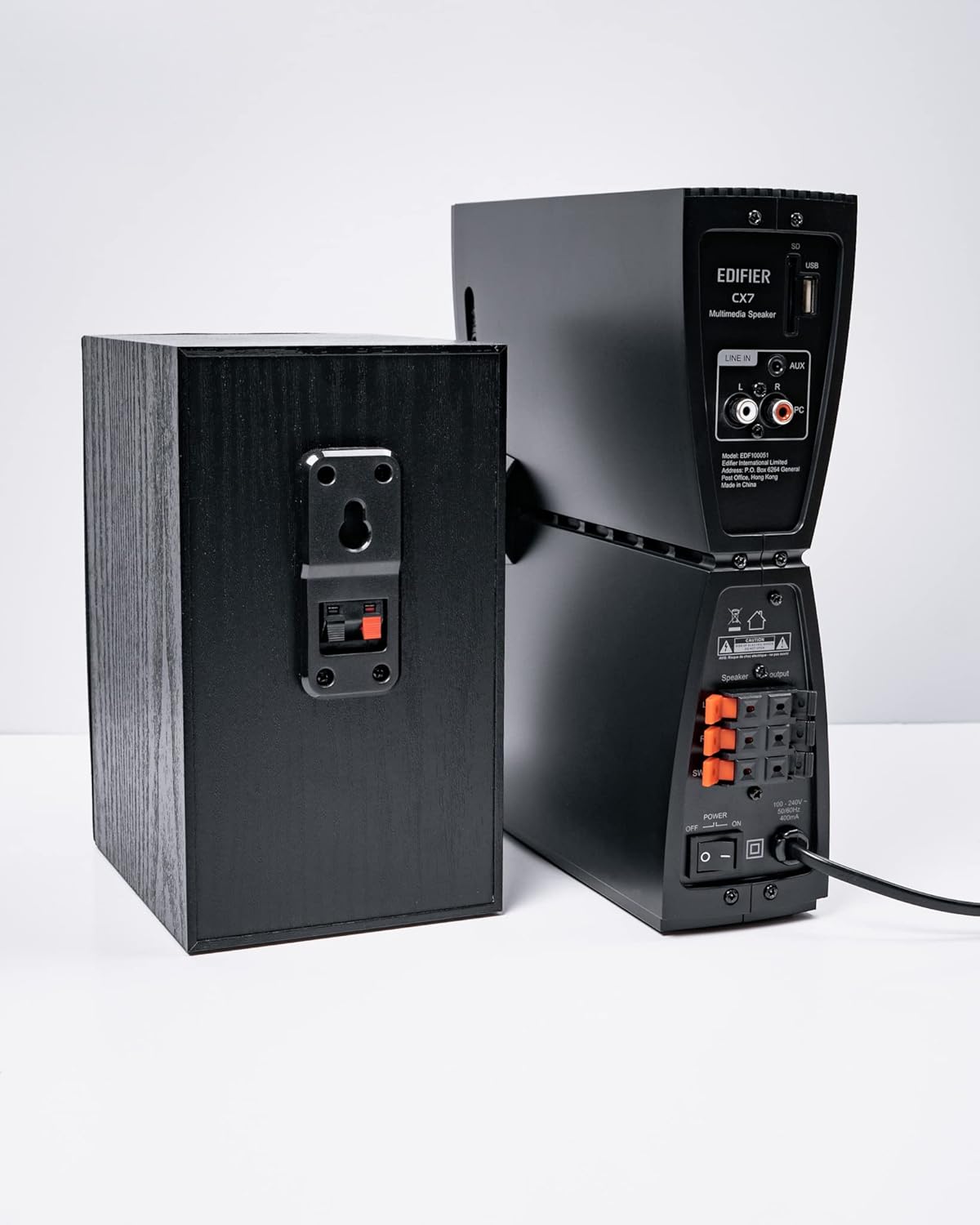
Figure 3: Speaker Connections
3. Connecting Audio Sources
The CX7 system supports multiple audio input options:
- AUX Input: Use the 3.5mm to RCA audio cable to connect devices like smartphones, tablets, or computers to the AUX input on the control unit.
- PC Input: Use the RCA to RCA audio cable to connect your PC's audio output to the PC input on the control unit.
- Bluetooth: For wireless connection, refer to the "Bluetooth Pairing" section under Operating Instructions.
4. Power Connection
Connect the power cable to the control unit and then plug it into a standard wall outlet. Turn on the power switch located on the rear of the control unit.
Operating Instructions
1. Power On/Off
After connecting the power, press the power button on the control unit or the remote control to turn the system on or off. The display on the control unit will illuminate when powered on.

Figure 4: Control Unit Display
2. Input Selection
Press the "INPUT" button on the control unit or the remote control to cycle through available audio sources: AUX, PC, and Bluetooth. The selected input will be displayed on the control unit's screen.

Figure 5: Control Knob and Input Buttons
3. Volume Control
Rotate the large knob on the control unit clockwise to increase volume and counter-clockwise to decrease it. Alternatively, use the "VOL+" and "VOL-" buttons on the remote control.
4. Bass and Treble Adjustment
Press the "BASS" or "TRE" (Treble) buttons on the control unit or remote control, then rotate the main knob to adjust the respective levels. The display will show the current bass/treble setting.
5. Bluetooth Pairing
- Select the Bluetooth input on the CX7 system. The display will show "BT" and flash, indicating it's in pairing mode.
- On your device (smartphone, tablet, etc.), enable Bluetooth and search for available devices.
- Select "EDIFIER CX7" from the list of found devices.
- Once paired, the "BT" indicator on the CX7 display will stop flashing and remain solid.
To disconnect a Bluetooth device, press and hold the "FUNC" button on the control unit or the Bluetooth button on the remote control for a few seconds.
6. Remote Control Functions

Figure 6: Infrared Remote Control
The remote control provides convenient access to all major functions:
- Power: Turns the system on/off.
- Input Selection: Cycles through AUX, PC, Bluetooth.
- Volume: Adjusts master volume.
- Bass/Treble: Adjusts bass and treble levels.
- Mute: Mutes/unmutes audio.
- Playback Controls: Play/Pause, Previous/Next track (for Bluetooth mode).
Maintenance
- Cleaning: Use a soft, dry cloth to clean the surfaces of the speakers and control unit. Do not use liquid cleaners or abrasive materials.
- Ventilation: Ensure adequate ventilation around the control unit and subwoofer to prevent overheating. Do not block ventilation openings.
- Environment: Avoid exposing the system to extreme temperatures, humidity, dust, or direct sunlight.
- Power Off: If the system will not be used for an extended period, disconnect it from the power outlet.
Troubleshooting
| Problem | Possible Cause | Solution |
|---|---|---|
| No sound |
|
|
| Bluetooth connection fails |
|
|
| Distorted sound |
|
|
Specifications
| Feature | Detail |
|---|---|
| Model Name | CX7 |
| Speaker Type | 2.1 Speaker system |
| Connectivity Technology | Bluetooth |
| Wireless Communication Technology | Bluetooth V5.0 |
| Bluetooth Range | 10 Meters |
| Audio Output Mode | Surround |
| Speaker Maximum Output Power | 69 Watts |
| Subwoofer Connectivity Technology | Wireless |
| Woofer Diameter | 8 Inches |
| Material | Polypropylene |
| Color | Black |
| Product Dimensions | 16.93"D x 17.72"W x 13.39"H |
| Item Weight | 29 pounds (13.2 Kilograms) |
| Power Source | Corded Electric |
| Controller Type | Remote Control |
| Recommended Uses | For Televisions, For Computers, For Smartphones or Tablets |
Warranty and Support
For warranty information and technical support, please refer to the warranty card included with your product or visit the official Edifier website. Keep your purchase receipt as proof of purchase for warranty claims.
Edifier Official Website: www.edifier.com
Related documentsCX7


Ask a question about this manual
Ask about setup, troubleshooting, compatibility, parts, safety, or missing instructions. Manuals+ will review the question and use this page’s manual context to help answer it.