
Introduction
Thank you for purchasing the Pichau Omega S Gaming Chair. This manual provides essential information for the safe assembly, operation, maintenance, and troubleshooting of your new chair. Please read these instructions carefully before use and retain them for future reference.
Safety Information
Important Safety Warning: The Pichau Omega S Gaming Chair is designed to support a maximum weight of 120 kg (264 lbs). Ensure the chair is assembled correctly and used on a stable, level surface. Do not stand on the chair or use it for purposes other than its intended use as a seating device. Keep hands and fingers clear of moving parts during adjustment.
Product Overview
The Pichau Omega S Gaming Chair is designed for comfort and support during extended use. Key features include adjustable height, robust support, and smooth-rolling casters. The chair also features a reclinable backrest and adjustable armrests for personalized comfort.
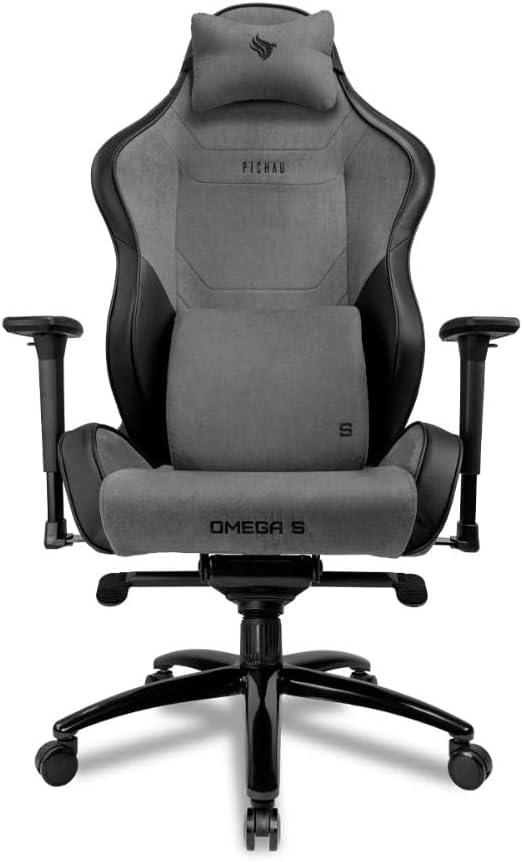
Front view of the Pichau Omega S Gaming Chair, showcasing its ergonomic design and included cushions.

Side view of the chair, highlighting the adjustable armrests and recline mechanism.

Rear view of the Pichau Omega S Gaming Chair, showing the backrest design.
Setup and Assembly
Assembly is required for this product. Please follow these general steps. Refer to the included assembly diagram for detailed visual guidance.
- Unpack Components: Carefully remove all parts from the packaging and lay them out on a clean, soft surface to prevent scratches. Verify all components are present according to the parts list (not provided in this manual, refer to product packaging).
- Assemble the Base: Attach the five casters (wheels) to the star-shaped base by pushing them firmly into the sockets until they click into place.
- Insert Gas Lift: Place the gas lift cylinder into the center hole of the assembled base. Ensure it is seated securely.
- Attach Mechanism to Seat: Secure the multi-functional tilt mechanism to the underside of the seat cushion using the provided screws. Ensure the front of the mechanism aligns with the front of the seat.
- Attach Armrests: Fasten the armrests to the sides of the seat cushion using the designated screws.
- Connect Backrest to Seat: Align the backrest with the seat's mounting brackets and secure it with screws. It may be helpful to have a second person assist with this step.
- Mount Seat Assembly to Base: Carefully place the assembled seat and backrest onto the gas lift cylinder, ensuring the center hole of the mechanism aligns with the top of the gas lift. Press down firmly to secure.
- Attach Cushions: Position the headrest and lumbar support cushions as desired.

Detail of the chair's mechanism, which connects the seat to the gas lift and controls tilt functions.
Operating Instructions
Your Pichau Omega S Gaming Chair offers several adjustment options to customize your seating experience:
- Height Adjustment: To raise the chair, lift the lever located under the seat on the right side while taking your weight off the seat. To lower the chair, lift the same lever while seated. Release the lever to lock the height.
- Backrest Recline: Pull the lever on the right side of the seat (usually near the backrest) upwards to unlock the backrest. Lean back to recline to your desired angle, then release the lever to lock it in place.
- Armrest Adjustment: The armrests can be adjusted in height. Locate the button or lever on the side of each armrest support. Press it to unlock, move the armrest up or down, and release to lock.
- Tilt Lock and Tension: The chair features a tilt function. A lever (often on the left side under the seat) can lock the chair in an upright position or allow it to tilt. A knob under the seat (usually at the front) adjusts the tilt tension, making it easier or harder to recline.

Adjustable backrest angle for optimal comfort.

Gas lift for smooth height adjustments.
Maintenance
Proper maintenance will extend the life and performance of your gaming chair:
- Cleaning: For general cleaning, wipe surfaces with a soft, damp cloth. For fabric areas, use a mild fabric cleaner if necessary, testing on an inconspicuous area first. Avoid harsh chemicals or abrasive cleaners.
- Check Fasteners: Periodically check all screws and bolts to ensure they are tight. Re-tighten if necessary to prevent wobbling or instability.
- Caster Care: Keep the casters clean by removing any hair or debris that may accumulate around them. This ensures smooth movement and prevents damage to your flooring.
- Avoid Direct Sunlight: Prolonged exposure to direct sunlight can cause fading or damage to the chair's materials.
Troubleshooting
If you encounter any issues with your Pichau Omega S Gaming Chair, refer to the following common problems and solutions:
| Problem | Possible Cause | Solution |
|---|---|---|
| Chair does not adjust height. | Gas lift malfunction or lever not engaged. | Ensure the height adjustment lever is fully engaged. If the issue persists, the gas lift may need replacement. Contact support. |
| Chair squeaks when moving. | Loose fasteners or friction between components. | Check and tighten all screws and bolts. Apply a small amount of silicone lubricant to moving parts or joints if necessary. |
| Casters (wheels) do not roll smoothly. | Debris caught in casters or damaged casters. | Remove any hair, dust, or debris from the caster wheels. If casters are damaged, they may need replacement. |
| Backrest does not recline or lock. | Recline mechanism jammed or lever not engaged. | Ensure the recline lever is fully pulled to unlock. Check for any obstructions in the mechanism. Do not force the recline. |
Specifications
Detailed specifications for the Pichau Omega S Gaming Chair:

Detailed dimensions of the Pichau Omega S Gaming Chair, including height, width, and depth measurements.
- Model Number: PG-OMG-BG01
- Brand: Pichau
- Color: Black and Gray
- Filling Material: Foam
- Maximum Recommended Weight: 120 kg (264 lbs)
- Form Factor: Reclinable
- Frame Material: Metal
- Assembly Required: Yes
- Included Components: Chair (unassembled)
- Product Dimensions (L x W x H): 90 cm x 70 cm x 42 cm (approximate, refer to diagram for detailed measurements)
- EAN: 7908446223829
- ASIN: B0BT629PY5
Warranty and Support
For warranty information, technical support, or to inquire about replacement parts, please refer to the warranty card included with your purchase or visit the official Pichau website. You may also contact Pichau customer service directly through their support channels.
Pichau Official Website: www.pichau.com.br