
respekta KM4400-28
Respekta Frameless Ceramic Hob Instruction Manual
Model: KM 4400-28
Brand: Respekta
1. Introduction
Thank you for choosing the Respekta KM 4400-28 frameless ceramic hob. This appliance is designed for modern kitchens, offering efficient and safe cooking with its advanced features. Please read this manual carefully before installation and use to ensure proper operation and to prevent damage or injury. Keep this manual for future reference.
2. Safety Instructions
Important: Read all instructions before using the appliance.
- This appliance is intended for domestic use only.
- Ensure the electrical installation is compliant with local regulations and standards.
- Do not touch hot surfaces. Always use oven mitts or pot holders.
- Supervise children closely when the appliance is in use. This appliance is not intended for use by persons (including children) with reduced physical, sensory or mental capabilities, or lack of experience and knowledge, unless they have been given supervision or instruction concerning use of the appliance by a person responsible for their safety.
- Never leave cooking unattended, especially when cooking with oil or fat, as this can be a fire hazard.
- Do not store flammable materials on or near the hob.
- Disconnect the appliance from the power supply before cleaning or maintenance.
- Do not use abrasive cleaners or sharp objects on the ceramic glass surface.
- In case of a crack in the ceramic glass, immediately switch off the appliance and disconnect it from the mains power supply to avoid the possibility of electric shock.
- Ensure proper ventilation during use.
3. Product Overview
The Respekta KM 4400-28 ceramic hob features four high-efficiency cooking zones and an intuitive touch control panel.

Figure 3.1: Top view of the Respekta KM 4400-28 ceramic hob, showing the four cooking zones and the central touch control panel.
3.1. Cooking Zones
- Front Left Zone: Ø 155 mm, 1200 W
- Rear Left Zone: Ø 190 mm, 1800 W
- Front Right Zone: Ø 190 mm, 1800 W
- Rear Right Zone: Ø 155 mm, 1200 W
3.2. Control Panel
The hob is operated via a sensitive touch control panel located at the front center. The panel includes controls for power levels, timer, child lock, and on/off functions.
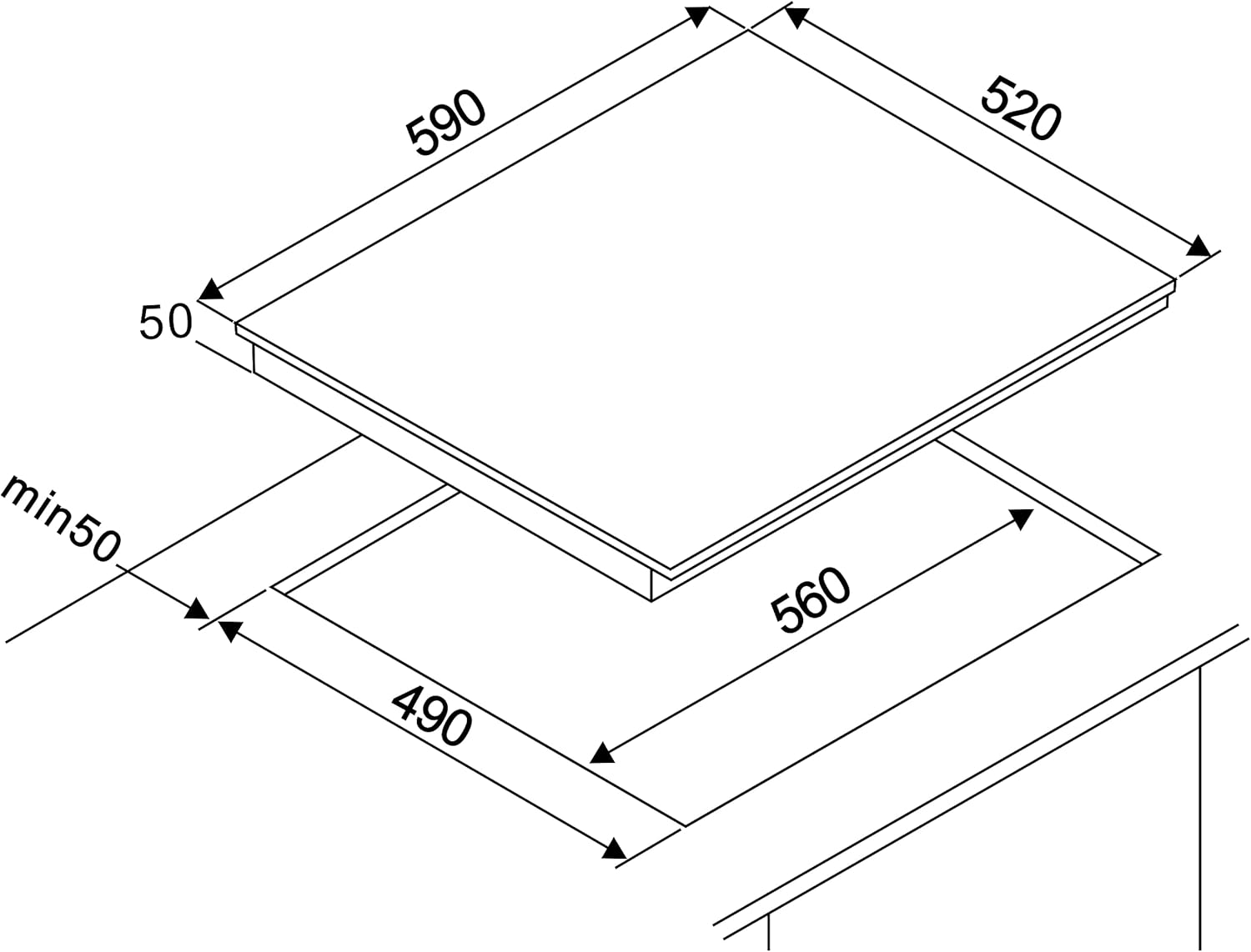
Figure 3.2: Detailed view of the touch control panel, showing individual zone controls, timer, and safety indicators.
4. Installation
Installation should only be carried out by a qualified electrician or technician in accordance with local regulations and safety standards.
4.1. Pre-Installation Checks
- Ensure the countertop material is heat-resistant.
- Verify that the cabinet below the hob has adequate ventilation.
- Check the dimensions of the cutout in the countertop. Refer to the specifications section for precise measurements.
- Ensure the power supply matches the voltage and frequency requirements of the hob.
4.2. Mounting the Hob
Carefully place the hob into the prepared cutout in the countertop. Ensure it sits flush and is securely supported. The hob is designed for drop-in installation.

Figure 4.1: Side view of the hob, illustrating its compact design suitable for built-in installation.
4.3. Electrical Connection
The appliance comes with a 100 cm connection cable without a plug. The electrical connection must be performed by a qualified electrician. Ensure the appliance is properly earthed.

Figure 4.2: Rear view of the hob, indicating the location for electrical wiring connection. Professional installation is required.
5. Operating Instructions
5.1. Turning On/Off
- To turn on: Touch and hold the Power button (I) for a few seconds. The display will light up.
- To turn off: Touch and hold the Power button (I) again.
5.2. Adjusting Power Levels
- Select the desired cooking zone by touching its corresponding zone selection button.
- Use the '+' and '-' buttons to adjust the power level from 1 (low) to 9 (high).
5.3. Using the Timer
- The timer can be set for up to 99 minutes.
- To set the timer: Touch the Timer button (P). Use the '+' and '-' buttons to set the desired time.
- When the set time expires, the hob will automatically switch off the selected cooking zone and emit an audible signal.
5.4. Child Lock Function
- To activate: With the hob turned on, touch and hold the Child Lock button (key symbol) for a few seconds until the indicator lights up. This prevents accidental operation.
- To deactivate: Touch and hold the Child Lock button again until the indicator turns off.
5.5. Residual Heat Indicator
After a cooking zone is switched off, the display for that zone may show an 'H' (Hot) indicator. This indicates that the surface is still hot and caution should be exercised. The 'H' will disappear once the surface has cooled down to a safe temperature.
6. Cleaning and Maintenance
Regular cleaning and maintenance will ensure the longevity and optimal performance of your ceramic hob.
6.1. Daily Cleaning
- After each use, allow the hob to cool down.
- Wipe the ceramic surface with a damp cloth and a small amount of mild dish soap.
- Rinse with a clean damp cloth and dry thoroughly with a soft, clean cloth to prevent water spots.
6.2. Removing Stubborn Stains
- For burnt-on food or stubborn stains, use a specialized ceramic hob cleaner and a hob scraper.
- Follow the instructions on the cleaner product.
- Do not use abrasive sponges, scouring pads, or harsh chemical cleaners, as these can scratch or damage the ceramic surface.
7. Troubleshooting
Before contacting customer service, please refer to the following table for common issues and their solutions.
| Problem | Possible Cause | Solution |
|---|---|---|
| Hob does not turn on. | No power supply; Child lock activated. | Check power connection; Deactivate child lock. |
| Cooking zone not heating. | Incorrect power level selected; Pan not suitable. | Increase power level; Use flat-bottomed cookware suitable for ceramic hobs. |
| Hob switches off unexpectedly. | Overheating protection activated; Timer expired. | Allow hob to cool down; Check timer settings. |
| Control panel unresponsive. | Spillage on control panel; Child lock activated. | Clean control panel; Deactivate child lock. |
| Error code displayed. | Internal fault. | Disconnect from power for a few minutes, then reconnect. If the error persists, contact customer service. |
8. Specifications
Technical data for the Respekta KM 4400-28 ceramic hob:
| Feature | Specification |
|---|---|
| Model Number | KM4400-28 |
| Installation Type | Drop-In |
| Number of Heating Elements | 4 |
| Material | Glass Ceramic |
| Color | Black |
| Voltage | 230 Volt |
| Wattage | 6000 Watt (2 x 1200W & 2 x 1800W) |
| Product Dimensions (H x W x D) | 5 x 59 x 52 cm |
| Weight | 7.8 Kilograms |
| Special Features | Residual Heat Indicator, Timer, Child Lock, Automatic Shut-off, Touch Control |
| Certification | German Safety Standards |
9. Warranty and Support
Your Respekta KM 4400-28 ceramic hob comes with a standard manufacturer's warranty. Please refer to the warranty card included in the packaging for specific terms and conditions.
For technical support, spare parts, or warranty claims, please contact Respekta customer service. You can find contact information on the official Respekta website or in your purchase documentation.
Website: www.respekta.de