
Garmin Edge 540
Garmin Edge 540 GPS Cycling Computer User Manual
Model: Edge 540 (010-02694-00)
Introduction
The Garmin Edge 540 is a compact GPS cycling computer designed to enhance your cycling experience with advanced navigation, performance tracking, and smart connectivity. This manual provides detailed instructions for setting up, operating, maintaining, and troubleshooting your device.

Image: Garmin Edge 540 cycling computer displaying a training plan, highlighting its button controls, advanced navigation, and personalized Garmin Coach training plans.
Setup
1. What's in the Box
Your Garmin Edge 540 package includes the following components:
- Edge 540 device
- Out-front mount
- Standard mount
- Tether
- USB-C cable
- Documentation (this manual)
2. Charging the Device
Before initial use, fully charge your Edge 540. Connect the device to a USB power adapter or a computer USB port using the provided USB-C cable. The device features a Lithium Polymer battery.
Battery life is up to 26 hours in demanding use cases and up to 42 hours in battery saver mode.
3. Mounting the Device
The Edge 540 can be mounted on your bicycle handlebars using either the out-front mount or the standard mount. Ensure the mount is securely fastened and the device clicks firmly into place.
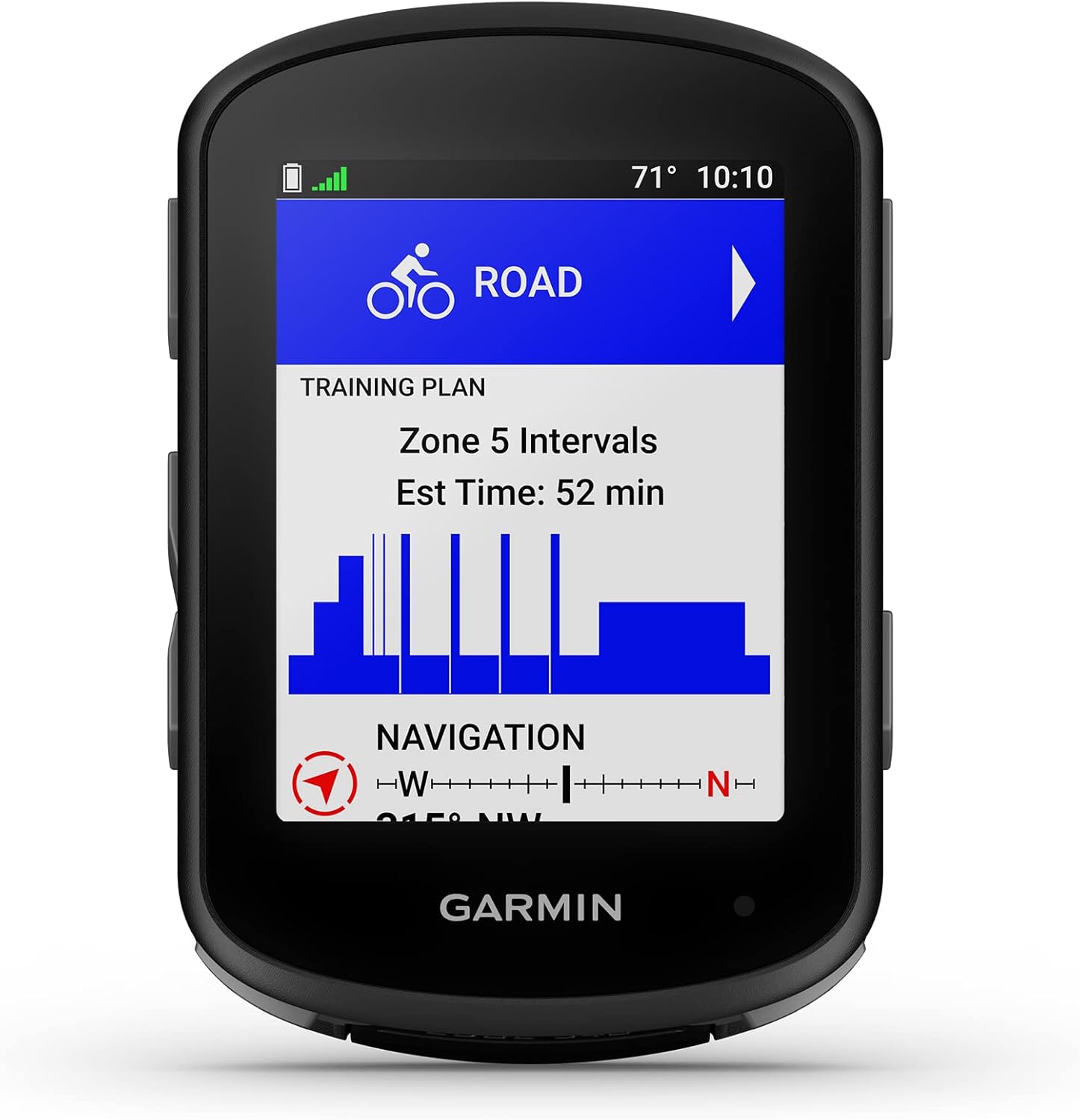
Image: Front view of the Garmin Edge 540, showing its compact design and display with a training plan. This image illustrates the device ready for mounting.
4. Initial Power On and Basic Settings
Press and hold the power button to turn on the device. Follow the on-screen prompts to select your language, units of measure, and other initial settings.
5. Pairing Sensors
The Edge 540 supports various external sensors such as heart rate monitors, speed sensors, and cadence sensors. To pair a sensor:
- Ensure the sensor is active and within range of the Edge 540.
- Navigate to the sensor pairing menu on your device.
- Select "Add Sensor" and choose the type of sensor you wish to pair.
- Follow the on-screen instructions to complete the pairing process.
When paired with compatible power meters and heart rate monitors, the device provides personalized coaching and stamina insights.
Operating Instructions
1. Button Controls
The Edge 540 features intuitive button controls for navigation and interaction. Familiarize yourself with the button layout and their functions for seamless operation in various conditions.

Image: Angled view of the Garmin Edge 540, showcasing its display with key cycling metrics and the physical buttons on the side.
2. Daily Suggested Workouts and Training Prompts
The device can display daily suggested workouts and training prompts directly on screen. These are tailored to your event and adapt to your current training load and recovery when used with a compatible power meter and heart rate monitor.

Image: The Garmin Edge 540 screen showing a "Daily Suggested Workout" for "Tempo" with a duration of "1:30:20".
3. Advanced Navigation with Multi-band GNSS
Benefit from superior positional accuracy, even in challenging environments like dense tree cover or urban canyons, thanks to multi-band GNSS technology.

Image: The Garmin Edge 540 screen showing a detailed map with a route highlighted, demonstrating its multi-band GNSS navigation capabilities.
4. ClimbPro Ascent Planner
The ClimbPro feature allows you to see remaining ascent and grade when climbing, helping you gauge your effort. This is available on every ride, even without a pre-loaded course.

Image: The Garmin Edge 540 screen showing the ClimbPro ascent planner, indicating current grade, remaining distance, and elevation profile of a climb.
5. Power Guide
Manage your efforts effectively with the power guide feature, which recommends power targets throughout a course when paired with a compatible power meter.

Image: The Garmin Edge 540 mounted on handlebars, displaying the Power Guide feature with current and recommended power targets during a ride.
6. Stamina Insights
Receive real-time stamina insights during your ride, helping you understand how much longer you can maintain your effort when paired with a compatible power meter and heart rate monitor.
7. Training Status
Evaluate your performance indicators to ensure you are training productively. The device provides insights into your VO2 Max and acute load.

Image: A hand holding the Garmin Edge 540, which displays the "Training Status" screen, showing metrics like VO2 Max and Acute Load to assess training productivity.
8. Ride Type-Specific Maps and Routing
The Edge 540 offers improved ride type-specific maps that highlight popular roads and trails, along with searchable points of interest. Get routing suited to your ride, whether on mountain, gravel, or road.

Image: A cyclist riding a mountain bike on a trail, representing the device's ride-specific routing feature for different terrains.
9. Trendline Popularity Routing
Your Edge device can find the best route by choosing from roads and trails most traveled by other Garmin users, helping you discover popular and well-maintained paths.

Image: Two cyclists taking a break with their bikes, symbolizing the Trendline Popularity Routing feature that guides users to frequently traveled routes.
10. GroupTrack Feature
Check each other's location with GroupTrack, allowing you to track up to 50 riders at once. This feature requires setup and your smartphone to be in an area with network coverage.

Image: Two cyclists riding side-by-side on a scenic road, representing the GroupTrack feature for tracking multiple riders.
11. Event Goals
Select a race distance and time goal, then receive daily suggested workouts to help you prepare for your event.

Image: A cyclist sitting and checking their phone, symbolizing the Event Goals feature where users can set race targets and receive tailored workouts.
12. Cycling Dynamics and MTB Dynamics
Gain insight into your performance with advanced cycling metrics, including cycling dynamics for variable conditions and MTB dynamics for tracking jump count, jump distance, and hang time.

Image: The Garmin Edge 540 screen showing detailed cycling dynamics metrics, including power phase and platform center offset.
13. Grit and Flow Metrics
Grit rates the difficulty of a trail, while Flow measures how smoothly you ride it, providing valuable insights for mountain biking.
Image: The Garmin Edge 540 displaying Grit and Flow metrics, offering insights into trail difficulty and riding smoothness.
14. Turn-by-Turn Directions and Back to Start
Stay on track with clear turn-by-turn directions and alerts. If you get lost or wish to return early, the "Back to Start" feature guides you back to your starting point.

Image: A cyclist riding on a winding road, representing the device's navigation features like turn-by-turn directions and the "Back to Start" function.
15. Nutrition and Hydration Alerts
Stay fueled and hydrated during your rides with timely notifications when it's time to drink or eat.
Image: A cyclist resting by their bike and checking their phone, symbolizing the nutrition and hydration alerts feature.
Maintenance
1. Cleaning the Device
Regularly clean your Edge 540 to ensure optimal performance and longevity. Use a soft, damp cloth to wipe the screen and casing. Avoid abrasive cleaners or solvents that could damage the device.
2. Battery Care
To maximize battery life, avoid exposing the device to extreme temperatures. For long-term storage, charge the device to approximately 50% and store it in a cool, dry place. Fully power down the device after each ride to conserve battery, especially if not using it for a few days.
Troubleshooting
1. Device Not Powering On
- Ensure the device is fully charged. Connect it to a power source using the USB-C cable.
- Perform a soft reset by holding down the power button for 10-15 seconds.
2. GPS Signal Issues
- Ensure you are in an open area with a clear view of the sky.
- Allow the device sufficient time to acquire a satellite signal, especially after being off for an extended period or traveling a long distance.
- Verify that Multi-band GNSS is enabled in the device settings for enhanced accuracy.
3. Sensor Connection Problems
- Check that the sensor's battery is not depleted.
- Ensure the sensor is active and within range of the Edge 540.
- Try re-pairing the sensor through the device's sensor menu.
- If issues persist, perform a factory reset on the Edge 540 (note: this will erase user data, back up important information first).
4. Display Not Responding
- Perform a soft reset as described in "Device Not Powering On."
- Ensure the screen is clean and free of debris.
Specifications
| Feature | Detail |
|---|---|
| Brand | Garmin |
| Model | Edge 540 (010-02694-00) |
| Color | Black |
| Product Dimensions | 2.3"L x 0.8"W x 3.4"H |
| Item Weight | 2.8 Ounces |
| Screen Size | 2.6 Inches |
| Display Type | LCD |
| Display Resolution | 246x322 |
| Battery Life | Up to 26 hours (demanding use), up to 42 hours (battery saver mode) |
| Battery Cell Composition | Lithium Polymer |
| Sensor Type Support | Heart Rate Sensor, Speed Sensor, Cadence Sensor |
| Connectivity Technology | USB, Bluetooth |
| Human Interface Input | Buttons |
| Mounting Type | Handlebar Mount |
| First Available Date | May 12, 2023 |
| UPC | 753759299804, 753759299835 |
Warranty and Support
For detailed warranty information, please refer to the official Garmin website or the warranty card included with your product. Garmin provides a limited warranty for its products against defects in materials and workmanship.
For technical support, product registration, or additional resources, please visit the official Garmin support website: