
Introduction
This manual provides detailed instructions for the safe and efficient use of your Instarter Mini LED Video Light, Model 23264. Please read this manual thoroughly before operating the device and retain it for future reference.
The Instarter Mini LED Video Light is a compact and versatile lighting solution designed for content creation, video calls, live streaming, product photography, and smartphone videography. It features magnetic mounting, a wide color temperature range, 360° RGB color spectrum, and app control.
1. Setup and Initial Use
1.1 Unboxing and Components
Carefully unpack all components and ensure the following items are present:
- 1x Instarter Mini LED Video Light
- 1x USB-C Charging Cable
- 4x Metal Adhesive Stickers (for non-metallic surfaces)
- 1x Diffuser

Figure 1: Included components. Ensure all items are present before proceeding.
1.2 Charging the Device
Before first use, fully charge the LED video light. Connect the supplied USB-C cable to the USB-C charging port on the device and to a compatible USB power source (e.g., computer, wall adapter). The charging indicator will show the charging status.
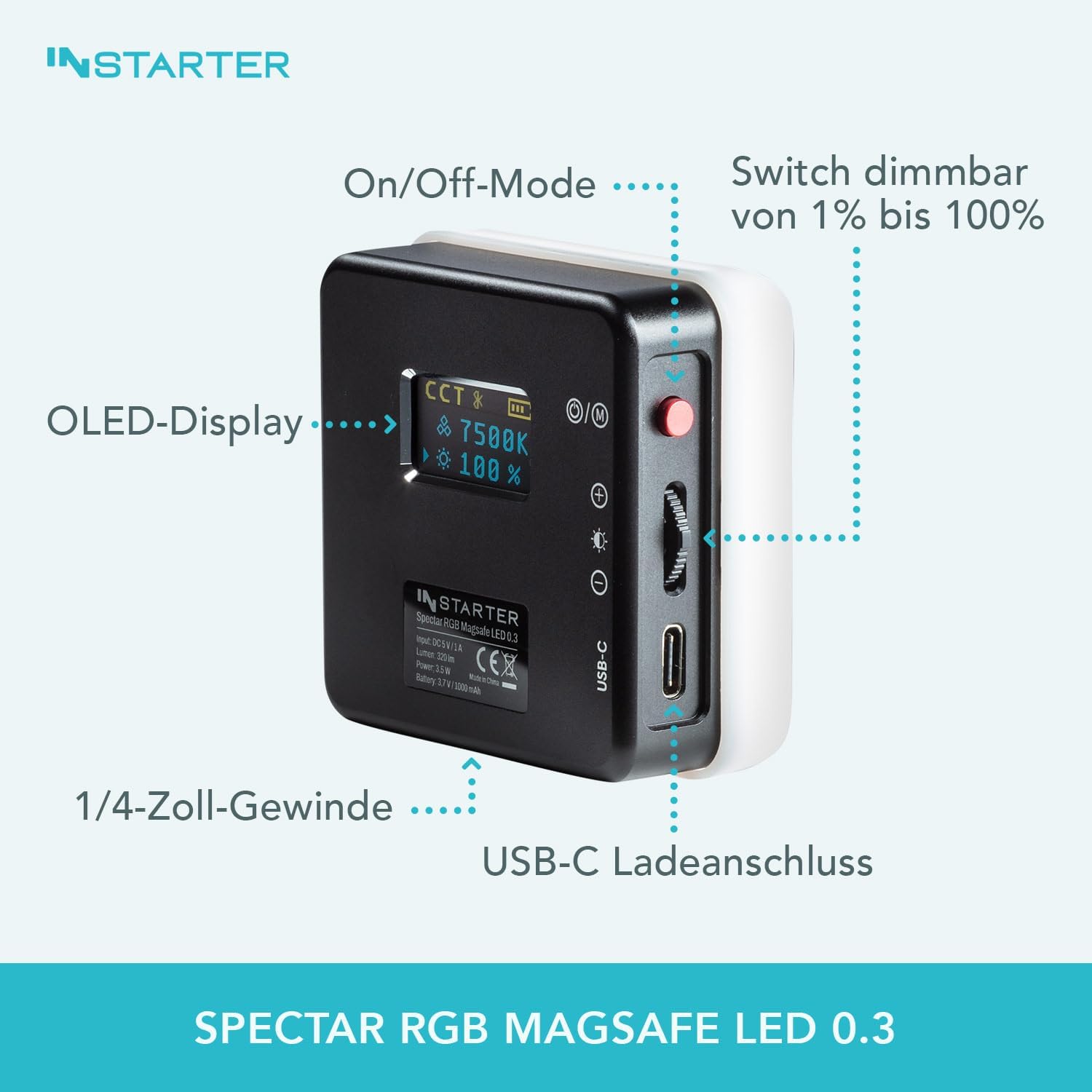
Figure 2: USB-C charging port location.
1.3 Mounting the Light
The Instarter Mini LED Video Light offers flexible mounting options:
- Magnetic Attachment: The light features a strong magnet, making it compatible with Magsafe-enabled iPhones and other metallic surfaces.
- Adhesive Metal Stickers: For non-metallic surfaces, attach one of the provided metal adhesive stickers to your device or desired surface, then magnetically attach the LED light.
- 1/4-inch Thread: The light includes a 1/4-inch thread for mounting on tripods, light stands, or other camera accessories.

Figure 3: Magnetic attachment to a smartphone.
2. Operating Instructions
2.1 Power On/Off and Basic Controls
Locate the power button on the side of the device. Press and hold to power on or off. Use the control buttons to navigate through settings and adjust parameters. The OLED display provides real-time information on current settings.
Figure 4: OLED display and control interface.
2.2 Adjusting Brightness and Color Temperature (Bi-Color Mode)
In bi-color mode, you can adjust the brightness from 1% to 100% and the color temperature from 3,200 K (warm white) to 7,500 K (cold white). Use the designated control buttons to increase or decrease these values. The OLED display will show the current brightness percentage and color temperature.
2.3 RGB Color Spectrum and Effects
The light offers a 360° RGB color spectrum for creative lighting. Switch to RGB mode using the mode button. You can select from 9 creative lighting effects, such as police car, candlelight, and more, to enhance your content.

Figure 5: Overview of RGB features and app control.
2.4 Using the Diffuser
Attach the included diffuser to the front of the LED light to create a softer, more even light output. This is particularly useful for portrait shots and reducing harsh shadows.
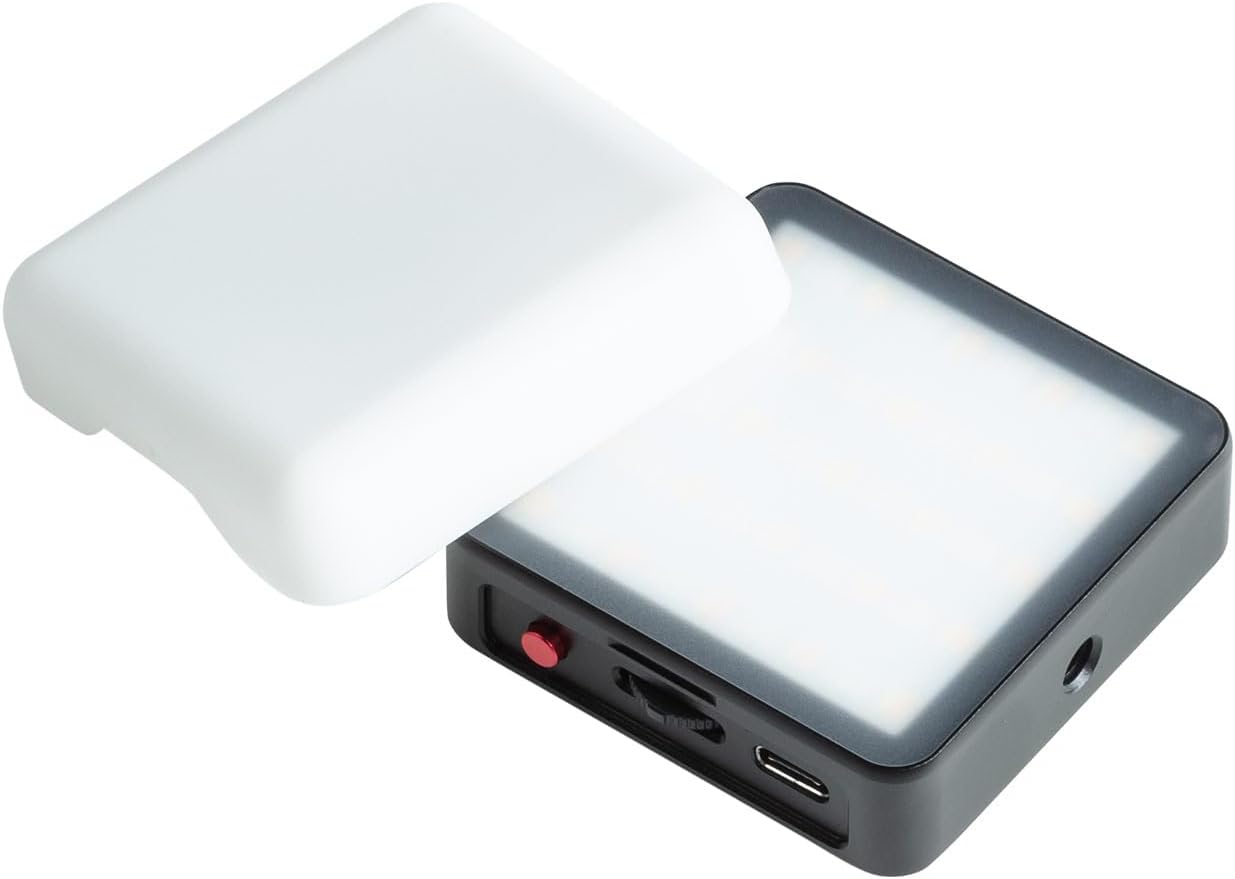
Figure 6: LED light with detachable diffuser.
2.5 App Control
Download the free Instarter app for iOS and Android devices to control the LED light remotely. The app allows for comprehensive control over brightness, color temperature, RGB colors, and lighting effects. It also supports controlling multiple Instarter LEDs simultaneously for complex lighting setups.
Refer to the app's in-app guide for detailed instructions on pairing and advanced features.
3. Maintenance
3.1 Cleaning
To clean the device, use a soft, dry cloth. Do not use liquid cleaners, aerosols, or solvents, as these may damage the surface or internal components. Ensure the device is powered off and disconnected from any power source before cleaning.
3.2 Storage
When not in use, store the LED video light in a cool, dry place, away from direct sunlight and extreme temperatures. Keep it protected from dust and moisture. If storing for an extended period, ensure the battery is partially charged (around 50%) to prolong its lifespan.
4. Troubleshooting
If you encounter issues with your Instarter Mini LED Video Light, please refer to the following common problems and solutions:
| Problem | Possible Cause | Solution |
|---|---|---|
| Device does not power on. | Battery is depleted. | Charge the device using the supplied USB-C cable. Ensure the charging cable and power source are functional. |
| Light output is dim or inconsistent. | Low battery; incorrect brightness setting. | Recharge the device. Adjust the brightness setting using the control buttons or the app. |
| Cannot connect to the Instarter app. | Bluetooth is off; app not updated; device not in pairing mode. | Ensure Bluetooth is enabled on your smartphone. Update the Instarter app to the latest version. Restart both the LED light and your smartphone. Follow app instructions for pairing. |
| Magnetic attachment is weak. | Surface is not metallic or too thick. | Ensure the surface is metallic or use the provided metal adhesive stickers. Avoid attaching to excessively thick materials. |
If the problem persists after trying these solutions, please contact customer support.
5. Technical Specifications
| Feature | Detail |
|---|---|
| Model Number | 23264 |
| Product Dimensions | 6L x 6W x 1.8H centimeters (6 x 6 x 1.8 cm) |
| Weight | 90g (device only), 160g (with packaging) |
| Battery Capacity | 1,000 mAh |
| Run Time (Full Power) | Up to 75 minutes |
| Run Time (Half Power) | Up to 3 hours |
| Color Temperature Range | 3,200 K (warm white) to 7,500 K (cold white) |
| Color Rendering Index (CRI) | 96+ |
| RGB Spectrum | 360° |
| Connectivity | USB Type C (charging), Bluetooth (app control) |
| Mounting Options | Magnetic (Magsafe compatible), 1/4-inch thread |
| Manufacturer | Instarter |

Figure 7: Compact dimensions and weight of the LED light.
6. Warranty Information
Instarter products are manufactured to high-quality standards. This product is covered by a limited warranty against defects in materials and workmanship from the date of purchase. Please retain your proof of purchase for warranty claims.
The warranty does not cover damage caused by misuse, accident, unauthorized modification, or normal wear and tear. For specific warranty terms and conditions, please refer to the warranty card included with your product or visit the official Instarter website.
7. Customer Support
If you have any questions, require technical assistance, or need to report a problem with your Instarter Mini LED Video Light, please contact our customer support team.
Contact Information:
- Website: www.instarter.com (Please check the official website for the most up-to-date contact details.)
- Email: support@instarter.com (Example email, please refer to product packaging or official website for actual email.)
When contacting support, please have your product model number (23264) and proof of purchase ready.