
Introduction
This manual provides comprehensive instructions for the assembly, operation, and maintenance of your Union & Scale FlexFit Hyken Mesh Task Chair. Designed for comfort and support during long workdays, this chair features a contoured mesh back, adjustable armrests, integrated lumbar support, and a waterfall padded seat. Please read this manual thoroughly before assembly and use to ensure proper function and longevity of your chair.
Key Features
- Contoured Mesh Back: Channels cool air for enhanced comfort.
- Adjustable Armrests: Height-adjustable to provide customized support for forearms and shoulders.
- Integrated Lumbar Support: Curves along the back to help maintain proper posture.
- Waterfall Padded Seat: Cushions to prevent fatigue during extended use.
- Synchro-Tilt Mechanism: Automatically adjusts reclining resistance.
- Four-in-One Control: Allows adjustment of seat height, slider control, and back locking.
- Durable Base: Rated for up to 275 lbs. based on an 8-hour workday.
- 360° Swivel Casters: Provides easy mobility.
- ANSI/BIFMA Standards: Meets or exceeds industry standards for performance and safety.

Figure 1: Front view of the Union & Scale FlexFit Hyken Mesh Task Chair, showcasing its black mesh design and silver base.

Figure 2: Side view illustrating the height and angle adjustable headrest, breathable mesh upholstery, and height-adjustable lumbar support designed for back comfort.

Figure 3: This image shows the chair's dynamic recline capability, tilt tension adjustment, and three reclining lock positions, along with adjustable seat height.

Figure 4: A close-up view of the height-adjustable armrests, featuring soft arm pads designed to support forearms and shoulders.
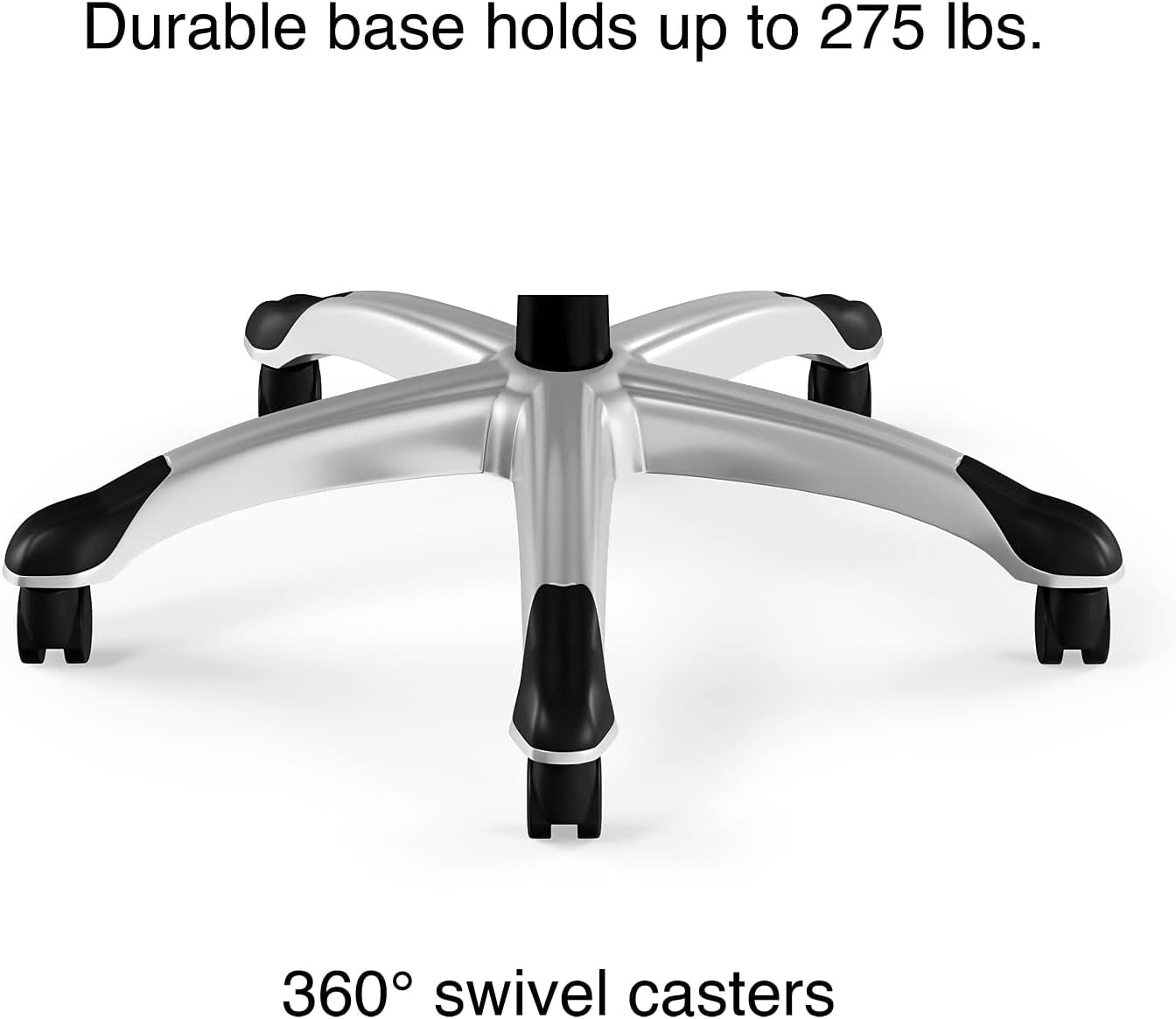
Figure 5: The durable five-star base of the chair, equipped with 360° swivel casters for easy movement, capable of supporting up to 275 lbs.
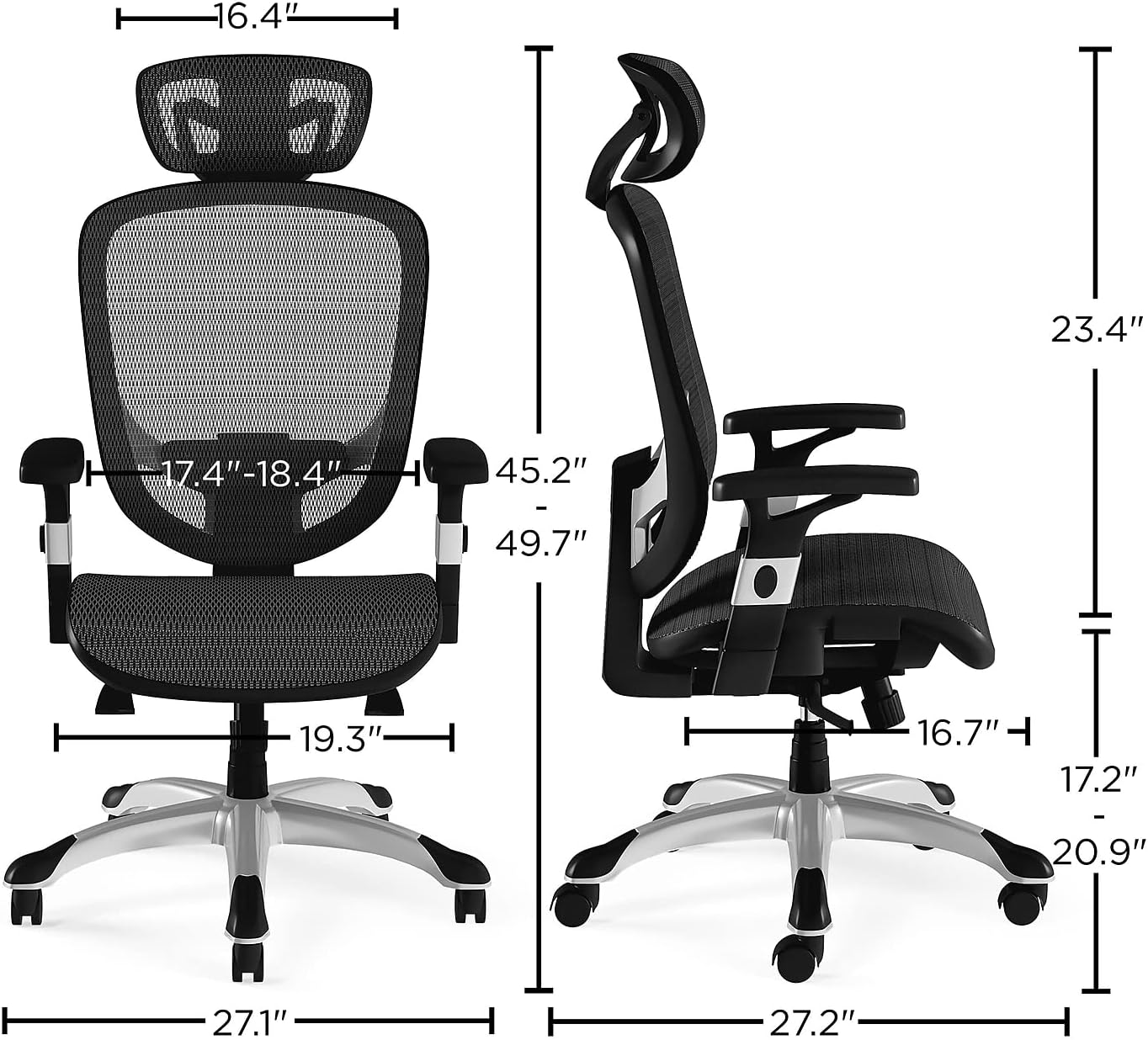
Figure 6: A diagram illustrating the overall dimensions of the chair, including height, width, depth, and seat height ranges.
Setup and Assembly
Assembly is required for this chair. Please follow the instructions provided in the separate assembly guide included with your product. Ensure all components are present and undamaged before beginning assembly. Typically, assembly involves attaching the base to the seat, connecting the backrest, and securing the armrests. It is recommended to assemble the chair on a soft, clean surface to prevent scratches.
Estimated Assembly Time: Approximately 10-20 minutes.
Tools Required: Usually an Allen wrench (often included).
Operating Instructions
Your FlexFit Hyken Mesh Task Chair offers multiple adjustment points to customize your seating experience for optimal comfort and ergonomic support.
1. Seat Height Adjustment
- Locate the lever on the right side, beneath the seat.
- To raise the seat: Lift the lever while taking your weight off the seat. The seat will rise automatically.
- To lower the seat: Lift the lever while remaining seated. The seat will lower under your weight.
- Release the lever to lock the seat at the desired height.
2. Armrest Height Adjustment
- Press the button located on the side of each armrest support.
- While holding the button, slide the armrest up or down to your preferred height.
- Release the button to lock the armrest in place.
3. Headrest Adjustment
- The headrest can be adjusted for both height and angle.
- Gently push or pull the headrest to adjust its angle.
- To adjust height, firmly pull the headrest upwards or push downwards. It will click into various positions.
4. Lumbar Support Adjustment
- The integrated lumbar support is designed to conform to your back.
- Adjustments for lumbar support are typically integrated with the backrest's overall design and may not have separate controls. Ensure the backrest is positioned correctly for optimal support.
5. Tilt Tension and Lock
- Tilt Tension: The tension knob located underneath the seat (usually at the front) allows you to adjust the resistance of the chair for reclining. Turn clockwise to increase tension (harder to recline) and counter-clockwise to decrease tension (easier to recline).
- Tilt Lock: Use the lever on the left side (or combined with the seat height lever) to lock the backrest in an upright position or in one of the three reclining lock positions. Push the lever in to lock, pull out to unlock and allow tilting.
Maintenance
Regular maintenance will help prolong the life and appearance of your chair.
- Cleaning Mesh: Use a soft cloth dampened with mild soap and water. Do not use abrasive cleaners or solvents.
- Cleaning Base and Casters: Wipe with a damp cloth. Periodically check casters for hair or debris and clean as needed to ensure smooth rolling.
- Hardware: Periodically check all screws and bolts to ensure they are tight. Retighten if necessary.
- Avoid Direct Sunlight: Prolonged exposure to direct sunlight can cause the mesh and plastic components to fade or degrade.
Troubleshooting
| Problem | Possible Cause | Solution |
|---|---|---|
| Chair does not adjust height. | Gas lift malfunction or lever not fully engaged. | Ensure the height adjustment lever is fully pulled. If the issue persists, the gas lift may need replacement. Contact customer support. |
| Chair wobbles or feels unstable. | Loose screws or uneven assembly. | Check and tighten all assembly screws. Ensure the base is properly attached and level. |
| Casters do not roll smoothly. | Debris (hair, lint) caught in casters. | Turn the chair over and carefully remove any debris from the caster wheels. |
| Backrest does not recline or lock. | Tilt lock mechanism engaged or tension too high. | Disengage the tilt lock lever. Adjust the tilt tension knob counter-clockwise to reduce resistance. |
Specifications
- Overall Dimensions: 45.28-49.76"H x 27.1"W x 27.2"D
- Seat Dimensions: 17.24-20.98"H x 19.37"W x 16.77"D
- Back Dimensions: 16.42"W x 23.43"D
- Weight Capacity: Up to 275 lbs (based on 8-hour workday)
- Item Weight: 48 pounds
- Material: Mesh back and seat
- Color: Black
- Compliance: Meets or exceeds ANSI/BIFMA standards
Warranty and Support
This Union & Scale FlexFit Hyken Mesh Task Chair comes with a 7-year manufacturer limited warranty. Please retain your proof of purchase for warranty claims.
For product support, troubleshooting assistance, or to inquire about warranty service, please refer to the contact information provided on your purchase receipt or visit the official Union & Scale website.
You can also find general customer support information on the Amazon product page under the "Customer Support" section.

Figure 7: The chair is backed by a 7-Year Limited Warranty, ensuring long-term reliability.


