
Introduction
Welcome to the instruction manual for your Nautica Men's Tin Can Bay Watch, Model NAPTCS304. This guide provides essential information on how to set up, operate, maintain, and troubleshoot your new timepiece. Please read these instructions carefully to ensure proper use and longevity of your watch.
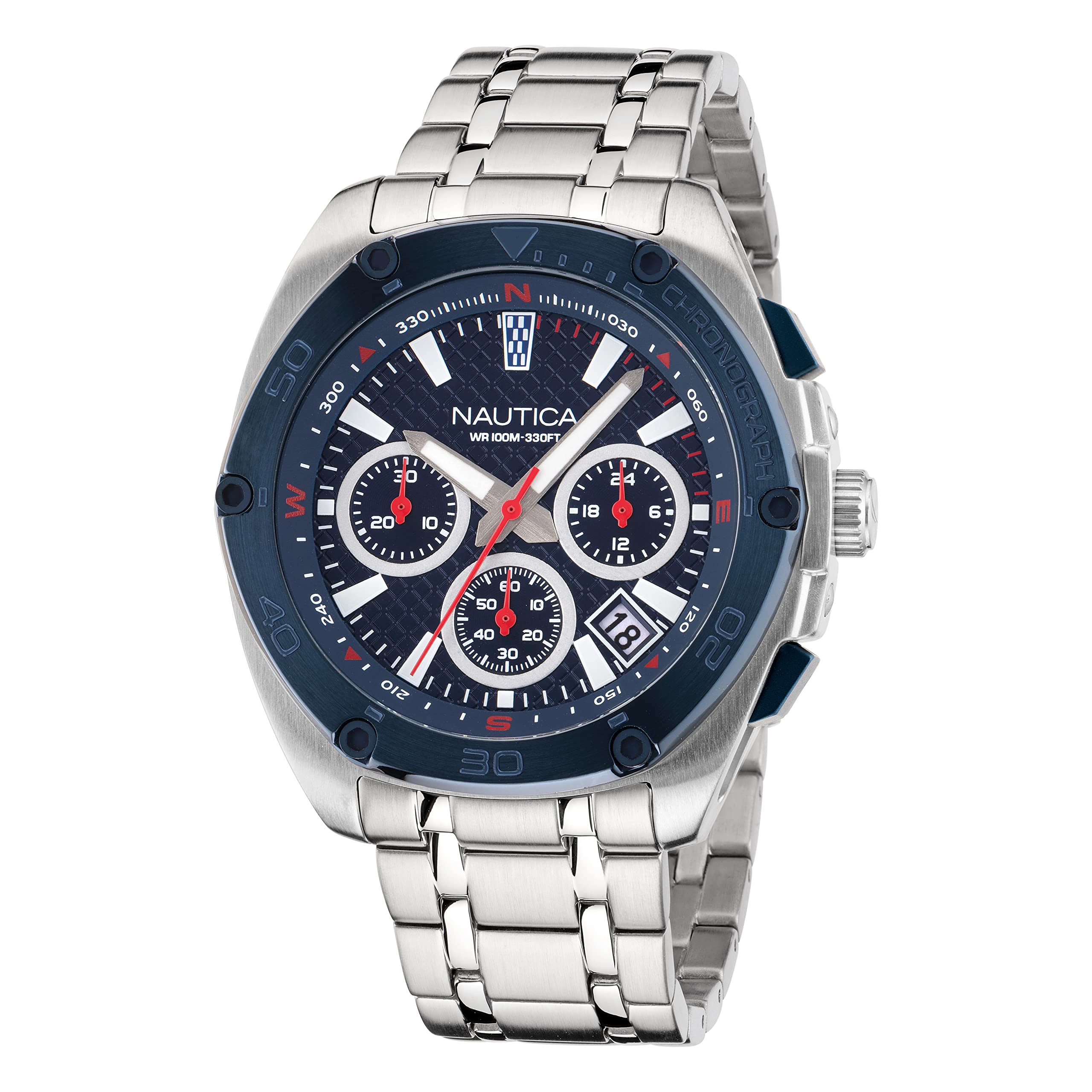
Image: Front view of the Nautica Men's Tin Can Bay Watch, Model NAPTCS304, featuring a blue dial, silver-tone case, and blue silicone strap.
Setup
1. Unboxing and Initial Inspection
Upon opening the packaging, ensure all components are present: the Nautica Tin Can Bay Watch, and any included documentation. Inspect the watch for any visible damage.
2. Setting the Time
- Pull the crown (located on the right side of the watch case) out to position 2 (the outermost position).
- Turn the crown clockwise or counter-clockwise to set the hour and minute hands to the desired time.
- Push the crown back into position 0 (normal operating position) to start the watch.
3. Setting the Date
- Pull the crown out to position 1 (the first click).
- Turn the crown clockwise to adjust the date. Avoid setting the date between 9 PM and 3 AM, as this can interfere with the automatic date change mechanism.
- Once the correct date is displayed, push the crown back into position 0.
4. Strap Adjustment
The watch comes with an adjustable silicone strap. Adjust the buckle to achieve a comfortable and secure fit on your wrist. Ensure the strap is not too tight to allow for proper circulation.
Operating Instructions
1. Chronograph Function
Your Nautica Tin Can Bay Watch features a chronograph movement for measuring elapsed time. The watch has three sub-dials and two pushers (buttons) on the side of the case, in addition to the crown.

Image: Side view of the watch, highlighting the crown and chronograph pushers for operation.
- Start/Stop: Press the top pusher (A) to start the chronograph. Press it again to stop.
- Reset: While the chronograph is stopped, press the bottom pusher (B) to reset all chronograph hands to their zero positions.
- The sub-dials typically measure seconds, minutes, and hours of elapsed time. Refer to the specific dial markings for precise readings.
2. Luminous Hands
The hour and minute hands, along with certain markers, are treated with luminous infill. This material absorbs light and glows in low-light conditions, improving readability. Exposure to bright light will enhance the glow effect.
3. Water Resistance (100m / 330ft)
Your watch is water-resistant to 100 meters (330 feet). This rating makes it suitable for swimming, snorkeling, and showering. Important: Ensure the crown is fully pushed in and screwed down (if applicable) before exposing the watch to water. Do not operate the crown or pushers while the watch is wet or submerged, as this can compromise the water resistance.
Maintenance
1. Cleaning Your Watch
- Wipe the watch case and crystal with a soft, damp cloth. For the silicone strap, mild soap and water can be used.
- Avoid using harsh chemicals, solvents, or abrasive cleaning materials, as these can damage the watch's finish or seals.
- After exposure to saltwater, rinse the watch thoroughly with fresh water and dry it with a soft cloth.
2. Battery Replacement
The watch is powered by a battery. When the battery runs low, the watch may stop or the second hand may jump in irregular intervals. Battery replacement should be performed by a qualified watch technician to ensure the water resistance seal is properly maintained.
3. Storage
When not wearing your watch, store it in a cool, dry place away from direct sunlight and extreme temperatures. The original watch box is ideal for storage.
Troubleshooting
- Watch Not Running: Ensure the crown is fully pushed in. If the watch still does not run, the battery may need replacement.
- Date Not Changing Correctly: Manually adjust the date as described in the "Setting the Date" section. If the issue persists, ensure the time is set correctly (AM/PM).
- Condensation Under Crystal: If you notice moisture or condensation under the watch crystal, this indicates a breach in the water resistance. Immediately seek professional service to prevent further damage to the movement.
- Chronograph Hands Not Resetting to Zero: This may require a chronograph hand calibration. Consult a professional watch repair service.
For issues not covered here, please contact Nautica customer support or a certified watch repair center.
Specifications
| Feature | Detail |
|---|---|
| Model Name | Tin Can Bay |
| Model Number | NAPTCS304 |
| Case Material | Stainless Steel (85% recycled) |
| Case Diameter | 44 Millimeters |
| Case Thickness | 11.4 Millimeters |
| Crystal | Mineral Glass |
| Movement Type | Quartz Chronograph |
| Water Resistance Depth | 100 Meters (330 Feet) |
| Band Material Type | Silicone |
| Band Width | 22 Millimeters |
| Dial Color | Blue |
| Additional Features | Date Display, Luminous Hands |
| Power Source | Battery Powered |
| Closure Type | Buckle |
Warranty and Support
Warranty Information
Your Nautica Tin Can Bay Watch is covered by a Limited Warranty. Please refer to the warranty card included with your purchase for specific terms, conditions, and duration of coverage. This warranty typically covers manufacturing defects but does not cover damage resulting from improper use, accidents, or unauthorized repairs.
Customer Support
For further assistance, technical support, or warranty claims, please contact Nautica customer service. You can find contact information on the official Nautica website or through your retailer.
Visit the official Nautica Store for more information: Nautica Store