
1. Introduction
The Jecod Jebao CF-45U UVC Canister Filter is designed to provide comprehensive multi-stage filtration for freshwater and marine aquariums. This system ensures clear and healthy water by effectively removing physical debris, converting harmful toxins, and clarifying water with ultraviolet light.
Key features of this filter include:
- Dual filtration system for superior water quality.
- Suitable for aquariums and ponds up to 1000 gallons.
- Recommended for use with pond pumps capable of pumping between 850 to 1250 Gallons per Hour (GPH).
- Integrated ultraviolet (UVC) lamp for algae clarification, with an independent switch for control.
- Thickened ABS engineering plastic construction for high resistance, no deformation, and leak-proof operation.
- Integrated rotor shaft design for quieter motor operation.
- Convenient backwash feature for simplified maintenance.

Image 1: The Jecod Jebao CF-45U UVC Canister Filter, showcasing its compact design and UVC clarifier label.
2. Safety Instructions
- Read all instructions carefully before installation and operation.
- Ensure the power supply matches the voltage specified on the filter label (DC 24V).
- Always disconnect power to the filter and any other aquarium equipment before performing maintenance or handling the unit.
- Do not operate the filter if the power cord or plug is damaged.
- Do not operate the UVC lamp outside of the filter housing, as direct exposure to UV light can be harmful to eyes and skin.
- This appliance is intended for indoor use only and for filtering water in aquariums or ponds.
- Keep out of reach of children.
- Ensure the filter is placed on a stable, level surface below the water level of the aquarium to facilitate proper priming and operation.
3. Product Components
Familiarize yourself with the various parts of your Jecod Jebao CF-45U filter before assembly.
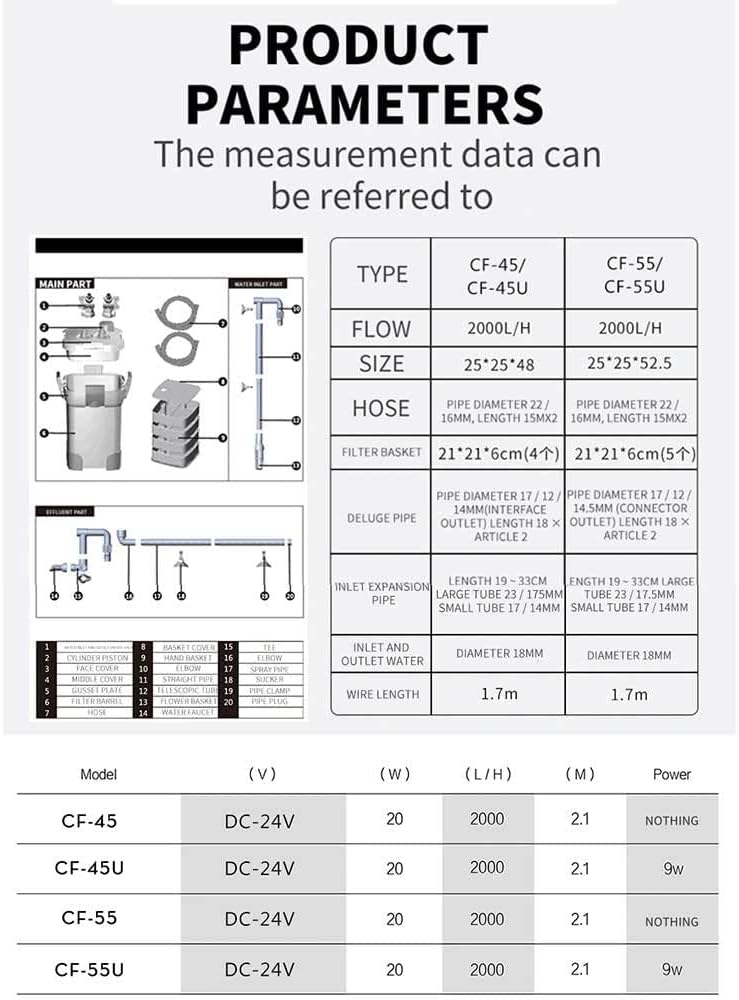
Image 2: Exploded view of the Jecod Jebao CF-45U filter components, including main parts, water inlet parts, and fitting parts.
The filter consists of the main filter unit, filter media baskets, inlet/outlet connections, and various fittings. Refer to the diagram above for a visual representation of the components.
Main Parts:
- Filter Head with integrated pump and UVC unit
- Filter Canister/Bucket
- Filter Media Baskets (4 layers)
- Lid Clamps
Water Inlet/Outlet Parts:
- Inlet/Outlet Connectors
- Hoses (not always included, check packaging)
- Spray Bar / Deluge Pipe
- Inlet Pipe with Strainer
Filter Media (Standard Configuration):
- White Filter Cotton (for fine impurities)
- Bio-balls / Ceramic Rings (for biological filtration)
- Coarse Filter Sponges (for rough impurities)
4. Setup Instructions
- Unpack and Inspect: Carefully remove all components from the packaging. Inspect for any damage during transit.
- Prepare Filter Media: Rinse all filter media (foam, bio-balls, ceramic rings) thoroughly with clean water to remove any manufacturing dust. Arrange the media into the filter baskets according to the recommended order (typically coarse mechanical at the bottom, biological in the middle, fine mechanical/chemical at the top).
- Assemble Filter Baskets: Stack the filled filter baskets into the main filter canister. Ensure they are seated correctly.
- Secure Filter Head: Place the filter head onto the canister, ensuring the gasket is properly seated. Secure the lid clamps firmly to create a watertight seal.
- Connect Hoses: Attach the inlet and outlet hoses to the corresponding connectors on the filter head. The recommended hose size is 1 inch, but the connectors are compatible with 1/2", 3/4", and 1" hoses. Secure hoses with clamps if provided.
- Install Inlet/Outlet Pipes: Position the inlet pipe (with strainer) and outlet pipe (e.g., spray bar) inside your aquarium. Ensure the inlet is submerged and the outlet provides adequate water circulation.
- Position Filter: Place the filter canister on a stable, level surface below the water level of your aquarium. This is crucial for proper priming and operation.
- Prime the Filter: Open the inlet and outlet valves (if present). The filter may require manual priming to initiate water flow. This can involve filling the canister with water before sealing, or using a priming button/lever if available. Some effort may be required to establish the initial siphon.
- Connect Power: Once water flow is established and there are no leaks, connect the power adapter to the filter and then plug it into a suitable electrical outlet.
5. Operating Instructions
After successful setup and priming, the filter will begin circulating and purifying your aquarium water.
- Initial Operation: Monitor the filter for the first few hours to ensure proper function and detect any leaks.
- UVC Lamp Control: The Jecod Jebao CF-45U features an independent switch for the ultraviolet (UVC) lamp. Turn this switch ON to activate the UVC clarifier for algae control and water sterilization. Turn OFF if not needed or during medication treatments that could be affected by UV light.
- Flow Adjustment: If your filter system includes flow control valves, adjust them to achieve the desired water circulation rate for your aquarium.
- Quiet Operation: The integrated rotor shaft design contributes to quiet operation. You should primarily hear the sound of water movement.
6. Maintenance
Regular maintenance is essential for the optimal performance and longevity of your Jecod Jebao CF-45U filter.

Image 3: Diagram illustrating the five-fold filtration process within the Jecod Jebao CF-45U, showing water flow through different media layers.
Filter Media Cleaning:
- Mechanical Filtration (Foam Discs/Sponges): These media collect physical debris. They should be rinsed or replaced regularly (e.g., every 2-4 weeks, depending on bioload) to prevent clogging and maintain flow. Rinse them thoroughly with old aquarium water during a water change to preserve beneficial bacteria.
- Biological Filtration (Bio-balls/Ceramic Rings): These media house beneficial bacteria. Avoid aggressive cleaning. If they become excessively dirty, gently rinse them in old aquarium water to remove sludge without destroying the bacterial colonies. Do not use tap water, as chlorine can kill beneficial bacteria.
- Chemical Filtration (if used): Replace chemical media (e.g., activated carbon) as per manufacturer's recommendations, typically every 2-4 weeks, as they become exhausted.
UVC Lamp Maintenance:
- The UVC lamp's effectiveness diminishes over time. It is recommended to replace the UVC bulb every 6-12 months, even if it still appears to be glowing.
- Before replacing, always disconnect power. Carefully remove the old bulb and insert the new one, ensuring it is properly seated.
- Periodically clean the quartz sleeve surrounding the UVC lamp to ensure maximum UV penetration.

Image 4: Illustration of the UVC function, showing the elimination of bacteria and algae for water purification.
Backwash Feature:
- The backwash feature allows for quick cleaning of accumulated debris without disassembling the filter. Consult your specific model's instructions for activating the backwash function. This typically involves redirecting water flow to flush out waste.
General Cleaning:
- Periodically clean the impeller and impeller housing in the filter head to ensure smooth and quiet operation.
- Inspect hoses and connections for any signs of wear, kinks, or leaks.
7. Troubleshooting
If you encounter issues with your Jecod Jebao CF-45U filter, refer to the following common problems and solutions:
| Problem | Possible Cause | Solution |
|---|---|---|
| Filter not priming / No water flow | Air in the system; improper setup; filter not below water level; clogged inlet. | Ensure all connections are secure and airtight. Manually fill the filter with water before starting. Verify filter is below aquarium water level. Check inlet strainer for obstructions. |
| Reduced water flow | Clogged filter media; kinked hoses; obstructed impeller. | Clean or replace filter media. Straighten hoses. Inspect and clean the impeller. |
| Cloudy water | Clogged filter media; ineffective UVC lamp; insufficient biological filtration. | Clean filter media. Check UVC lamp operation and consider replacement. Ensure proper biological media is present and established. |
| Unusual noise / Vibration | Obstructed or damaged impeller; air in the system; filter not stable. | Disconnect power, inspect and clean the impeller. Re-prime the filter to remove air. Place the filter on a stable, level surface. |
| Leaks | Improperly sealed lid; loose hose connections; damaged O-rings/gaskets. | Ensure lid clamps are fully secured. Tighten all hose connections. Inspect and replace any damaged O-rings or gaskets. |
8. Specifications
Detailed technical specifications for the Jecod Jebao CF-45U UVC Canister Filter:
| Feature | Specification |
|---|---|
| Model | CF-45U (PET-CF-45U) |
| Voltage | DC 24V |
| Power Consumption | 20W |
| Flow Rate | 528 GPH (2000 L/H) |
| Max Head | 8.2 ft (2.1 m) |
| Filter Baskets | 4 Layers |
| Inlet/Outlet Size | 1/2", 3/4", 1" (1" recommended) |
| Wire Length | 1.7 m |
| Parcel Dimensions | 41.27 x 34.29 x 26.67 cm |
| Item Weight | 6.44 kg |
| Manufacturer | Jecod |
| First Available | Jan. 27, 2023 |
9. Warranty Information
Warranty information for the Jecod Jebao CF-45U UVC Canister Filter is not explicitly provided in the available product details. Please refer to the product packaging or contact the retailer/manufacturer directly for specific warranty terms and conditions.
10. Customer Support
For technical assistance, replacement parts, or further inquiries regarding your Jecod Jebao CF-45U filter, please contact the manufacturer, Jecod, or your authorized retailer. Contact details are typically found on the product packaging or the manufacturer's official website.