
1. Introduction
This manual provides essential instructions for the safe and effective use of your Technical Precision replacement battery, model AX-7SA3-5. This battery is designed as a compatible replacement for the Black & Decker VP940 VERSAPAK Rotary Tool Cordless Tool Battery. Please read this manual thoroughly before installation and operation to ensure optimal performance and safety.
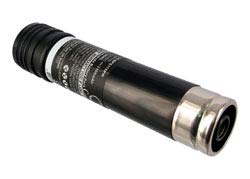
Image 1.1: Technical Precision Replacement Battery. This image displays the replacement battery unit, highlighting its compact design and connection terminals.
2. Safety Information
Always observe the following safety precautions when handling and using the battery:
- Do not disassemble, open, or shred the battery pack.
- Do not expose the battery to heat or fire. Avoid storage in direct sunlight.
- Do not short-circuit the battery. Do not store battery packs haphazardly in a box or drawer where they may short-circuit each other or be short-circuited by other metal objects.
- Do not remove the battery from its original packaging until required for use.
- Do not subject battery packs to mechanical shock.
- In the event of a battery leaking, do not allow the liquid to come into contact with the skin or eyes. If contact has been made, wash the affected area with copious amounts of water and seek medical advice.
- Do not use any charger other than that specifically provided for use with the equipment.
- Observe the plus (+) and minus (-) marks on the battery and equipment and ensure correct use.
- Keep battery packs out of the reach of children.
- Seek medical advice immediately if a battery pack has been swallowed.
- Always purchase the correct battery pack for the equipment.
- Keep battery packs clean and dry.
- Wipe the battery pack terminals with a clean dry cloth if they become dirty.
- Do not leave a battery pack on prolonged charge when not in use.
- After extended periods of storage, it may be necessary to charge and discharge the battery pack several times to obtain maximum performance.
- Recharge only with the charger specified by the manufacturer.
3. Package Contents
Your package should contain the following item:
- 1 x Technical Precision Replacement Battery (Model: AX-7SA3-5)
4. Setup & Installation
Follow these steps to install the replacement battery into your compatible Black & Decker VERSAPAK rotary tool:
- Ensure Tool is Off: Before attempting to replace the battery, ensure your Black & Decker VERSAPAK rotary tool is powered off and disconnected from any power source.
- Remove Old Battery: Locate the battery compartment on your rotary tool. Depending on the model, there may be a latch or button to release the existing battery. Carefully remove the old battery.
- Insert New Battery: Align the Technical Precision replacement battery (Model AX-7SA3-5) with the battery compartment. Ensure the positive (+) and negative (-) terminals match the tool's connectors.
- Secure Battery: Gently push the battery into the compartment until it clicks into place or is firmly seated. Ensure it is secure and does not wobble.
- Test Functionality: After installation, attempt to power on your rotary tool to confirm the battery is correctly installed and providing power.
Note: If the tool does not power on, re-check the battery's seating and ensure it is fully charged.
5. Charging Instructions
This is a rechargeable battery. To charge your Technical Precision replacement battery, use the original Black & Decker VERSAPAK charger compatible with VP940 batteries.
- Connect Charger: Plug your Black & Decker VERSAPAK charger into a standard electrical outlet.
- Insert Battery: Place the Technical Precision battery into the charging slot of the charger. Ensure it is properly seated.
- Monitor Charging: The charger's indicator light (if available) will typically show when the battery is charging and when it is fully charged. Refer to your original Black & Decker charger manual for specific indicator meanings.
- Remove When Charged: Once the battery is fully charged, remove it from the charger to prevent overcharging, which can reduce battery life.
Important: Do not use incompatible chargers. Using an incorrect charger may damage the battery or pose a safety risk.
6. Operating Instructions
Once the Technical Precision replacement battery is installed and charged, your Black & Decker VERSAPAK rotary tool is ready for use. Operate your tool according to its original manufacturer's instructions.
- Power On/Off: Use the power switch on your rotary tool to turn it on or off.
- Monitor Performance: If you notice a decrease in tool performance or power, it may be an indication that the battery needs recharging.
- Avoid Deep Discharge: For optimal battery life, avoid completely draining the battery before recharging.
7. Maintenance
Proper maintenance ensures the longevity and performance of your replacement battery:
- Cleaning: Keep the battery terminals clean and free of dirt or debris. Use a dry, clean cloth to wipe them if necessary.
- Storage: Store the battery in a cool, dry place away from direct sunlight and extreme temperatures. If storing for extended periods, ensure the battery has a partial charge (around 50%) to prevent deep discharge.
- Regular Use: If the battery is not used for a long time, it is recommended to charge and discharge it periodically to maintain its capacity.
- Disposal: Do not dispose of batteries in household waste. Follow local regulations for proper battery recycling.
8. Troubleshooting
| Problem | Possible Cause | Solution |
|---|---|---|
| Tool does not power on after battery installation. | Battery not fully charged. Battery not properly seated. Tool malfunction. | Ensure battery is fully charged using a compatible charger. Remove and re-insert the battery, ensuring it clicks into place. If the issue persists, consult your tool's manual or contact tool manufacturer. |
| Battery not charging. | Charger not plugged in. Battery not properly inserted into charger. Faulty charger or battery. | Verify the charger is securely plugged into a working outlet. Ensure the battery is correctly seated in the charger. Test with another known good battery/charger if possible. Contact support if issue persists. |
| Reduced run time or power. | Battery needs recharging. Battery nearing end of life. Tool operating under heavy load. | Recharge the battery fully. Consider replacing the battery if it consistently holds less charge. Ensure the tool is used within its intended operating parameters. |
9. Specifications
| Feature | Detail |
|---|---|
| Brand | Technical Precision |
| Model Name | AX-7SA3-5 |
| Model Number | AX-7SA3-5 |
| Compatibility | Black & Decker VP940 VERSAPAK Rotary Tool Cordless Tool Battery |
| Voltage | 3 Volts |
| Reusability | Rechargeable |
| Unit Count | 1.0 Count |
| Manufacturer | Technical Precision |
| Part Type | Replacement Part |
| ASIN | B0BSVM497X |
10. Warranty Information
This Technical Precision replacement battery comes with a 1 Year Manufacturer Warranty. This warranty covers defects in materials and workmanship under normal use. Please retain your proof of purchase for warranty claims.
For warranty service, please contact Technical Precision customer support with your product details and proof of purchase.
11. Customer Support
If you encounter any issues or have questions regarding your Technical Precision replacement battery that are not addressed in this manual, please contact our customer support team.
For the most up-to-date contact information, please visit the official Technical Precision website or refer to your purchase documentation.
Online Resources: Technical Precision Store on Amazon