
1. Introduction
The Xtenzi XTBR14 is an external remote bass gain control knob designed to provide convenient adjustment of your amplifier's secondary gain circuit from the driver's seat. This unit allows for quick and precise bass level adjustments without needing to access the amplifier directly. It includes a 5-meter (16-foot) long connection cable and mounting hardware.
2. Product Overview
The XTBR14 remote control unit consists of a rotary knob for adjusting bass levels, an RJ45 8-pin connector port, and screw mount holes for secure installation. The package includes the bass knob, a 5-meter (196-inch) long RJ45 8-pin flex cable, and mounting screws.

This image displays the Xtenzi XTBR14 bass remote control unit, its accompanying 5-meter (16-foot) RJ45 connection cable, and two black mounting screws. The remote features a rotary knob for bass level adjustment.

A diagram illustrating the key components of the XTBR14. It points out the screw mount holes on the remote unit, the 8-pin flex cable, the mounting screws, and a back view of the remote showing the RJ45 8-pin connector port.
3. Compatibility
The Xtenzi XTBR14 bass remote control is specifically designed for use with select Hifonics amplifier models only. It is crucial to verify compatibility before purchase, as using this remote with an incompatible device may result in improper function or damage.

This image presents a clear list of Hifonics Alpha, Goliath, Brutus (BRX), and Zeus series amplifier models that are compatible with the Xtenzi XTBR14 bass remote control. It also reiterates the warning to ensure compatibility before purchase.
Compatible Hifonics Amplifier Models:
- Alpha Series: A2500.5D, A1000.2D, A1200.1D
- Goliath Series: GA-2500.1D, H35 1700.1D
- Brutus (BRX) Series: BRX116.1D, BRX156.1D, BRX2016.1D, BRX2416.1D, BRX3016.1D, BRX4016.1D, BRX616.4, BRX1616.4, BRX5016.5
- Zeus Series: ZXX-1800.1D, ZRX1816.1D
Compatible Part Numbers: XTBR14, HFR-3

This image highlights the XTBR14's compatibility with select Hifonics amplifiers and includes a crucial warning: 'Make sure Remote Knob Compatible with the Amplifier. It will not work or can cause damages.' It also shows the Xtenzi logo and a legal disclaimer.
4. Setup and Installation
Proper installation ensures optimal performance and safety. Follow these steps for installing your Xtenzi XTBR14 bass remote.
4.1. Amplifier Gain Setting
Before connecting the remote, it is essential to set your amplifier's internal gain. The XTBR14 functions as a secondary gain control and will not increase the amplifier's internal gain setting. Its purpose is to allow you to reduce bass levels as desired, helping to protect your system from square waves and distortion. Set your amplifier's gains for maximum bass levels first, then use the XTBR14 for fine-tuning.
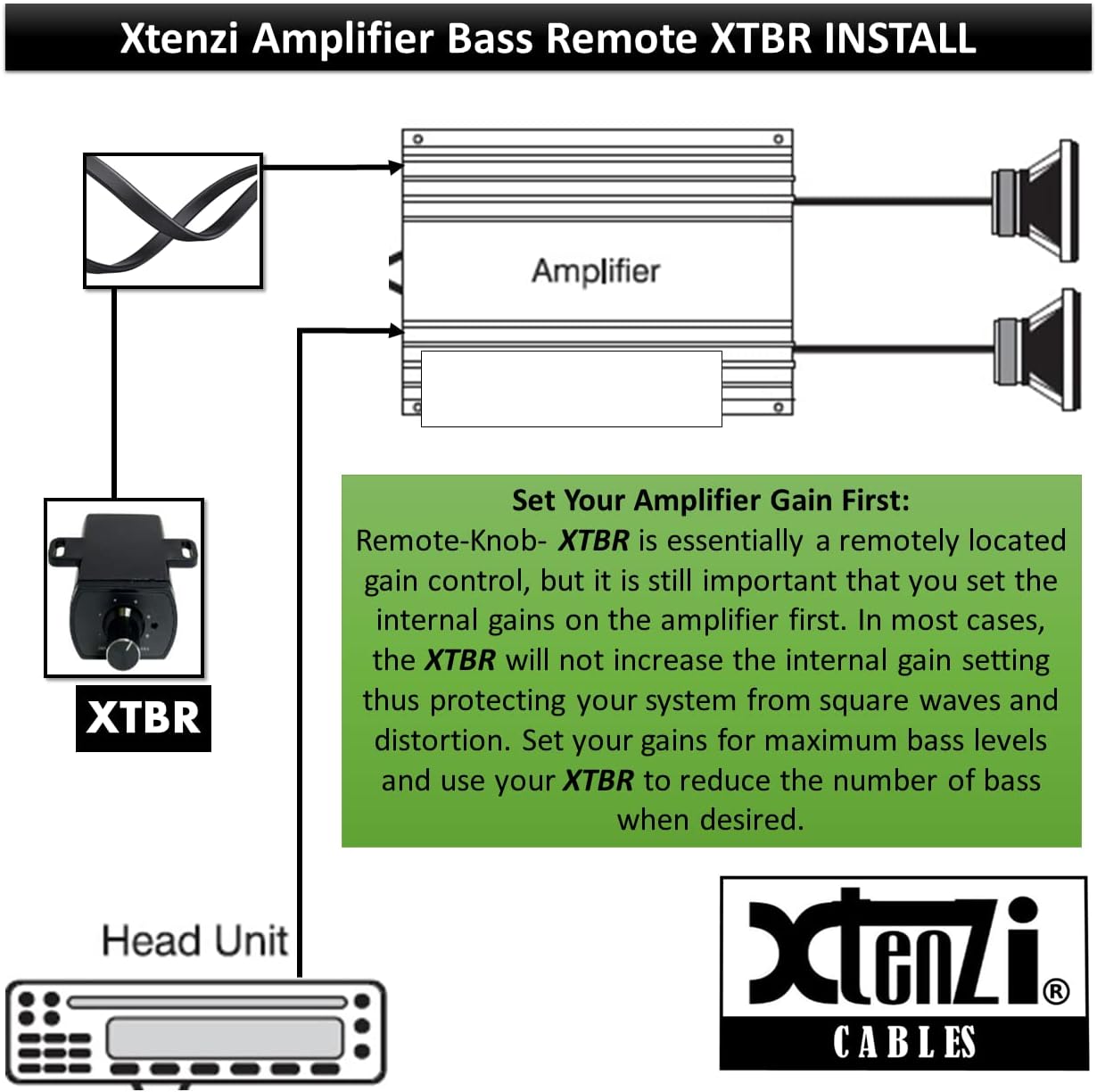
This diagram illustrates the connection of the XTBR14 remote knob between a head unit and an amplifier. It emphasizes the importance of setting the amplifier's internal gain first, explaining that the XTBR will not increase the internal gain setting but allows for bass reduction as desired.
4.2. Remote Installation
- Choose a Location: Select a convenient location for the bass knob that is easily accessible from the driver's seat but out of the way. Common installation spots include unused dash locations, inside the center console, or on the trim panel below the steering wheel. Some models can be flush-mounted, while others are designed for surface mounting with the entire box visible.
- Route the Cable: Route the 5-meter (16-foot) long connection cable from your chosen remote location to the amplifier. Ensure the cable is routed safely, away from moving parts, heat sources, and potential pinch points.
- Connect to Amplifier: Connect one end of the RJ45 8-pin cable to the amplifier's dedicated 'REMOTE LEVEL PORT' connector.
- Connect to Remote: Connect the other end of the RJ45 8-pin cable to the port on the XTBR14 remote unit.
- Secure the Remote: Use the provided mounting screws to securely fasten the XTBR14 remote unit in your chosen location.

A comprehensive diagram showing the typical installation path for the XTBR14 bass remote within a vehicle. It depicts the remote's connection to the amplifier, which is then connected to the car battery, head unit, and speakers. The diagram also provides guidance on choosing an installation location for the knob and routing the cable.
Note: Plugging in the remote bass control overrides the BASS EQ Control on the amplifier's side panel.
5. Operating Instructions
Once installed, the XTBR14 allows for easy adjustment of your amplifier's bass output. Simply turn the knob clockwise to increase the bass level or counter-clockwise to decrease it. This provides on-the-fly control over your audio system's bass response from your driving position.
6. Maintenance
The Xtenzi XTBR14 requires minimal maintenance. Keep the unit clean and free from dust and debris. Avoid exposing it to excessive moisture or extreme temperatures. Ensure the connection cable remains securely plugged into both the remote and the amplifier.
7. Troubleshooting
If you experience issues with your XTBR14, consider the following:
- No Bass Control: Verify that the XTBR14 is correctly connected to the amplifier's 'REMOTE LEVEL PORT'. Ensure the amplifier itself is powered on and functioning correctly. Confirm that your amplifier model is listed as compatible.
- Intermittent Control: Check the RJ45 cable connections at both ends for looseness or damage. Replace the cable if necessary.
- Damage: If the unit appears physically damaged, it may need replacement.
If problems persist after checking these points, consult a professional car audio technician.
8. Specifications
| Model Number | XTBR14 |
| Cable Length | 5 meters (16 feet / 196 inches) |
| Cable Type | 8-PIN RJ45 Flex Cable (Straight Wire, non-flipped) |
| Color | Black |
| Item Weight | 5.6 ounces |
| Package Dimensions | 8.43 x 5.35 x 1.57 inches |
| Max Number of Supported Devices | 1 |
9. Safety Information
This remote control is designed to work only with the specified compatible amplifier models. Do not attempt to use this product with different amplifier brands or models not listed in the compatibility section. Doing so may cause the device to malfunction or result in damage to your audio system components.
10. Support
For further assistance or inquiries regarding your Xtenzi XTBR14 bass remote control, please contact Xtenzi customer support. Refer to the product packaging or the Xtenzi official website for contact details.