1. Introduction and Overview
This manual provides essential information for the installation, operation, and maintenance of your Vinka DR23 Electrical Bicycle Display. The DR23 display is designed for Vinka motor systems and utilizes a 6-prong wire connector for seamless integration. It serves as the primary interface for monitoring your e-bike's performance and status.
Please read this manual thoroughly before attempting any installation or operation to ensure proper function and safety.

Figure 1: Vinka DR23 Electrical Bicycle Display. This image shows the front view of the DR23 display unit, featuring a digital screen and three control buttons on the left side.
2. Setup and Installation
The Vinka DR23 display is a 6-wire control unit. Proper connection to your e-bike's Vinka motor system is crucial for functionality. Ensure the e-bike's power is off before beginning installation.
2.1 Mounting the Display
The display is designed for stem mounting. Securely attach the display to your bicycle's stem using the provided mounting hardware. Ensure it is positioned for clear visibility and easy access to the control buttons while riding.
2.2 Wire Connection
The DR23 display connects via a 6-prong wire connector. Carefully match the wires according to the diagram and table below. Incorrect wiring can damage the display or the e-bike system.
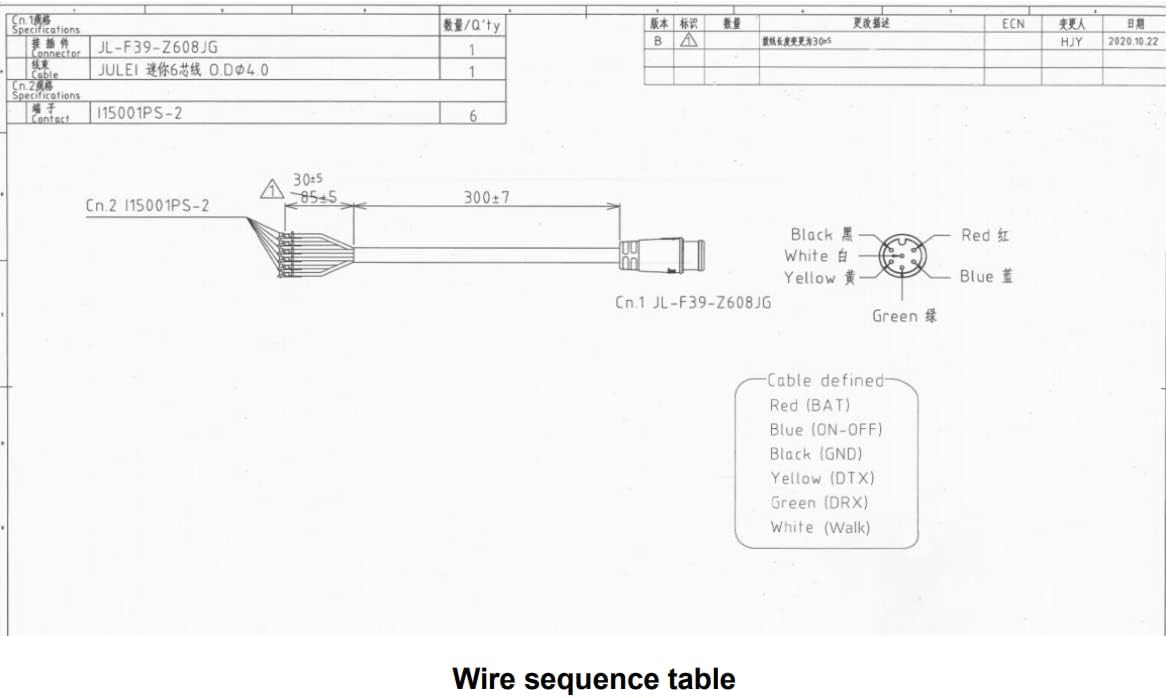
Figure 2: Vinka DR23 Wire Diagram. This diagram illustrates the 6-wire connector (Cn.1 JL-F39-2608JG) and the corresponding wire colors and their functions, leading to the display unit (Cn.2 I15001PS-2).

Figure 3: Vinka DR23 Wire Sequence Table. This table provides a detailed breakdown of each of the 6 wires, listing their serial number, code, and specific function.
2.3 Wire Function Table
| Wire Serial | Code | Function |
|---|---|---|
| 1 | BAT | Battery power wire (Red) |
| 2 | GND | Ground wire (Black) |
| 3 | DTX | Data transmission wire of the display (Yellow) |
| 4 | DRX | Data receiving wire of the display (Green) |
| 5 | ON-OFF | Controller power control wire (Blue) |
| 6 | Walk | Push control wire (White) |
After connecting all wires, ensure they are securely fastened and protected from moisture and physical damage. Once connections are verified, you may power on your e-bike system.
3. Operating Instructions
The Vinka DR23 display provides real-time information and control over your e-bike's functions. It features a clear digital screen and intuitive button controls.
3.1 Power On/Off
To power on the display, press and hold the central power button (typically marked with a power symbol) for a few seconds. To power off, press and hold the same button until the display shuts down.
3.2 Display Information
The display shows various parameters, including:
- Speed: Current riding speed (Km/h).
- Distance: Total distance traveled (Km).
- Battery Level: Indication of remaining battery charge.
- Headlight Indicator: Shows if the e-bike's headlights are active.
- Error Codes: May display codes for system malfunctions (refer to e-bike's main manual for specific codes).
3.3 Button Functions
The display features buttons for interaction. While specific functions may vary slightly based on the e-bike's controller, common button functions include:
- Power Button: Powers the display on/off.
- Up/Down Buttons: Adjust assist levels, navigate menus, or activate specific features like walk assist (as indicated by the "Walk" wire function).
- Mode/Set Button: Cycles through display modes (e.g., ODO, Trip) or enters settings menus.
Refer to your e-bike's main user manual for detailed instructions on specific button operations and advanced settings.
4. Maintenance
Proper maintenance ensures the longevity and optimal performance of your Vinka DR23 display.
- Cleaning: Use a soft, damp cloth to wipe the display screen and casing. Avoid abrasive cleaners or solvents that could damage the surface.
- Protection: While the display is designed for outdoor use, avoid prolonged exposure to direct sunlight, extreme temperatures, or heavy rain. Consider a protective cover if storing the e-bike outdoors.
- Connections: Periodically check all wire connections to ensure they are secure and free from corrosion.
- Storage: If storing the e-bike for an extended period, ensure the display is clean and dry.
5. Troubleshooting
If you encounter issues with your Vinka DR23 display, consider the following troubleshooting steps:
- Display Not Turning On:
- Check if the e-bike's main battery is charged and turned on.
- Verify all wire connections, especially the BAT (Battery power) and GND (Ground) wires, are secure.
- Ensure the ON-OFF wire is correctly connected and functioning.
- No Speed/Distance Reading:
- Check the connection of the DTX (Data transmission) and DRX (Data receiving) wires.
- Ensure the speed sensor on your e-bike is properly installed and functioning.
- Buttons Unresponsive:
- Try restarting the display by powering it off and on.
- Ensure no debris is obstructing the buttons.
- Error Codes Displayed:
- Note the specific error code.
- Consult your e-bike's main user manual or contact the e-bike manufacturer for interpretation of error codes.
If problems persist after attempting these steps, it is recommended to contact a qualified e-bike technician or the product's support.
6. Specifications
| Feature | Detail |
|---|---|
| Model Number | DR23 |
| Brand | Generic (Manufacturer: Vinka) |
| Connectivity Technology | Wired (6-wire control unit) |
| Color | Black |
| Sensor Type Compatibility | Speed Sensor, Cadence Sensor, Heart Rate Sensor (dependent on e-bike system) |
| Mounting Type | Stem Mount |
| Human Interface Input | Buttons |
| Designed For | Vinka motor systems |
7. Warranty and Support
For warranty information and technical support, please refer to the documentation provided with your complete e-bike system or contact the original seller/manufacturer of the e-bike. This display unit is designed to integrate with specific Vinka motor systems, and support may be provided through the overall e-bike system's warranty and service channels.
For further assistance, please have your product model number (DR23) and any relevant purchase information ready.
