
Introduction
This user manual provides comprehensive instructions for the safe and effective use of your S2 Anti Barking Training Collar. Please read this manual thoroughly before operating the device to ensure proper functionality and the well-being of your pet.
Safety Information
- Do not use this collar on aggressive dogs.
- Ensure the collar fits properly; it should be snug but not too tight.
- Avoid leaving the collar on your dog for more than 12 hours per day to prevent skin irritation.
- Regularly check your dog's neck for signs of irritation or sores. If found, discontinue use until the skin heals.
- This device is designed for training purposes and should not be used as a punishment tool.
- Keep out of reach of children.
- Use only the provided charging cable and a compatible 5V output charger.
Package Contents
Upon opening the package, please verify that all items listed below are present and in good condition:
- S2 Bark Collar (1)
- Nylon Collar Strap (1)
- Metal Prongs (2 pairs - short and long)
- Conductive Silicone Covers (2 pairs)
- Magnetic Charging Cable (1)
- Test Bulb (1)
- User Manual (1)

Image: All components included in the S2 Bark Collar package.
Video: Demonstrates the unboxing and initial setup of the S2 Bark Collar, showing all included components.
Product Overview
The S2 Anti Barking Training Collar features a full-color LCD display and multiple training modes to effectively manage your dog's barking behavior.

Image: The S2 Bark Collar, highlighting its sleek design and full-color screen.
Key Components:
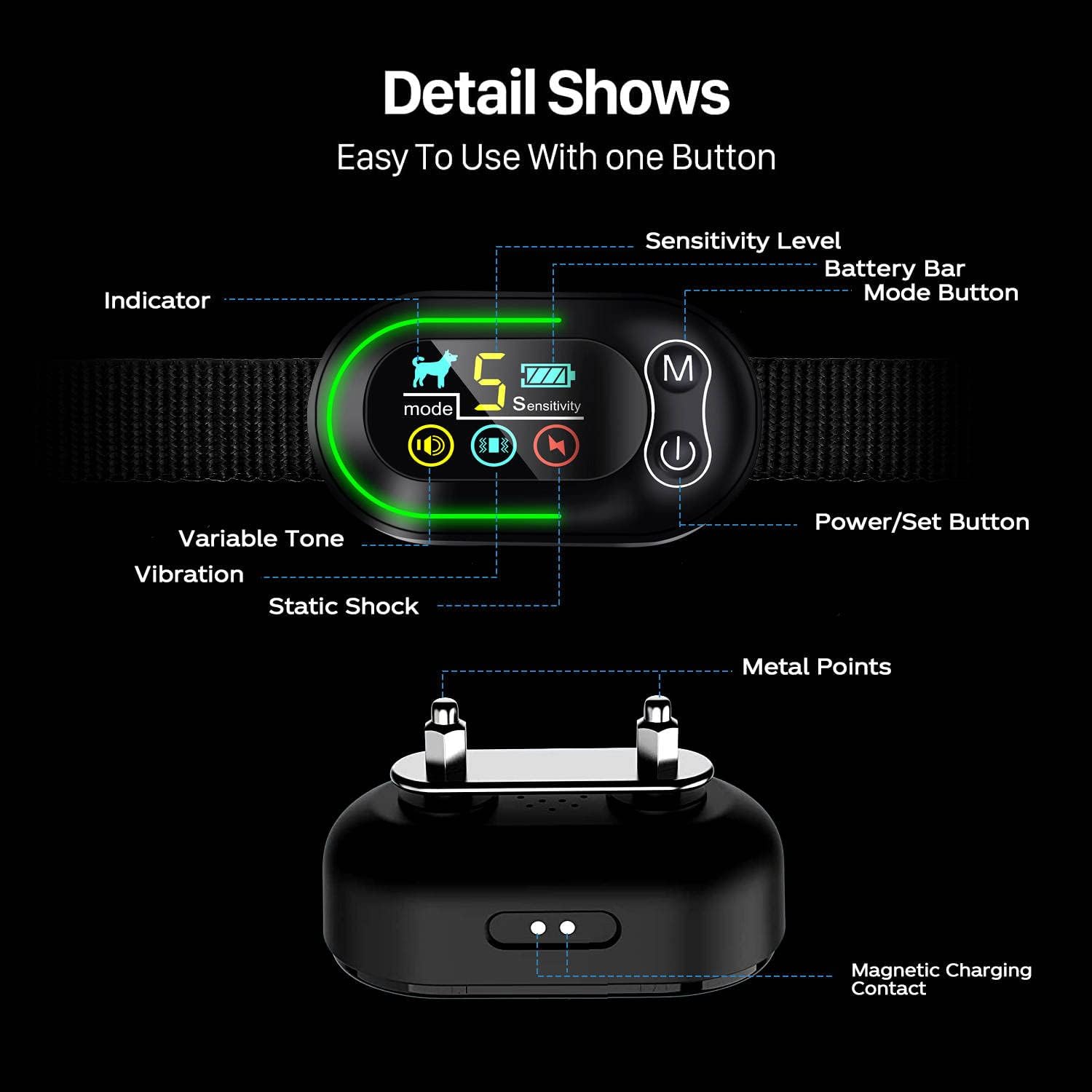
Image: A detailed view of the S2 Bark Collar's components and display elements.
- Display Screen: Full-color LCD showing mode, sensitivity, and battery status.
- M Button: Used to switch between different training modes.
- Power/Set Button: Turns the device on/off and adjusts sensitivity levels.
- Metal Prongs: Conductive points for static shock (optional, use with silicone covers).
- Magnetic Charging Contact: For easy and secure charging.
Setup
1. Charging the Collar:
Before first use, fully charge the collar. Connect the magnetic charging cable to the collar's charging port and plug the USB end into a 5V USB adapter (not included), car charger, power bank, or laptop/PC.
- Charging Time: Approximately 2-3 hours.
- Usage Time: Up to 15 days, depending on frequency of use.

Image: Illustration of the magnetic charging method and compatible power sources.
2. Attaching the Collar Strap:
Thread the nylon collar strap through the loops on the bark collar unit. Ensure the unit is positioned correctly with the contact points facing inwards towards the dog's neck.
Video: Demonstrates how to attach the nylon strap to the S2 Bark Collar unit.
3. Installing Contact Prongs and Silicone Covers:
Choose the appropriate length of metal prongs based on your dog's fur length. For short-haired dogs, use shorter prongs; for long-haired dogs, use longer prongs. Always place the conductive silicone covers over the metal prongs to ensure comfort and prevent direct metal-to-skin contact.
4. Fitting the Collar on Your Dog:
Place the collar around your dog's neck. The contact points should be positioned underneath the dog's throat. Adjust the strap so that it is snug, allowing only one finger to fit comfortably between the strap and your dog's neck. A proper fit is crucial for the collar to function effectively and safely.
- Suitable for dogs weighing 5 to 150 lbs.
- Adjustable collar length: 1.5 to 24 inches.
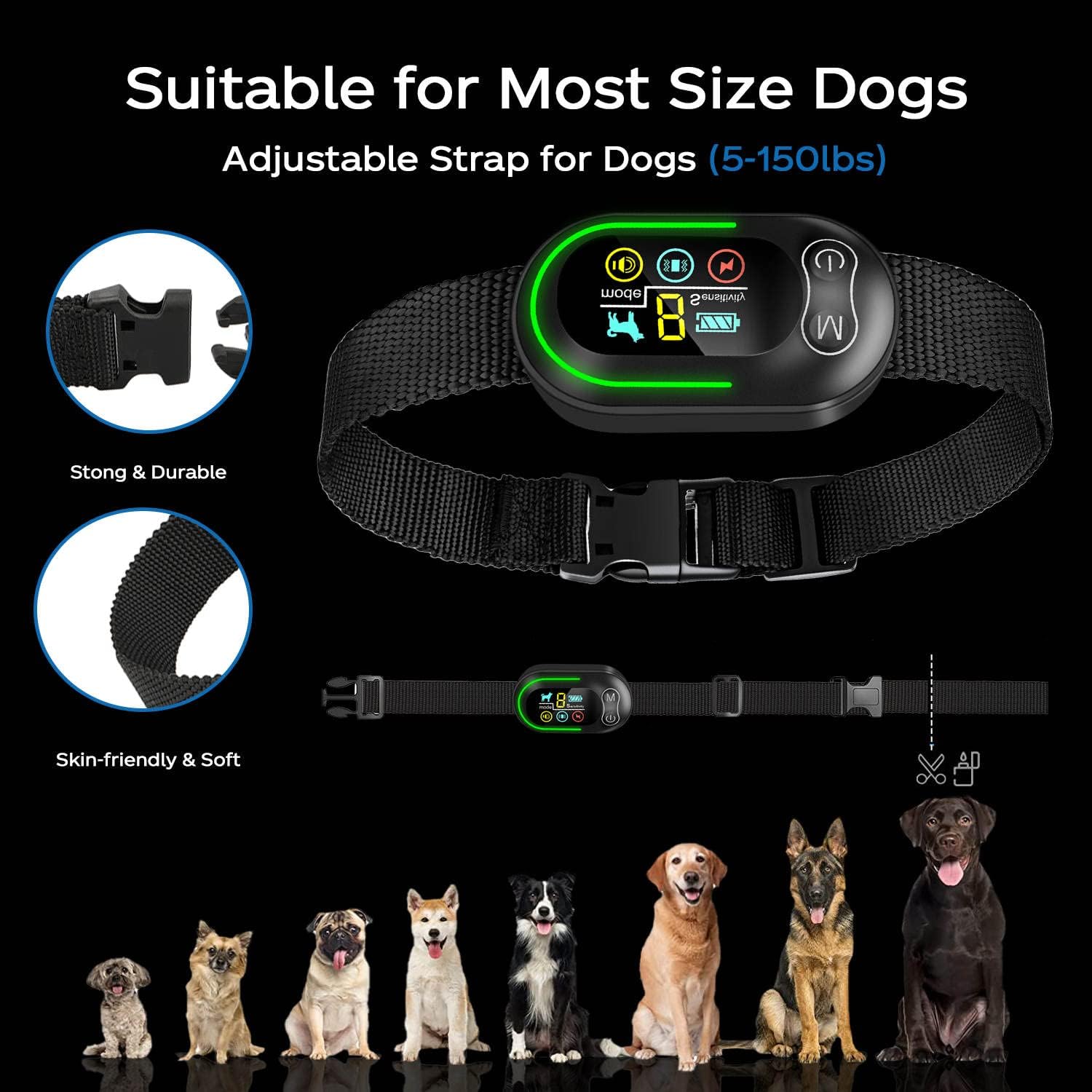
Image: The S2 Bark Collar is suitable for a wide range of dog sizes.
Operating Instructions
Turning On/Off:
Press and hold the Power/Set button to turn the collar on or off.
Selecting Training Modes:
The S2 Bark Collar offers 4 distinct training modes. Press the 'M' button once to cycle through the modes. The corresponding function icons will be displayed on the screen.
- Mode 1: 6 levels variable warning tone.
- Mode 2: 3 levels variable vibration.
- Mode 3: 6 levels variable tone + variable vibration.
- Mode 4: 6 levels variable tone + variable vibration + variable shock.
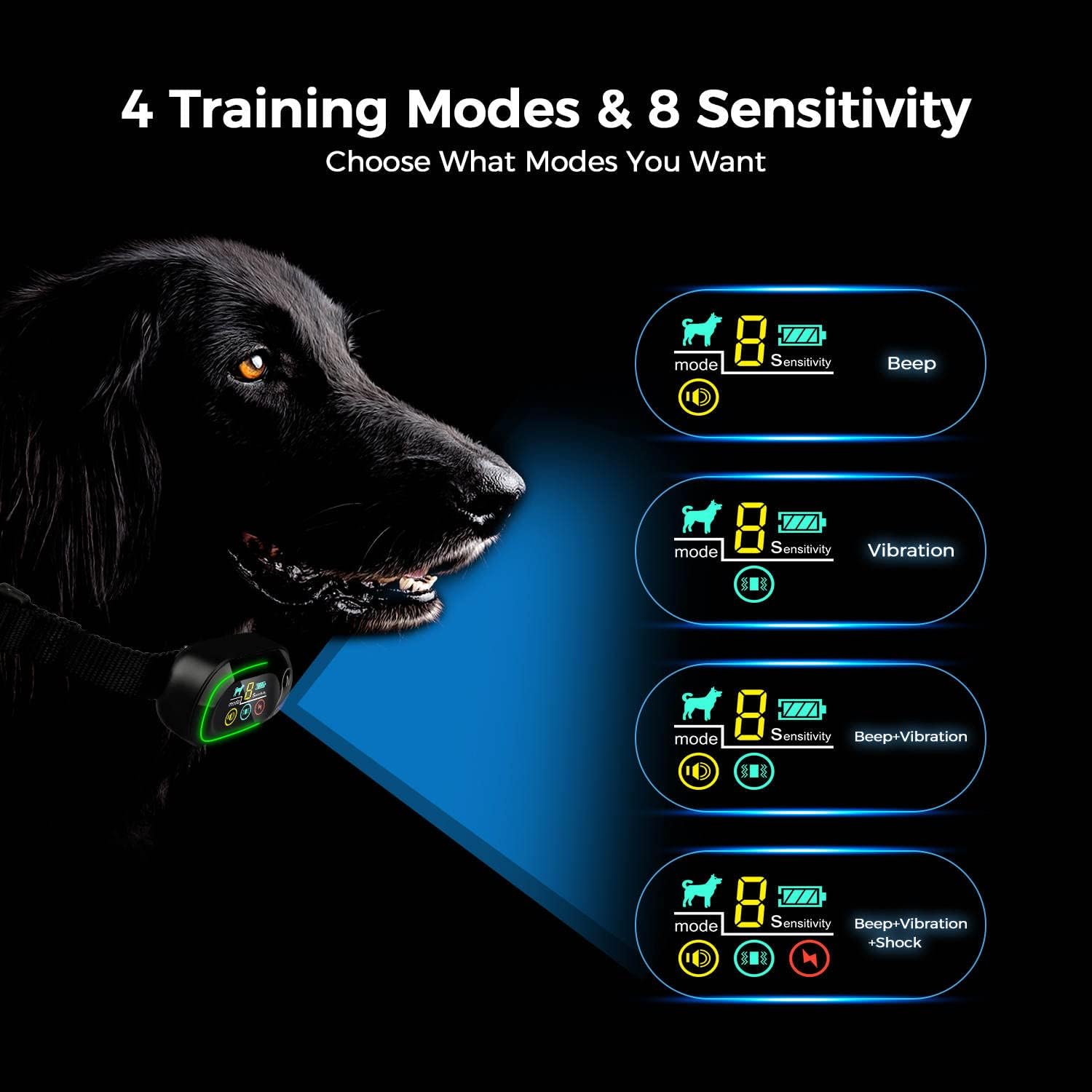
Image: Visual representation of the four available training modes.
Adjusting Sensitivity Levels:
The collar has 8 adjustable sensitivity levels. Use the Power/Set button to adjust the sensitivity. Higher sensitivity means the collar will detect barking more easily.
Test Mode:
Before placing the collar on your dog, you can use "Test Mode" (level "0") to verify all functions are working. This mode activates all functions simultaneously.
Protection Mode:
To prevent over-stimulation, the collar will enter a 30-second protection mode (displaying "8") after being triggered 6 times in the warning tone + vibration + shock mode. During this time, it will not trigger again.
Smart Anti-Interference:
The S2 collar is designed to automatically filter out other dogs' barking and environmental noise, ensuring it only responds to your dog's barking.

Image: The collar's intelligent filtering system for accurate bark detection.
Maintenance
- Cleaning: Wipe the collar unit and strap with a damp cloth. Do not use harsh chemicals or abrasive cleaners.
- Waterproof: The collar has an IP67 waterproof rating, meaning it is resistant to water submersion. However, prolonged submersion or exposure to high-pressure water jets should be avoided. Ensure the charging port is dry before charging.
- Storage: Store the collar in a cool, dry place when not in use.
- Contact Points: Periodically check the metal prongs and silicone covers for wear and tear. Replace if damaged.

Image: The S2 Bark Collar's IP67 waterproof rating allows for use in various wet conditions.
Troubleshooting
| Problem | Possible Cause | Solution |
|---|---|---|
| Collar not turning on. | Low battery; device off. | Charge the collar fully; press and hold power button to turn on. |
| Collar not responding to barking. | Incorrect fit; sensitivity too low; dog not barking loud enough; collar malfunction. | Adjust collar fit; increase sensitivity; test with test bulb; contact support if issue persists. |
| Collar triggers without barking. | Sensitivity too high; external noise interference (rare due to anti-interference); collar malfunction. | Decrease sensitivity; ensure collar is not rubbing against objects; contact support. |
| Skin irritation on dog's neck. | Collar too tight; worn for too long; improper contact point use. | Loosen collar; remove for several hours daily; ensure silicone covers are used; consult a vet if severe. |
Specifications
- Product Model: S2
- Product Color: Black
- Product Weight: 0.28 lbs (5.6 ounces)
- Dimensions (LxWxH): 4.33 x 3.54 x 0.01 inches (Unit) / 4.41 x 3.62 x 1.85 inches (Package)
- Working Modes: 4 (Tone, Vibration, Tone+Vibration, Tone+Vibration+Shock)
- Sensitivity Levels: 8 adjustable levels
- Input Voltage: 5V
- Battery Capacity: 300mAh lithium battery
- Charging Time: 2-3 hours
- Use Time: Approximately 15 days (based on frequency of use)
- Waterproof Rating: IP67
- Collar Length: 1.5 inches - 24 inches (adjustable)
- Material: Metal, Nylon, Silicone
- Manufacturer: Smart
- Certificates: FCC CE MSDS UN38.3 UL
Warranty and Support
Please refer to the product packaging or the seller's information for specific warranty details. For technical support or further inquiries, please contact the seller or manufacturer directly through the platform where the product was purchased.