
1. Introduction
This manual provides essential information for the setup, operation, and maintenance of your Smart Bracelet Watch. This device is designed to be your personal health steward, featuring a color screen and Bluetooth connectivity to monitor various health metrics and provide notifications.
Key functionalities include heart rate monitoring, blood pressure tracking, calorie counting, pedometer, and sleep monitoring. It also provides notifications for calls, messages, and social media alerts directly on your wrist.

Figure 1: Front view of the Smart Bracelet Watch displaying current time, steps taken, and date.
2. Package Contents
- Smart Bracelet Watch (band and watch unit)
Please ensure all components are present upon unboxing. If any items are missing or damaged, contact customer support.
3. Setup and Initial Use
3.1. Application Installation
The Smart Bracelet Watch requires a dedicated fitness band application to function correctly and to set the time and date. You will receive a barcode with your product; please scan it to download the official application from your device's app store (e.g., Google Play Store).
- Locate the barcode provided with your watch.
- Scan the barcode using a QR code scanner on your smartphone to download the fitness band application.
- Install the application on your smartphone.
3.2. Device Pairing
To connect your Smart Bracelet Watch with the application:
- Ensure Bluetooth and location services are enabled on your smartphone.
- Important: Do not attempt to connect the watch directly through your phone's Bluetooth settings. The connection must be established via the fitness band application.
- Open the installed fitness band application.
- Follow the in-app instructions to search for and pair your Smart Bracelet Watch.
- Once successfully paired, the watch's time and date will automatically synchronize with your phone.
4. Charging the Device
The Smart Bracelet Watch features an inbuilt USB port for charging. A separate charger is not included in the package.
- Carefully remove one of the watch straps to reveal the integrated USB charging port.
- Connect the exposed USB port directly into any standard USB power source, such as a laptop, PC, or a mobile phone charger adapter.
- The typical charging time is approximately 2 hours.
5. Operating the Smart Bracelet Watch
5.1. Health Monitoring
The watch is designed to track various health and fitness metrics:
- Pedometer: Tracks your daily steps taken.
- Calories: Estimates calories consumed based on activity.
- Distance: Records the distance covered.
- Heart Rate Monitoring: Provides continuous heart rate data.
- Blood Pressure Monitoring: Monitors blood pressure levels.
- Sleep Monitoring: Records your sleep duration and quality.
All tracked data can be viewed in detail within the connected fitness band application.

Figure 2: The back of the watch with its optical sensor emitting a green light, indicating active heart rate monitoring.
5.2. Notifications
The Smart Bracelet Watch provides notifications directly on its display, ensuring you don't miss important alerts:
- Call Notifications: Receive alerts for incoming calls. You can accept or reject calls from the watch.
- SMS Notifications: Get alerts for new text messages.
- Social Media Notifications: Receive notifications from applications like Facebook, WhatsApp, and Instagram.
Note: This watch does not support calling features directly or typing/reading full SMS content. It only provides notifications.

Figure 3: The watch displaying various notification icons, such as messages and social media alerts, on the wrist.
5.3. Music Control
You can control music playback on your connected smartphone directly from the watch. This feature allows you to play, pause, and skip tracks without needing to access your phone.

Figure 4: A user interacting with the watch to control music playback on a nearby smartphone, showing the music control interface on the watch screen.
5.4. Other Features
The Smart Bracelet Watch offers a comprehensive suite of features to enhance your daily life:

Figure 5: An overview of the watch's capabilities, including step counting, distance tracking, social media notifications, phone finding, heart rate and blood pressure monitoring, sedentary reminders, calorie tracking, call reminders, sleep monitoring, alarm clock, Bluetooth connectivity, and weather display.
- Alarm Clock: Set alarms to wake you up or remind you of tasks.
- Sedentary Reminder: Alerts you when you've been inactive for too long.
- Find Your Phone: Helps locate your paired smartphone.
- Weather Display: Shows current weather information (requires app synchronization).
- Bluetooth Connectivity: For seamless connection with your smartphone.
5.5. Customizing Watch Faces
The Smart Bracelet Watch allows for personalization through various online theme dials. After connecting the bracelet with the FitProApp (or similar compatible application), you can download different watch faces. You can also convert personal photos from your mobile phone into custom watch backgrounds to suit your preferences.
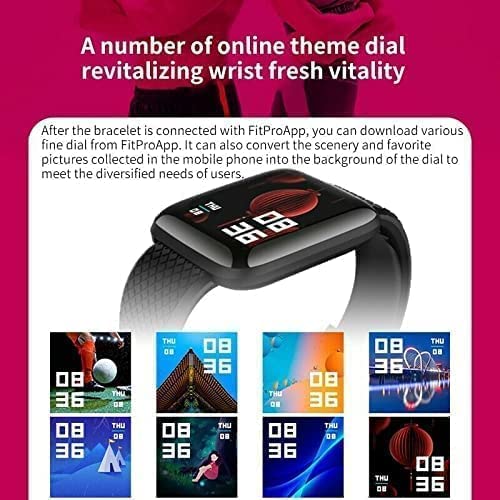
Figure 6: A display of various online theme dials available for customization, along with the option to upload personal images as watch backgrounds.
6. Maintenance
- Cleaning: Wipe the watch and strap regularly with a soft, dry cloth. Avoid using harsh chemicals or abrasive materials.
- Water Resistance: While the watch may have some splash resistance, avoid submerging it in water or exposing it to heavy rain. Refer to product specifications for exact water resistance ratings.
- Storage: Store the watch in a cool, dry place when not in use.
- Battery Care: To prolong battery life, avoid fully discharging the battery frequently. Charge it when the battery level is low.
7. Troubleshooting
7.1. Watch Time/Date Not Setting
The watch's time and date are synchronized via the fitness band application. If the time is incorrect:
- Ensure the fitness band application is installed and running on your smartphone.
- Verify that Bluetooth is enabled on your phone and the watch is successfully paired within the app.
- Check your phone's internet connection to ensure the app can synchronize data.
- Restart both the watch (if possible) and the application.
7.2. Connectivity Issues
If the watch is not connecting to your phone:
- Confirm Bluetooth is active on your phone.
- Ensure location services are enabled on your phone, as some apps require this for Bluetooth scanning.
- Make sure you are attempting to connect through the fitness band application, not directly via phone's Bluetooth settings.
- Move the watch closer to your phone to ensure they are within Bluetooth range.
- Try unpairing and re-pairing the device through the application.
7.3. Notifications Not Appearing
If you are not receiving notifications on your watch:
- Check notification settings within the fitness band application to ensure notifications for desired apps are enabled.
- Verify that your phone's notification settings allow the fitness app to display notifications.
- Ensure the watch is properly connected to your phone via Bluetooth.
- Disable any "Do Not Disturb" or "Power Saving" modes on your phone that might restrict notifications.
8. Specifications
| Attribute | Detail |
|---|---|
| Brand | Generic |
| Model | smart bracelet watch |
| Product Dimensions | 1 x 3.4 x 28.6 cm (10 x 34 x 286 Millimeters) |
| Display Resolution | 240 x 240 pixels |
| Compatible Devices | Laptop (for charging), Smartphones (for app connectivity) |
| Special Features | Distance Tracker, Heart Rate Monitor, Blood Pressure Monitor, Pedometer, Sleep Monitor, Notification Display |
| Display Type | Smartwatch Color Screen |
| Wattage | 5 Watts |
| Charging Time | Approximately 2 Hours |
| Battery Cell Composition | Lithium Ion |
| Wireless Type | Bluetooth |
| Connector Type | Bluetooth, USB (inbuilt) |
| Device Interface | Buttons |
| GPS | No GPS |
9. Important Notes and Disclaimers
- No Calling Feature: This watch does not support direct calling or typing/reading full SMS messages. It is designed for notification display only.
- Charger Not Included: The watch features an integrated USB charging port. A separate charging adapter is not provided.
- App Dependent: Full functionality, including time setting and data synchronization, relies on the dedicated fitness band application.
10. Warranty and Support
Specific warranty information for this product is not provided within this manual. For details regarding warranty coverage, returns, or technical support, please refer to the product packaging, the seller's information on the purchase platform, or the manufacturer's official website.
Always ensure you have your purchase receipt or order details available when contacting support.


