
Panasonic NR-TH292CPKN
Panasonic 280 L Double Door Refrigerator
Model: NR-TH292CPKN
AI Enabled Inverter Technology Frost Free Refrigerator
1. Introduction
This user manual provides essential information for the safe and efficient operation of your new Panasonic 280 L Double Door Refrigerator. Please read this manual thoroughly before using the appliance and keep it for future reference.
Your Panasonic refrigerator features advanced technologies such as AI ECONAVI, Inverter Compressor, and AG Clean, designed to provide optimal food preservation and energy efficiency.
2. Safety Information
Always follow basic safety precautions when using electrical appliances to reduce the risk of fire, electric shock, and injury.
- Ensure the refrigerator is placed on a stable, level surface.
- Do not block ventilation openings.
- Do not use mechanical devices or other means to accelerate the defrosting process, other than those recommended by the manufacturer.
- Do not damage the refrigerant circuit.
- Do not use electrical appliances inside the food storage compartments of the appliance, unless they are of the type recommended by the manufacturer.
- Unplug the refrigerator before cleaning or performing maintenance.
- Keep flammable materials and vapors away from the refrigerator.
3. Setup and Installation
Your Panasonic refrigerator is designed for freestanding installation.
3.1 Unpacking
Carefully remove all packaging materials. Inspect the refrigerator for any damage incurred during transit. Keep packaging materials away from children.
3.2 Placement
Choose a location that is dry, well-ventilated, and away from direct sunlight or heat sources. Ensure there is adequate space around the refrigerator for proper ventilation (as per manufacturer guidelines, typically a few inches from walls).

Figure 3.2.1: Refrigerator dimensions (56 cm W x 68.1 cm D x 160.5 cm H). Ensure sufficient space for proper air circulation.
3.3 Leveling
Use the adjustable feet at the bottom of the refrigerator to ensure it is perfectly level. This prevents vibrations and ensures proper door sealing.
3.4 Power Connection
Connect the refrigerator to a dedicated grounded electrical outlet. Allow the refrigerator to stand upright for at least 2-4 hours before plugging it in to allow refrigerants to settle.
4. Operating Instructions
Your Panasonic refrigerator is equipped with intelligent features for optimal performance.
4.1 Initial Operation
After plugging in, the refrigerator will begin cooling. It may take several hours for the internal temperature to reach the desired level. Avoid placing large quantities of food inside immediately.
4.2 AI ECONAVI Technology

Figure 4.2.1: Front view highlighting Intelligent Inverter and AI ECONAVI features.
AI ECONAVI monitors and memorizes your refrigerator usage patterns, such as door opening frequency and internal temperature. The Inverter Compressor automatically adjusts cooling power to optimize energy efficiency based on these patterns, saving electricity.

Figure 4.2.2: Illustration of Econavi Technology utilizing multiple sensors for optimized performance.

Figure 4.2.3: Depiction of the Inverter Compressor, which provides energy-efficient and quiet operation.
4.3 AG Clean Technology
This technology eliminates 99.9% of mold and bacteria inside the refrigerator, ensuring a hygienic environment for your food.

Figure 4.3.1: AG Clean technology actively deactivates 99.9% of bacteria within the refrigerator compartment.
4.4 Gentle Surround Cooling
This feature minimizes food damage by providing even cooling throughout the refrigerator, preventing concentrated airflow directly onto food items.

Figure 4.4.1: Arrows illustrating the gentle surround airflow for uniform cooling.
4.5 Humidity Care Controller & Jumbo Fresh Vegetable Case
The 30L Jumbo Fresh Vegetable Case, combined with the Humidity Care Controller, maintains optimum humidity and constant temperature, keeping fruits and vegetables fresh and juicy for longer.

Figure 4.5.1: The spacious 30L Jumbo Fresh Vegetable Case, designed to store a large quantity of produce.

Figure 4.5.2: Close-up of the humidity control mechanism within the vegetable crisper.
4.6 Tempered Glass Shelves & Double Twist Ice Tray
The highly durable tempered glass shelves can withstand weight up to 100 kgs, allowing for storage of heavy pans and containers. The detachable double twist ice tray makes ice dispensing convenient.

Figure 4.6.1: Interior view showing tempered glass shelves, big door pockets, and humidity control features.

Figure 4.6.2: Tempered glass shelves designed to hold heavy items up to 100 kg.

Figure 4.6.3: Demonstrating the easy operation of the double twist ice tray for convenient ice dispensing.
4.7 Stabilizer Free Operations
The refrigerator is designed for stabilizer-free operation, providing reliable performance even during voltage fluctuations.

Figure 4.7.1: Interior view indicating the refrigerator's capability for stabilizer-free operation.
5. Maintenance
Regular maintenance ensures the longevity and efficiency of your refrigerator.
5.1 Cleaning the Interior
Unplug the refrigerator before cleaning. Use a soft cloth dampened with a mild detergent solution to clean the interior surfaces. Rinse with clean water and dry thoroughly. Do not use abrasive cleaners or solvents.
5.2 Cleaning the Exterior
Wipe the exterior surfaces with a soft, damp cloth. For stubborn stains, use a mild detergent. Avoid spraying water directly onto the refrigerator.
5.3 Condenser Coils
Periodically clean the condenser coils at the back or bottom of the refrigerator to ensure efficient cooling. Use a vacuum cleaner or a soft brush to remove dust and debris.
5.4 Door Gaskets
Inspect and clean the door gaskets regularly to ensure a tight seal. A damaged or dirty gasket can lead to energy loss and inefficient cooling.
6. Troubleshooting
Before contacting service, refer to the following common issues and their solutions.
| Problem | Possible Cause | Solution |
|---|---|---|
| Refrigerator not cooling | Power cord unplugged; thermostat set too high; door not closed properly; excessive food load. | Check power connection; adjust thermostat; ensure door is sealed; reduce food load if overloaded. |
| Unusual noises | Refrigerator not level; objects vibrating against the unit; compressor noise (normal). | Level the refrigerator; remove vibrating objects; normal compressor sounds are common. |
| Water on floor/inside | Drain tube clogged; door not sealed properly; high humidity. | Clear drain tube; check door gasket; this is normal in high humidity. |
| Excessive frost build-up | Door left open frequently; door gasket not sealing; high humidity. | Ensure door is closed quickly; check and clean door gasket; this is normal in high humidity. |
If the problem persists after attempting these solutions, please contact Panasonic customer service.
7. Specifications
| Feature | Detail |
|---|---|
| Brand | Panasonic |
| Model | NR-TH292CPKN |
| Capacity | 280 litres (Net Capacity: 256L) |
| Energy Efficiency | 3 Star (as per BEE guidelines) |
| Annual Energy Consumption | 234 Kilowatt Hours |
| Refrigerator Fresh Food Capacity | 207 litres |
| Freezer Capacity | 83 Litres |
| Installation Type | Freestanding |
| Colour | Diamond Black |
| Defrost System | Automatic (Frost Free) |
| Shelf Type | Toughened Glass |
| Item Dimensions (LxWxH) | 60 x 68.1 x 160.5 Centimeters |
| Item Weight | 54 kg |
| Special Features | 30L Jumbo Fresh Vegetable Basket, Humidity Care Controller, Functional Storage Design, Height Adjustable Shelves, Movable Ice Tray, Toughened Glass Shelves, Big Door Pockets, Ag Clean Technology, Gentle Surround Cooling, Inverter Compressor |
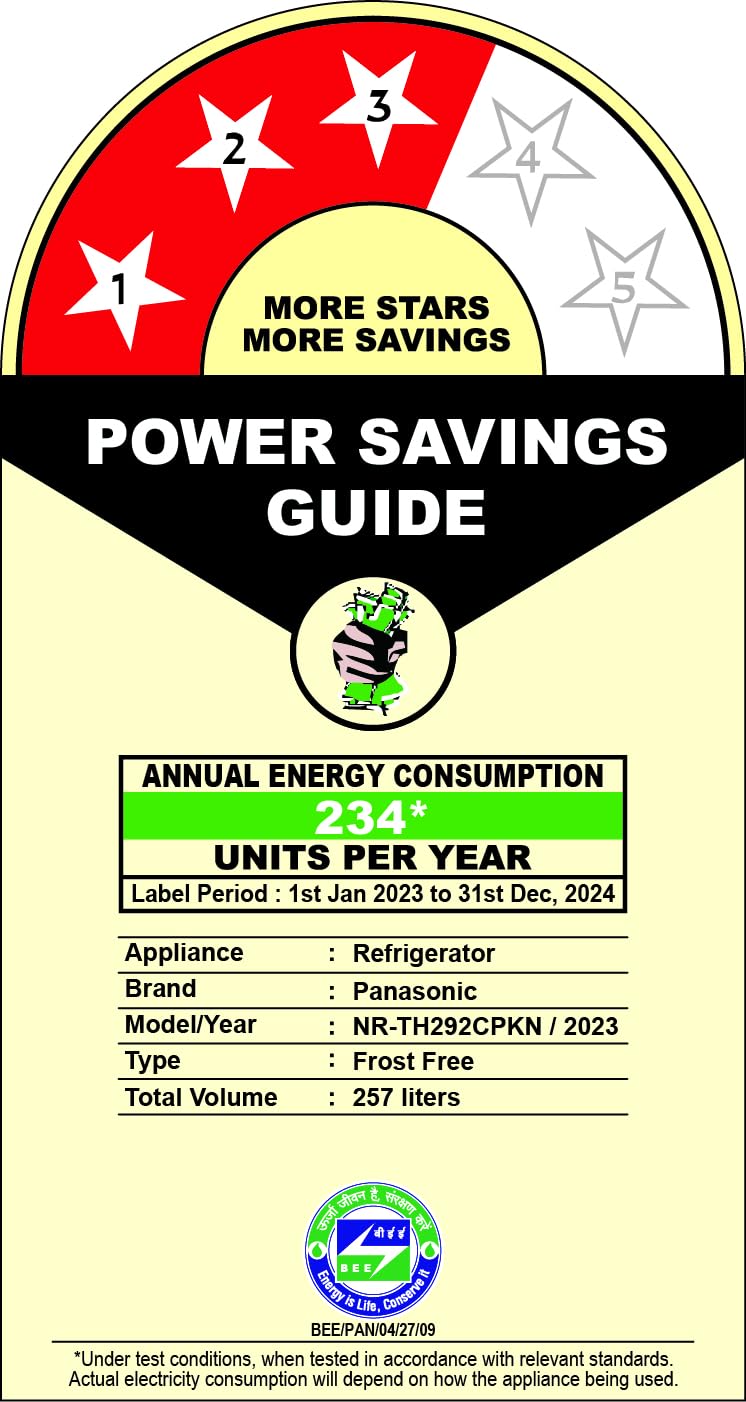
Figure 7.1: Front view of the Panasonic NR-TH292CPKN Refrigerator.

Figure 7.2: Side view of the refrigerator illustrating its dimensions.

Figure 7.3: Energy efficiency label for the Panasonic NR-TH292CPKN Refrigerator, showing 3-star rating and annual energy consumption.
8. Warranty and Support
Your Panasonic refrigerator comes with a comprehensive warranty:
- 1 Year on Product
- 10 Years on Compressor
For service requests, technical support, or warranty claims, please contact Panasonic customer service. Refer to the warranty card included with your product for detailed terms and conditions.
Included Components: Main Unit, Owners Manual, Warranty Card.
Related Documents - NR-TH292CPKN
 |
Panasonic Refrigerator Service Manual NR-BX418 Series Service manual for Panasonic refrigerators, models NR-BX418VS, NR-BX418VW, NR-BX41BVW, NR-BX468VS, NR-BX46BVW, NR-BX418XS, NR-BX41BXS, NR-BX468XS, NR-BX46BXS, NR-BX418GW, NR-BX468GW, NR-BX418GK, NR-BX468GK, NR-BX41BGK, NR-BX46BGK. Includes parts exploded views and safety information. |
 |
Panasonic Refrigerator Operating Instructions Comprehensive operating instructions and specifications for Panasonic refrigerators, covering installation, usage, maintenance, and troubleshooting. |
 |
Panasonic Refrigerator Service Manual: NR-BW414 & NR-BW464 Series Troubleshooting and Repair Guide Comprehensive service manual for Panasonic NR-BW414 and NR-BW464 series refrigerators, providing detailed specifications, performance data, self-protection and self-diagnosis functions, temperature control, troubleshooting guides, disassembly instructions, and replacement parts lists for professional technicians. |
 |
Panasonic Refrigerator Operating Instructions Comprehensive operating instructions for Panasonic refrigerators, covering safety precautions, installation, usage tips, cleaning, troubleshooting, and specifications for models NR-BX418X, NR-BX418G, NR-BX418V, NR-BX468X, NR-BX468G, and NR-BX468V. |
 |
Hướng Dẫn Sử Dụng Tủ Lạnh Panasonic NR-XZ Series Hướng dẫn sử dụng chi tiết cho tủ lạnh Panasonic dòng NR-XZ590, NR-XZ550, NR-XZ520. Bao gồm hướng dẫn lắp đặt, vận hành, vệ sinh và xử lý sự cố. |
 |
Panasonic Refrigerator Operating Instructions - NR-F603GT, NR-F603HX, NR-F503 Series Official operating instructions and user manual for Panasonic refrigerators, including models NR-F603GT, NR-F603HX, and NR-F503 series. This guide covers installation, operation, temperature settings, ECONAVI energy saving, nanoeX air purification, cleaning, maintenance, troubleshooting, and specifications for household use. |
Ask a question about this manual
Ask about setup, troubleshooting, compatibility, parts, safety, or missing instructions. Manuals+ will review the question and use this page’s manual context to help answer it.