
1. Introduction
Thank you for choosing the CENGNIAN Personal Portable Blender. This compact and versatile device is designed for preparing fresh shakes, smoothies, and juices on the go. Its USB rechargeable design and powerful 6-blade system make it ideal for sports, travel, and outdoor activities. Please read this manual thoroughly before first use to ensure proper operation and maintenance.

Image 1: CENGNIAN Personal Portable Blender with blending cup and separate lid.
2. Safety Information
- Read all instructions before using the appliance.
- Keep the blender out of reach of children.
- Do not immerse the motor base in water or other liquids.
- Ensure the cup is securely attached and tightened to the motor base before operating.
- Avoid contact with moving parts, especially the blades.
- Do not operate the blender when empty.
- Use only the provided USB charging cable.
- Do not attempt to blend hard, dry ingredients without sufficient liquid.
- If the red light flashes and the blender does not turn on, ensure the cup and base are properly tightened.
3. Package Contents
- 1 x Personal Blender (Motor Base with 6-blade assembly)
- 1 x Blending Cup (400ml capacity)
- 1 x Travel Lid
- 1 x USB Charging Cable
- 1 x Cup Brush (for cleaning)
4. Product Overview
The CENGNIAN Personal Portable Blender features a powerful motor base and 6 food-grade stainless steel 3D blades for efficient blending. Constructed from food-grade and environmentally friendly PP & PC materials, it is BPA-free. The blender utilizes advanced CS+C (Cold Spin+Centrifugal) Technology to extract nutrients from fruits and vegetables. Its compact size and USB rechargeable battery make it highly portable.

Image 2: Detailed view of the 6-blade design for efficient blending.
5. Setup
- Unpack: Carefully remove all components from the packaging.
- Initial Charge: Before first use, fully charge the blender using the provided USB cable. The charging time is approximately 3-4 hours.
- Clean: Wash the blending cup, travel lid, and blade assembly with warm soapy water. Rinse thoroughly and dry. Do not immerse the motor base in water.
- Assemble: Ensure the blade assembly is securely attached to the motor base.
6. Operating Instructions
- Prepare Ingredients: Cut fruits and vegetables into small pieces (approximately 1 inch or smaller) to ensure optimal blending.
- Add Ingredients: Place your desired ingredients into the blending cup. Ensure liquids are added first, followed by softer ingredients, then harder fruits/vegetables, and finally ice. Do not exceed the maximum fill line (400ml).
- Secure Lid: Tightly screw the blade assembly onto the blending cup.
- Attach to Base: Invert the cup and securely attach it to the motor base. Ensure the cup and base are tightened firmly to activate the safety mechanism. If not tightened, a red light may flash, and the blender will not operate.
- Start Blending: Double-click the power button to start the blending cycle.
- Optimize Blending: While blending, you can gently shake the bottle at a 45-degree angle to help mix ingredients more effectively.
- Stop Blending: The blender will typically run for about 20 seconds. You can stop it at any time by single-clicking the power button.
- Enjoy: Remove the blending cup from the motor base. You can drink directly from the cup or replace the blade assembly with the travel lid for on-the-go consumption.
Video 1: Demonstration of adding ingredients, blending, drinking, and refrigerating the CENGNIAN Personal Portable Blender.
7. Maintenance and Cleaning
- Immediate Cleaning: After each use, rinse the blending cup and blade assembly immediately to prevent food residue from drying.
- Thorough Cleaning: The juicer cup can be opened from both the top and bottom for easy access. Use the provided cup brush with warm soapy water to clean the inside of the cup and around the blades.
- Motor Base: Wipe the motor base with a damp cloth. Do not immerse the motor base in water.
- Drying: Allow all components to air dry completely before reassembling or storing.

Image 3: Cleaning the blender cup with a brush.
8. Troubleshooting
- Blender not starting / Red light flashing: This indicates that the blending cup and motor base are not securely tightened. Ensure they are firmly screwed together until the red light stops flashing and the blender is ready to operate.
- Ingredients not blending smoothly: Ensure fruits and vegetables are cut into small pieces. Do not overfill the cup. Add sufficient liquid. Gently shake the blender during operation to help circulate ingredients.
- Battery not charging: Ensure the USB charging cable is properly connected to both the blender and a power source. Allow 3-4 hours for a full charge.
9. Specifications
| Feature | Detail |
|---|---|
| Brand | CENGNIAN |
| Model Number | B0BSGHCJB1 |
| Color | Dark Blue |
| Special Feature | Portable, USB Rechargeable |
| Capacity | 400 Milliliters |
| Product Dimensions | 3.54"D x 3.54"W x 7.87"H |
| Included Components | USB charging cable, Blending Cup, Travel Lid, Cup Brush |
| Recommended Uses | Mixer |
| Power Source | Battery Powered |
| Voltage | 5 Volts |
| Material Type Free | BPA Free |
| Blade Material | Stainless Steel |
| Control Type | Basic |
| Container Material | Polypropylene, Polycarbonate |
| Item Weight | 10.6 ounces |
| Battery Capacity | 2000 mAh |
| Rotational Speed | 21,000 r/min |
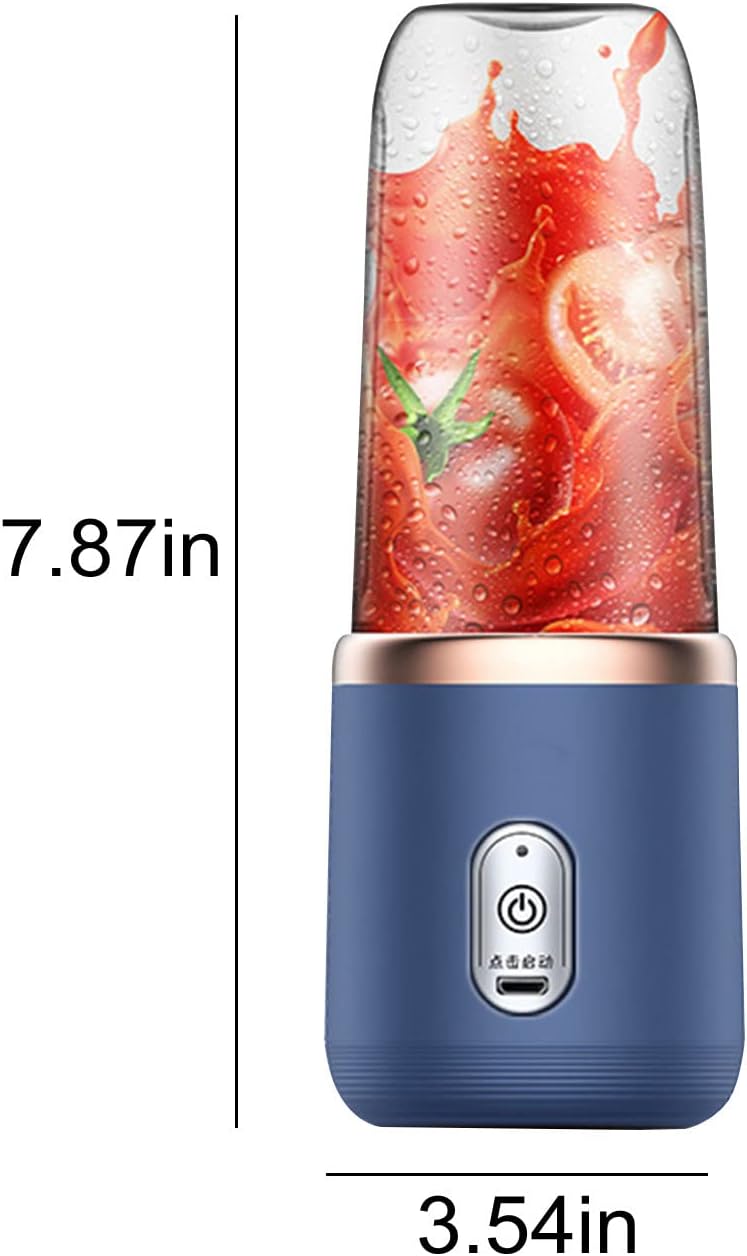
Image 4: Product dimensions of the CENGNIAN Personal Portable Blender.
10. Warranty and Support
This product comes with a Limited Warranty. For detailed warranty information, claims, or technical support, please refer to the product packaging or contact CENGNIAN customer service directly. Keep your purchase receipt as proof of purchase.