
Introduction
Thank you for choosing the Topiky X6 Bone Conduction Headphones. These open-ear, wireless sports headphones are designed for comfort and durability, featuring IP68 waterproofing, 16GB built-in memory, and Bluetooth 5.3 connectivity. This manual provides essential information for setup, operation, maintenance, and troubleshooting to ensure optimal performance and longevity of your device.
Product Overview
The Topiky X6 headphones utilize bone conduction technology, allowing you to hear audio while remaining aware of your surroundings. They are ideal for various activities including running, cycling, and driving.

Figure 1: Topiky X6 Bone Conduction Headphones. This image shows the overall design of the headphones.
- Open-Ear Design: Ensures comfort and situational awareness.
- IP68 Waterproof: Resistant to sweat, water, and dust, suitable for various environments.
- 16GB Internal Memory: Store music directly on the device for phone-free listening.
- Bluetooth 5.3: Stable and clear wireless connection.
- Ergonomic Fit: Lightweight titanium alloy construction for secure and comfortable wear.
Setup
1. Charging the Headphones
Before first use, fully charge the headphones. Use the provided magnetic charging cable.
- Connect the USB end of the charging cable to a standard USB power adapter (DC 5V) or a computer's USB port.
- Attach the magnetic end of the cable to the charging port on the headphones. Ensure a secure connection.
- The charging indicator light will illuminate. A full charge takes approximately 2 hours.
- Once fully charged, the indicator light will change or turn off (refer to specific LED behavior in the Quick Start Guide if available).
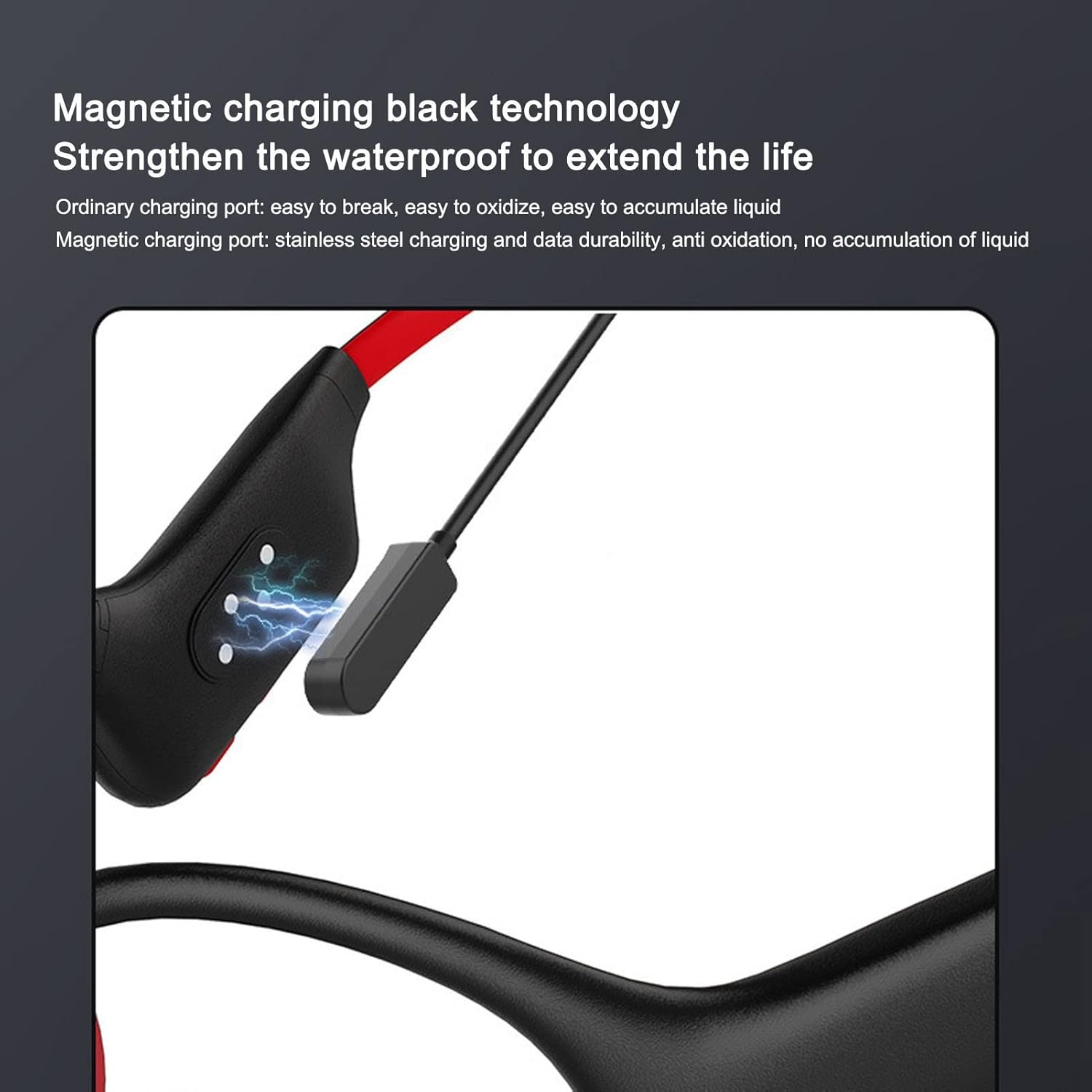
Figure 2: Magnetic Charging. This image illustrates the magnetic charging connection for the headphones.
2. Powering On/Off
- To Power On: Press and hold the Power button for approximately 3 seconds until the indicator light flashes.
- To Power Off: Press and hold the Power button for approximately 5 seconds until the indicator light turns off.
3. Bluetooth Pairing
The headphones support Bluetooth 5.3 for wireless connection to your devices.
- Ensure the headphones are powered off.
- Press and hold the Power button for about 5-7 seconds until the indicator light flashes red and blue alternately, indicating pairing mode.
- On your device (smartphone, tablet, etc.), enable Bluetooth and search for available devices.
- Select "Topiky X6" (or similar name) from the list of found devices.
- Once paired, the indicator light will flash blue slowly.
Operating Instructions
1. Wearing the Headphones
Place the headphones over your ears with the transducers resting on your cheekbones, just in front of your ears. The band should rest comfortably around the back of your head.

Figure 3: Proper Wearing Position. This image demonstrates how to correctly wear the bone conduction headphones for optimal sound and comfort.
2. Music Playback (Bluetooth Mode)
- Play/Pause: Press the Multi-function button once.
- Next Track: Press and hold the Volume Up button.
- Previous Track: Press and hold the Volume Down button.
- Volume Up: Short press the Volume Up button.
- Volume Down: Short press the Volume Down button.
3. MP3 Player Mode (16GB Internal Memory)
The headphones feature 16GB of internal storage for music playback without a connected device.

Figure 4: 16GB Internal Memory. This image highlights the integrated 16GB storage for MP3 playback.
- Switching Modes: While powered on, double-press the Multi-function button to switch between Bluetooth mode and MP3 player mode.
- Transferring Music: Connect the headphones to a computer using the magnetic charging cable. The headphones will appear as a removable drive. Drag and drop your MP3, APE, or FLAC audio files into the drive.
- Playback controls (Play/Pause, Next/Previous Track, Volume) are the same as in Bluetooth mode.
4. Call Management
- Answer/End Call: Press the Multi-function button once.
- Reject Call: Press and hold the Multi-function button for 2 seconds.
- Voice Assistant: Triple-press the Multi-function button to activate your device's voice assistant (e.g., Siri, Google Assistant).
Maintenance
- Cleaning: Wipe the headphones with a soft, damp cloth. Do not use abrasive cleaners or solvents.
- Water Exposure: While IP68 rated, it is recommended to dry the headphones thoroughly after exposure to water, especially the charging contacts, to prevent corrosion.
- Storage: Store the headphones in a cool, dry place away from direct sunlight and extreme temperatures.
- Battery Care: To prolong battery life, avoid fully discharging the battery frequently. Charge regularly, even if not in use for extended periods.

Figure 5: IP68 Waterproofing. This image shows the headphones' resistance to water, highlighting their suitability for active use.
Troubleshooting
| Problem | Possible Cause | Solution |
|---|---|---|
| Headphones do not power on. | Low battery. | Charge the headphones for at least 30 minutes. |
| Cannot pair with device. | Headphones not in pairing mode; device Bluetooth off; too far from device. | Ensure headphones are in pairing mode (flashing red/blue). Turn on device Bluetooth. Move closer to the device (within 10 meters). |
| No sound or low volume. | Volume too low; incorrect wearing position; device volume low. | Increase headphone and device volume. Adjust headphones to ensure transducers are on cheekbones. |
| MP3 files not playing. | Incorrect file format; headphones in Bluetooth mode. | Ensure files are MP3, APE, or FLAC. Double-press Multi-function button to switch to MP3 mode. |
| Charging not working. | Loose magnetic connection; faulty cable/adapter. | Ensure magnetic cable is securely attached. Try a different USB port or adapter. |
Specifications
| Feature | Detail |
|---|---|
| Model | X6 (Topikyqxf74iweys) |
| Bluetooth Version | V5.3 |
| Bluetooth Protocols | A2DP, AVRCP, HSP, HFP |
| Audio Decoding | MP3, APE, FLAC |
| Internal Memory | 16GB |
| Waterproof Rating | IP68 (fully waterproof design) |
| Battery Type | 180mAh Lithium-ion battery |
| Playback Time | Up to 10 hours (at 70% volume in BT mode) |
| Charging Time | Approximately 2 hours |
| Input Voltage | DC 5V |
| Microphone Sensitivity | -42dB |
| Material | Titanium alloy, ABS |
| Weight | 25g (0.9 oz) |
Warranty Information
Topiky products are covered by a standard manufacturer's warranty. Please refer to the warranty card included in your product packaging for specific terms and conditions, including warranty duration and coverage details. Keep your purchase receipt as proof of purchase for warranty claims.
Customer Support
For technical assistance, troubleshooting beyond this manual, or warranty inquiries, please contact Topiky customer support through the retailer where you purchased the product or visit the official Topiky website for contact information.
Note: Product specifications and features are subject to change without prior notice.