
1. Introduction
Thank you for choosing the SENGBIRCH Magic Keyboard. This manual provides detailed instructions for setting up, operating, and maintaining your new keyboard case. Please read this manual carefully before use to ensure optimal performance and longevity of your device.
This keyboard case is designed for specific iPad models:
- iPad Air 4th generation 10.9 inch (2020)
- iPad Air 5th generation 10.9 inch (2022)
- iPad Pro 11 inch 1st generation (2018)
- iPad Pro 11 inch 2nd generation (2020)
- iPad Pro 11 inch 3rd generation (2021)
- iPad Pro 11 inch 4th generation
Please verify your iPad model before attempting to install the keyboard case.

Image: The SENGBIRCH Magic Keyboard with an iPad, displaying a list of compatible iPad Air and iPad Pro 11-inch models.
2. Package Contents
Ensure all items are present in the package:
- SENGBIRCH Magic Keyboard Case
- USB-C Charging Cable
- User Manual (this document)
3. Product Overview
The SENGBIRCH Magic Keyboard is a wireless, detachable keyboard case designed to enhance your iPad experience. It features a backlit keyboard, an integrated trackpad, and smart sleep/wake functionality.

Image: Top-down view of the SENGBIRCH Magic Keyboard with an iPad inserted, showing the backlit keys and trackpad.

Image: The SENGBIRCH Magic Keyboard case in a closed position, protecting the iPad.
4. Setup Instructions
4.1 Charging the Keyboard
Before first use, fully charge the keyboard. Connect the provided USB-C cable to the charging port on the keyboard and to a USB power adapter (not included).
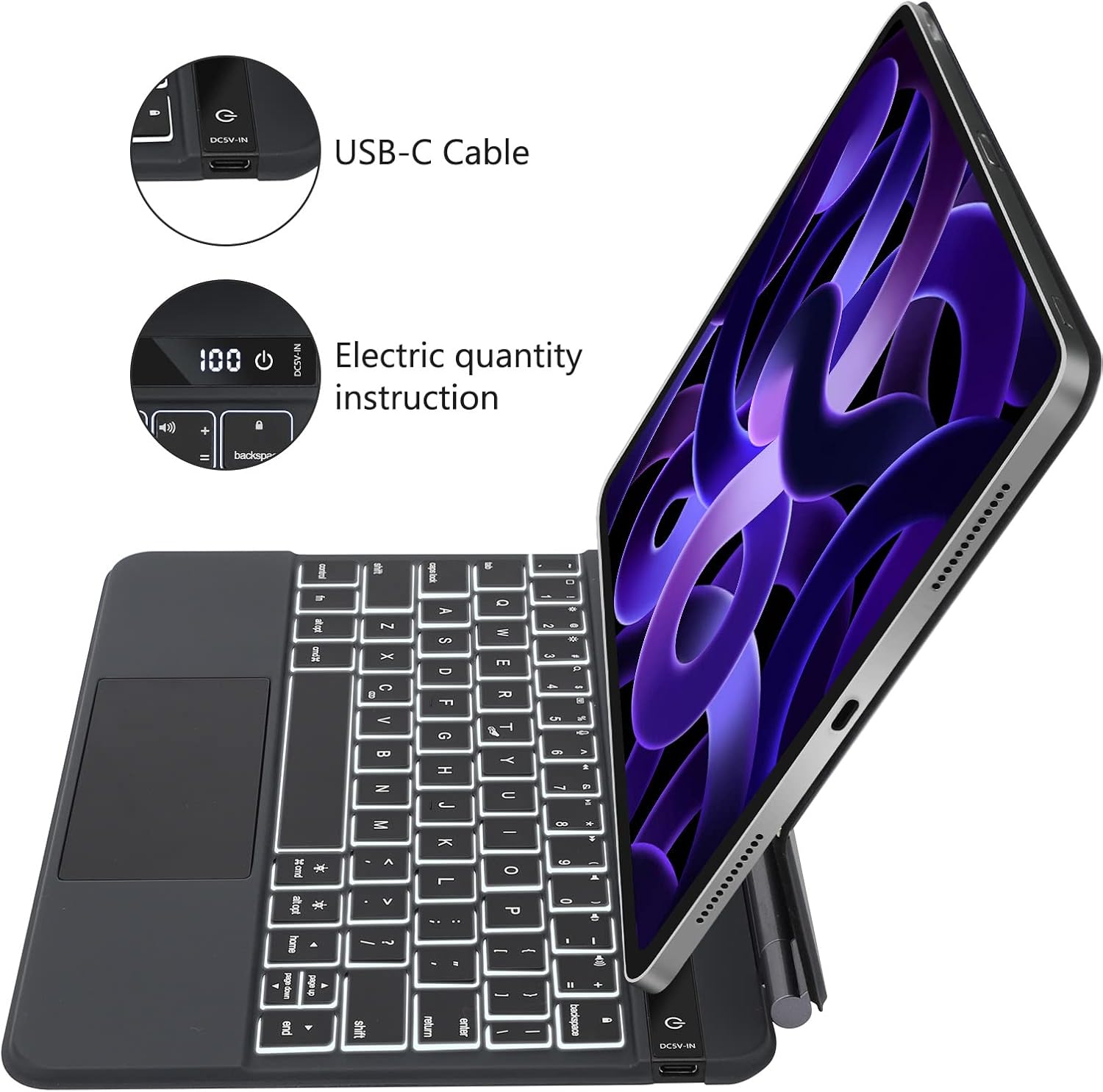
Image: Side view of the keyboard, highlighting the USB-C charging port and the digital display for battery percentage.
The LCD screen on the keyboard will display the power status, showing the percentage of charge. A full charge provides up to 90 days of standby time or 180 hours of uninterrupted working time without backlight, and 5 hours with backlight.
4.2 Attaching Your iPad
- Open the keyboard case.
- Align your iPad with the magnetic back panel of the case. The iPad will snap into place securely.
- Adjust the viewing angle as desired.
4.3 Bluetooth Pairing
- Ensure the keyboard is charged and powered on.
- On your iPad, go to Settings > Bluetooth.
- Turn on Bluetooth.
- The iPad will search for nearby devices. Select "SENGBIRCH Keyboard" (or similar name) from the list of available devices.
- Follow any on-screen prompts to complete the pairing process.
5. Operating Instructions
5.1 Power On/Off and Smart Features
- To power on the keyboard, press the power button.
- To power off, press and hold the power button.
- The keyboard case features sensitive smart sleep and wake-up integration. Opening or closing the case will automatically wake up or put your iPad into sleep mode, conserving battery life.
5.2 Backlight Function
The keyboard includes a backlight feature for use in dim environments. Specific keys or key combinations (e.g., Fn + Light icon key) control the backlight brightness and color (if applicable). Refer to the keyboard layout for exact key functions.
5.3 Trackpad Usage
The integrated trackpad allows for precise navigation and gesture control on your iPad. For optimal performance, ensure your iPad's software is up to date.
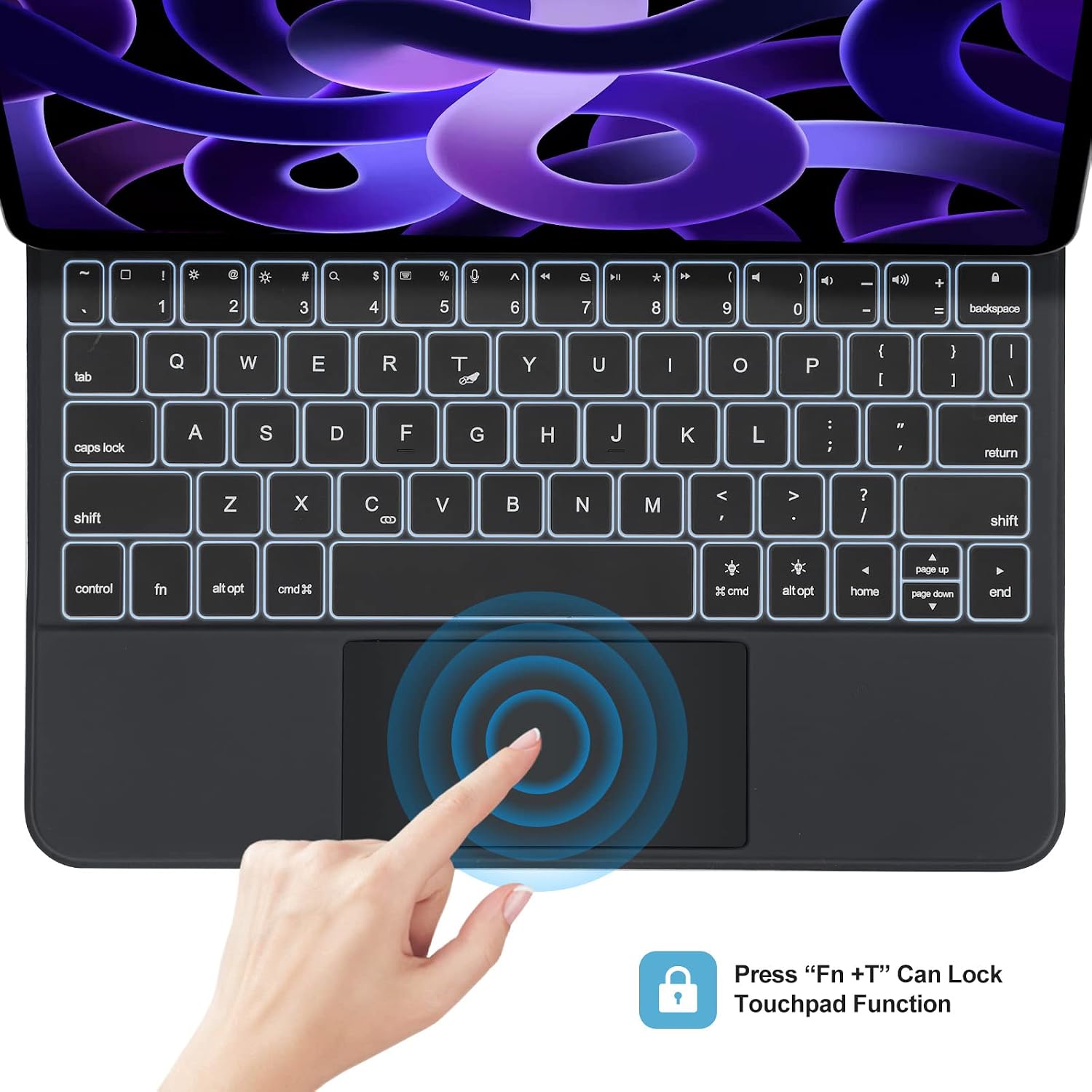
Image: Close-up of the keyboard's trackpad, illustrating the 'Fn+T' key combination to lock or unlock the trackpad function.
To lock or unlock the trackpad function, press the Fn + T keys simultaneously.
6. Charging and Battery Information
The keyboard is equipped with a rechargeable battery. The LCD screen provides real-time battery status. When the battery is low, connect the USB-C charging cable to recharge.

Image: A close-up of the keyboard's integrated LCD display, showing a '100' percentage for battery charge.
Battery Life:
- Standby Time: Up to 90 days
- Working Time (without backlight): Up to 180 hours
- Working Time (with backlight): Up to 5 hours
7. Maintenance
To ensure the longevity and proper functioning of your SENGBIRCH Magic Keyboard, follow these maintenance guidelines:
- Cleaning: Use a soft, damp cloth to wipe the exterior of the case and keys. Avoid using harsh chemicals or abrasive materials.
- Storage: When not in use, keep the keyboard case closed to protect your iPad and the keyboard. Store in a cool, dry place away from direct sunlight.
- Protection: The keyboard is made of high-quality, scratch-resistant, and wear-resistant Acrylonitrile Butadiene Styrene (ABS) material. However, avoid dropping the device or exposing it to extreme temperatures or liquids.
8. Troubleshooting
If you encounter issues with your SENGBIRCH Magic Keyboard, try the following solutions:
- Keyboard not connecting:
- Ensure the keyboard is charged and powered on.
- Check that Bluetooth is enabled on your iPad.
- Forget the device in your iPad's Bluetooth settings and attempt to re-pair.
- Restart both your iPad and the keyboard.
- Keys not responding:
- Ensure the keyboard is properly connected via Bluetooth.
- Check battery level.
- Clean any debris from around the keys.
- Trackpad not working:
- Ensure the trackpad is not locked (press Fn + T).
- Check iPad settings for trackpad functionality.
- Ensure the keyboard is connected.
- Backlight not working:
- Check battery level, as backlight consumes more power.
- Ensure the backlight function is activated using the appropriate key combination.
If problems persist, please contact customer support.
9. Specifications
| Feature | Detail |
|---|---|
| Brand | SENGBIRCH |
| Model Number | B0BSC5RZ7W |
| Compatible Devices | iPad Pro 11-inch (1st, 2nd, 3rd, 4th Gen), iPad Air 10.9-inch (4th, 5th Gen) |
| Connectivity Technology | Bluetooth |
| Keyboard Description | Wireless, Detachable |
| Special Features | Backlit, Rechargeable, Trackpad, Smart Sleep/Wake |
| Material | Acrylonitrile Butadiene Styrene (ABS) |
| Number of Keys | 78 |
| Battery Standby Time | 90 days |
| Working Time (no backlight) | 180 hours |
| Working Time (with backlight) | 5 hours |
10. Warranty and Support
The SENGBIRCH Magic Keyboard comes with a 1-year warranty from the date of purchase. This warranty covers manufacturing defects and workmanship under normal use.
For warranty claims, technical support, or any questions regarding your product, please contact SENGBIRCH customer service through the retailer's platform or the official SENGBIRCH website.
Please retain your proof of purchase for warranty validation.