
Aneken N60
Aneken N60 Mixed Denomination Money Counter Machine User Manual
Model: N60
1. Introduction
Thank you for choosing the Aneken N60 Mixed Denomination Money Counter Machine. This manual provides detailed instructions for the proper setup, operation, maintenance, and troubleshooting of your new device. Please read this manual thoroughly before operating the machine to ensure optimal performance and longevity. This machine is designed for efficient and accurate counting of various currencies with advanced counterfeit detection capabilities.
2. Product Overview
2.1 Key Features
- Mixed Denomination Counting (MDC): Automatically recognizes and counts the value of bills, displaying both quantity and total amount. Supports USD, CAD, MXN, EUR, and GBP.
- Bank-Grade Counterfeit Detection: Utilizes Infrared (IR), Ultraviolet (UV), Magnetic (MG), and Dimensional Detection for accurate counterfeit identification. An alarm sounds and the screen turns red upon detection.
- Dual-Screen Display: Features a 3.5-inch TFT screen for clear operation and an external monitor for customer viewing.
- High Efficiency: Counts over 1200 bills per minute with low noise.
- Large Hopper Capacity: Holds up to 200 bills, suitable for various business needs.
2.2 Components and Packaging
Your Aneken N60 Money Counter Machine package includes the following items:
- 1 x AL-N60 Bill Counter
- 1 x External Display
- 1 x Power Cord
- 1 x IR Calibration Paper
- 1 x Nylon Brush
- 1 x Clean Cloth
- 1 x Fuse
- 1 x User Manual (this document)
- 8 x Currency Straps
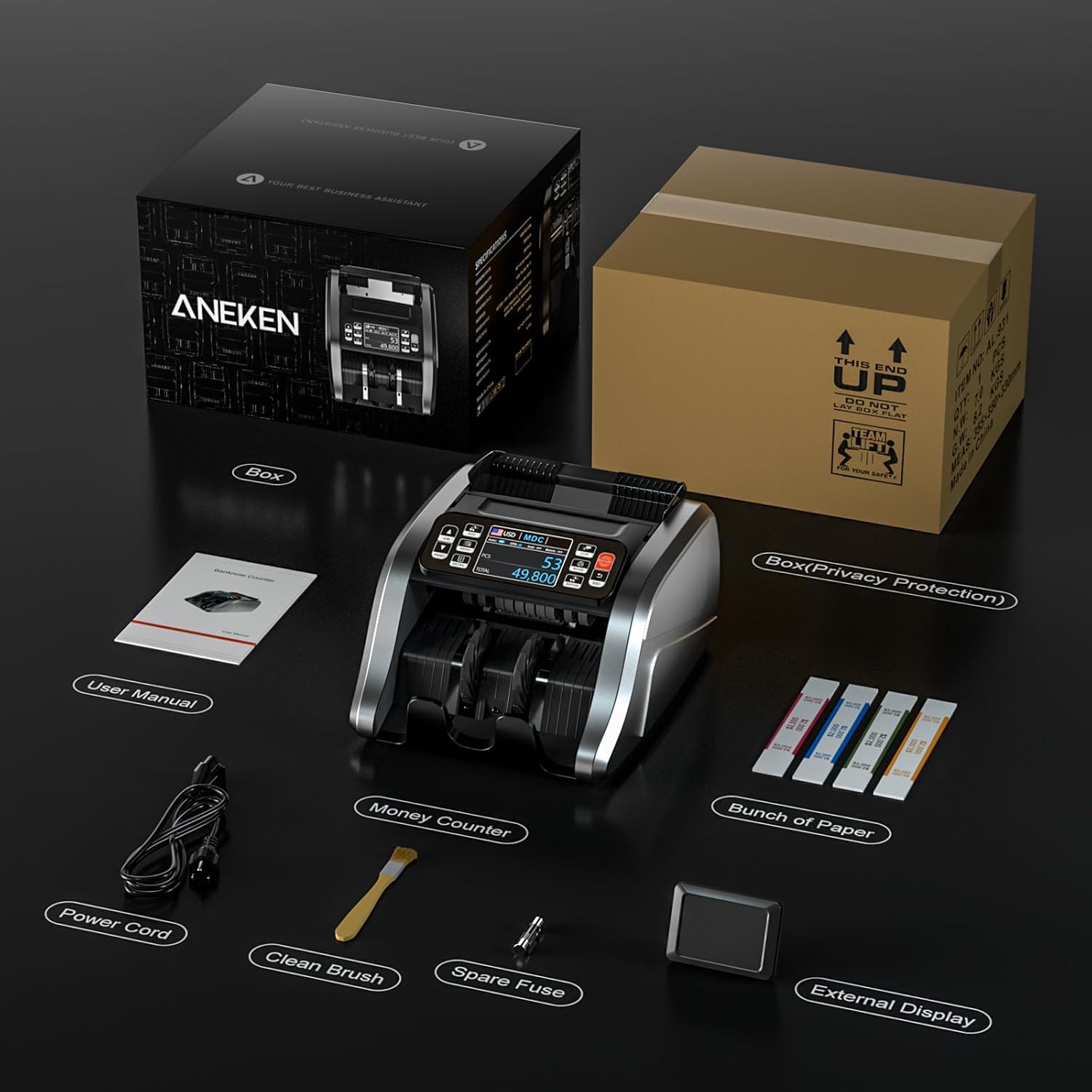
Figure 2.2.1: Contents of the Aneken N60 package, including the main unit, external display, power cord, cleaning tools, and user manual.
3. Setup
Follow these steps to set up your Aneken N60 Money Counter Machine:
- Unpack the Machine: Carefully remove the money counter and all accessories from the packaging. Retain the packaging for future storage or transport.
- Place the Machine: Position the machine on a stable, flat, and dry surface, ensuring adequate ventilation around the unit.
- Connect Power: Insert the power cord into the power input port on the back of the machine, then plug the other end into a suitable power outlet.
- Connect External Display (Optional): If using the external display, connect its cable to the designated port on the back of the main unit.
- Power On: Press the power switch, usually located on the side or back of the machine, to turn it on. The display screen should illuminate.

Figure 3.1.1: The Aneken N60 Money Counter Machine ready for operation, showing the main unit and its display.
4. Operating Modes
The Aneken N60 offers several operating modes to suit various counting needs. Navigate between modes using the control panel buttons.

Figure 4.1.1: Control panel buttons and their functions for easy operation.
4.1 Mode Selection
- MDC (Mixed Denomination Counting): This is the primary mode for counting mixed denominations. The machine automatically identifies the value of each bill and provides a total amount.
- SDC (Single Denomination Counting): For counting bills of a single denomination.
- CNT (Count The Number): Counts the number of bills without recognizing their value.
- Batch: Allows you to set a specific number of bills for the machine to count into batches.
- Accumulation: Adds the current count to the previous count, useful for large volumes of bills.
4.2 Basic Operation
- Select Currency: Press the CUR button to cycle through supported currencies (USD, CAD, MXN, EUR, GBP).

Figure 4.2.1: The Aneken N60 supports multiple currencies.
- Select Mode: Press the MODE button to choose between CNT, SDC, or MDC modes.
- Place Bills: Neatly place the bills into the hopper. Ensure bills are flat and not folded or crumpled.
- Start Counting: The machine will typically start counting automatically (Auto mode). If not, press the RESTART button.
- Read Display: The 3.5-inch TFT screen will show the count results, including total pieces (PCS) and total value (TOTAL) in MDC mode.

Figure 4.2.2: Clear display of counting results on the TFT screen.

Figure 4.2.3: The machine efficiently handles mixed denominations.
- Counterfeit Detection: If a counterfeit bill is detected, the machine will stop, the screen will turn red, and an alarm will sound. Remove the suspicious bill and press RESTART to continue.

Figure 4.2.4: Bank-grade counterfeit detection in action.
- Print Detailed List (Optional): If connected to a compatible printer, press the PRINT button to get a detailed list of counted banknotes.

Figure 4.2.5: Option to print a detailed list of counted bills.
5. Maintenance
Regular maintenance ensures the accuracy and longevity of your Aneken N60 Money Counter Machine.
- Cleaning: Use the provided nylon brush and clean cloth to regularly remove dust and paper residue from the bill pathways, sensors, and rollers. Ensure the machine is powered off and unplugged before cleaning.
- IR Calibration: If you experience inconsistent counting or detection, use the included IR Calibration Paper according to the on-screen instructions or refer to the machine's internal menu for calibration procedures.
- General Care: Keep the machine away from direct sunlight, high humidity, and extreme temperatures. Avoid spilling liquids on the machine.
6. Troubleshooting
If you encounter issues with your Aneken N60, refer to the common problems and solutions below. For persistent issues, please contact customer support.
| Problem | Possible Cause | Solution |
|---|---|---|
| Machine does not power on | Power cord not connected; Power outlet faulty; Fuse blown. | Ensure power cord is securely connected. Try a different outlet. Check and replace fuse if necessary (refer to fuse replacement instructions). |
| Bills jam frequently | Bills are not neatly stacked; Too many bills in hopper; Worn or dirty rollers; Foreign objects in pathway. | Ensure bills are flat and neatly aligned. Do not overload the hopper. Clean the bill pathways and rollers regularly. Remove any foreign objects. |
| Inaccurate counting or detection errors | Sensors are dirty; Bills are damaged or extremely worn; Incorrect currency/mode selected; Calibration needed. | Clean all sensors and bill pathways. Avoid counting severely damaged bills. Verify the correct currency and operating mode are selected. Perform IR calibration. |
| External display not working | Cable not connected properly; Display unit faulty. | Check the connection of the external display cable. If the issue persists, contact support. |
6.1 Common Questions
- What if there is a problem with the machine?
Aneken provides 7*24 hours of service support. We will identify and solve problems for you as soon as possible until you are satisfied. - What about repairs?
As long as it is an ANEKEN product, we offer two-year maintenance support.
7. Specifications
Detailed technical specifications for the Aneken N60 Money Counter Machine:
| Specification | Value |
|---|---|
| Brand | Aneken |
| Model Number | N60 |
| Item Weight | 11.41 pounds |
| Package Dimensions | 15 x 13.7 x 10 inches |
| Color | Grey |
| Display Type | 3.5" TFT Screen |
| Counting Speed | Over 1200 bills/min |
| Hopper Capacity | 200 bills |
| Detection Methods | Infrared (IR), Ultraviolet (UV), Magnetic (MG), Dimensional Detection |
| Supported Currencies | USD, CAD, MXN, EUR, GBP |
8. Warranty and Support
Aneken is committed to providing high-quality products and excellent customer service.
- Warranty: Aneken offers a two-year maintenance support for all ANEKEN products.
- Software Updates: We provide free software upgrades for the lifetime of the product.
- Customer Support: For any inquiries, technical assistance, or service requests, please contact Aneken customer support. Our team is available 7 days a week, 24 hours a day, to assist you.
Related documentsN60

Ask a question about this manual
Ask about setup, troubleshooting, compatibility, parts, safety, or missing instructions. Manuals+ will review the question and use this page’s manual context to help answer it.