
Sigma SG60600L
Sigma 60-600mm F4.5-6.3 DG DN OS for L-Mount Instruction Manual
Model: SG60600L
1. Introduction
This manual provides detailed instructions for the safe and effective use of your Sigma 60-600mm F4.5-6.3 DG DN OS Sports Lens for L-Mount. Please read this manual thoroughly before using the product and retain it for future reference. This lens is designed for mirrorless cameras and offers a versatile 10x zoom range, suitable for various photographic applications from landscapes to wildlife.
2. What's in the Box
Upon opening the package, ensure all the following items are present:
- Sigma 60-600mm F4.5-6.3 DG DN OS Sports Lens
- Lens Hood
- Front Lens Cap
- Rear Lens Cap
- Tripod Socket (removable)
- Instruction Manual (this document)
3. Key Features
- Versatile 10x Zoom: Covers a broad focal length range from 60mm to 600mm.
- High-response Linear Actuator (HLA) AF Motor: Provides fast and precise autofocus performance.
- Dust and Splash-Resistant Structure: Designed for durability in various shooting conditions.
- Maximum Magnification Ratio of 1:2.4: Allows for detailed close-up shots.
- Dual Action Zoom Function: Offers both rotary and push-pull zoom mechanisms for flexible operation.
- Optical Stabilization (OS): Minimizes camera shake for sharper images, especially at longer focal lengths.
- Manual Focus Override: Enables manual focus adjustments even when using autofocus.
- Zoom Lock Switch: Secures the lens at a desired focal length to prevent accidental extension.
4. Setup
4.1 Attaching the Lens to Your Camera
- Ensure both the camera and lens are powered off.
- Remove the rear lens cap from the lens and the body cap from the camera.
- Align the mounting index marks on the lens and camera body.
- Insert the lens into the camera's lens mount and rotate it clockwise until it clicks into place.
4.2 Attaching the Lens Hood
The included lens hood helps to block stray light and protect the front element of the lens. Align the red dot on the lens hood with the red dot on the front of the lens, then twist the hood clockwise until it locks securely.
4.3 Using the Tripod Socket
For stable shooting, especially at longer focal lengths, attach the lens to a tripod using the integrated tripod socket. The tripod collar can be rotated for optimal balance and composition. Loosen the locking knob on the tripod collar to rotate the lens, then tighten it to secure the position.
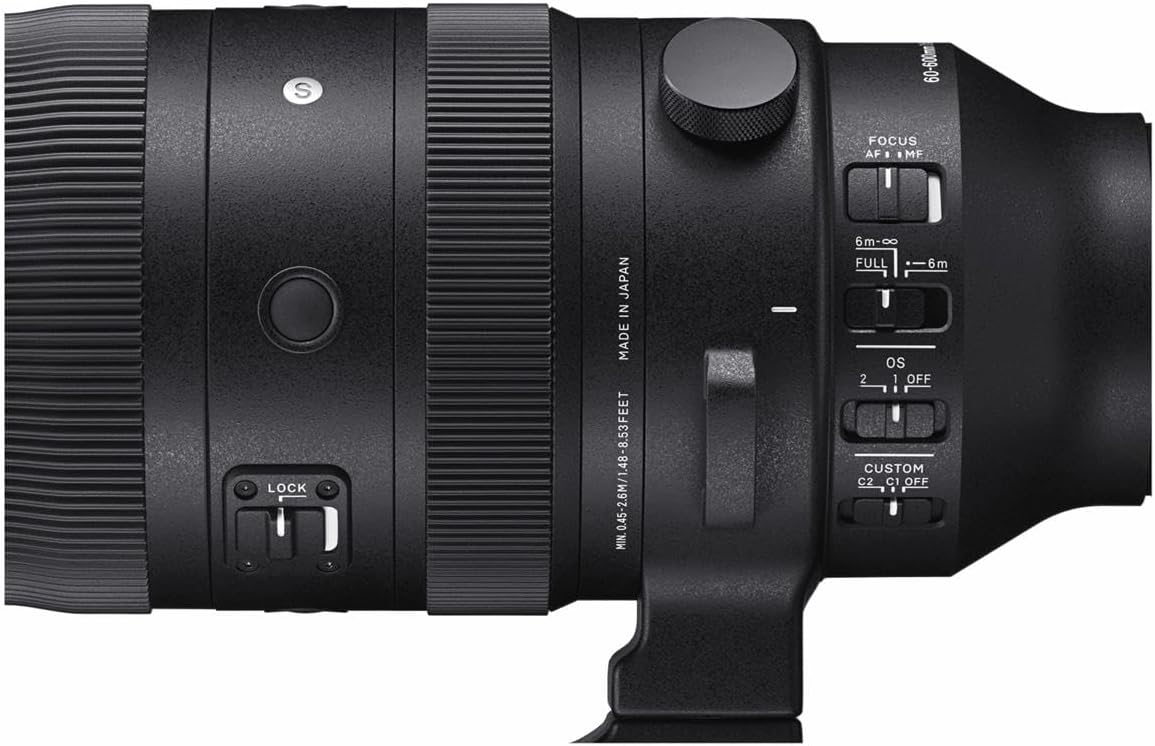
Image: Sigma 60-600mm lens securely mounted on a tripod, demonstrating its use for stable photography.
5. Operating Modes
5.1 Focus Modes (AF/MF)
The lens features a switch to select between Autofocus (AF) and Manual Focus (MF). In AF mode, the camera automatically focuses on the subject. In MF mode, you manually adjust the focus ring on the lens. The Manual Override (MO) function allows for fine-tuning focus manually even when AF is engaged.
5.2 Optical Stabilizer (OS) Modes
The Optical Stabilizer (OS) system helps reduce blur caused by camera shake. The lens offers different OS modes:
- Mode 1: General-purpose stabilization for static subjects.
- Mode 2: Optimized for panning shots, stabilizing vertical movement while allowing horizontal movement.
- OFF: Disables optical stabilization.
5.3 Zoom Lock Switch
The zoom lock switch prevents the lens barrel from extending or retracting unintentionally, which is useful during transport or when shooting at a fixed focal length.

Image: Detailed view of the lens control panel, highlighting the various switches for focus, optical stabilization, and zoom lock.
6. Specifications
| Feature | Specification |
|---|---|
| Brand | Sigma |
| Model Name | SG60600L |
| Focal Length | 60-600mm |
| Lens Type | Telephoto Zoom |
| Compatible Mountings | Leica L-Mount |
| Maximum Aperture | F4.5-6.3 |
| Minimum Aperture | F22-32 |
| Image Stabilization | Optical (OS) |
| Focus Type | Autofocus (HLA) with Manual Focus Override |
| Number of Diaphragm Blades | 9 (Rounded) |
| Minimum Focusing Distance | 45 cm (17.7 inches) at 200mm |
| Maximum Magnification Ratio | 1:2.4 (at 200mm) |
| Filter Size | 105mm |
| Item Weight | 2500 Grams (5.5 lbs) |
| Water Resistance Level | Water Resistant |
7. Maintenance
7.1 Cleaning the Lens
- Use a blower brush to remove dust from the lens surface.
- For smudges or fingerprints, use a clean, soft microfiber cloth specifically designed for optics, along with a lens cleaning solution.
- Never use harsh chemicals or abrasive materials, as these can damage the lens coatings.
7.2 Storage
Store the lens in a cool, dry place away from direct sunlight and extreme temperatures. Use the front and rear lens caps to protect the glass elements. If storing for an extended period, consider using a dehumidifying agent to prevent mold growth.
8. Troubleshooting
8.1 Image Blur
- Check OS setting: Ensure the Optical Stabilizer is set to an appropriate mode (Mode 1 or Mode 2) for your shooting conditions, or OFF if using a tripod.
- Shutter Speed: Use a faster shutter speed, especially when shooting handheld at longer focal lengths.
- Focus: Verify that the lens is properly focused on your subject.
8.2 Autofocus Issues
- AF/MF Switch: Confirm the lens is set to AF mode.
- Lighting Conditions: Autofocus may struggle in very low light. Consider using manual focus or a brighter light source.
- Camera Settings: Check your camera's autofocus settings to ensure they are appropriate for your subject.
9. Warranty and Support
The Sigma 60-600mm F4.5-6.3 DG DN OS Sports Lens comes with a 4-year warranty. For warranty claims, technical support, or service inquiries, please contact Sigma customer service or visit their official website. Keep your proof of purchase for warranty validation.
For more information, visit the official Sigma Global website.
Related Documents - SG60600L
 |
Sigma 150-600mm f/5-6.3 DG OS HSM | C Lens Instruction Manual Comprehensive user manual for the Sigma 150-600mm f/5-6.3 DG OS HSM | C lens, covering its components, attachment to camera bodies, focusing and zooming operations, the Optical Stabilizer (OS) function, custom modes, tripod socket, lens hood, teleconverters, and basic care. It also includes technical specifications in multiple languages. |
 |
Introduction to Bird Photography: Settings and Techniques A comprehensive guide to bird photography, covering essential camera settings, lens choices, and techniques for capturing stunning images of birds in various situations, including stationary and in-flight shots. |
 |
Sigma 100-400mm F5-6.3 DG OS HSM Lens Instruction Manual Detailed instructions for using the Sigma 100-400mm F5-6.3 DG OS HSM lens, covering its features, operation, care, and technical specifications. Includes information on Optical Stabilizer (OS), Custom Modes, Tele Converters, and more. |
 |
Sigma APO 50-150mm F2.8 EX DC OS HSM Lens Instruction Manual This manual provides detailed instructions for the Sigma APO 50-150mm F2.8 EX DC OS HSM lens, covering safety precautions, lens parts, operation (focusing, zooming, OS stabilization), compatibility with camera bodies and accessories like teleconverters and filters, basic care, and technical specifications. |
 |
SIGMA 80-400mm F4.5-5.6 EX DG OS Telephoto Zoom Lens User Manual A comprehensive user manual for the SIGMA 80-400mm F4.5-5.6 EX DG OS telephoto zoom lens, covering operation, features like optical stabilization, maintenance, and technical specifications for optimal photographic performance. |
 |
Sigma 24-70mm F2.8 DG DN Lens: User Manual and Specifications Comprehensive user manual for the Sigma 24-70mm F2.8 DG DN lens, covering attachment, focusing, zooming, care, and technical specifications. Includes safety precautions and multilingual instructions. |