
Introduction
The Marantec Maveo Bluefi Stick is a Wi-Fi adapter designed to connect your Marantec Synergy 200 and 300 Series garage door openers to your smartphone. This device enables convenient control and monitoring of your garage door from anywhere, along with advanced features like geo-fencing and guest access management.
Important: This device works exclusively with Marantec Synergy 200 and 300 Series garage door openers.
Setup Instructions
1. Hardware Installation
Unplug the Garage Door Opener: For safety, ensure the garage door opener is completely powered off by unplugging it from the electrical outlet.

Image: The Marantec Maveo Bluefi Stick, a compact black device with a yellow button.
Locate the BlueFi Stick Port: Identify the designated port on your Marantec Synergy 200 or 300 Series garage door opener for the BlueFi Stick. This is typically a rectangular port on the side or front of the main unit.
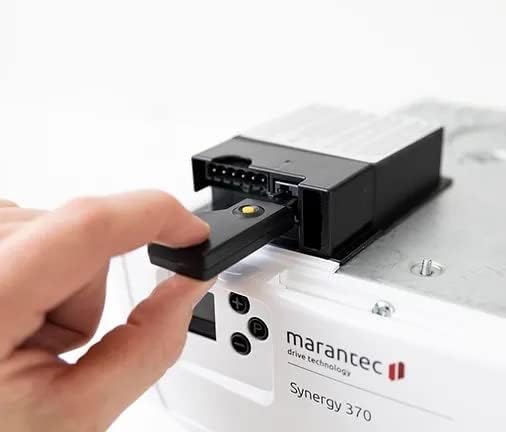
Image: A hand inserting the Bluefi Stick into the designated port on a Marantec garage door opener.
Insert the BlueFi Stick: Carefully insert the BlueFi Stick into the port until it is firmly seated. Ensure it is inserted in the correct orientation.

Image: The Bluefi Stick fully inserted into the Marantec garage door opener unit.
Reconnect Power: Plug the garage door opener back into the electrical outlet. The BlueFi Stick will automatically attempt to connect to the drive.
Video: Maveo Set Up Guide
This video provides a visual guide for the hardware installation and initial app setup of the Maveo Bluefi Stick.
2. App Installation and Configuration
Download the Maveo App: Download the official Maveo app from your smartphone's app store (available for iOS and Android).

Image: A smartphone displaying the Maveo app interface, showing options for garage door control.
Create an Account: Open the app and follow the prompts to create a new Maveo account. You will need to provide an email address and choose a password. A verification code will be sent to your email to confirm your account.
Add New Device: In the app, select the option to "Add new item" or "Add device" and choose "maveo BlueFi stick" from the list of products.
Pair via Bluetooth: The app will begin searching for your device. To initiate the pairing process, briefly press the yellow button located on the BlueFi Stick. The stick will connect to your smartphone via Bluetooth.
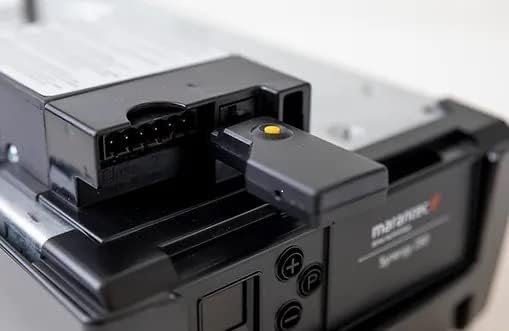
Image: A close-up view of the Bluefi Stick, highlighting its yellow button.
Connect to Wi-Fi: Once Bluetooth pairing is successful, the app will prompt you to connect the BlueFi Stick to your local Wi-Fi network. Select your router from the list and enter the Wi-Fi password. A solid green light on the BlueFi Stick indicates a successful connection to your router.
Complete Setup: Follow any remaining on-screen instructions in the app to finalize the setup process and name your garage door.
Operating Instructions
Once the Maveo Bluefi Stick is successfully installed and configured, you can control and monitor your garage door using the Maveo app.
- Remote Control: Open or close your garage door from anywhere using the app.
- Geo-fencing ("Coming Home" Scenario): Set up a geo-fence to automatically open or close your garage door as you approach or leave your home. This feature enhances convenience and security.
- Guest Access: Grant temporary access to family members or friends by generating and sharing access keys through the app. You can set duration limits for these keys.
- Automatic Closing: Configure the time-to-close automation feature to automatically close the garage door after a set period of time following opening. Note: This feature is only available when a light barrier is installed.
- Monitoring: The maveo pro app allows you to monitor connected garage door openers for malfunctions and failures, helping you address issues proactively.
Video: Maveo Stick Features
This video demonstrates various features of the Maveo Bluefi Stick, including remote control and smart automations.
Maintenance
The Marantec Maveo Bluefi Stick is designed for low maintenance. Ensure the device remains securely plugged into the garage door opener. Regularly check for app updates to ensure optimal performance and access to the latest features. Keep your Wi-Fi network stable and secure for consistent connectivity.
Troubleshooting
| Problem | Possible Cause | Solution |
|---|---|---|
| Device not connecting to app/Wi-Fi | Incorrect Wi-Fi password, out of Wi-Fi range, BlueFi Stick not properly seated, temporary network issue. |
|
| Garage door not responding to app commands | No internet connection, BlueFi Stick disconnected, app glitch. |
|
| Reduced range of existing garage door remotes | Potential interference from the BlueFi Stick or Wi-Fi network. |
|
| Garage door opener displaying error codes after BlueFi Stick installation | Compatibility issue or internal fault. |
|
Specifications
| Feature | Detail |
|---|---|
| Manufacturer | Marantec |
| Part Number | Maveo Bluefi Stick |
| Item Weight | 0.32 ounces |
| Product Dimensions | 2.13 x 0.43 x 0.79 inches |
| Item Model Number | Maveo Bluefi Stick |
| Color | Black |
| Item Package Quantity | 1 |
| Included Components | Maveo Bluefi Stick |
| Batteries Included? | No |
| Batteries Required? | No |
| First Available Date | January 12, 2023 |
Warranty and Support
For warranty information and technical support, please contact Marantec customer service directly. Refer to the product packaging or the official Marantec website for the most up-to-date contact details and warranty terms.
It is recommended to register your product with Marantec to receive important updates and support.