
1. Product Overview
The Hitage BS-315 is a portable Bluetooth speaker designed for high-quality audio playback. It features Bluetooth 5.0 connectivity, multiple input options, and a built-in rechargeable battery for extended use. This manual provides detailed instructions for setup, operation, and maintenance of your speaker.

Image 1.1: Front view of the Hitage BS-315 Bluetooth Speaker.
2. Package Contents
Upon unboxing, please ensure all items are present:
- Hitage BS-315 Bluetooth Speaker
- Charging Cable (Type-C)
- User Manual (this document)
3. Product Layout and Controls
3.1 Control Buttons
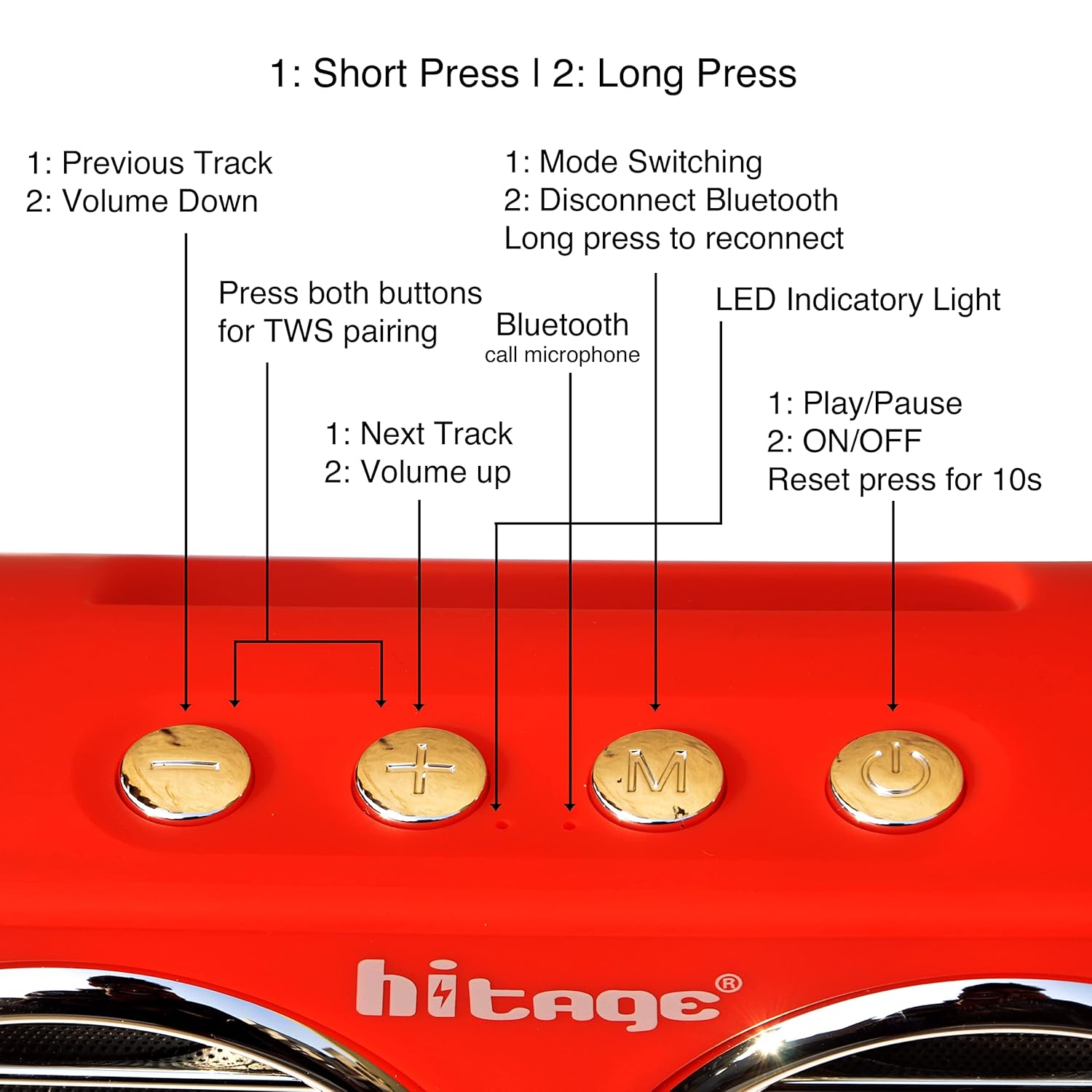
Image 3.1: Detailed view of the control buttons on the Hitage BS-315 speaker.
- '-' Button:
1. Short Press: Previous Track
2. Long Press: Volume Down - '+' Button:
1. Short Press: Next Track
2. Long Press: Volume Up - 'M' (Mode) Button:
1. Short Press: Mode Switching (Bluetooth, AUX, Micro SD, USB)
2. Long Press: Disconnect Bluetooth / Long press again to reconnect - Power Button:
1. Short Press: Play/Pause
2. Long Press: ON/OFF
3. Press for 10 seconds: Reset - TWS Pairing: Press both '-' and '+' buttons simultaneously for TWS pairing.
- Bluetooth Call Microphone: Integrated for hands-free calls.
- LED Indicator Light: Displays status (e.g., charging, Bluetooth connected).
3.2 Ports and Sockets

Image 3.2: Rear view showing the various input and charging ports.
- TF Card Socket: For Micro SD card playback.
- Charging Socket: Type-C port for charging the speaker.
- USB Socket: For USB drive playback.
- 3.5mm Audio Input Jack: For AUX cable connection.
4. Setup Instructions
4.1 Charging the Speaker
- Connect the provided Type-C charging cable to the Charging Socket on the speaker.
- Connect the other end of the cable to a USB power adapter (not included) or a computer's USB port.
- The LED indicator will show charging status. Once fully charged, the indicator will change or turn off.
- A full charge typically takes a few hours and provides approximately 6 hours of playback.
4.2 Powering On/Off
- To Power On: Long press the Power Button until you hear an audible prompt and the LED indicator lights up.
- To Power Off: Long press the Power Button until you hear an audible prompt and the LED indicator turns off.
4.3 Bluetooth Pairing
- Ensure the speaker is powered on and in Bluetooth mode (the LED indicator will typically flash). If not, short press the 'M' button to switch modes.
- Enable Bluetooth on your device (smartphone, tablet, computer).
- Search for available Bluetooth devices and select "Hitage BS-315" from the list.
- Once paired, the speaker will provide an audible confirmation, and the LED indicator will stop flashing and remain solid.
4.4 TWS (True Wireless Stereo) Pairing
The Hitage BS-315 supports TWS functionality, allowing two BS-315 speakers to connect wirelessly for a stereo sound experience.

Image 4.1: Visual representation of two speakers connected via TWS.
- Ensure both Hitage BS-315 speakers are powered on and not connected to any other Bluetooth device.
- On one of the speakers, simultaneously press and hold the '-' and '+' buttons. The speaker will enter TWS pairing mode.
- Repeat the action on the second speaker.
- The speakers will automatically search and pair with each other. Once connected, you will hear an audible confirmation.
- Now, connect your device to one of the paired speakers via Bluetooth as described in Section 4.3. Both speakers will play audio in stereo.
5. Operation
5.1 Basic Audio Controls
- Play/Pause: Short press the Power Button.
- Volume Up: Long press the '+' button.
- Volume Down: Long press the '-' button.
- Next Track: Short press the '+' button.
- Previous Track: Short press the '-' button.
5.2 Mode Switching
Short press the 'M' (Mode) button to cycle through available input modes: Bluetooth, AUX, Micro SD, and USB.
5.3 Call Function (Bluetooth Mode)
When connected via Bluetooth to a smartphone:
- Answer/End Call: Short press the Power Button.
- Reject Call: Long press the Power Button.
- Redial Last Number: Double short press the Power Button.
5.4 Connecting via AUX, Micro SD, or USB
- AUX: Connect a 3.5mm audio cable from your device's audio output to the speaker's 3.5mm Audio Input Jack. Switch the speaker to AUX mode using the 'M' button.
- Micro SD: Insert a Micro SD card (TF card) with audio files into the TF Card Socket. Switch the speaker to Micro SD mode using the 'M' button.
- USB: Insert a USB drive with audio files into the USB Socket. Switch the speaker to USB mode using the 'M' button.
6. Maintenance
6.1 Cleaning
- Wipe the speaker's exterior with a soft, dry, lint-free cloth.
- Do not use abrasive cleaners, alcohol, benzene, or other chemical solvents, as these may damage the surface.
- Avoid getting moisture into any openings.
6.2 Battery Care
- Charge the speaker fully before first use.
- To preserve battery life, charge the speaker at least once every three months if not in regular use.
- Avoid exposing the speaker to extreme temperatures (hot or cold), as this can shorten battery life.
6.3 Storage
Store the speaker in a cool, dry place away from direct sunlight and excessive dust when not in use.
7. Troubleshooting
| Problem | Possible Cause | Solution |
|---|---|---|
| Speaker does not power on | Low battery; Power button not pressed correctly | Charge the speaker; Long press the Power Button for 3-5 seconds |
| Cannot pair via Bluetooth | Speaker not in pairing mode; Device Bluetooth off; Speaker already connected to another device | Ensure speaker is in Bluetooth mode (flashing LED); Turn on device Bluetooth; Disconnect from other devices or long press 'M' button to disconnect |
| No sound | Volume too low; Incorrect mode; Source device issue | Increase speaker and device volume; Press 'M' to select correct input mode; Check audio on source device |
| TWS pairing fails | Speakers too far apart; Already paired to a device | Ensure speakers are close; Disconnect both speakers from any Bluetooth devices before TWS pairing |
| Speaker unresponsive | Software glitch | Perform a factory reset by pressing the Power Button for 10 seconds. |
8. Specifications
| Feature | Detail |
|---|---|
| Model Name | BS-315 |
| Brand | Hitage |
| Connectivity Technology | Bluetooth, USB |
| Wireless Communication Technology | Bluetooth |
| Bluetooth Version | 5.0 |
| Speaker Type | Subwoofer |
| Audio Output Mode | Stereo |
| Speakers Nominal Output Power | 5 Watts |
| Power Source | Battery Powered |
| Battery Average Life | 6 Hours |
| Control Method | Touch |
| Special Features | Bass Boost, Multi Room Audio (TWS), USB Port |
| Audio Input Compatible | Auxiliary |
| Material | Plastic |
| Product Dimensions | 330D x 40W x 80H Millimeters |
| Item Weight | 950 Grams |
| Water Resistance Level | Not Water Resistant |
9. Warranty and Support
9.1 Warranty Information
The Hitage BS-315 Bluetooth Speaker comes with a 3-Month Warranty against manufacturing defects. Please retain your purchase receipt as proof of purchase for warranty claims.
9.2 Customer Support
For any technical assistance, warranty claims, or further inquiries, please contact Hitage customer support through the retailer where the product was purchased or visit the official Hitage website for contact details.
10. Important Safety Information
- Do not expose the speaker to water or moisture.
- Do not disassemble, repair, or modify the speaker yourself.
- Keep the speaker away from heat sources, direct sunlight, and flammable materials.
- Do not use the speaker at excessively high volumes for prolonged periods to avoid hearing damage.
- Dispose of the speaker and its battery responsibly according to local regulations.