
1. Introduction
This manual provides detailed instructions for the NEEWER DL200 Motorized Camera Dolly. The DL200 is designed to provide smooth, controlled camera movements for video recording and time-lapse photography. It features app control, a silent motor, and compatibility with various cameras and smartphones. Please read this manual thoroughly before use to ensure proper operation and to maximize the product's potential.
2. Package Contents
Verify that all items listed below are included in your package:
- 1 x Motorized Dolly
- 1 x Type C Charging Cable
- 1 x Ball Head
- 1 x Mobile Phone Holder
- 1 x Storage Bag

3. Product Overview
The NEEWER DL200 Motorized Camera Dolly is a compact and versatile device for dynamic camera movements. It features a foldable design for portability and a high-precision stepping motor for quiet operation.
3.1 Main Unit and Controls

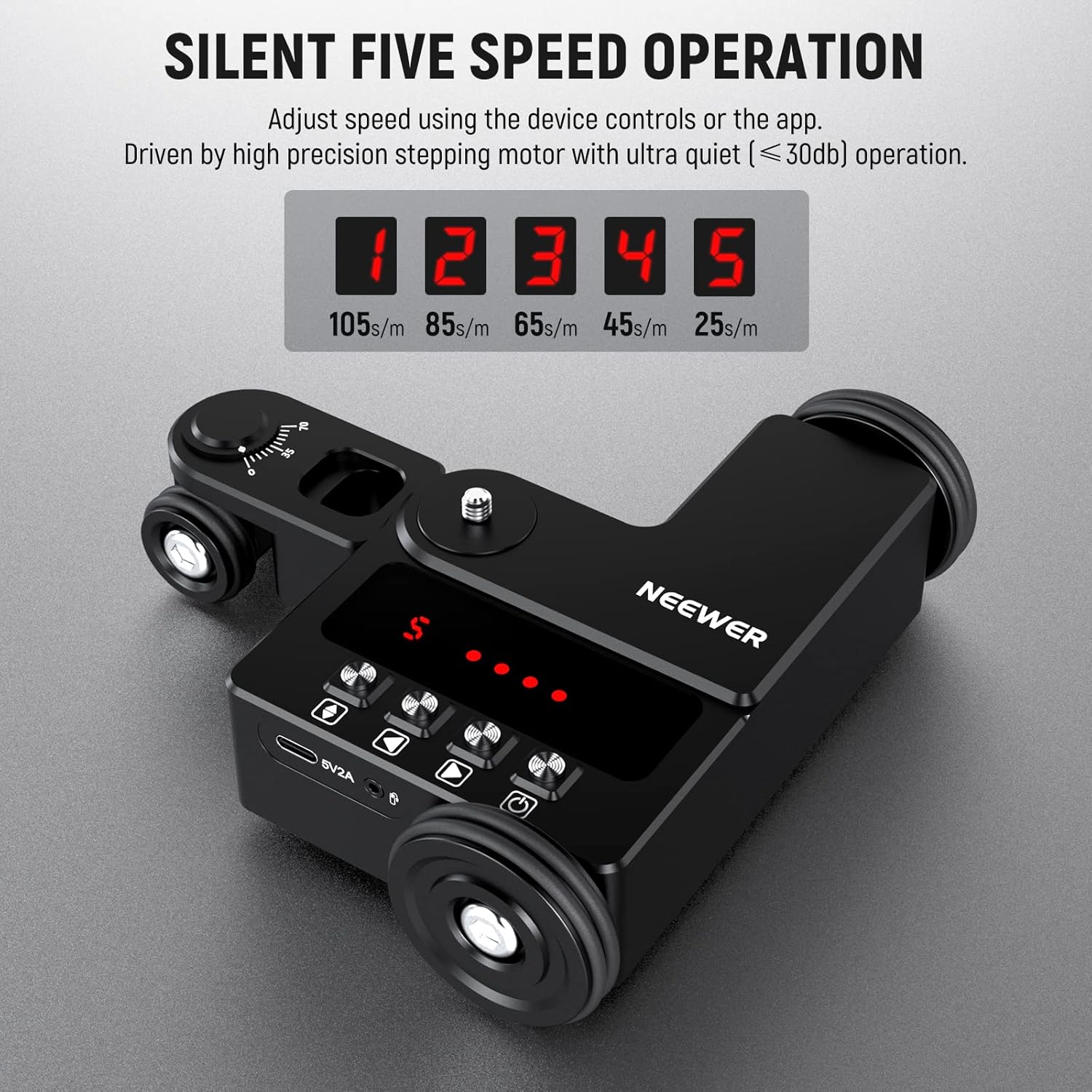
The dolly features an integrated control panel with buttons for power, direction, and speed adjustment. LED indicators display the current speed level.

3.2 Mounting Points and Ports
The dolly includes a 1/4" screw for attaching cameras or the included ball head. A USB Type-C port is provided for charging and firmware upgrades.


4. Setup
4.1 Attaching Your Camera or Smartphone
- For DSLR/Mirrorless Cameras: Mount your camera directly onto the 1/4" screw on the dolly. Ensure it is securely tightened.
- For Smartphones: Attach the included ball head to the 1/4" screw on the dolly. Then, attach the mobile phone holder to the ball head. Secure your smartphone in the holder.


4.2 Powering On and Charging
- To power on, press and hold the power button on the dolly until the LED indicators light up.
- To charge the dolly, connect the included Type-C charging cable to the dolly's USB-C port and a 5V/2A power source. The charging time is approximately 3 hours.
4.3 Adjusting Wheels for Movement Paths
The front wheels of the dolly can be manually angled to achieve different movement paths:
- Straight Line Movement: Ensure the front wheels are aligned straight.
- Curved Movement: Manually adjust the angle of the front wheels (0-70 degrees) to create curved or circular paths.


5. Operating Instructions
The NEEWER DL200 can be operated directly via its onboard controls or through the dedicated smartphone app.
5.1 Smartphone App Control
The dolly can be paired with iOS and Android smartphones via Bluetooth for advanced control and customization. Download the NEEWER app from your device's app store.
5.2 Operating Modes
The app offers three distinct operating modes:
- Manual Mode: Set movement directions, speed (1-5 levels), and movement mode (even/slow).
- Video Mode: Set movement directions, movement distance (66-999cm), and movement mode (even/slow).
- Time Lapse Mode: Set shutter speed, frame length, number of shots, and fixed point shooting. Note: Time-lapse photography requires a camera shutter cable, which is not included and must be purchased separately.
5.3 Speed Levels and Silent Operation
The dolly offers 5 speed levels, adjustable via the app or onboard controls. The high-precision stepping motor ensures ultra-quiet operation (below 30dB), suitable for video recording environments.

6. Maintenance
To ensure the longevity and optimal performance of your NEEWER DL200 Motorized Camera Dolly, follow these maintenance guidelines:
- Cleaning: Use a soft, dry cloth to wipe the dolly's exterior. Avoid using harsh chemicals or abrasive materials.
- Storage: When not in use, store the dolly in its provided storage bag in a cool, dry place, away from direct sunlight and extreme temperatures.
- Battery Care: For extended storage, ensure the battery is partially charged (around 50-60%) to maintain battery health. Recharge periodically if stored for long periods.
- Wheel Inspection: Periodically check the wheels for any debris or obstructions that might affect smooth movement.
7. Troubleshooting
If you encounter issues with your NEEWER DL200, refer to the following common problems and solutions:
- Dolly not moving or unresponsive:
- Ensure the dolly is powered on and fully charged.
- Check app connection if using smartphone control.
- Verify that no obstructions are blocking the wheels.
- Linear motion shifts slightly:
- This can occur after a certain distance. Fine-tune the front wheel in the opposite direction of the shift to correct the path.
- Ensure the surface is perfectly flat and smooth, as uneven surfaces can cause deviations.
- App connection issues:
- Ensure Bluetooth is enabled on your smartphone.
- Restart the dolly and the app.
- Make sure the dolly is within Bluetooth range.
- Time-lapse function not working:
- Confirm that a compatible camera shutter cable is connected between your camera and the dolly (sold separately).
- Check camera settings for external shutter release.
- Unusual noise during operation:
- While the motor is designed to be silent (under 30dB), ensure no foreign objects are caught in the wheels or motor mechanism.
- Operating on rough surfaces can increase noise. Use on smooth floors and desktops only.
8. Specifications
| Feature | Specification |
|---|---|
| Input | 5V 2A |
| Output | 3.7V 1A |
| Communication Method | Bluetooth 5.0 |
| Charging Time | About 3 Hours |
| Continuous Use Time | About 3 Hours |
| Product Weight | 685g (1.51 pounds) |
| Horizontal Load Bearing | 3kg (6.6lb) |
| Working Temperature | -10°C to 60°C |
| Working Humidity | 40%-80% RH at 25°C |
| Storage Temperature | -20°C to 60°C |
| Storage Humidity | <93% RH at 40°C |
| Item Model Number | 10101855 |
| ASIN | B0BS5W31T2 |

9. Warranty and Support
NEEWER products are designed for reliability and performance. For specific warranty information, please refer to the warranty card included with your product or visit the official NEEWER website. If you require technical assistance, troubleshooting beyond this manual, or have questions about your product, please contact NEEWER customer support through their official channels.
You can find more information and support resources on the NEEWER Store on Amazon.