
VoleStay VS05F
VoleStay VS05F Biometric Mounted Handgun Safe User Manual
Model: VS05F
1. Introduction
This manual provides comprehensive instructions for the safe and effective use of your VoleStay VS05F Biometric Mounted Handgun Safe. Please read this manual thoroughly before installation and operation to ensure proper functionality and security. Keep this manual for future reference.
2. Important Safety Information
- Always store firearms unloaded in the safe.
- Keep the safe locked and keys stored securely away from children and unauthorized individuals.
- Do not store ammunition inside the safe with the firearm.
- Ensure the safe is mounted to a stable and secure surface to prevent removal.
- Test all access methods (fingerprint, keypad, key) after setup to confirm proper operation.
- Replace batteries promptly when the low battery indicator appears.
3. Package Contents
Verify that all items are present in the package:
- VoleStay VS05F Biometric Mounted Handgun Safe
- Emergency Keys (2)
- Mounting Plate
- Mounting Hardware (screws, anchors)
- User Manual (this document)
4. Product Overview
The VoleStay VS05F safe offers multiple access methods and robust construction for secure firearm storage.

Image 4.1: Front view of the VoleStay VS05F Biometric Mounted Handgun Safe, showing the biometric sensor, keypad, keyhole, and open compartment with a handgun inside.
4.1 Key Features
- Biometric Fingerprint Sensor: Stores up to 30 unique fingerprints for quick access.
- 6-Button Backlit Keypad: For secure numeric code entry.
- Emergency Key Access: Two physical keys for manual override.
- Durable Construction: 16-gauge carbon steel with anti-impact latch.
- Interior LED Light: Illuminates the compartment for visibility in low light.
- Battery Level Display: Indicates current battery status.
- Silent Mode: Option to disable audible alerts.
- Smart Alarm System: Activates after 3 incorrect access attempts.
- Mounting Versatility: Designed for mounting under desks, nightstands, walls, or in vehicles.

Image 4.2: Illustration highlighting the three quick access methods: Biometric Identification, Numeric Password, and Key Unlock.
4.2 Dimensions and Capacity
- Exterior Dimensions: 7.5"D x 2.9"W x 13.75"H
- Interior Dimensions: 7.25"D x 9.8"W x 2.75"H
- Maximum Handgun Length: 9.5 inches
- Weight: 8.3 pounds

Image 4.3: Detailed diagram showing the exterior and interior dimensions of the VoleStay VS05F safe, including maximum pistol size.
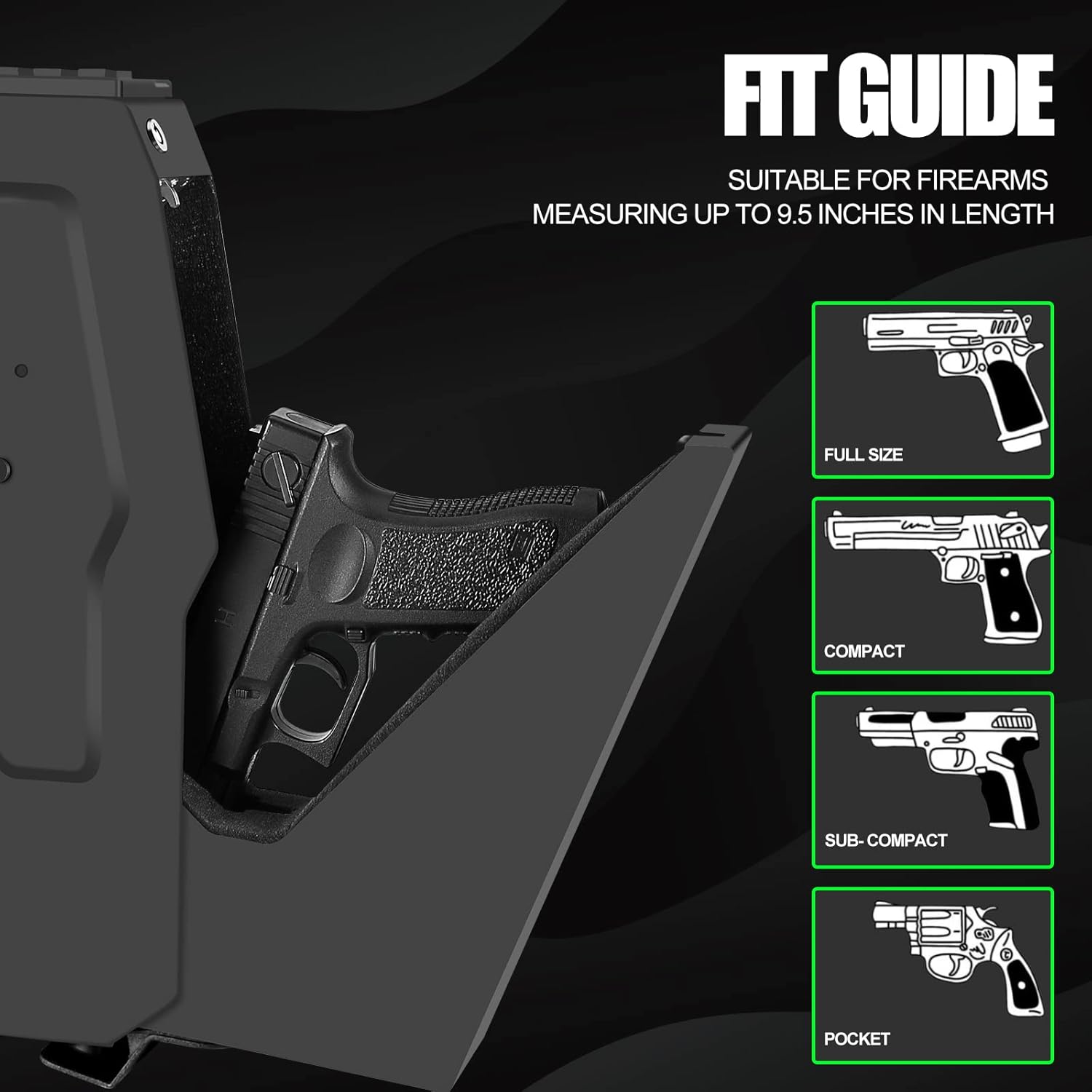
Image 4.4: Visual guide illustrating the types of handguns (full size, compact, sub-compact, pocket) that fit within the safe's maximum length of 9.5 inches.
5. Setup
5.1 Battery Installation
The safe requires 4 AAA batteries (not included) for operation of the biometric sensor, keypad, and interior light.
- Locate the battery compartment, typically on the inside of the safe door or a designated panel.
- Open the compartment and insert 4 AAA batteries, ensuring correct polarity (+/-).
- Close the battery compartment securely.
- The battery level indicator on the keypad will illuminate, showing the current charge.

Image 5.1: Close-up of the battery level indicator on the safe's control panel, showing a full battery icon.
5.2 Mounting the Safe
The VoleStay VS05F safe can be mounted in various locations using the included mounting plate and hardware.
- Choose a secure and stable mounting location (e.g., under a desk, inside a cabinet, on a wall stud).
- Position the mounting plate at the desired location and mark the drilling points.
- Drill pilot holes according to the size of the included screws and anchors.
- Secure the mounting plate to the surface using the provided hardware. Ensure it is firmly attached.
- Align the safe with the mounting plate and slide it into place. Secure the safe to the mounting plate using the designated locking mechanism or screws.

Image 5.2: Close-up of the mounting plate, showing the keyhole slots for secure attachment to a surface.

Image 5.3: The VoleStay VS05F safe mounted discreetly under a nightstand, demonstrating a common installation scenario.
6. Operating Instructions
6.1 Initial Access with Emergency Key
Upon first use or if batteries are depleted, use the emergency key to open the safe.
- Locate the keyhole on the front panel of the safe.
- Insert one of the emergency keys and turn it to unlock the safe.
- The safe door will open automatically.
6.2 Programming Fingerprints
The safe can store up to 30 unique fingerprints.
- Open the safe using the emergency key or a previously programmed method.
- Locate the SET button inside the safe (refer to product diagram if needed). Press and hold the SET button until you hear a beep or the indicator light flashes.
- Place your finger firmly on the biometric sensor. Lift and repeat this action several times (typically 3-5 times) from different angles until the safe confirms successful registration (e.g., a long beep or green light).
- Repeat for additional fingerprints as desired.
- Close the safe door and test the newly registered fingerprint.
6.3 Setting a Keypad Code
The safe uses a 6-button keypad. A code can be 4-8 digits long.
- Open the safe using the emergency key or a previously programmed method.
- Press and hold the SET button inside the safe until you hear a beep or the indicator light flashes.
- Enter your desired code (4-8 digits) on the keypad.
- Press the # button (or designated confirmation button) to confirm.
- The safe will confirm successful code registration (e.g., a long beep or green light).
- Close the safe door and test the new keypad code.

Image 6.1: Close-up view of the 6-button backlit keypad on the safe's control panel.
6.4 Opening the Safe
- Using Fingerprint: Place a registered finger firmly on the biometric sensor. The safe will open if the fingerprint is recognized.
- Using Keypad: Enter your programmed keypad code and press the # button. The safe will open if the code is correct.
- Using Emergency Key: Insert the emergency key into the keyhole and turn to unlock.
6.5 Silent Mode
To enable or disable silent mode (disabling audible beeps during operation):
- Open the safe.
- Locate the silent mode button or sequence (refer to specific product instructions if different from general SET button). Typically, pressing and holding a specific key or combination on the keypad for a few seconds will toggle silent mode.
- A confirmation light or sound (if not in silent mode) will indicate the change.
6.6 Smart Alarm System
The safe features an alarm that activates after three consecutive incorrect access attempts (fingerprint or keypad). The safe will emit an audible alarm and temporarily lock out further attempts for a short period.

Image 6.2: Illustration depicting the smart alarm system, showing an alarm beacon and sound waves, indicating the safe will beep and lock after 3 incorrect code inputs.
7. Maintenance
- Battery Replacement: Replace all 4 AAA batteries when the low battery indicator appears. Do not mix old and new batteries.
- Cleaning: Wipe the exterior of the safe with a soft, damp cloth. Avoid abrasive cleaners or solvents. Clean the biometric sensor gently with a dry, lint-free cloth.
- Key Storage: Store emergency keys in a secure location away from the safe and out of reach of unauthorized individuals.
- Interior Foam: The interior features thick, dense foam to protect contents. Ensure it remains free of debris.

Image 7.1: View of the safe's interior, showing the blue LED light illuminating the compartment and the protective foam lining.
8. Troubleshooting
| Problem | Possible Cause | Solution |
|---|---|---|
| Safe does not open with fingerprint. | Fingerprint not registered, finger not placed correctly, low batteries, dirty sensor. | Re-register fingerprint, ensure full contact with sensor, replace batteries, clean sensor. |
| Safe does not open with keypad code. | Incorrect code entered, low batteries. | Verify code, re-enter carefully, replace batteries. |
| No power/lights. | Dead or incorrectly installed batteries. | Replace all 4 AAA batteries, check polarity. |
| Alarm sounds frequently. | Multiple incorrect access attempts. | Ensure correct access methods are used. Consider enabling silent mode if desired. |
| Safe door does not open smoothly. | Obstruction, mechanism issue. | Check for obstructions. If issue persists, contact customer support. |
9. Specifications
| Model: | VS05F |
| Brand: | VoleStay |
| Lock Type: | Biometric, Keypad, Key |
| Material: | Alloy Steel, Carbon Steel (16-gauge) |
| Exterior Dimensions: | 7.5"D x 2.9"W x 13.75"H |
| Interior Dimensions: | 7.25"D x 9.8"W x 2.75"H |
| Item Weight: | 8.3 Pounds |
| Power Source: | 4 x AAA Batteries (not included) |
| Fingerprint Capacity: | Up to 30 unique fingerprints |
| Special Features: | Fingerprint Sensor, Backlit Keypad, Interior LED Light, Battery Level Display, Silent Mode, Anti-theft Alarm |
| Mounting Type: | Wall Mount (with included mounting plate) |
10. Warranty and Customer Support
VoleStay is committed to providing high-quality products and customer satisfaction. For any questions, concerns, or technical assistance, please contact our customer service team.
- Contact: Refer to your purchase documentation or the VoleStay official website for current contact information.
- Warranty: Specific warranty details may vary. Please retain your proof of purchase for warranty claims.
We provide 24/7 customer service to assist you with any issues.
Ask a question about this manual
Ask about setup, troubleshooting, compatibility, parts, safety, or missing instructions. Manuals+ will review the question and use this page’s manual context to help answer it.