
EFFYDESK BGRIN-GRIN
EFFYDESK GrinChair Ergonomic Office Chair Instruction Manual
Model: BGRIN-GRIN
Introduction
Thank you for choosing the EFFYDESK GrinChair Ergonomic Office Chair. This manual provides detailed instructions for assembly, operation, maintenance, and troubleshooting to ensure you get the most out of your new chair. Designed for comfort and support, the GrinChair features a breathable mesh backrest, adjustable lumbar support, 4D armrests, and a height-adjustable gas lift mechanism to promote proper posture and enhance your workspace experience.
Safety Information
Important Safety Precautions:
- Always assemble the chair strictly according to the provided instructions.
- Exercise caution when moving the chair, especially on uneven surfaces, to prevent instability and potential tipping.
- Do not stand on the chair.
- Do not use the chair if any parts are damaged or missing. Contact customer support for replacement parts.
- Keep children away from the chair during assembly and operation.
Package Contents
Please verify that all components are present before beginning assembly. If any parts are missing or damaged, please contact EFFYDESK customer support.
- Backrest Assembly
- Seat Cushion Assembly
- Armrests (2)
- Chair Base
- Casters (5)
- Gas Lift Cylinder
- Gas Lift Cover
- Mechanism Plate
- Hardware Kit (screws, washers, Allen wrench)
- Instruction Manual
Setup and Assembly
Assembly typically takes 10-20 minutes. For visual guidance, refer to the included installation instructions and any available assembly videos from EFFYDESK.
- Attach Casters to Base: Insert each of the five casters into the holes at the end of each leg of the chair base until they click securely into place.
- Insert Gas Lift: Place the gas lift cylinder into the center hole of the chair base. Cover the gas lift with the telescopic cover.
- Attach Mechanism Plate to Seat: Align the mechanism plate with the pre-drilled holes on the underside of the seat cushion. Secure it using the provided screws and Allen wrench. Ensure the front of the mechanism faces the front of the seat.
- Attach Armrests to Seat: Secure the armrests to the sides of the seat cushion using the designated screws. Ensure they are firmly attached.
- Attach Backrest to Seat: Align the backrest with the mounting points on the seat mechanism. Secure it with the remaining screws.
- Connect Seat to Gas Lift: Carefully place the assembled seat and backrest onto the gas lift cylinder, ensuring the center hole of the mechanism plate aligns with the top of the gas lift. Press down firmly to secure.


Operating Instructions
The GrinChair offers multiple adjustment options to customize your seating experience for optimal comfort and ergonomic support.
1. Seat Height Adjustment
To adjust the seat height, locate the lever on the right side, beneath the seat. While seated, pull the lever upwards to lower the seat. To raise the seat, stand up and pull the lever upwards. Release the lever at your desired height.
2. Tilt and Recline Adjustment
The chair features EFFY Sychron-tilt Technology for adjustable and lockable recline. Locate the lever on the left side, beneath the seat.
- To Recline: Pull the lever outwards to unlock the tilt mechanism. Lean back to your desired angle.
- To Lock Tilt: Push the lever inwards to lock the backrest in an upright or reclined position.
- Tilt Tension: A knob located at the front-center under the seat adjusts the tension of the recline. Turn clockwise to increase tension (making it harder to recline) or counter-clockwise to decrease tension (making it easier to recline).

3. 4D Armrest Adjustment
The 4D armrests can be adjusted in four directions to provide optimal support for your arms and wrists.
- Height Adjustment: Press the button on the side of the armrest support and move the armrest up or down. Release the button to lock.
- Forward/Backward: Slide the armrest pad forward or backward.
- Pivot/Swivel: Rotate the armrest pad inwards or outwards.
- Side-to-Side: Slide the armrest pad left or right.

4. Lumbar Support
The GrinChair features built-in lumbar support designed to maintain the natural curve of your spine. While the lumbar support is integrated into the backrest design, some models may offer minor depth adjustments by applying pressure to the backrest. Adjust your seating position to find the most comfortable and supportive alignment.

Maintenance
Regular maintenance will help prolong the life and appearance of your EFFYDESK GrinChair.
- Cleaning: For general cleaning, use a soft, damp cloth to wipe down surfaces. For spills or stains, spot clean immediately with a mild soap solution and a clean cloth. Avoid harsh chemicals or abrasive cleaners.
- Mesh Care: The breathable mesh backrest can be gently vacuumed to remove dust and debris.
- Casters: Periodically check casters for hair or debris that may impede smooth movement. Clean as necessary.
- Hardware: Occasionally check all screws and bolts to ensure they are tight. Retighten if necessary.
Troubleshooting
If you encounter any issues with your GrinChair, refer to the following common problems and solutions.
| Problem | Possible Cause | Solution |
|---|---|---|
| Chair does not adjust height | Gas lift cylinder not properly installed or faulty. | Ensure the gas lift is fully inserted into the base and mechanism. If the issue persists, the gas lift may need replacement. Contact support. |
| Chair wobbles or is unstable | Loose screws or uneven assembly. | Check all screws and bolts, especially those connecting the seat, backrest, and mechanism, and tighten them securely. Ensure the chair is on a flat surface. |
| Casters do not roll smoothly | Debris caught in casters or casters not fully inserted. | Remove any hair or debris from the caster wheels. Ensure each caster is fully inserted into the chair base. |
| Backrest does not recline or lock | Tilt mechanism locked or tension too high. | Ensure the tilt lock lever is disengaged (pulled outwards). Adjust the tilt tension knob counter-clockwise to reduce tension. |
If you cannot resolve the issue using the above solutions, please contact EFFYDESK customer support for further assistance.
Specifications
| Brand | EFFYDESK |
| Model Number | BGRIN-GRIN |
| Colour | Charcoal Black |
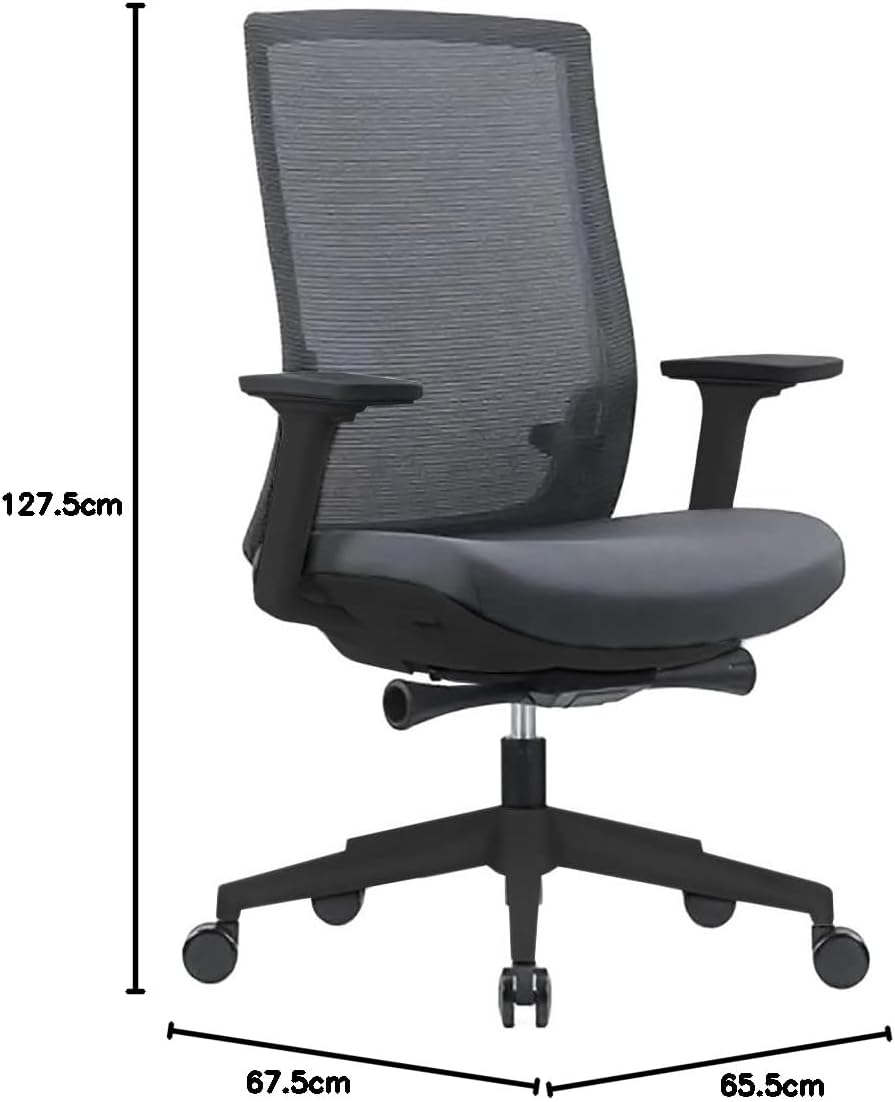
| Product Dimensions (L x W x H) | 67.5 x 65.5 x 127.5 cm (26.6 x 25.8 x 50.2 inches) |
| Item Weight | 19.1 kg (42 lbs) |
| Material | Mesh, Metal, Nylon |
| Special Features | Adjustable Armrests, Cushion Availability, Ergonomic Design, Adjustable Height, Lockable Tilt/Recline |
| Back Style | Mesh Back |
| Frame Material | Metal |
| Product Care Instructions | Spot Clean, Wipe Clean |
Warranty Information
EFFYDESK products are designed for quality and durability. For specific warranty terms and conditions applicable to your GrinChair, please refer to the warranty card included with your purchase or visit the official EFFYDESK website. Keep your proof of purchase for any warranty claims.
Customer Support
Should you require assistance, have questions, or need to report a missing or damaged part, please contact EFFYDESK customer support:
- Email: team@effydesk.ca
- Phone: 604-715-7577
- Website: Visit the official EFFYDESK website for FAQs and additional resources.
Please have your model number (BGRIN-GRIN) and purchase information ready when contacting support.
Ask a question about this manual
Ask about setup, troubleshooting, compatibility, parts, safety, or missing instructions. Manuals+ will review the question and use this page’s manual context to help answer it.