
Introduction
Thank you for choosing Gabba Goods TrueBuds Echo Wireless Earbuds. This manual provides essential information for setting up, operating, and maintaining your earbuds to ensure optimal performance and longevity. Please read this manual thoroughly before use.
Package Contents
- Gabba Goods TrueBuds Echo Wireless Earbuds (Left and Right)
- Charging Case with LED Display
- USB-C Charging Cable
- User Manual
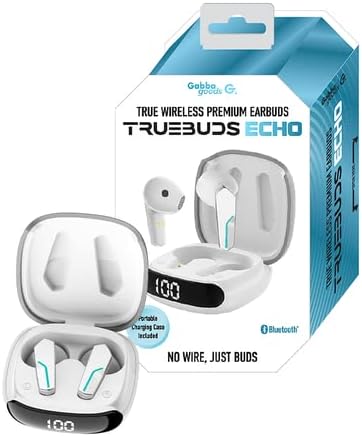
Image: The retail packaging for Gabba Goods TrueBuds Echo, showing the earbuds and charging case.
Product Overview
Familiarize yourself with the components of your TrueBuds Echo earbuds and charging case.
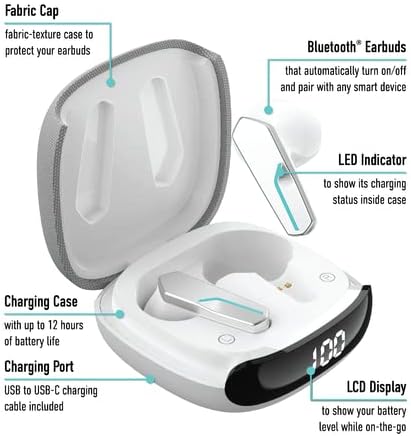
Image: A diagram illustrating the key features of the TrueBuds Echo earbuds and charging case, including the fabric cap, Bluetooth earbuds, LED indicator, charging case, charging port, and LCD display.
- Earbuds: In-ear design with touch controls and built-in microphones.
- Charging Case: Portable case with a fabric texture cap, houses and charges the earbuds.
- LCD Display: Located on the charging case, shows the battery level.
- LED Indicator: On the earbuds, indicates charging status.
- Charging Port: USB-C port on the case for recharging.
Setup
1. Charging the Earbuds and Case
Before first use, fully charge the earbuds and the charging case.
- Place the earbuds into the charging case. Ensure they are correctly seated.
- Connect the USB-C charging cable to the charging port on the case and the other end to a USB power source (e.g., wall adapter, computer USB port).
- The LCD display on the case will show the current battery percentage. The LED indicators on the earbuds will light up during charging.
- Charging is complete when the LCD display shows 100% and the earbud LEDs turn off.
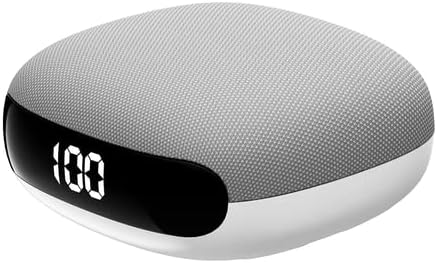
Image: The Gabba Goods TrueBuds Echo charging case, closed, displaying "100" on its LED screen, indicating a full charge.
2. Pairing with a Bluetooth Device
The earbuds are designed for automatic pairing.
- Open the charging case. The earbuds will automatically power on and enter pairing mode.
- On your device (smartphone, tablet, etc.), enable Bluetooth and search for available devices.
- Select "Gabba Goods TrueBuds Echo" from the list of found devices.
- Once connected, your device will indicate successful pairing. The earbuds will automatically re-pair with your device when removed from the case after the initial setup.

Image: A graphic demonstrating the automatic pairing feature of the TrueBuds Echo earbuds, showing them connecting wirelessly to a device.
Operating Instructions
Wearing the Earbuds
Gently insert each earbud into your ear canal. Adjust for a comfortable and secure fit. The earbuds are marked 'L' for left and 'R' for right.

Image: A person wearing the Gabba Goods TrueBuds Echo earbuds, demonstrating how they fit in the ear during use.
Touch Controls
The TrueBuds Echo feature intuitive touch controls on each earbud.
- Play/Pause: Single tap on either earbud.
- Next Track: Double tap on the right earbud.
- Previous Track: Double tap on the left earbud.
- Answer/End Call: Single tap on either earbud during an incoming call or active call.
- Reject Call: Press and hold either earbud for 2 seconds during an incoming call.
- Activate Voice Assistant: Triple tap on either earbud.
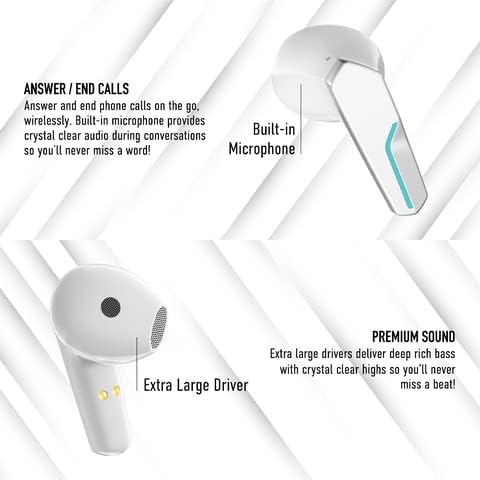
Image: A diagram highlighting the built-in microphone for calls and the extra-large audio drivers for sound quality in the TrueBuds Echo earbuds.
Maintenance
- Cleaning: Use a soft, dry, lint-free cloth to clean the earbuds and charging case. Do not use harsh chemicals or abrasive materials.
- Storage: When not in use, store the earbuds in their charging case to protect them and keep them charged.
- Water Resistance: These earbuds are not water resistant. Avoid exposure to liquids, moisture, and extreme temperatures.
Troubleshooting
| Problem | Solution |
|---|---|
| Earbuds not pairing |
|
| No sound from one earbud |
|
| Charging case not charging |
|
Specifications
- Model: GG-TBEC
- Bluetooth Version: 5.3
- Wireless Communication Technology: Bluetooth
- Ear Placement: In Ear
- Form Factor: In Ear
- Noise Control: Sound Isolation
- Battery Life (Earbuds): Up to 6 hours per charge
- Carrying Case Battery Life: Provides up to 3 full earbud charges (total 12 hours playtime)
- Charging Port: USB-C
- Control Type: Touch, Voice Assistant
- Compatible Devices: Bluetooth-enabled devices
- Frequency Range: 20 Hz - 20,000 Hz
- Water Resistance Level: Not Water Resistant
- UPC: 840286403047
Safety Information
- Do not disassemble or modify the product.
- Keep away from extreme temperatures, direct sunlight, and moisture.
- Avoid dropping or subjecting the earbuds to strong impacts.
- Do not use abrasive cleaners or sharp objects to clean the product.
- Prolonged listening at high volume levels may cause hearing damage.
Warranty and Support
Gabba Goods products are designed for quality and reliability. For warranty information or technical support, please refer to the warranty card included with your purchase or visit the official Gabba Goods website. Please retain your proof of purchase for warranty claims.
Manufacturer: Gabba Goods