
YISSVIC WD-981
YISSVIC Electric Fly Swatter Instruction Manual
Model: WD-981
Introduction
Thank you for choosing the YISSVIC Electric Fly Swatter. This versatile 2-in-1 device is designed to effectively eliminate flying insects such as mosquitoes, flies, gnats, and moths, offering both manual and automatic zapping modes. With its powerful 4000V voltage and convenient features like a rechargeable battery and UV attractant light, it provides a clean and comfortable environment for your home, office, backyard, patio, or camping trips.

Image: Two YISSVIC Electric Fly Swatters, highlighting their sleek design and included charging cables.
Safety Information
- Keep out of reach of children and pets.
- Do not touch the electric mesh with your fingers or other metal objects when the swatter is active. High voltage is present.
- Do not use in the presence of flammable liquids or gases.
- Do not wash the swatter with water. Use a dry brush or cloth to clean the mesh.
- Ensure the device is fully charged before first use and recharge regularly to maintain battery life.
- Avoid using the swatter in wet environments.
Package Contents
- YISSVIC Electric Fly Swatter (2 units for 2-pack)
- Detachable Charging Base (2 units for 2-pack)
- USB Type-C Charging Cable (2 units for 2-pack)
- User Manual
Product Overview

Image: Detailed diagram of the electric fly swatter's features and controls.
- Three-layer Nets: Outer protective nets and inner high-voltage grid for safety and effective zapping.
- Attractant Light: 365nm wavelength purple light to attract insects in auto mode.
- Battery Indicator: LED lights showing remaining battery power.
- Working Indicator: Red light illuminates when the zapping function is active.
- Type-C Charging Port: For convenient and fast charging.
- Non-slip Handle: Ergonomically designed for comfortable grip.
- Mode Switch: Selects between Power OFF, Manual Mode, and Auto Mode.
- Zap Button: Activates the high-voltage grid in Manual Mode.
Setup
Initial Charging
Before first use, fully charge the electric fly swatter for 3-4 hours. Ensure the mode switch is in the "Power OFF" position during charging.

Image: The Type-C charging port with the cable connected.
- Connect the provided USB Type-C charging cable to the swatter's charging port.
- Plug the other end of the cable into a compatible USB power source (e.g., adapter, power bank, PC). Note: Adapter is not included.
- The battery indicator lights will flash during charging and remain solid when fully charged.

Image: Battery indicator showing charge levels.
Operating Modes
Manual Mode
For active insect elimination, use the Manual Mode. This mode allows you to directly swat at flying insects.
- Slide the mode switch to the middle position (Manual Mode).
- Press and hold the "Zap Button" on the handle. The red working indicator light will illuminate, indicating the grid is active.
- Swing the racket towards the insect to make contact with the electrified mesh.

Image: Woman demonstrating manual mode usage.
Auto Mode (Stationary Zapper)
For passive insect control, use the Auto Mode. The swatter will attract and zap insects automatically when placed on its charging base.
- Slide the mode switch to the top position (Auto Mode).
- Place the swatter vertically into its detachable charging base.
- The purple UV attractant light will turn on, drawing insects to the electrified grid.
- It is recommended to make the swatter the unique light source when using AUTO mode at night for best results.
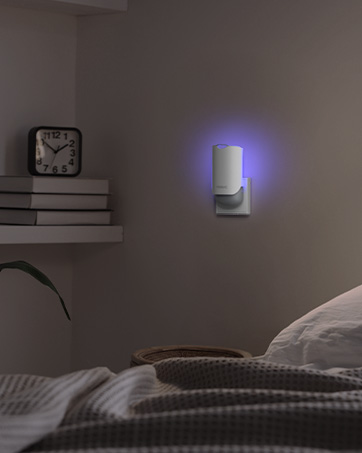
Image: Auto mode in use next to a sleeping child, showing the attractant light.
Power OFF
To turn off the device completely, slide the mode switch to the bottom position (Power OFF).
Maintenance
Cleaning
The YISSVIC Electric Fly Swatter is designed for easy cleaning. Most insect remains will fall off naturally. For stubborn debris:
- Ensure the device is completely powered off and unplugged before cleaning.
- Use a dry brush or a soft, dry cloth to gently wipe the mesh and frame.
- Do not use water or any cleaning liquids directly on the device.
- The device features a one-second residual electricity elimination function for added safety after use.

Image: Illustration of the three-layer safety nets.
Battery Care
To prolong the life of the 1500mAh rechargeable Lithium-Ion battery:
- Recharge the swatter when the battery indicator shows low power.
- If not used for a long period (e.g., over 3 months), charge the product for 3 hours every 3 months to prevent battery damage.
Troubleshooting
| Problem | Possible Cause | Solution |
|---|---|---|
| Swatter not zapping/no red light in manual mode. | Battery is low or depleted. Mode switch is not in manual position. Zap button not pressed. | Charge the swatter fully. Ensure switch is in manual mode. Press and hold the zap button. |
| Attractant light not turning on in auto mode. | Mode switch not in auto position. Swatter not correctly placed on charging base. | Ensure switch is in auto mode. Re-seat the swatter firmly on the charging base. |
| Swatter not charging. | Charging cable or adapter faulty. Charging port dirty. | Try a different USB-C cable and power adapter. Clean the charging port gently. |
| Ineffective zapping. | Mesh is dirty with insect remains. Battery is low. | Clean the mesh thoroughly. Recharge the swatter. |
Specifications
- Brand: YISSVIC
- Model: WD-981
- Color: White
- Material: Stainless Steel
- Product Dimensions: 11.02"L x 1.57"W x 17.32"H
- Item Weight: 1.15 pounds
- Battery: 1500mAh Lithium Ion (Rechargeable)
- Voltage: 4000V
- Charging Port: USB Type-C
- Attractant Light: 365nm UV
- Safety: 3-layer protective nets
Official Product Videos
YISSVIC Electric Fly Swatter 4000V Bug Zapper
This video provides a comprehensive overview of the YISSVIC Electric Fly Swatter, demonstrating its features and effectiveness in eliminating various flying insects. It highlights both manual and automatic modes, showcasing the UV attractant light and the powerful zapping capability.
Bug Zapper Racket Dual Modes Mosquito Killer 4000V
This video focuses on the dual operating modes of the YISSVIC Bug Zapper Racket, illustrating how to switch between manual and auto modes. It demonstrates the ease of use for both active swatting and passive insect attraction, emphasizing the 4000V power.
Warranty and Support
YISSVIC is committed to providing the best service and stands behind its products. For any questions, concerns, or support needs regarding your Electric Fly Swatter, please refer to the contact information provided in your product packaging or visit the official YISSVIC store online.
For additional resources, you may also refer to the User Manual (PDF).
Ask a question about this manual
Ask about setup, troubleshooting, compatibility, parts, safety, or missing instructions. Manuals+ will review the question and use this page’s manual context to help answer it.