
VSYSTO Camouflage-S6P
VSYSTO S6P Motorcycle Dash Camera User Manual
Model: Camouflage-S6P | Brand: VSYSTO
Introduction
This manual provides comprehensive instructions for the installation, operation, and maintenance of your VSYSTO 2 Inch Screen WiFi Motorcycle Dash Camera HD 1080P Front and Rear Camera, Full Body Waterproof DVR with GPS, High Speed Download Videos, Remote Control Take Pictures (Camouflage-S6P). Please read this manual thoroughly before using the product to ensure proper functionality and safety.

Image: Overview of the VSYSTO S6P Motorcycle Dash Camera components.
What's in the Box
The following items are included with your VSYSTO S6P Motorcycle Dash Camera:
- Host with bracket
- 2 Cameras (Front and Rear)
- GPS Module
- Wired Controller
- Wire Clip
- WiFi Signal Enhancer
- USB Test Cable
- Power Cable
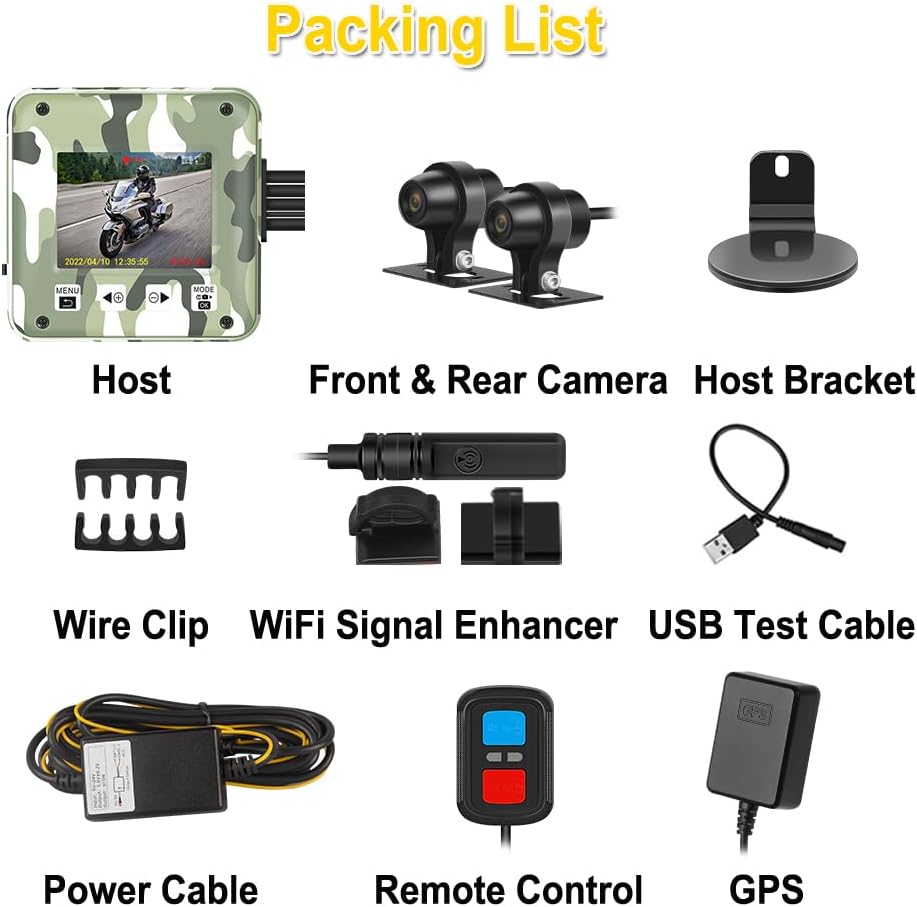
Image: All components included in the VSYSTO S6P package.
Key Features
- WiFi Signal Enhancer: Equipped with a WiFi signal enhancer for improved video download speeds. Connect to the recorder's WiFi via the mobile app (iOS & Android) to view real-time video, download, edit, and share without needing phone data or removing the memory card.

Image: Illustration of the WiFi signal enhancer and mobile app connectivity.
- Dual 1080P Cameras and GPS Tracker: Features front and rear 1080P cameras for clear video recording day and night. The integrated GPS tracks driving speed, longitude, and latitude, with driving tracks viewable on the mobile app and computer.

Image: Daytime video screenshot from the HD 1080P dual cameras.

Image: Nighttime video screenshot from the HD 1080P dual cameras.

Image: GPS tracker functionality with map display on a mobile device.
- Multifunctional Wired Remote Control: Allows switching between front/rear camera views (short blue button press), recording emergency video and capturing pictures (short red button press), and resetting WiFi (long red button press). LED indicators show recorder status, and the remote vibrates to alert of recorder failures.

Image: Wired remote control with button functions labeled.
- Full Body Waterproof: The host and cameras are fully waterproof, ensuring stable operation in rainy or dusty conditions.

Image: Waterproof design of the dash camera system.
- Seamless Loop Recording & G-Sensor: Users can set video recording intervals (1/2/3/5 minutes). When the memory card is full, new video automatically overwrites the oldest. The built-in G-sensor detects collisions and automatically locks the current video segment, preventing it from being overwritten by loop recording. This ensures critical incident footage is preserved.
- Stable Motorcycle Dash Cam System: Two-channel separated cameras with 2.0-meter extension cables for front and rear recording. Hard-wired connections provide stable signal transmission.
Installation Guide
Power Cable Connection (ACC Line Identification)
Connecting the power cable correctly is crucial for the dash camera's operation. The red wire connects to the positive pole of the motorcycle battery, the black wire to the negative pole, and the yellow wire connects to the 12V ACC (Accessory) power source, which is active only when the motorcycle key is turned on.
To identify the ACC line, follow these steps:
- First, connect the black wire of the recorder's power cable to the negative terminal of the motorcycle battery and the red wire to the positive terminal.
- Motorcycles have many wires. To find the ACC line, turn the motorcycle key to power it on.
- Take the yellow wire from the power cable module and test it against various wires on the motorcycle. The correct ACC line will cause the blue light on the power cable module to illuminate.
- Once the blue light is on, turn the motorcycle key off. If the blue light on the module goes out, and then turns back on when the key is turned on again, this confirms it is the correct ACC line. If the light remains on regardless of the key switch, it is not the ACC line.
- After determining the correct ACC line, you can proceed with the full installation.
Video: Detailed guide on how to find the ACC port of a motorcycle for dash cam installation.
General Installation Steps
The VSYSTO S6P dash camera system offers flexible installation options:
- The main unit can be mounted on the handlebar, under the seat, or in the trunk, depending on your motorcycle's design and your preference.
- Position the front and rear cameras to ensure clear, unobstructed views. Secure them firmly using the provided mounts.
- Route all cables securely, avoiding moving parts or heat sources. Use the included wire clips to keep cables tidy and prevent interference.
- Ensure all connections are tight and waterproof.
Image: Various installation methods for the VSYSTO S6P dash camera.

Image: Connection diagram for the VSYSTO S6P system.
Initial Setup
Mobile App Connection
To access advanced features and manage your recordings, download the VSYSTO mobile application (available for iOS and Android). Connect your smartphone to the dash camera's built-in WiFi network. The WiFi signal enhancer improves connection stability and download speed.

Image: Mobile app interface for the VSYSTO dash camera.
GPS Functionality
The integrated GPS module automatically records your driving speed, longitude, and latitude. This data can be viewed alongside your video recordings on the mobile app or a computer. The default map is Baidu, but you can switch to Google Maps within the app settings.
Operation
Wired Remote Control Functions
- Blue Button (Short Press): Switches the displayed camera image between front and rear views.
- Red Button (Short Press): Records an emergency video and captures a picture from both front and rear cameras. This video is locked and will not be overwritten by loop recording.
- Red Button (Long Press): Resets the WiFi name and password of the dash camera.
- LED Indicator: Provides visual feedback on the recorder's working status.
- Vibration Alert: The remote control will vibrate continuously to alert you if the recorder experiences a failure.
Recording Modes
- Loop Recording: The dash camera continuously records video. When the memory card is full, the oldest video files are automatically overwritten by new recordings. You can select recording intervals of 1, 2, 3, or 5 minutes.
- G-Sensor (Emergency Recording): The built-in G-sensor detects sudden impacts or collisions. When triggered, it automatically locks the current video segment, preventing it from being overwritten during loop recording. This ensures critical incident footage is preserved.
Maintenance
- Cleaning: Regularly clean the camera lenses and the main unit with a soft, damp cloth. Avoid abrasive cleaners or solvents.
- Cable Inspection: Periodically check all cables and connections for wear, damage, or loose fittings, especially after riding in harsh conditions.
- Firmware Updates: Check the VSYSTO official website or app for any available firmware updates to ensure optimal performance and new features.
- Memory Card: Format the memory card regularly (e.g., once a month) through the device settings or app to maintain optimal recording performance and prevent data corruption. Use a high-quality, high-speed microSD card.
Troubleshooting
| Problem | Possible Cause | Solution |
|---|---|---|
| Device does not power on. | Incorrect power connection, dead battery, faulty cable. |
|
| Blue light on power module is always on/off. | Incorrect ACC line connection. | Re-test ACC line as per the "Power Cable Connection" section. Ensure the blue light turns on/off with the ignition key. |
| Poor video quality. | Dirty lens, low light conditions, incorrect settings. |
|
| WiFi connection issues. | Interference, incorrect password, distance from device. |
|
| Memory card error. | Card full, corrupted, or incompatible. |
|
Specifications
| Feature | Detail |
|---|---|
| Product Dimensions | 2.67 x 0.86 x 2.67 inches (Main Unit) |
| Item Weight | 2.29 pounds |
| Batteries | 1 Lithium Ion battery required (included) |
| Connectivity Technologies | Wi-Fi |
| GPS | Integrated GPS module |
| Special Features | Built-in WiFi module, High Speed Download WiFi Signal Enhancer, Full Body Waterproof, 2 Inch Screen and Camouflage Shell, HD 1080P Front and Rear Camera, Loop Recording, Built-in G-sensor, Wired Controller, GPS |
| Color | Camouflage-S6P |
| Manufacturer | VSYSTO |
| Model Name | Camouflage-S6P |
| Vehicle Service Type | Motorcycle |
| Video Capture Resolution | 1080p |
| Mounting Type | Adhesive Mount |

Image: Product dimensions of the main unit and cameras.
Warranty and Support
For warranty information, technical support, or further assistance, please refer to the official VSYSTO website or contact their customer service directly. A detailed User Manual (PDF) is also available for download:
Ask a question about this manual
Ask about setup, troubleshooting, compatibility, parts, safety, or missing instructions. Manuals+ will review the question and use this page’s manual context to help answer it.