
VSYSTO Black-S6PL
VSYSTO WiFi Motorcycle Dash Camera S6PL User Manual
Model: Black-S6PL | Brand: VSYSTO
1. Introduction
This manual provides detailed instructions for the installation, operation, maintenance, and troubleshooting of your VSYSTO WiFi Motorcycle Dash Camera S6PL. Please read this manual thoroughly before using the product to ensure proper functionality and safety.
2. What's in the Box
The VSYSTO S6PL package includes the following components:
- Host with bracket
- 2 Cameras (Front and Rear)
- GPS Module
- Wired Controller
- Power Cable
- USB Cable
- 2-in-1 Power Cable
- 2 meter/6.5ft Camera Extension Cables (x2)
- 2 meter/6.5ft Extension Cable for GPS
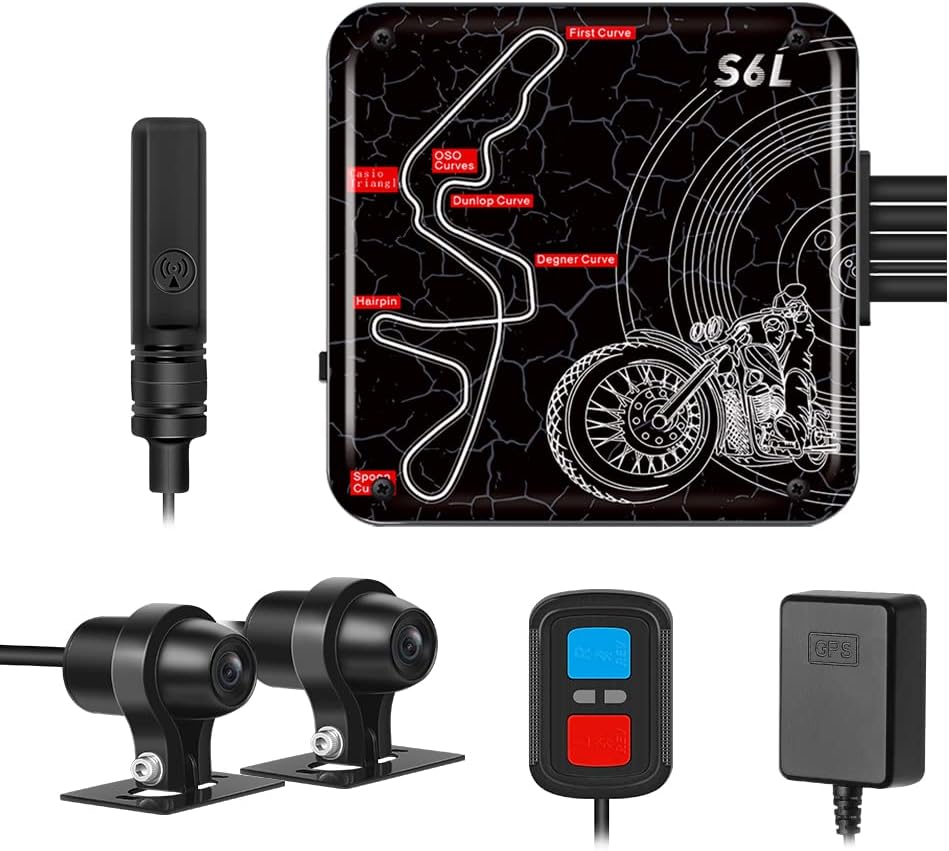
Figure 2.1: Overview of the VSYSTO S6PL dash camera system components, including the main host unit, front and rear cameras, GPS module, and wired remote control.

Figure 2.2: Detailed diagram illustrating all included items and their approximate dimensions, such as the host, cameras, and various cables.
3. Setup
3.1 Installation Overview
The VSYSTO S6PL system is designed for easy installation on motorcycles. Ensure all components are securely mounted and connected before operation.

Figure 3.1: An example of how the dash camera components are typically installed on a motorcycle, showing the placement of the host, front camera, rear camera, remote control, and ACC power cable.
3.2 Power Connection
The system requires a 12V-24V DC power input. The red wire connects to the positive pole of the motorcycle power supply, the black wire to the negative pole, and the yellow wire to the ACC power of the motorcycle. This enables automatic power on/off with the motorcycle ignition.

Figure 3.2: Diagram illustrating the power cable connection method for the VSYSTO S6PL dash camera system on a motorcycle.
Alternatively, the system can be powered via a USB power cable (5V/2A) using a power bank or charger. Ensure the output voltage does not exceed 5V to prevent damage.

Figure 3.3: Illustration of using a USB power cable with a power bank or charger for the dash camera system.
3.3 Component Mounting
Mount the host unit and cameras securely using the provided brackets and adhesive tape. Ensure cameras have a clear view of the road.

Figure 3.4: Step-by-step guide for mounting the host unit and camera brackets, including securing with screws and adhesive.
Utilize the fixed cable accessories to manage and secure all wiring, preventing interference and ensuring a tidy installation.

Figure 3.5: Example of using fixed cable accessories to organize and secure the wiring for the dash camera system.
4. Operating Instructions
4.1 Power On/Off
The VSYSTO S6PL dash camera system features automatic power on/off. When connected to the motorcycle's ACC power, the system will automatically power on when the ignition is turned on and power off when the ignition is turned off.

Figure 4.1: The dash camera system automatically powers on and off with the motorcycle's ignition.
4.2 WiFi Connection and App Operation
The built-in WiFi module allows for easy connection to your mobile device via the dedicated app for real-time viewing, video download, editing, and sharing. The app supports both iOS and Android systems.

Figure 4.2: The mobile app interface showing real-time video feed and recorded video files, accessible via WiFi connection.
The WiFi signal enhancer significantly improves video download speeds.

Figure 4.3: Illustration of the WiFi signal enhancer improving data transfer speeds between the dash camera and a mobile device.
App Connection Steps:
- Turn on the recorder.
- Download the "WiFi Camera" app on your phone.
- Open WLAN settings on your phone, find "MotoDV_S6L", click it, and enter the password "1234567890".
- Return to the app and click "Connect Device".
- Once connected, "Command Succeed" will be displayed, and you can view the live camera feed.

Figure 4.4: Visual guide for connecting the dash camera to your smartphone via WiFi using the dedicated app.
Video 4.1: A demonstration of the VSYSTO S6L WiFi Motorcycle Dash Cam APP operation, showing how to connect to the device, view live footage, and access recorded files.
Viewing and Downloading Footage:
Within the app, navigate to the "Online" section to view videos stored on the recorder. You can play videos directly or download them to your phone. The "Local" section displays downloaded videos. The app also allows for editing and sharing of videos.
4.3 Recording Features
The S6PL features dual 1080P cameras for clear front and rear recording, day and night. Users can select recording durations of 1, 2, 3, or 5 minutes.

Figure 4.5: Screenshots demonstrating the clear video quality from both front and rear 1080P cameras during daytime and nighttime conditions.

Figure 4.6: Visual representation of the 140-degree wide-angle view captured by both front and rear cameras, ensuring comprehensive coverage.
Loop Recording:
When the SD card is full, the system automatically overwrites the oldest recorded video with new footage, ensuring continuous recording without manual intervention.

Figure 4.7: Depiction of the loop recording function, where the camera continuously records and overwrites older files when the memory card is full.
G-Sensor & Emergency Recording:
The built-in G-sensor detects collisions and automatically records and locks emergency video files, preventing them from being overwritten. This feature helps protect riders by providing accident proof.
Manual emergency recording can also be initiated by short-pressing the red button on the wired controller. This will record an emergency video and capture a picture. The automatically recorded emergency video file name starts with "GSR". Manually recorded files start with "KEY". Up to 10 G-sensor and 10 manual emergency videos can be saved. After more than 10, the system will automatically delete the oldest emergency video.

Figure 4.8: Explanation of automatic emergency recording triggered by the G-sensor and manual emergency recording via the wired controller.
4.4 Wired Controller
The multifunctional wired controller provides convenient access to key functions. If the remote control vibrates abnormally, it indicates a potential recorder fault. Long-pressing the blue button stops motor vibration. Short-pressing the red button records emergency video and takes pictures; long-pressing it resets the WiFi name and password. The LED indicator displays the recorder's working status.

Figure 4.9: The wired remote control mounted on motorcycle handlebars, showing its buttons and LED indicator for various functions.

Figure 4.10: A summary of the wired controller's functions, including stopping vibration reminders, fault vibration reminders, entering emergency recording, snapshot, resetting WiFi, and checking recording status.
4.5 GPS Tracking
Equipped with GPS, the system allows riders to view their speed and driving track on the mobile app or a computer. This feature provides valuable data for route analysis and incident reconstruction.

Figure 4.11: The GPS tracker module and its integration with a mobile map application to display driving routes and speed.
5. Maintenance
5.1 Waterproof Design
The VSYSTO S6PL features a full-body waterproof design for both the host and cameras, ensuring stable operation in rainy or dusty conditions. The waterproof connectors further enhance durability.

Figure 5.1: The dash camera system demonstrating its waterproof and dustproof capabilities in various weather conditions.

Figure 5.2: Close-up of the waterproof connectors, designed to prevent water ingress and ensure reliable connections.
5.2 General Care
- Regularly check all cable connections to ensure they are secure.
- Clean the camera lenses periodically with a soft, damp cloth to maintain clear video quality.
- Ensure the memory card is properly inserted and formatted as needed.
- Avoid exposing the device to extreme temperatures outside its operating range.
6. Troubleshooting
| Issue | Possible Cause | Solution |
|---|---|---|
| Device does not power on. | Incorrect power connection; loose cables; faulty power source. | Verify all power cable connections (red to positive, black to negative, yellow to ACC). Ensure the motorcycle's power supply is active. Check if the USB power source (if used) provides 5V/2A. |
| App connection issues (e.g., app crashes, cannot connect to WiFi). | Incorrect WiFi password; app malfunction; temporary software glitch. | Ensure correct WiFi password "1234567890" is entered. Try restarting the app and the dash camera. Long-press the red button on the wired controller to reset WiFi name and password. Ensure your phone's WiFi is enabled and connected to the device's network. |
| Poor video quality or distorted image (e.g., white vertical strips). | Dirty lens; camera malfunction; interference. | Clean camera lenses. Check camera cable connections. If issue persists, contact customer support. |
| Difficulty downloading videos to phone. | Slow WiFi connection; large file sizes; app issue. | Ensure a stable WiFi connection. Consider setting shorter clip times (1-2 minutes) for easier downloads. Ensure sufficient storage on your phone. |
| GPS not tracking or inaccurate. | GPS module not properly connected or positioned. | Ensure the GPS module is securely connected and placed in an area with a clear view of the sky, away from obstructions. |
| Remote control abnormal vibration. | Indicates a potential recorder fault. | Long-press the blue button on the wired controller to stop the vibration. If the fault persists, contact customer support. |
7. Specifications
| Feature | Detail |
|---|---|
| Product Dimensions | 2.44 x 2.28 x 0.79 inches |
| Item Weight | 2.25 pounds |
| ASIN | B0BRSSY21L |
| Batteries | 1 Lithium Ion batteries required (included) |
| Connectivity Technologies | Wi-Fi |
| GPS | Yes |
| Special Features | Built-in WiFi module, High Speed Download WiFi Signal Enhancer, Full Body Waterproof, HD 1080P Front and Rear Camera, Loop Recording and G-Sensor, Wired Controller, GPS |
| Other Display Features | Wireless |
| Color | Black |
| Manufacturer | VSYSTO |
| Date First Available | January 6, 2023 |
| Orientation | Front & Rear |
| Vehicle Service Type | Motorcycle |
| Video Capture Resolution | 1080p |
| Mounting Type | Under the seat |
| Control Method | App |

Figure 7.1: Detailed dimensions of the VSYSTO S6PL host unit and cameras.
8. Warranty and Support
8.1 Warranty Information
VSYSTO products are covered by a manufacturer's warranty. For specific warranty terms and conditions, please refer to the warranty card included with your product or visit the official VSYSTO website.
8.2 Customer Support
For technical assistance, troubleshooting, or any product-related inquiries, please contact VSYSTO customer support. Contact details can typically be found on the product packaging, the official VSYSTO website, or through your purchase platform.
You can also visit the VSYSTO Store on Amazon for additional resources and information.
Ask a question about this manual
Ask about setup, troubleshooting, compatibility, parts, safety, or missing instructions. Manuals+ will review the question and use this page’s manual context to help answer it.