
1. Introduction
Welcome to the user manual for your new Infinix HOT 20 Play smartphone. This device is designed to provide an exceptional mobile experience with its large 17.32 cm (6.82) Punch Hole display, powerful 6000 mAh battery, and advanced camera system. This manual will guide you through the setup, operation, and maintenance of your device to ensure optimal performance and user satisfaction.
2. What's in the Box
Please check the contents of your product package. If any items are missing or damaged, contact your retailer.
- Handset
- Adaptor
- USB Type-C Cable
- TPU Case
- SIM Ejector Pin
- Quick Start Guide
- Warranty Card
- Xclub Card
3. Setup Guide
3.1. SIM Card Installation
Your Infinix HOT 20 Play supports Dual-SIM functionality. To install SIM cards:
- Locate the SIM card tray on the side of the device.
- Insert the SIM ejector pin into the small hole next to the tray and push gently until the tray pops out.
- Place your Nano-SIM cards and/or microSD card into the designated slots on the tray. Ensure they are correctly oriented.
- Carefully push the tray back into the slot until it is flush with the device body.
3.2. Charging the Device
Before first use, fully charge your device using the provided adaptor and USB Type-C cable.
- Connect the USB Type-C cable to the charging port at the bottom of the phone.
- Connect the other end of the cable to the power adaptor.
- Plug the adaptor into a power outlet.
- The battery indicator on the screen will show the charging status.
3.3. Powering On/Off
- To Power On: Press and hold the Power button (located on the side) until the Infinix logo appears.
- To Power Off: Press and hold the Power button until the power options menu appears, then select 'Power off'.
4. Key Features
The Infinix HOT 20 Play is equipped with features designed for enhanced performance and user convenience:
- Processor: MediaTek G37 Octa-Core Processor for smooth performance.
- RAM: 4 GB RAM (with up to 7GB extended RAM support) for efficient multitasking.
- Storage: 64 GB internal storage for your apps and media.
- Operating System: Android 12.0 for a user-friendly interface.
- Battery: Long-lasting 6000 mAh Li-ion Polymer Battery with Type-C power monster and 18W fast charge support.
- Connectivity: Dual-SIM support and 4G ready for reliable network access.
- Security: Side Fingerprint Sensor and Face Unlock for convenient and secure access.
- Display: 6.82-inch HD+ Punch Hole display with a 90Hz refresh rate for an immersive visual experience.
- Audio: DTS Cinematic Audio Processing for enhanced sound quality.
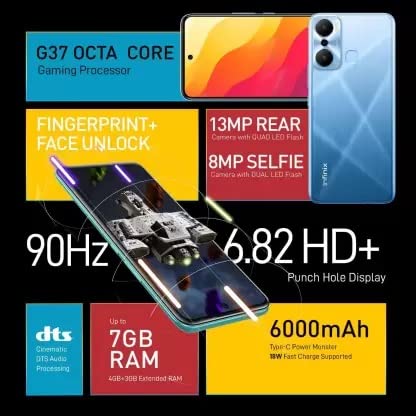
Image: Infographic highlighting key features like G37 Octa Core processor, 90Hz display, 6000mAh battery, and camera specifications.
5. Operating Instructions
5.1. Basic Navigation
- Touchscreen: Tap to select, swipe to scroll, pinch to zoom.
- Home Screen: Access apps, widgets, and notifications.
- Navigation Bar: Use the Back, Home, and Recent Apps buttons at the bottom of the screen.
5.2. Making Calls
- Open the 'Phone' app.
- Enter the phone number using the dial pad or select a contact.
- Tap the call button to initiate the call.
5.3. Sending Messages
- Open the 'Messages' app.
- Tap the 'Start chat' or '+' icon to compose a new message.
- Enter the recipient's number or select from contacts.
- Type your message and tap the send button.
5.4. Connecting to Wi-Fi
- Go to 'Settings' > 'Network & internet' > 'Wi-Fi'.
- Turn on Wi-Fi.
- Select your desired Wi-Fi network from the list.
- Enter the password if prompted and tap 'Connect'.
5.5. Using the Camera
Capture stunning photos and videos with your device's camera.
- Open the 'Camera' app.
- Select your desired mode (Photo, Video, Portrait, etc.).
- Tap the shutter button to take a photo or start/stop recording a video.
6. Camera Features
The Infinix HOT 20 Play is equipped with a versatile camera system:
- Rear Camera: 13 MP Main Rear Camera with Quad LED Flash for clear and bright photos.
- Front Camera: 8 MP Selfie Shooter with Dual LED Flash for high-quality selfies.
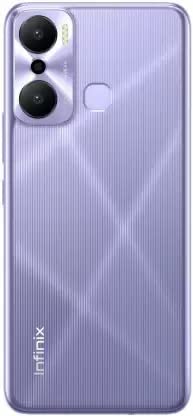
Image: Rear view of the Infinix HOT 20 Play, highlighting the dual camera setup and fingerprint sensor.
7. Display Information
Experience vibrant visuals on the Infinix HOT 20 Play's expansive display:
- Size: 6.82 inches LCD display.
- Resolution: 720 x 1640 pixels (HD+).
- Refresh Rate: 90Hz for smooth scrolling and gaming.

Image: Front view of the Infinix HOT 20 Play display, emphasizing its large screen size.
8. Technical Specifications
Detailed specifications for the Infinix HOT 20 Play:
| Feature | Specification |
|---|---|
| OS | Android 12.0 |
| RAM | 4 GB |
| Product Dimensions | 13 x 5 x 2 cm |
| Item Weight | 410 g |
| Batteries | 1 A batteries required. (included) |
| Item model number | X6825 |
| Wireless communication technologies | Cellular |
| Connectivity technologies | Wi-Fi |
| GPS | GLONASS |
| Special features | Front Camera, Camera |
| Other display features | Wireless |
| Resolution | 720p |
| Other camera features | Front |
| Form factor | palm-held |
| Colour | Fantasy Purple |
| Manufacturer | ismartu india pvt ltd |
| Date First Available | 5 January 2023 |
| CPU Model | MediaTek Helio |
| Memory Storage Capacity | 64 GB |
9. Maintenance and Care
To ensure the longevity and optimal performance of your Infinix HOT 20 Play, follow these care guidelines:
- Cleaning: Use a soft, lint-free cloth to clean the screen and body. Avoid abrasive materials or harsh chemicals.
- Temperature: Do not expose the device to extreme temperatures (hot or cold) or direct sunlight for prolonged periods.
- Water Resistance: This device is not water-resistant. Avoid contact with liquids.
- Software Updates: Regularly check for and install software updates to enhance security and performance.
- Battery Care: Avoid fully discharging the battery frequently. Charge it before it drops too low.
10. Troubleshooting
Here are solutions to some common issues you might encounter:
- Device Freezing/Unresponsive: Press and hold the Power button for about 10-15 seconds to force a restart.
- Battery Draining Quickly: Check background app usage, reduce screen brightness, disable unnecessary features like GPS or Wi-Fi when not in use.
- Network Connectivity Issues: Restart the device, check SIM card insertion, or reset network settings.
- Apps Crashing: Clear the app's cache and data in 'Settings' > 'Apps', or reinstall the app.
- Storage Full: Delete unnecessary files, clear app caches, or move media to a microSD card.
11. Warranty Information
Your Infinix HOT 20 Play comes with a manufacturer's warranty. Please refer to the Warranty Card included in your package for detailed terms and conditions, including coverage period and service procedures. Keep your proof of purchase for warranty claims.
12. Support and Contact
For further assistance, technical support, or service inquiries, please refer to the contact information provided in your Quick Start Guide or visit the official Infinix support website. You can also find additional resources and FAQs online.
13. Customer Reviews Summary
The Infinix HOT 20 Play has received a customer rating of 3.4 out of 5 stars based on 25 global ratings. Here's a breakdown of the ratings:
- 5 Star: 35%
- 4 Star: 19%
- 3 Star: 14%
- 2 Star: 12%
- 1 Star: 20%
Customers appreciate the large screen and battery life. Some users have noted performance aspects. For detailed feedback, please refer to the product's customer review section on the purchase platform.
14. Product Overview Video
Video: An official overview of the Infinix HOT 20 Play, showcasing its features and design.
15. Product Images

Image: Front and back view of the Infinix HOT 20 Play in Fantasy Purple.
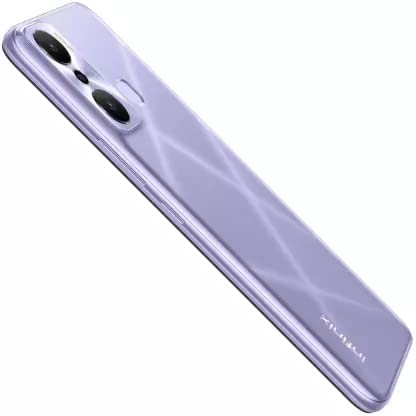
Image: Angled view of the Infinix HOT 20 Play, showcasing its slim profile and rear design.