
1. Introduction
Thank you for choosing the MOWETOO M3500 LED Rechargeable Flashlight. This powerful and versatile flashlight is designed for various outdoor activities such as camping, hiking, dog walking, and fishing, as well as for emergency use. Please read this manual carefully before use to ensure proper operation and maintenance.
2. Product Overview and Package Contents
The MOWETOO M3500 flashlight features a durable aluminum body, 3500 lumens brightness, 5 lighting modes, and a zoomable function. It is powered by a rechargeable lithium-ion battery.
Package Contents:
- MOWETOO M3500 LED Flashlight
- 1 x Lithium-ion Battery (2600mAh)
- 1 x USB Charging Cable
- 1 x Wrist Strap Hand Lanyard

Image: MOWETOO M3500 LED Flashlight, showing the flashlight, battery, USB charging cables, and product packaging.
3. Specifications
| Feature | Detail |
|---|---|
| Brand | MOWETOO |
| Model Number | M3500 |
| Dimensions (L x W x H) | 14.3 x 2.9 x 14.3 cm (5.6 x 1.14 x 5.6 inches) |
| Weight | 210 grams |
| Material | Aluminum |
| Light Source Type | LED |
| Luminosity | 3500 Lumens |
| Battery Type | 1 x Lithium-ion (2600mAh, included) |
| Voltage | 3.7 Volts |
| Special Features | Rechargeable, Zoomable, 5 Lighting Modes |
| Beam Distance | Up to 500 meters |
4. Setup
4.1 Battery Installation
- Unscrew the tail cap of the flashlight.
- Insert the included 2600mAh Lithium-ion battery with the positive (+) end facing towards the flashlight head (LED).
- Screw the tail cap back on securely.

Image: Visual guide for battery installation, showing the tail cap unscrewed, battery inserted, and cap re-secured.
4.2 Charging the Flashlight
The MOWETOO M3500 flashlight is rechargeable via its USB port.
- Locate the USB charging port on the flashlight body. It is usually covered by a rubber flap for protection.
- Open the rubber flap.
- Connect the provided USB charging cable to the flashlight's port and the other end to a USB power source (e.g., computer, power bank, USB wall adapter, car charger).
- The indicator light on the power button will show charging status:
- Red light: Charging
- Green light: Fully charged
- Once fully charged, disconnect the cable and close the rubber flap to protect the port from dust and moisture.

Image: The flashlight's USB-C charging port and indicator lights (red for charging, green for charged).
5. Operating Instructions
5.1 Power On/Off and Lighting Modes
The flashlight features a single button for power control and mode switching.
- To Turn On/Off: Press the power button once to turn the flashlight on. Press it again to turn it off.
- To Change Modes: While the flashlight is on, press the power button repeatedly to cycle through the 5 lighting modes:
- High Brightness (3500 Lumens)
- Medium Brightness
- Low Brightness
- Strobe Mode (Flashing light for signaling or disorientation)
- SOS Mode (Morse code for emergency signaling)
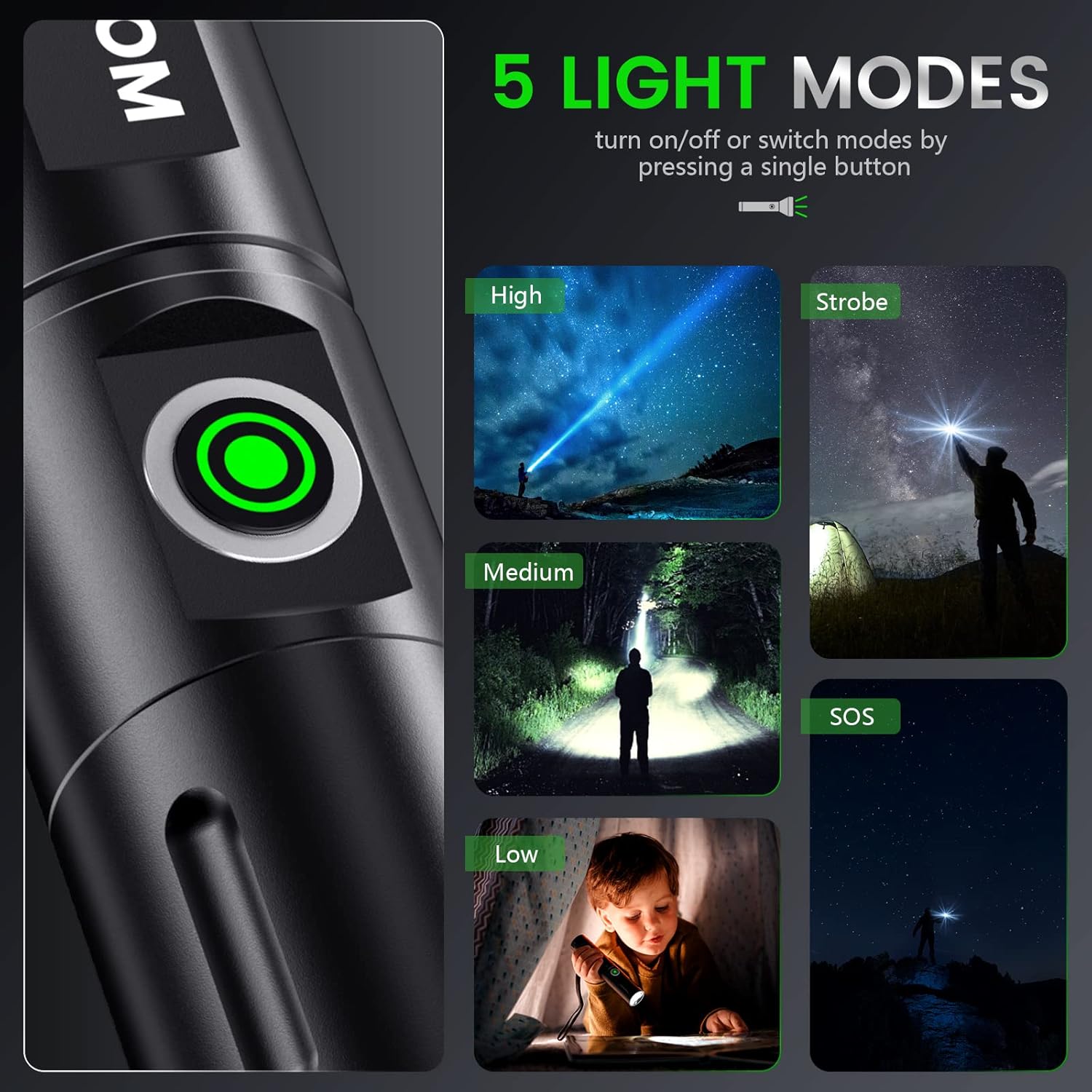
Image: Illustration of the five distinct lighting modes: High, Medium, Low, Strobe, and SOS, with examples of their use.
5.2 Zoom Function
The MOWETOO M3500 flashlight features a zoomable head, allowing you to adjust the beam from a wide floodlight to a focused spotlight.
- To Zoom In (Spotlight): Extend the flashlight head forward to narrow the beam and focus the light for long-distance illumination.
- To Zoom Out (Floodlight): Retract the flashlight head backward to widen the beam for illuminating a larger area.
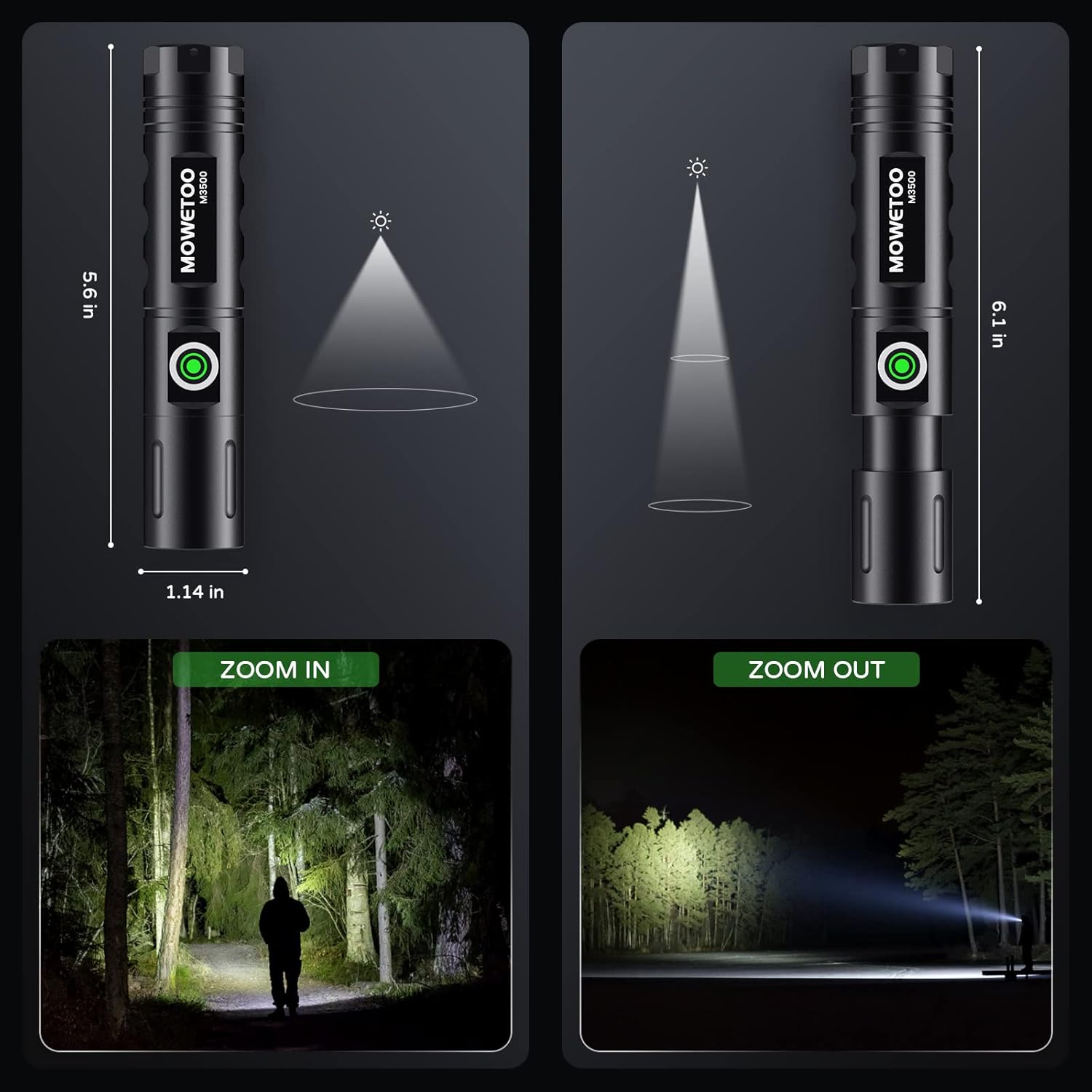
Image: Comparison of the flashlight's zoom-in (narrow beam) and zoom-out (wide beam) capabilities.
6. Maintenance
- Cleaning: Wipe the flashlight body with a soft, damp cloth. Do not use abrasive cleaners or solvents.
- Battery Care:
- Charge the battery fully before first use.
- Recharge the battery regularly, even if not in use, to maintain its lifespan.
- If storing for an extended period, charge the battery every 3-6 months.
- Do not overcharge or completely discharge the battery.
- Storage: Store the flashlight in a cool, dry place away from direct sunlight and extreme temperatures.
- Lubrication: Periodically apply a thin layer of silicone grease to the O-rings and threads to maintain water resistance and smooth operation.
7. Troubleshooting
| Problem | Possible Cause | Solution |
|---|---|---|
| Flashlight does not turn on. | Low battery or incorrect battery installation. | Charge the battery. Ensure the battery is inserted with the correct polarity (+/-). Check if the tail cap is fully tightened. |
| Light is dim or flickers. | Low battery. Loose connections. | Recharge the battery. Ensure the tail cap and head are securely tightened. |
| Flashlight does not charge. | Faulty USB cable or power source. Charging port obstruction. | Try a different USB cable and power source. Clean the charging port gently. |
| Cannot change lighting modes. | Button malfunction or low battery. | Ensure the battery is sufficiently charged. Press the button firmly. If the issue persists, contact customer support. |
8. Safety Information
- Do not shine the flashlight directly into eyes, as the powerful LED can cause temporary vision impairment.
- Keep out of reach of children.
- Do not disassemble the flashlight or battery.
- Avoid exposing the flashlight to extreme temperatures, fire, or water (beyond its rated water resistance).
- Use only the specified battery type and charging cable.
- Dispose of batteries according to local regulations.
9. Warranty and Support
MOWETOO products are designed for reliability and performance. For any questions, concerns, or warranty claims, please contact MOWETOO customer support through your purchase platform or the official MOWETOO website. Please have your model number (M3500) and purchase details ready.
While specific warranty details are not provided in this manual, most MOWETOO products come with a standard manufacturer's warranty covering defects in materials and workmanship. Please refer to your purchase documentation for specific warranty terms and conditions.
