
1. Introduction
Thank you for choosing the Alpicool Y16T Portable Refrigerator/Freezer. This manual provides essential information for the safe and efficient operation, maintenance, and troubleshooting of your new appliance. Please read this manual thoroughly before use and keep it for future reference.

Image 1.1: The Alpicool Y16T portable refrigerator/freezer, shown with its included 12V DC and AC power adapters.
2. Important Safety Instructions
To reduce the risk of fire, electric shock, or injury when using your refrigerator, follow these basic precautions:
- Read all instructions before using the appliance.
- Do not operate the refrigerator if the power cord is damaged.
- Ensure proper ventilation around the unit. Do not block ventilation openings.
- Do not use electrical appliances inside the storage compartment unless they are of the type recommended by the manufacturer.
- Do not immerse the refrigerator in water or other liquids.
- Keep the appliance away from heat sources and direct sunlight.
- Always disconnect the power supply before cleaning or performing maintenance.
- This appliance is not intended for use by persons (including children) with reduced physical, sensory or mental capabilities, or lack of experience and knowledge, unless they have been given supervision or instruction concerning use of the appliance by a person responsible for their safety.
3. Product Features and Components
Familiarize yourself with the various parts of your Alpicool Y16T refrigerator:

Image 3.1: Key components of the Alpicool Y16T, including the removable door, secure latch, internal storage, integrated handle, control panel on the top, and the DC power input.
- Removable Door: For easy cleaning and access.
- Door Latch: Secures the lid during transport.
- Storage Room: The main insulated compartment.
- Built-in Handle: Ergonomic handle for portability.
- Functional Top: Houses the control panel and display.
- DC 12V/24V Input: For vehicle power connection.

Image 3.2: The digital control panel, allowing temperature adjustments and mode selection.
4. Setup and Installation
4.1 Unpacking
Carefully remove the refrigerator from its packaging. Inspect for any damage during transit. Keep packaging materials for future storage or transport.
4.2 Placement
Place the refrigerator on a flat, stable surface. Ensure there is adequate ventilation around the unit (at least 10 cm clearance on all sides) to allow for proper heat dissipation. Avoid placing it in direct sunlight or near heat sources.
4.3 Power Connection
The Alpicool Y16T supports multiple power supply modes:
- 12V/24V DC: Connect the DC power cord to your vehicle's cigarette lighter socket (12V for cars, 24V for trucks).
- 100-240V AC: Use the provided AC adapter to connect to a standard household power outlet.
- Portable Power Station/Solar Panel: Can be powered by compatible portable power stations or solar panels (ensure output voltage and current match the refrigerator's requirements).

Image 4.1: Illustration of the versatile power supply options for the Alpicool Y16T, including vehicle, home, and portable power sources.
5. Operating Instructions
5.1 Powering On/Off
Press the power button on the control panel to turn the unit on or off. The display will illuminate when the unit is on.
5.2 Temperature Control
Use the '+' and '-' buttons on the control panel to set the desired temperature. The temperature range is from -20°C to +20°C. The display will show the current internal temperature.

Image 5.1: This infographic details the optimal temperature settings for different food items, the energy-saving ECO mode, the fast-cooling MAX mode, and the battery protection levels.
5.3 MAX/ECO Mode
The refrigerator offers two operating modes:
- MAX Mode: Provides maximum cooling power for rapid temperature reduction. Ideal for initial cooling.
- ECO Mode: Energy-saving mode, consuming less power. Suitable for maintaining temperature once the desired level is reached.
Switch between modes by pressing the 'SET' button (refer to Image 3.2 for control panel layout).
5.4 Battery Protection Settings
The unit features a 3-level battery protection system to prevent your vehicle's battery from draining:
- H1 (Low): Least sensitive, allows the battery to discharge more before cutting off.
- H2 (Medium): Moderate sensitivity.
- H3 (High): Most sensitive, cuts off power sooner to protect the battery. Recommended for most vehicle applications.
Adjust the battery protection level by pressing and holding the 'SET' button until the display flashes, then use '+' or '-' to select H1, H2, or H3. The unit will automatically cut off power if the input voltage drops below the selected level.
6. Maintenance
6.1 Cleaning
- Always disconnect power before cleaning.
- Clean the interior and exterior with a damp cloth and mild detergent. Do not use abrasive cleaners or solvents.
- Ensure the unit is completely dry before reconnecting power.
- Regularly clean the ventilation grilles to ensure proper airflow.
6.2 Defrosting
If a thick layer of ice forms inside, manually defrost the unit. Turn off the refrigerator, remove contents, and leave the lid open until the ice melts. Wipe away excess water with a clean cloth.
6.3 Storage
When not in use for extended periods, clean the unit thoroughly, leave the lid slightly ajar to prevent odors, and store it in a dry, well-ventilated area.
7. Troubleshooting Guide
Before contacting customer support, please refer to the following table for common issues and solutions:
| Problem | Possible Cause | Solution |
|---|---|---|
| Refrigerator not turning on | No power supply; Damaged power cord; Blown fuse in vehicle. | Check power connection; Replace power cord; Check/replace vehicle fuse. |
| Poor cooling performance | Insufficient ventilation; Door not closed properly; Too much content; High ambient temperature. | Ensure proper clearance; Close door tightly; Do not overfill; Move to cooler environment if possible. |
| Display shows error code | Specific internal fault. | Refer to the specific error code in the full manual (if available) or contact customer support. |
| Unit making unusual noise | Unit not level; Fan obstruction. | Place on a level surface; Check for obstructions around the fan. |
8. Technical Specifications
| Specification | Value |
|---|---|
| Brand | Alpicool |
| Model Number | Y16T |
| Capacity | 15 Liters |
| Dimensions (L x W x H) | 59.8 x 32 x 26 cm |
| Weight | 8.4 Kilograms |
| Voltage | 12 Volts (DC), 24 Volts (DC) |
| Defrost System | Manual |
| Energy Efficiency Rating | B |
| Noise Level | 45 dB |
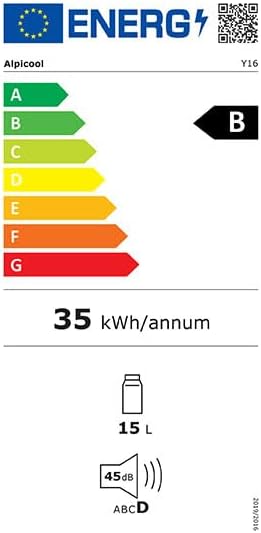
Image 8.1: The energy efficiency label for the Alpicool Y16T, indicating its energy consumption and noise level.
9. Warranty and Customer Support
Alpicool products are manufactured to high-quality standards. This product comes with a standard manufacturer's warranty. Please refer to the warranty card included with your purchase for specific terms and conditions, including the warranty period.
For technical assistance, troubleshooting beyond this guide, or warranty claims, please contact Alpicool customer support through the retailer where you purchased the product or visit the official Alpicool website for contact information.
Please have your model number (Y16T) and purchase date ready when contacting support.


