
Introduction
This instruction manual provides essential information for the safe and efficient installation, operation, and maintenance of your LEDUPDATES UL Listed 24V 60W Waterproof LED Power Supply Driver. Please read this manual thoroughly before installation and retain it for future reference.
This power supply is designed to convert 100-277V AC input to a stable 24V DC output, suitable for various LED lighting applications such as LED strips and modules. Its IP67 waterproof rating allows for use in dry, damp, or wet locations.
Safety Information
WARNING: Risk of electric shock. Installation should be performed by a qualified electrician in accordance with all local and national electrical codes.
- Ensure the power supply is disconnected from the main power source before any installation or maintenance.
- Do not exceed the maximum output load of 60W (2.5A at 24V DC).
- Verify input voltage (100-277V AC) matches your electrical supply.
- Ensure proper grounding to prevent electrical hazards.
- Do not open the power supply casing; it contains no user-serviceable parts. Opening the casing will void the warranty.
- Keep away from flammable materials.
Package Contents
- 1 x LEDUPDATES 24V 60W Waterproof LED Power Supply Driver
Setup and Installation
Follow these steps for proper installation:
- Preparation: Disconnect power at the circuit breaker before beginning installation. Gather necessary tools (wire strippers, screwdriver, electrical tape/wire nuts).
- Mounting: Securely mount the power supply in a suitable location. The solid aluminum casing with dissipation fins helps ensure the power supply operates within a safe temperature range.
- Input Wiring (AC):

Image: Detailed view of the input and output wiring connections on the LED power supply. The input side shows connections for earth wire (green), live wire (black), and neutral wire (white). The output side shows red (+) and black (-) wires.
- Connect the Black wire from the power supply's input side to your AC Live wire.
- Connect the White wire from the power supply's input side to your AC Neutral wire.
- Connect the Green wire from the power supply's input side to your AC Earth/Ground wire.
- Ensure all connections are secure and insulated using appropriate connectors or electrical tape. The input features bare wires for direct connection to a junction box or for attaching your own plug.
- Output Wiring (DC):
- Connect the Red wire from the power supply's output side to the Positive (+) terminal of your 24V DC LED lighting.
- Connect the Black wire from the power supply's output side to the Negative (-) terminal of your 24V DC LED lighting.
- Ensure the total wattage of your connected LED lighting does not exceed 60W.
- Power On: Once all connections are secure and verified, restore power at the circuit breaker.
Operating Instructions
This power supply is designed for continuous operation within its specified parameters. Once properly installed and connected to your LED lighting, it will provide a stable 24V DC output.
- Ensure the connected LED load does not exceed 60W. Overloading can cause damage to the power supply and connected devices.
- The unit is equipped with overcharge, short circuit, and overvoltage protection for enhanced safety and stability.
- The IP67 rating ensures protection against dust and immersion in water up to 1 meter for 30 minutes, making it suitable for outdoor and wet environments.

Image: The LED power supply highlighting its built-in protection features: Overcharge Protection, Short Circuit Protection, and Overvoltage Protection. It also indicates 24V DC 2.5A 60W output.
Maintenance
The LEDUPDATES power supply is designed for minimal maintenance. However, periodic checks are recommended:
- Cleaning: Ensure the exterior of the power supply is free from excessive dust or debris, especially around the heat dissipation fins, to maintain optimal cooling. Use a soft, dry cloth for cleaning.
- Connections: Periodically inspect all wiring connections to ensure they remain secure and free from corrosion.
- Environmental Conditions: While waterproof, avoid prolonged submersion beyond its IP67 rating. Ensure the operating temperature remains within the specified range.
- Do not attempt to repair the unit. Refer to the troubleshooting section or contact support for assistance.
Troubleshooting
| Problem | Possible Cause | Solution |
|---|---|---|
| No output power to LEDs |
|
|
| LEDs flicker or dim |
|
|
| Power supply is hot to touch |
|
|
Specifications
| Model Number | smt024060vwsw |
| Input Voltage | 100-277V AC |
| Output Voltage | 24V DC |
| Output Current | 2.5 Amps |
| Output Power | 60 Watts |
| Protection Rating | IP67 (Waterproof) |
| Safety Certification | UL Listed, Class 2 |
| Dimensions (L x W x H) | 11.25 x 0.75 x 1.25 inches |
| Weight | 13 ounces |
| Power Source | Corded Electric |
| Mounting Type | Surface Mount |
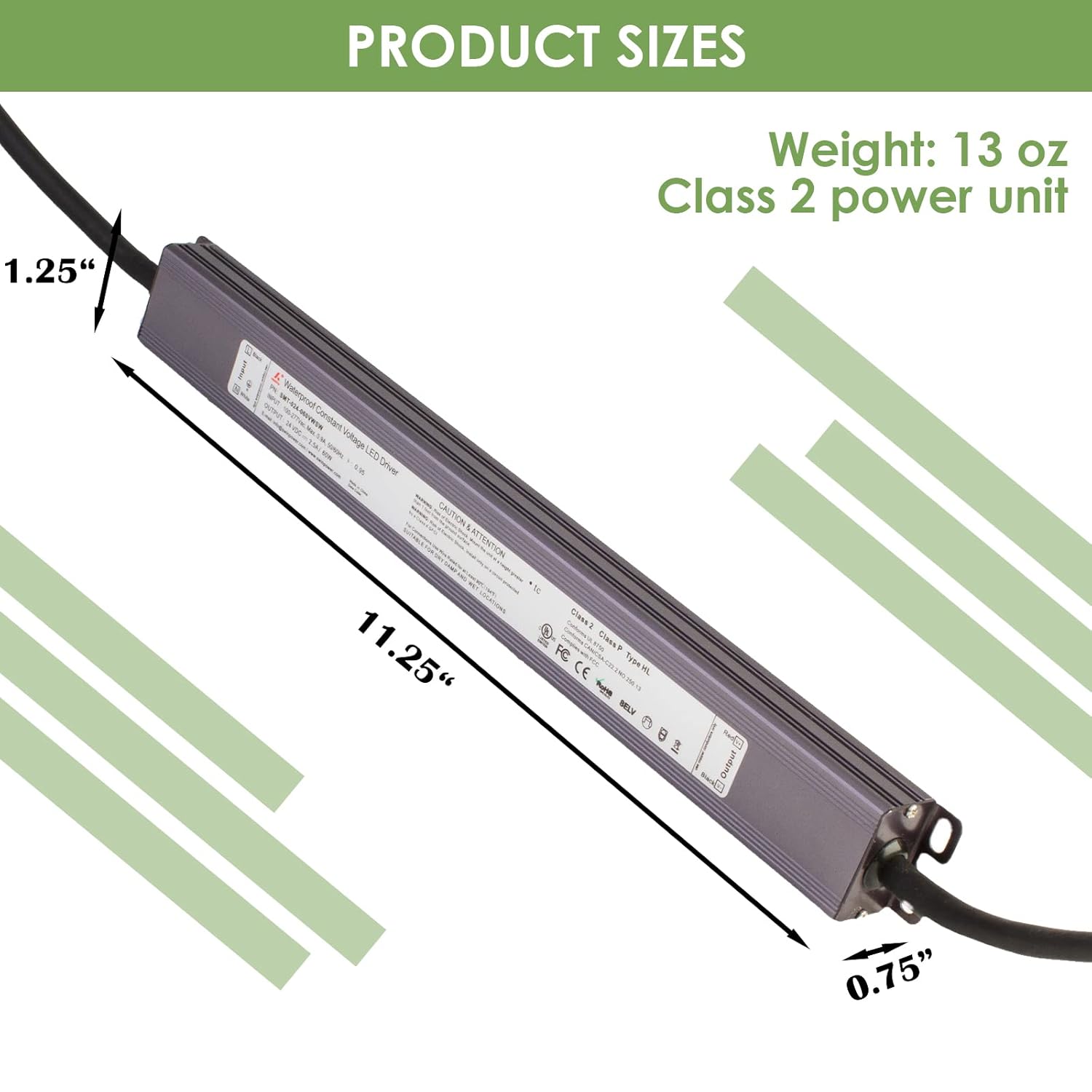
Image: Diagram illustrating the dimensions of the LED power supply: 11.25 inches in length, 0.75 inches in width, and 1.25 inches in height. It also states the weight as 13 oz and identifies it as a Class 2 power unit.
Warranty Information
This product is covered by the manufacturer's standard warranty. For specific warranty terms and conditions, please refer to the product packaging or contact LEDUPDATES customer support. The warranty typically covers defects in materials and workmanship under normal use.
Note: Opening the product casing will void the warranty.
Customer Support
For technical assistance, troubleshooting, or warranty inquiries, please contact LEDUPDATES customer support. We are a U.S. based company located in Illinois and are available to answer your questions.
Please refer to the contact information provided on your product packaging or the official LEDUPDATES website for the most current support details.
When contacting support, please have your product model number (smt024060vwsw) and purchase date available.